当前位置:网站首页>安装typescript环境并开启VSCode自动监视编译ts文件为js文件
安装typescript环境并开启VSCode自动监视编译ts文件为js文件
2022-06-29 12:05:00 【前端技术站】
一、前言
小编最近开始学习typescript,懂得人都知道,typescript是vue3的基础伴生,配合更加默契。就像vue2和js一样!typescript不像js那样浏览器直接可以解读,需要我们把ts文件编译成js文件,这样浏览器才可以解读。所以我们要安装一下ts的环境和自动编译,方便我们后续学习,不需要写完一个ts文件在手动编译!
二、安装typescript环境
必须要有node环境哈!
win + R 输入cmd
npm install -g typescript-g代表global全局安装
查看版本
tsc -v
三、VSCode配置自动监视编译
1. 新建一个文件夹

2. 在终端打开

3. 初始化配置文件
tsc --init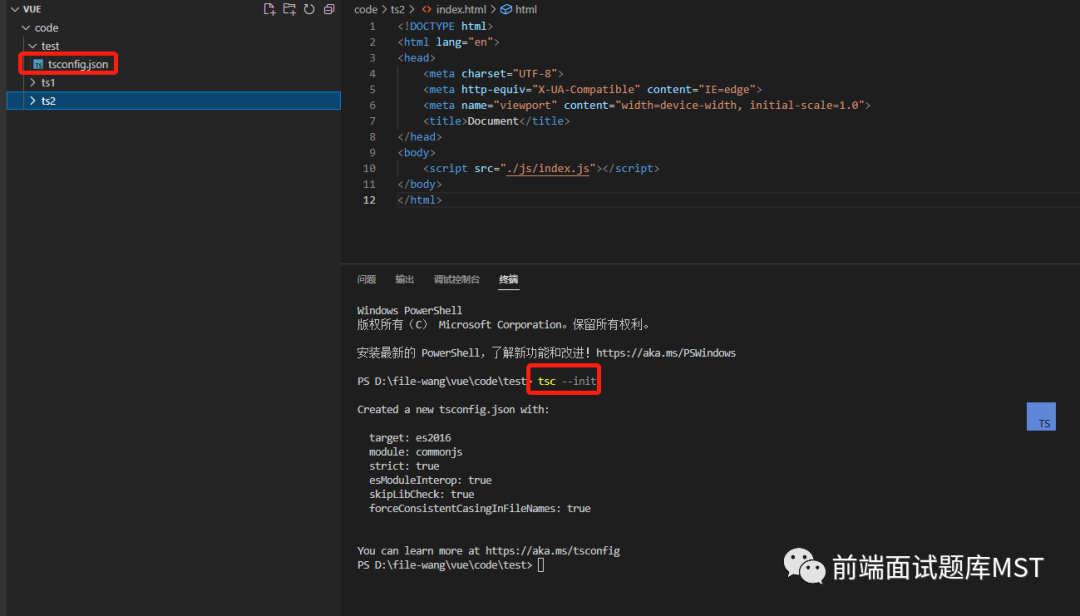
4. 编辑配置文件
52行修改生成的js文件存放位置为:json文件夹所在目录的js文件夹下,js不存在会帮助我们新建!
79行我们关闭语法检查,随意一点哈!(根据个人喜好设置)
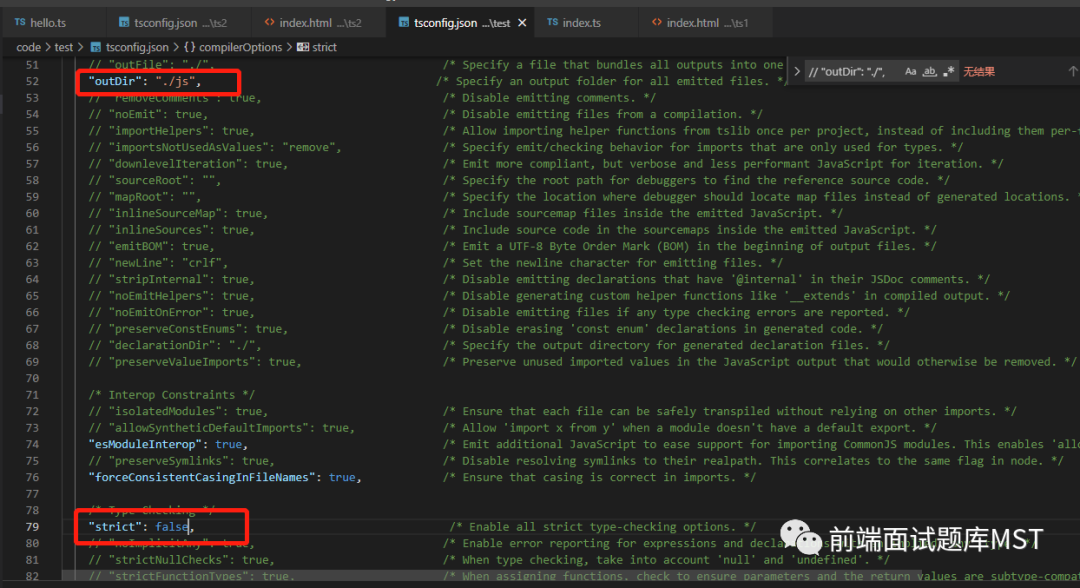
5. 开启自动编译
找到终端,点击运行任务
点击显示所有任务
找到要监视的json文件

出现报错:
error TS18003: No inputs were found in config file
'd:/file-wang/vue/code/test/tsconfig.json'.
Specified 'include' paths were '["**/*"]' and 'exclude' paths were '["./js"]'.
我们不要着急,这是没有监视到ts文件,所以提示的,我们不用管,直接写一个ts测试一下!
四、测试
1. 编写ts文件
新建test.ts
(() => {    function helloWord(str:string){        return '这是第一个ts程序:' + str
    }    var text = 'helloword'
    console.log(helloWord(text))
})();
我们发现,js文件夹下已经给我们编译成js文件了!

2. 编写html文件
我们直接引入js文件夹下的js文件!
<!DOCTYPE html><html lang="en"><head>
    <meta charset="UTF-8">
    <meta http-equiv="X-UA-Compatible" content="IE=edge">
    <meta name="viewport" content="width=device-width, initial-scale=1.0">
    <title>Document</title></head><body>
    <script src="./js/test.js"></script></body></html>
3. 浏览器测试
我们在test.html页面按住快捷键:alt + B在浏览器打开次html文件
我们F12看看是否输出了:这是第一个ts程序:helloword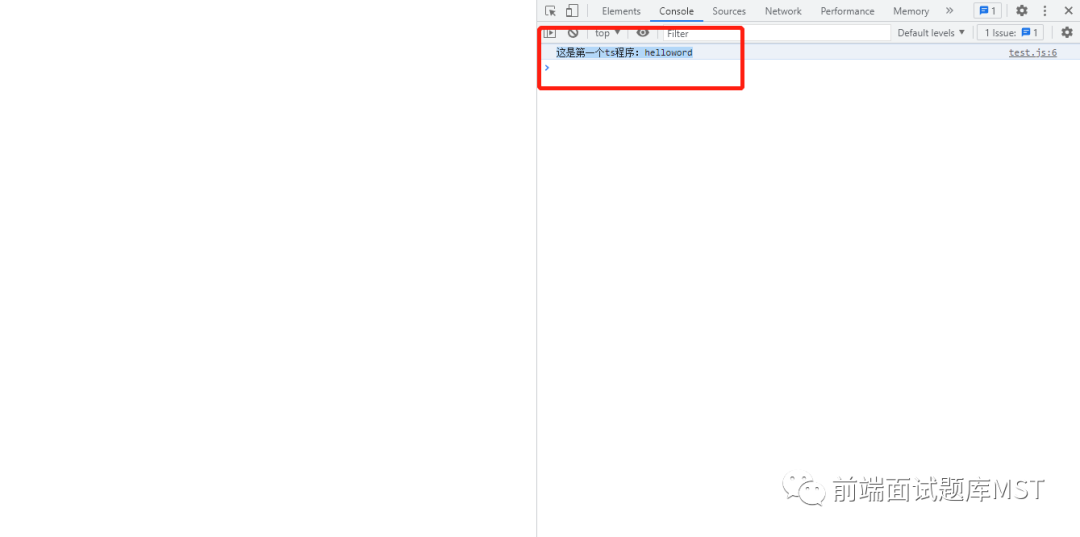
五、总结
这样就完成了基础的安装和配置自动监视ts文件编译成js文件,帮到你的小伙伴记得一键三连哦!谢谢小伙伴的支持!!
边栏推荐
- MySQL主从同步之 异步复制 半同步复制 全同步复制
- C#实现图的邻接矩阵和邻接表结构
- 2022.6.28-----leetcode. three hundred and twenty-four
- Interview shock 61: tell me about MySQL transaction isolation level?
- Recurrence of recommended models (IV): multi task models esmm and MMOE
- QQ group was stolen, a large-scale social death scene caught off guard
- 【云原生】2.4 Kubernetes 核心实战(中)
- [环境配置]PWC-Net
- Gbase8s database select has order by Clause 2
- Interpolated scatter data
猜你喜欢

缓存一致性,删除缓存,写入缓存,缓存击穿,缓存穿透,缓存雪崩
Lm07 - detailed discussion on cross section strategy of futures
解决问题:ModuleNotFoundError: No module named ‘pip‘
How to calculate win/tai/loss in paired t-test
Method area of JVM

Principle and process of MySQL master-slave replication
![[leetcode] 14. Longest public prefix](/img/3b/3388ce8382ad5caaaf0a42488da2f9.png)
[leetcode] 14. Longest public prefix

【智能QbD风险评估工具】上海道宁为您带来LeanQbD介绍、试用、教程
【JUC系列】同步工具类之ThreadLocal

Testing -- automated testing: about the unittest framework
随机推荐
Gbase8s database select has order by Clause 2
Qt中的UI文件介绍
解决问题:ModuleNotFoundError: No module named ‘pip‘
Recurrence of recommended models (III): recall models youtubednn and DSSM
C#实现二叉排序树定义、插入、构造
Nacos startup error
[comprehensive case] credit card virtual transaction identification
面试突击61:说一下MySQL事务隔离级别?
【云原生】2.4 Kubernetes 核心实战(中)
qt json
Go learning - build a development environment vscode development environment golang
C#实现二叉树的层次遍历
go 学习-搭建开发环境vscode开发环境golang
qt json
Golang image/png 处理图片 旋转 写入
qt 自定义控件 :取值范围
Gbase8s database for update clause
推荐模型复现(二):精排模型DeepFM、DIN
Quick look | the long-awaited 2022 Guangzhou assistant testing engineer's real problem analysis is finally released
After class assignment of module 5 of the construction practice camp