当前位置:网站首页>QT read / write excel--qxlsx worksheet display / hide status setting 4
QT read / write excel--qxlsx worksheet display / hide status setting 4
2022-06-30 12:49:00 【mahuifa】
Qt Reading and writing Excel–QXlsx Worksheet display / Hide status settings 4🤏
| More highlights |
|---|
| Personal content summary |
1、 summary
QXlsx It's one that can read and write Excel Document library . Do not rely on office as well as wps Components , Can be in Qt5 Any platform supported by ;
Usage mode
- QXlsx It can be compiled into a dynamic library to use ( Using dynamic libraries does not require every compilation , You can also reduce the amount of project code , You don't have to open dozens of files as soon as you open the project );
- Direct will QXlsx.pri Add code to use ( I recommend using the source code directly , because QXlsx The annotation information of is basically cpp In file , You can learn by reading the source code and comments QXlsx The function of , Of course , If you're familiar QXlsx It will be more convenient to compile it into a library , It can reduce the amount of code in the project );
The functions implemented in this paper :
- Create a worksheet with the specified name (Sheet), Automatically add to the end ;
- Query open Excel All available worksheets in (Sheet) name ;
- Query the status of the selected worksheet ( Show 、 hide 、 Absolute hide );
- Set the status of the selected worksheet ( Show 、 hide 、 Absolute hide );
- One click call WPS fast open Excel( For the convenience of viewing the effect ).
2、 preparation
| Qt Reading and writing Excel–QXlsx Basic use 1 |
|---|
| Qt Reading and writing Excel–QXlsx Compile as a static library 2 |
3、 Function description 🤟
Be careful : The operation has been executed and will not take effect until it is saved .
QStringList sheetNames() const - Functional specifications : Inquire about Excel All worksheets in (Sheet) name ;
- Return value : List of names of all worksheets ;
bool addSheet(const QString &name = QString(), AbstractSheet::SheetType type = AbstractSheet::ST_WorkSheet) - Functional specifications : Create a name at the end name, The type is type The worksheet for ;
- Parameters name: Name of the worksheet created , If no name is specified, it defaults to Sheet1、Sheet2 Increasing ;
- Parameters type: Type of worksheet created , Omission ;
- ST_WorkSheet: Form sheet
- ST_ChartSheet: Chart sheet
- ST_DialogSheet: Not yet
- ST_MacroSheet: Not yet
- Return value : If it is created successfully, it will return true, Failure to return false;
- If the name already exists, the creation fails ;
- If it is ST_DialogSheet、ST_MacroSheet Also failed to create ;( Note that this creation failure has bug, Entered after creation failure name Will be saved , You cannot create a worksheet with this name next time , But it doesn't affect the use of , Repair method : stay
xlsxworkbook.cppIn the documentQ_ASSERT(false);Add... To the next linereturn sheet;that will do )
AbstractSheet *Document::sheet(const QString &sheetName) const - Functional specifications : According to the worksheet name entered sheetName Returns a pointer to the worksheet , Returns if it does not exist NULL
- Parameters sheetName: Worksheet name ;
- Return value : Successfully returned the available worksheet pointer , Failure to return NULL;
AbstractSheet::SheetState AbstractSheet::sheetState() const Functional specifications : Get the status of the current worksheet ;
Return value : Current status of the worksheet
enum SheetState { SS_Visible( Show ),SS_Hidden( hide ), SS_VeryHidden( Absolute hide ) };;Display state : adopt WPS open Excel You can see the worksheet ;
Hidden state : open Excel Can't see hidden worksheets , Need to set up Unhide To see ;

Absolute hide : Set up Unhide I can't see .
void AbstractSheet::setSheetState(SheetState state) - Functional specifications : Set sheet status .
- Parameters state: Worksheet status to be set
enum SheetState { SS_Visible( Show ),SS_Hidden( hide ), SS_VeryHidden( Absolute hide ) };;
bool AbstractSheet::isHidden() const - Functional specifications : Whether the worksheet is hidden .
- Return value : The worksheet is 【 Hidden state 】 perhaps 【 Absolutely hidden 】 return true,【 Display state 】 return false;
bool AbstractSheet::isVisible() const - Functional specifications : Whether the worksheet shows ( And isHidden() contrary ).
- Return value : The worksheet is 【 Hidden state 】 perhaps 【 Absolutely hidden 】 return false,【 Display state 】 return true;
void AbstractSheet::setHidden(bool hidden) - Functional specifications : Set the sheet to be hidden or visible .
- Parameters hidden: true: hide false: Show
void AbstractSheet::setVisible(bool visible) - Functional specifications : Set the sheet to be hidden or visible .
- Parameters hidden: true: Show false: hide
4、 Sample code
4.1 .h file
/****************************************************************************** * @ file name  test3.h * @ function   be based on AbstractSheet Class Demo, Mainly demonstrated  * 1、 Create sheet ; * 2、 Query worksheet ; * 3、 Query worksheet status ; * 4、 Set sheet status . * * @ developer  mhf * @ mailbox  [email protected] * @ Time  2022/06/19 * @ remarks  *****************************************************************************/
#ifndef TEST3_H
#define TEST3_H

#include <QWidget>

namespace Ui {

class Test3;
}

class Test3 : public QWidget
{

    Q_OBJECT

public:
    explicit Test3(QWidget *parent = nullptr);
    ~Test3();

private slots:
    void on_but_show_clicked();

    void on_but_addSheet_clicked();

    void on_com_sheets_activated(const QString &arg1);

    void on_com_state_activated(int index);

private:
    Ui::Test3 *ui;
};

#endif // TEST3_H
4.2 .cpp file
#include "test3.h"
#include "ui_test3.h"

#include <QDir>
#include <qprocess.h>
#include <QDebug>
#include "xlsxdocument.h"
QXLSX_USE_NAMESPACE            //  add to Xlsx Namespace

#define EXCEL_NAME "state.xlsx" //  Ben Demo The use of Excel file name

Test3::Test3(QWidget *parent) :
    QWidget(parent),
    ui(new Ui::Test3)
{

    ui->setupUi(this);
    this->setWindowTitle("QXlsx Query and set worksheet status Demo");
}

Test3::~Test3()
{

    delete ui;
}


/** * @brief  By calling WPS Open... Under the current path Excel file , If the opening fails, you need to replace your own wps Installation path for  */
void Test3::on_but_show_clicked()
{

    bool ret = QProcess::startDetached("D:/WPS Office/ksolaunch.exe", QStringList() << QDir::currentPath() + "/" + EXCEL_NAME);
    if(!ret)
    {

        qWarning() << " open Excel Failure , Please note that wps Does the path exist , Or replace other programs to open excel";
    }
}

/** * @brief  Create a worksheet  */
void Test3::on_but_addSheet_clicked()
{

    Document xlsx(EXCEL_NAME);             //  If the file exists, open EXCEL_NAME, If it does not exist, pass in the file name , stay save Save as EXCEL_NAME
    qDebug() << xlsx.load();               //  If the file exists , And if it is opened successfully, it will be true, Otherwise false
// xlsx.addSheet(); //  Create a worksheet , If no name is specified, it defaults to Sheet1、Sheet2 Increasing
    xlsx.addSheet(ui->line_name->text());  //  Specify a name to create a worksheet ( The default setting is the currently active worksheet )
    xlsx.write(2, 2, "hello");             //  Write data to the currently active worksheet
    if(xlsx.save())                        //  Because in 【Document xlsx(EXCEL_NAME);】 File name specified , So save it to EXCEL_NAME, If not specified, it defaults to 【Book1.xlsx】
    {

        qDebug() << " Saved successfully !";

        ui->com_sheets->clear();
        ui->com_sheets->addItems(xlsx.sheetNames());   //  Query all available worksheets
    }
    else
    {

        qDebug() << " Save failed !";
    }
}

/** * @brief  Select the worksheet name from the drop-down box , Query worksheet status  * @param arg1 */
void Test3::on_com_sheets_activated(const QString &arg1)
{

    Document xlsx(EXCEL_NAME);
    AbstractSheet* sheet = xlsx.sheet(arg1);   //  Get worksheet pointer by name
    if(!sheet) return;    //  Judge whether it is NULL

    int state = sheet->sheetState();           //  Get current worksheet status
    ui->com_state->setCurrentIndex(state);
}

/** * @brief  Set sheet status , *  It can be done by setSheetState Set display 、 hide 、 Absolute hide 【 Three states 】, *  adopt sheetState Get the current status of the worksheet 【 Three states 】 *  It can also be done through setHidden or setVisible Set display 、 Hidden state 【 Two kinds of state 】, *  And pass isHidden perhaps isVisible Query shows hidden status 【 Two kinds of state 】 * @param index */
void Test3::on_com_state_activated(int index)
{

    Document xlsx(EXCEL_NAME);
    AbstractSheet* sheet = xlsx.sheet(ui->com_sheets->currentText());   //  Get worksheet pointer by name
    if(!sheet) return;    //  Judge whether it is NULL

    sheet->setSheetState(AbstractSheet::SheetState(index));             //  Modify worksheet status
    if(xlsx.save())
    {

        qDebug() << " Saved successfully !" ;
    }
    else
    {

        qDebug() << " Save failed !";
    }
}
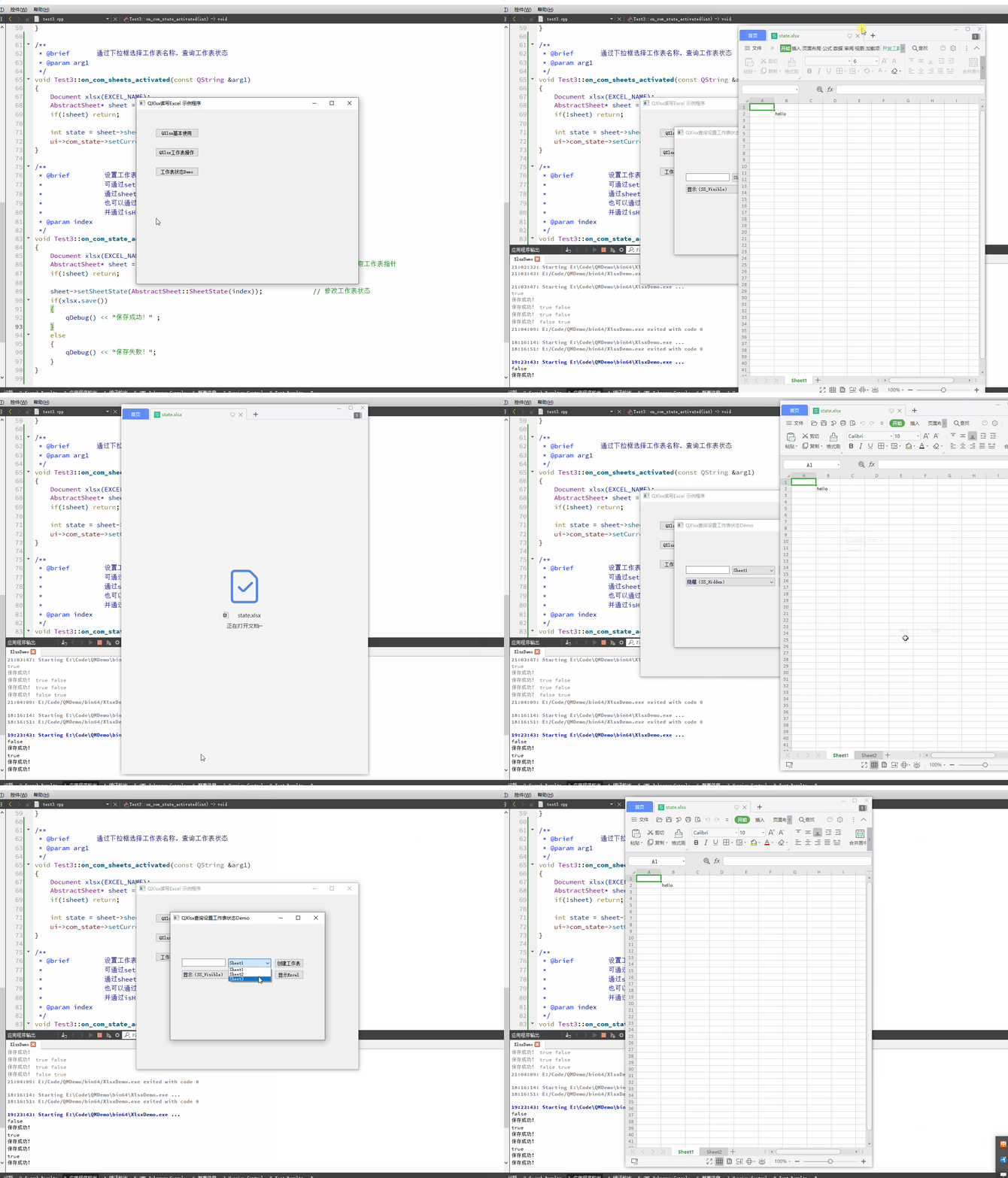
5、 Realization effect
6、 Source code
边栏推荐
- 解决numpy.core._exceptions.UFuncTypeError: ufunc ‘add‘ did not contain a loop with signature matchin问题
- Sublist3r error reporting solution
- [one day learning awk] Fundamentals
- MATLAB小技巧(22)矩阵分析--逐步回归
- [target tracking] |pytracking configuring win to compile prroi_ pool. pyd
- STM32 移植 RT-Thread 标准版的 FinSH 组件
- Qt中的数据库使用
- How to solve cross domain problems
- 黑马笔记---集合(Collection的常用方法与遍历方式)
- Determining the subject area of data warehouse construction
猜你喜欢

NoSQL - redis configuration and optimization

Redis-缓存问题
![[MySQL] MySQL installation and configuration](/img/82/8500949734e57e6a1047c4e838f625.png)
[MySQL] MySQL installation and configuration
![[QNX Hypervisor 2.2用户手册]6.2.3 Guest与外部之间通信](/img/ca/9065325ce8882d95fb24c82fb62abc.png)
[QNX Hypervisor 2.2用户手册]6.2.3 Guest与外部之间通信

Shell基础入门

Instructions for legend use in SuperMap iclient3d 11i for cesium 3D scene

市值蒸发650亿后,“口罩大王”稳健医疗,盯上了安全套
![[learn awk in one day] operator](/img/52/fd476d95202f3a956fd59437c2d960.png)
[learn awk in one day] operator

Redis installation on Linux system

Questionnaire star questionnaire packet capturing analysis
随机推荐
When MySQL judges that the execution condition is null, it returns 0. Correct parameter count in the call to native function 'isnull',
Qt中的数据库使用
QT implementation dynamic navigation bar
60 divine vs Code plug-ins!!
Basic interview questions for Software Test Engineers (required for fresh students and test dishes) the most basic interview questions
如何利用AI技术优化独立站客服系统?听听专家怎么说!
FlinkSQL自定义UDTF使用的四种方式
Two batches of pure milk are unqualified? Michael responded that he was conducting a large-scale screening and sampling inspection of products
Dataworks synchronizes maxcomputer to sqlserver. Chinese characters become garbled. How can I solve it
STM32 移植 RT-Thread 标准版的 FinSH 组件
mqtt-ros模拟发布一个自定义消息类型
Charles break point modify request data & response data
Unity脚本的基础语法(1)-游戏对象的常用操作
Tencent two sides: @bean and @component are used on the same class. What happens?
【一天学awk】运算符
kubeedge的核心理念
Apple executives openly "open the connection": Samsung copied the iPhone and only added a large screen
【一天学awk】正则匹配
Commands for redis basic operations
Google refutes rumors and gives up tensorflow. It's still alive!