当前位置:网站首页>Learn Taiji Maker - mqtt Chapter 2 (IV) esp8266 reserved message application
Learn Taiji Maker - mqtt Chapter 2 (IV) esp8266 reserved message application
2022-06-28 04:55:00 【xuechanba】
Video link :https://www.bilibili.com/video/BV1Ff4y1e7AB/?spm_id_from=autoNext&vd_source=b91967c499b23106586d7aa35af46413
The data link :http://www.taichi-maker.com/homepage/esp8266-nodemcu-iot/iot-tuttorial/mqtt-tutorial/esp8266-retained-message/
Example 1 – Publish retention messages
/**********************************************************************  Project name /Project :  Zero basic introduction to the Internet of things   Program name /Program name : publish_retained_msg  The team /Team :  Taiji maker team  / Taichi-Maker (www.taichi-maker.com)  author /Author : CYNO Shuo   date /Date(YYYYMMDD) : 20201014  Purpose of procedure /Purpose :  The purpose of this program is to demonstrate how to use PubSubClient Library usage ESP8266 towards MQTT The server publishes reserved information .  This program is available at a_publish_ranye_url Based on the program . The key revision is publish Function added   The third parameter , Used to set whether the published information is reserved (retained msg) -----------------------------------------------------------------------  This sample program is made by Taiji maker team 《 Zero basic introduction to the Internet of things 》 Sample program in .  This tutorial is designed and produced by friends who are interested in the development of the Internet of things . For more information about this tutorial , Please refer to the following pages : http://www.taichi-maker.com/homepage/esp8266-nodemcu-iot/iot-c/esp8266-nodemcu-web-client/http-request/ ***********************************************************************/
#include <ESP8266WiFi.h>
#include <PubSubClient.h>

//  Set up wifi Access information ( Please according to your WiFi Modify the information )
const char* ssid = "FAST_153C80";
const char* password = "123456798";
const char* mqttServer = "test.ranye-iot.net";

//  As above MQTT The server cannot connect normally , Please go to the following page to find a solution
// http://www.taichi-maker.com/public-mqtt-broker/

WiFiClient wifiClient;
PubSubClient mqttClient(wifiClient);

void setup() {

  Serial.begin(9600);

  // Set up ESP8266 The working mode is wireless terminal mode
  WiFi.mode(WIFI_STA);

  //  Connect WiFi
  connectWifi();

  //  Set up MQTT Server and port number
  mqttClient.setServer(mqttServer, 1883);

  //  Connect MQTT The server
  connectMQTTServer();

  if (mqttClient.connected()) {
     //  If the development board successfully connects to the server
    pubRetMQTTmsg();               //  Publish the information
  }
}

void loop() {

  mqttClient.loop();          //  Keep your heart beating
}

void connectMQTTServer(){

  //  according to ESP8266 Of MAC Address generation client ID( Avoid contact with other ESP8266 The client of ID The nuptial )
  String clientId = "esp8266-" + WiFi.macAddress();

  //  Connect MQTT The server
  if (mqttClient.connect(clientId.c_str())) {

    Serial.println("MQTT Server Connected.");
    Serial.println("Server Address: ");
    Serial.println(mqttServer);
    Serial.println("ClientId:");
    Serial.println(clientId);
  } else {

    Serial.print("MQTT Server Connect Failed. Client State:");
    Serial.println(mqttClient.state());
    delay(3000);
  }
}

//  Publish the information
void pubRetMQTTmsg(){

  //  Create a publishing theme . The title of the topic is Taichi-Maker- The prefix , The device is added later MAC Address .
  //  This is done to ensure that different users MQTT When information is released ,ESP8266 Client names vary ,
  String topicString = "Taichi-Maker-Ret-" + WiFi.macAddress();
  char publishTopic[topicString.length() + 1];
  strcpy(publishTopic, topicString.c_str());

  //  Create an upcoming retention message . The message is "Retained Msg".
  String messageString = "Retained Msg";
  char publishMsg[messageString.length() + 1];
  strcpy(publishMsg, messageString.c_str());

  //  Realization ESP8266 Post to topic retained Information
  //  following publish The third parameter of the function is used to set the reserved information (retained message)
  if(mqttClient.publish(publishTopic, publishMsg, true)){

    Serial.println("Publish Topic:");Serial.println(publishTopic);
    Serial.println("Publish Retained message:");Serial.println(publishMsg);
  } else {

    Serial.println("Message Publish Failed.");
  }
}

// ESP8266 Connect wifi
void connectWifi(){


  WiFi.begin(ssid, password);

  // wait for WiFi Connect , Output success information after successful connection
  while (WiFi.status() != WL_CONNECTED) {

    delay(1000);
    Serial.print(".");
  }
  Serial.println("");
  Serial.println("WiFi Connected!");
  Serial.println("");
}
Let's verify the operation of the program .
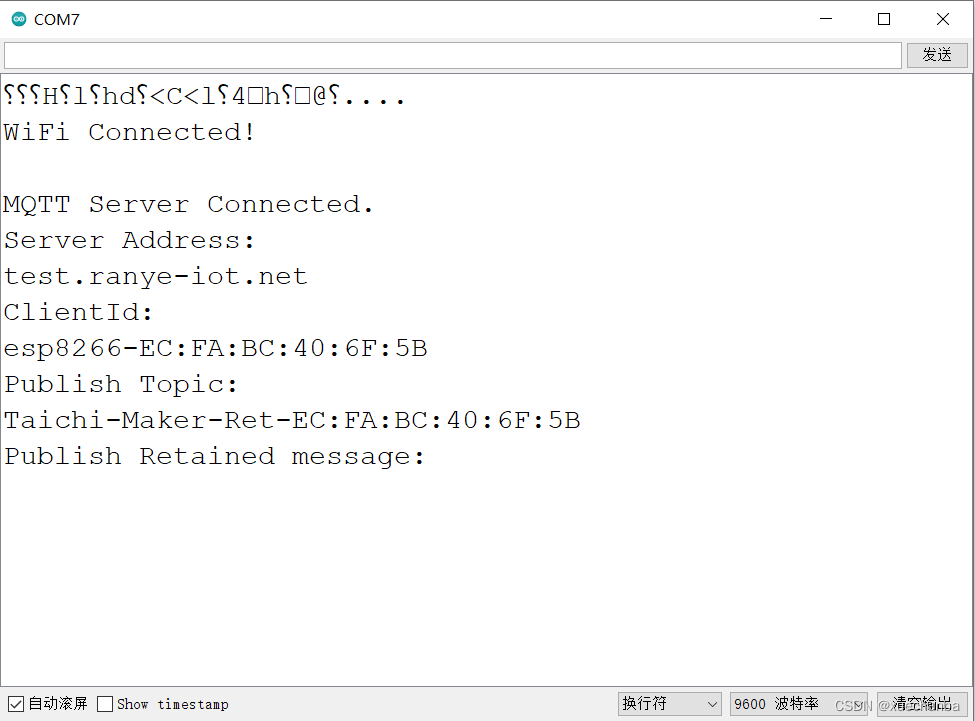
First , Use the serial port monitor to see the output results .

next , We use MQTT.fx Software to subscribe to the news published by the development board . You can find , I received a message as soon as I subscribed .

below , Let's analyze the key content of this program .
//  Publish the information
void pubRetMQTTmsg(){

  //  Create a publishing theme . The title of the topic is Taichi-Maker- The prefix , The device is added later MAC Address .
  //  This is done to ensure that different users MQTT When information is released ,ESP8266 Client names vary ,
  String topicString = "Taichi-Maker-Ret-" + WiFi.macAddress();
  char publishTopic[topicString.length() + 1];
  strcpy(publishTopic, topicString.c_str());

  //  Create an upcoming retention message . The message is "Retained Msg".
  String messageString = "Retained Msg";
  char publishMsg[messageString.length() + 1];
  strcpy(publishMsg, messageString.c_str());

  //  Realization ESP8266 Post to topic retained Information
  //  following publish The third parameter of the function is used to set the reserved information (retained message)
  if(mqttClient.publish(publishTopic, publishMsg, true)){

    Serial.println("Publish Topic:");Serial.println(publishTopic);
    Serial.println("Publish Retained message:");Serial.println(publishMsg);
  } else {

    Serial.println("Message Publish Failed.");
  }
}
Be careful ,publish Function number 3、 ... and Parameters (true Just tell the server , This message is reserved , This parameter defaults to false) It is used to set retention information (retained message) Of .
Example 2 – Modify the reserved message
Just change the content of the message to be published .
Example 3 – Delete reserved messages
Just set the above message content to be published as empty .
String messageString = "";
stay Serial port monitor end ,
stay MQTT.fx End ,

边栏推荐
- On the necessity of building a video surveillance convergence platform and its scenario application
- Sum of squares of each bit of a number
- 【微服务|OpenFeign】OpenFeign快速入门|基于Feign的服务调用
- 判断对象中是否存在某一个属性
- June 27, 2022: give a 01 string with a length of N. now please find two intervals so that the number of 1 and the number of 0 in the two intervals are equal. The two intervals can intersect, but not c
- 2022年安全员-B证考试题库及答案
- 【Matlab红绿灯识别】红绿灯识别【含GUI源码 1908期】
- QCOM LCD调试
- 汇编常用指令
- 无线传感器网络学习笔记(一)
猜你喜欢

Flexible IP network test tool -- x-launch

Severe tire damage: the first rock band in the world to broadcast live on the Internet

分享一个因子挖掘的利器:遗传规划
学习太极创客 — MQTT 第二章(四)ESP8266 保留消息应用

mysql导入文本文件时的pager

Detailed reading of the thesis: implementing volume models for handowriting text recognition

吴恩达深度学习测验题:deeplearning.ai-week1-quiz
![[CSP-J2020] 优秀的拆分](/img/05/90f9cf71791b3cdc37073eaf5db989.png)
[CSP-J2020] 优秀的拆分
How to clean the nozzle of Epson l3153 printer

恭喜我自己,公众号粉丝破万
随机推荐
交流电和直流电的区别是什么?
Mask's miserable and inspirational childhood, who is introverted by campus violence
Severe tire damage: the first rock band in the world to broadcast live on the Internet
!‘cat‘ 不是内部或外部命令,也不是可运行的程序 或批处理文件。
Huawei's 9-year experience as a software testing director
几百行代码实现一个脚本解释器
Precautions for using C language global variables (global variables in C and H files, static global variables)
Code understanding: implementing volume models for hangwriten text recognition
快速下载JDK,除了官方Oracle下载,还有国内可以有最新版本的下载地址吗
Sum of squares of each bit of a number
C语言中函数是什么?编程中的函数与数学中的函数区别?理解编程语言中的函数
Meta universe standard forum established
Has anyone ever used CDC to synchronize to MySQL with a deadlock?
UI自动化测试框架搭建 —— 编写一个APP自动化
测试开发必备技能:安全测试漏洞靶场实战
UI automation test framework construction - write an app automation
禁用右击、键盘打开控制台事件
多线程实现 重写run(),怎么注入使用mapper文件操作数据库
Role of native keyword
Function and working principle of controller