当前位置:网站首页>学习太极创客 — MQTT 第二章(四)ESP8266 保留消息应用
学习太极创客 — MQTT 第二章(四)ESP8266 保留消息应用
2022-06-28 04:24:00 【xuechanba】
示例1 – 发布保留消息
/********************************************************************** 项目名称/Project : 零基础入门学用物联网 程序名称/Program name : publish_retained_msg 团队/Team : 太极创客团队 / Taichi-Maker (www.taichi-maker.com) 作者/Author : CYNO朔 日期/Date(YYYYMMDD) : 20201014 程序目的/Purpose : 本程序旨在演示如何使用PubSubClient库使用ESP8266向MQTT服务器发布保留信息。 此程序在a_publish_ranye_url程序基础上修改。重点修改内容是publish函数添加了 第三个参数,用于设置发布信息是否是保留信息(retained msg) ----------------------------------------------------------------------- 本示例程序为太极创客团队制作的《零基础入门学用物联网》中示例程序。 该教程为对物联网开发感兴趣的朋友所设计和制作。如需了解更多该教程的信息,请参考以下网页: http://www.taichi-maker.com/homepage/esp8266-nodemcu-iot/iot-c/esp8266-nodemcu-web-client/http-request/ ***********************************************************************/
#include <ESP8266WiFi.h>
#include <PubSubClient.h>

// 设置wifi接入信息(请根据您的WiFi信息进行修改)
const char* ssid = "FAST_153C80";
const char* password = "123456798";
const char* mqttServer = "test.ranye-iot.net";

// 如以上MQTT服务器无法正常连接,请前往以下页面寻找解决方案
// http://www.taichi-maker.com/public-mqtt-broker/

WiFiClient wifiClient;
PubSubClient mqttClient(wifiClient);

void setup() {

  Serial.begin(9600);

  //设置ESP8266工作模式为无线终端模式
  WiFi.mode(WIFI_STA);

  // 连接WiFi
  connectWifi();

  // 设置MQTT服务器和端口号
  mqttClient.setServer(mqttServer, 1883);

  // 连接MQTT服务器
  connectMQTTServer();

  if (mqttClient.connected()) {
     // 如果开发板成功连接服务器
    pubRetMQTTmsg();               // 发布信息
  }
}

void loop() {

  mqttClient.loop();          // 保持心跳
}

void connectMQTTServer(){

  // 根据ESP8266的MAC地址生成客户端ID(避免与其它ESP8266的客户端ID重名)
  String clientId = "esp8266-" + WiFi.macAddress();

  // 连接MQTT服务器
  if (mqttClient.connect(clientId.c_str())) {

    Serial.println("MQTT Server Connected.");
    Serial.println("Server Address: ");
    Serial.println(mqttServer);
    Serial.println("ClientId:");
    Serial.println(clientId);
  } else {

    Serial.print("MQTT Server Connect Failed. Client State:");
    Serial.println(mqttClient.state());
    delay(3000);
  }
}

// 发布信息
void pubRetMQTTmsg(){

  // 建立发布主题。主题名称以Taichi-Maker-为前缀,后面添加设备的MAC地址。
  // 这么做是为确保不同用户进行MQTT信息发布时,ESP8266客户端名称各不相同,
  String topicString = "Taichi-Maker-Ret-" + WiFi.macAddress();
  char publishTopic[topicString.length() + 1];
  strcpy(publishTopic, topicString.c_str());

  // 建立即将发布的保留消息。消息内容为"Retained Msg"。
  String messageString = "Retained Msg";
  char publishMsg[messageString.length() + 1];
  strcpy(publishMsg, messageString.c_str());

  // 实现ESP8266向主题发布retained信息
  // 以下publish函数第三个参数用于设置保留信息(retained message)
  if(mqttClient.publish(publishTopic, publishMsg, true)){

    Serial.println("Publish Topic:");Serial.println(publishTopic);
    Serial.println("Publish Retained message:");Serial.println(publishMsg);
  } else {

    Serial.println("Message Publish Failed.");
  }
}

// ESP8266连接wifi
void connectWifi(){


  WiFi.begin(ssid, password);

  //等待WiFi连接,成功连接后输出成功信息
  while (WiFi.status() != WL_CONNECTED) {

    delay(1000);
    Serial.print(".");
  }
  Serial.println("");
  Serial.println("WiFi Connected!");
  Serial.println("");
}
下面来验证下程序的运行情况。
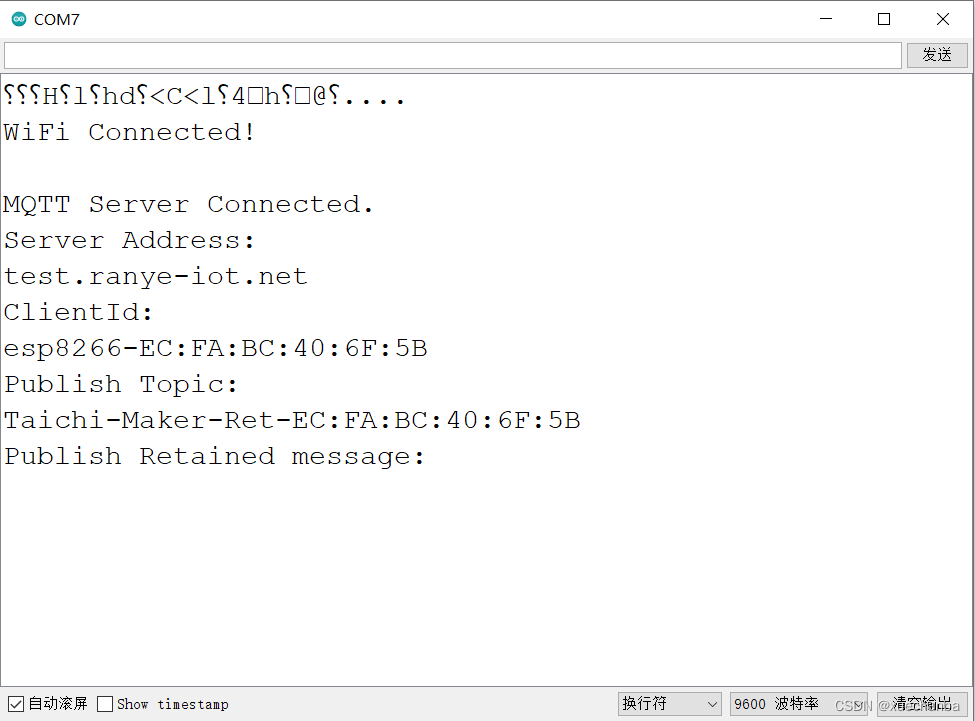
首先,使用串口监视器来看下输出结果。

接着,我们使用 MQTT.fx 软件来订阅开发板所发布的消息。可以发现,刚一订阅就马上收到了一个消息。

下面,我们再来分析下这段程序的重点内容。
// 发布信息
void pubRetMQTTmsg(){

  // 建立发布主题。主题名称以Taichi-Maker-为前缀,后面添加设备的MAC地址。
  // 这么做是为确保不同用户进行MQTT信息发布时,ESP8266客户端名称各不相同,
  String topicString = "Taichi-Maker-Ret-" + WiFi.macAddress();
  char publishTopic[topicString.length() + 1];
  strcpy(publishTopic, topicString.c_str());

  // 建立即将发布的保留消息。消息内容为"Retained Msg"。
  String messageString = "Retained Msg";
  char publishMsg[messageString.length() + 1];
  strcpy(publishMsg, messageString.c_str());

  // 实现ESP8266向主题发布retained信息
  // 以下publish函数第三个参数用于设置保留信息(retained message)
  if(mqttClient.publish(publishTopic, publishMsg, true)){

    Serial.println("Publish Topic:");Serial.println(publishTopic);
    Serial.println("Publish Retained message:");Serial.println(publishMsg);
  } else {

    Serial.println("Message Publish Failed.");
  }
}
注意,publish 函数第 三 个参数(true正是告诉服务端,这则消息为保留消息,该参数默认为 false)正是用于设置保留信息(retained message) 的。
示例2 – 修改保留消息
只需要将上述要发布的消息内容更改即可。
示例3 – 删除保留消息
只需要将上述要发布的消息内容设置为空即可。
String messageString = "";
在 串口监视器端,
在 MQTT.fx 端,

边栏推荐
- Password encryption MD5 and salt treatment
- Distributed transaction - Final consistency scheme based on message compensation (local message table, message queue)
- UI automation test framework construction - write an app automation
- Has anyone ever used CDC to synchronize to MySQL with a deadlock?
- The development of the Internet has promoted the emergence of a series of new models such as unbounded retail, digital retail and instant retail
- The SQL of filincdc always reports this error when there are multiple tables. How can I solve it
- 恭喜我自己,公众号粉丝破万
- Unity delegate
- E-week finance Q1 mobile banking has 650million active users; Layout of financial subsidiaries in emerging fields
- inherit
猜你喜欢
![[matlab traffic light identification] traffic light identification [including GUI source code 1908]](/img/0e/3103c4c5dd664196c85db9b30bcaf5.png)
[matlab traffic light identification] traffic light identification [including GUI source code 1908]

Analysis of distributed transaction solution Seata golang

Multi thread implementation rewrites run (), how to inject and use mapper file to operate database

Difference between curdate() and now()

What to do when MySQL changes the password and reports an error

?位置怎么写才能输出true
2022年安全员-B证考试题库及答案

100+ data science interview questions and answers Summary - machine learning and deep learning

Games104 operation 2-colorgrading

一文详解|增长那些事儿
随机推荐
Multithreading and high concurrency six: source code analysis of thread pool
Severe tire damage: the first rock band in the world to broadcast live on the Internet
Is it true that qiniu business school gives away securities accounts? Is it safe to open an account
JS逆向之巨量星图sign签名
A doctor's 22 years in Huawei (full of dry goods)
June 27, 2022: give a 01 string with a length of N. now please find two intervals so that the number of 1 and the number of 0 in the two intervals are equal. The two intervals can intersect, but not c
Establishment of SSH Framework (Part 2)
Where does the storm go? Whose pot is the weather forecast wrong?
2022年G3锅炉水处理复训题库模拟考试平台操作
Light collector, Yunnan Baiyao!
Blocking, non blocking, IO multiplexing select\poll\epoll
Principle and implementation of SSD for target detection
Database garbled
Meta universe standard forum established
Analysis of distributed transaction TCC
Sword finger offer 47 Maximum gift value (DP)
Role of native keyword
Analyse complète annuelle du marché chinois de l'audio en 2022
TACo:一种关于文字识别的数据增强技术
The coming wave of Web3