当前位置:网站首页>Installation and use of selenium IDE
Installation and use of selenium IDE
2022-06-24 08:07:00 【qq_ four hundred and ninety-two million four hundred and forty-】
Selenium IDE brief introduction
Selenium IDE( Integrated development environment ) yes Selenium Suite Open source under Web Automated test tool . And Selenium WebDriver and RC Different , It doesn't need any programming logic to write its test script , Instead, just record the interaction with the browser to create test cases . after , You can rerun the test case using the playback option .
Be careful :Selenium IDE Just for Mozilla Firefox and Chrome Plug in provides , It can't be in Firefox and Chrome Record test cases on browsers other than . Recorded test scripts can also be exported to C#,Java,Ruby or Python Programming language .
Selenium IDE install
1.Mozilla Firefox browser .
open URL => https://addons.mozilla.org/en-us/firefox/addon/selenium-ide/ , It redirects to Firefox Official additional page .
Click on Add to Firefox Button .

2.chrome browser :
open https://chrome.google.com/webstore/detail/selenium-ide/mooikfkahbdckldjjndioackbalphokd stay chrome Mall add selenium IDE.
Use selenium IDE
Click on selenium IDE Button , Enter the following page :

Here we take creating a new project as an example , Click on create a new project, After entering the project name , You can create a test project . As shown below :

Here are seleniumIDE A brief introduction to the panel of :
Selenium IDE Divided into different components , Each component has its own features and functions . Here to Selenium IDE Seven different components of are classified , These include :
menu bar
The toolbar
Address bar
Test case pane
Test script editor box
Start / Stop recording button
journal , Reference pane
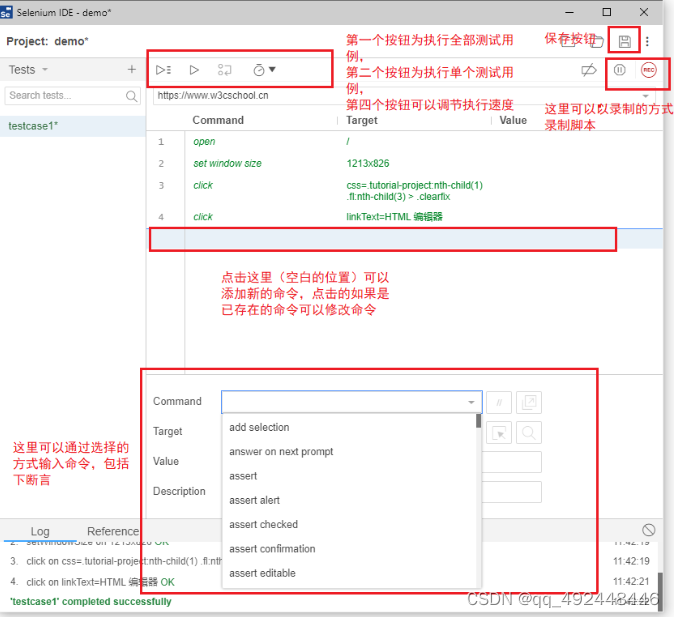
The first step in the beginning of the project is to specify the goal url, Designated target url The next test is in this url On the ( You can see url Appears above the first command line in the above figure ):

While recording ,seleniumIDE A new window will open ( Pictured , The first window has a recording flag at the bottom right ):

Be careful , The recording process is not the whole test process , The most important thing about testing is not just the execution of the steps , And the verification of the results . The verification of the results requires assertions , This can only be done by adding a command line .
selenium IDE There is a set of execute buttons on the panel of the to execute the written code , Click to execute ( You can also adjust the speed of execution ).
export
Come here ,seleniumIDE Only a script recording tool , But this is not what it was meant to be , Remember , Our ultimate goal is to get python( perhaps java) Object code of , At this point, you need to export :
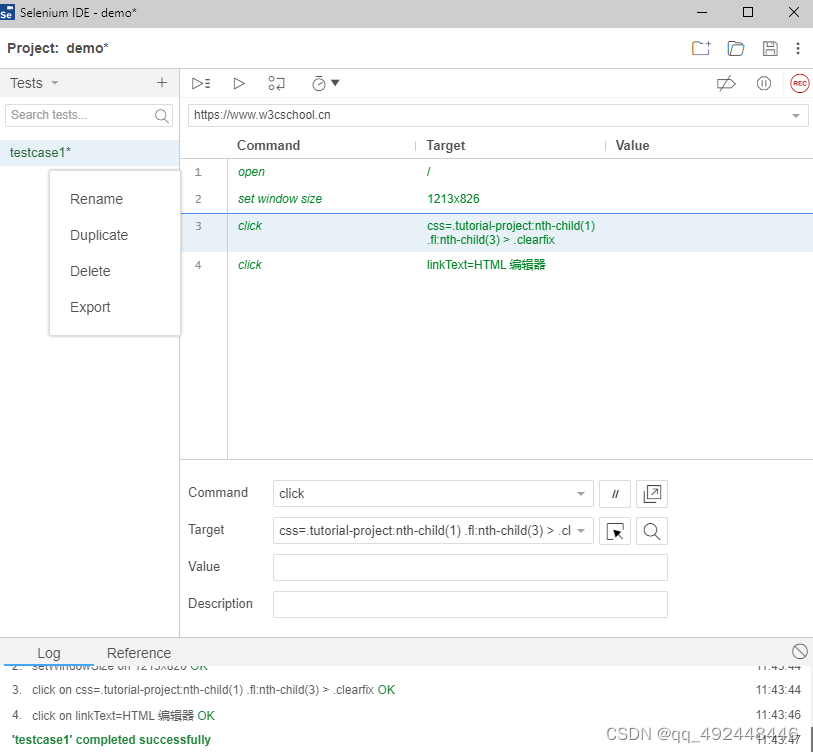
Test case options on the left , There is a button with three dots , Click to display such a drop-down menu , One of the buttons is Export, Click this button to export the corresponding code .

Click on Export The options for language selection will appear , At this time, we can according to our requirements , Choose the corresponding language ( about selenium Come on , The best language should be python, The second is java, majority selenium These two languages will be selected for teaching in the course ).
notes : about java for , Use Junit it , But for the python for , The exported code uses pytest, This is something to be aware of (python There are many test frameworks , Corresponding Junit The framework of such unit testing python The unit testing framework is unittest),pytest Not a built-in test framework , Before using, you need to install the corresponding third-party library .
The exported code is as follows :

You can see ,selenium IDE It does export an executable python Code ( I selected... When exporting python Code ). But the quality of the code it exports is not good ( Have you seen the above article , A large useless package is introduced ), Such code needs to be optimized , This is what we still need to learn selenium The reason for the code .
in addition , Use pycharm In this way IDE Executing the test framework is better than selenium IDE It is more convenient
Selenium IDE Introduce _iSelenium The blog of -CSDN Blog _selenium Of ide
边栏推荐
- Hongmeng OS development III
- Leetcode 515 find the leetcode path of the maximum [bfs binary tree] heroding in each row
- Part 2: drawing a window
- Simple refraction effect
- Swift Extension NetworkUtil(網絡監聽)(源碼)
- Chapitre 2: dessiner une fenêtre
- Smart pointer remarks
- Tuple remarks
- 调用Feign接口时指定ip
- How does dating software cut your leeks
猜你喜欢

从 jsonpath 和 xpath 到 SPL

OC extension detects whether an app is installed on the mobile phone (source code)

Synchronous FIFO

Introduction of model compression tool based on distiller
Baidu map, coordinate inversion, picking coordinate position

第 2 篇:绘制一个窗口
解决错误: LNK2019 无法解析的外部符号

Solve the problem of notebook keyboard disabling failure

1-4metaploitable2 introduction
第 2 篇:繪制一個窗口
随机推荐
The monthly salary of two years after graduation is 36K. It's not difficult to say
[data update] Xunwei comprehensively upgraded NPU development data based on 3568 development board
1-4metasploitable2介绍
没有专业背景,还有机会成为机器学习工程师吗?
Practice of opengauss database on CentOS, configuration
解决笔记本键盘禁用失败问题
Latest news of awtk: new usage of grid control
火线,零线,地线,你知道这三根线的作用是什么吗?
站在风暴中心:如何给飞奔中的腾讯更换引擎
Examples of corpus data processing cases (reading multiple text files, reading multiple files specified under a folder, decoding errors, reading multiple subfolder text, batch renaming of multiple fil
从 jsonpath 和 xpath 到 SPL
研究生英语期末考试复习
AWTK 最新动态:Grid 控件新用法
基于Distiller的模型压缩工具简介
OpenGauss数据库在 CentOS 上的实践,配置篇
5-if语句(选择结构)
[test development] first knowledge of software testing
JS implementation to check whether an array object contains values from another array object
Simple summary of lighting usage
In the post epidemic era, the home service robot industry has just set sail