当前位置:网站首页>ScottPlot入门教程:获取和显示鼠标处的数值
ScottPlot入门教程:获取和显示鼠标处的数值
2022-07-28 13:34:00 【新塘老笨】
1效果展示
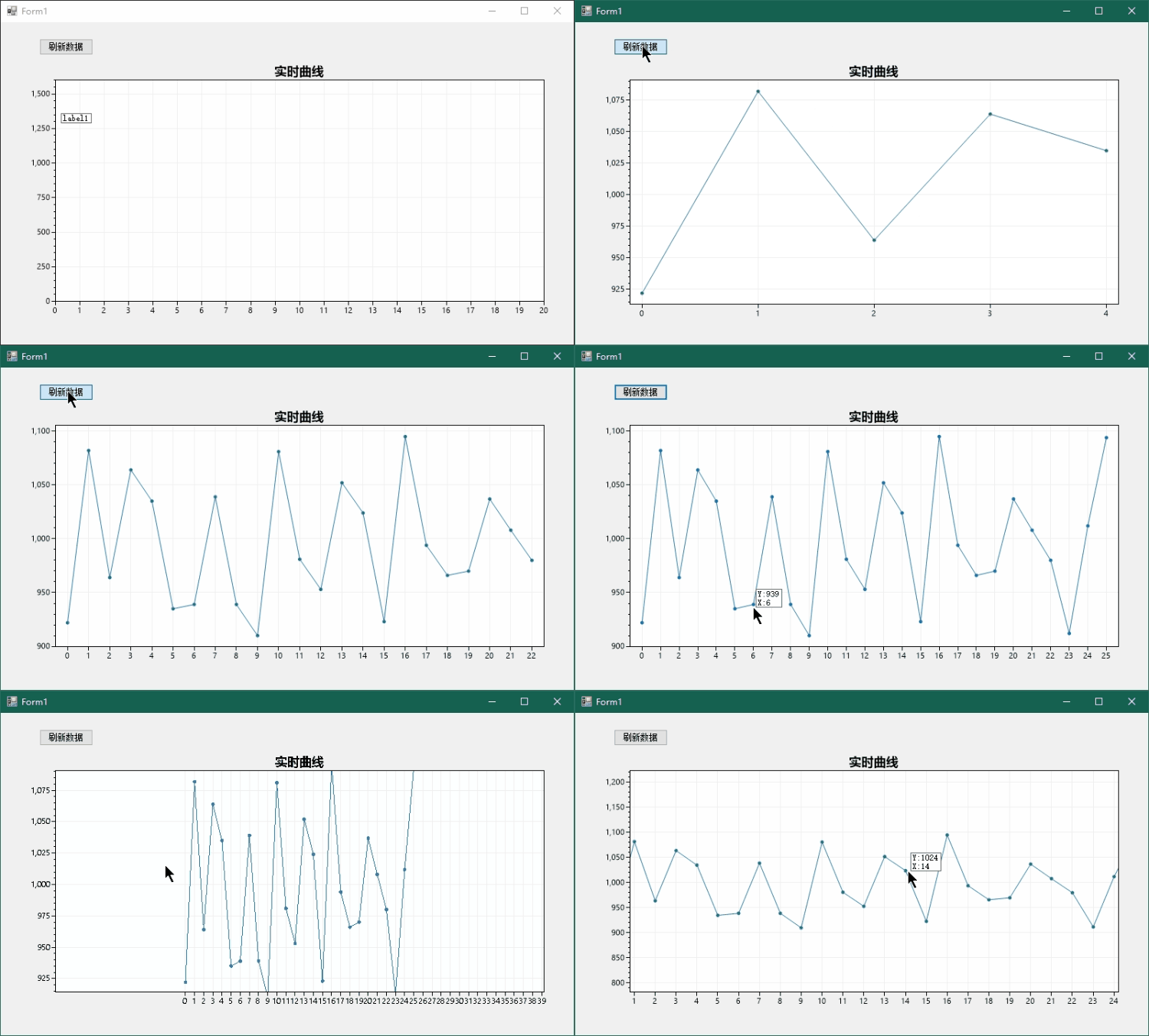
ScottPlot是个非常不错的开源图表库,官方的例程也比较丰富,本文简单举例说明如何获取鼠标处的数值。
2创建Demo工程
创建空白的Winform桌面程序

引入ScottPlot库

右键解决方案,点击Nuget程序包管理,搜索完整名ScottPlot:

引入完成之后设计窗口的工具箱中会出现FromsPlot控件,将其拖放到设计界面中,这里再加两个控件:
Button用于点击产生随机数据,Label用于显示鼠标位置的数值,初始位置随意,程序里我们让它跟随鼠标在适当的位置显示。

图中更改了Label的背景色和边框样式,这样看起来好看些。
3代码编辑
双击添加的刷新Button可快速添加监听并进入代码编辑模式。
using System;
using System.Collections.Generic;
using System.ComponentModel;
using System.Data;
using System.Drawing;
using System.Linq;
using System.Text;
using System.Threading.Tasks;
using System.Windows.Forms;

namespace ScottPlotTest
{
    public partial class Form1 : Form
    {
        public const int MAX_LOG_LENGHT = 1000;

        private double[] values = new double[MAX_LOG_LENGHT];
        private int dataCnt = 0;
        private ScottPlot.Plottable.SignalPlot signalPlot;
        public Form1()
        {
            InitializeComponent();

            /*
             * 1.设置数据源,自定义X轴标签
             */
            var plt = formsPlot1.Plot;
            plt.Title("实时曲线");
            plt.SetAxisLimitsY(0, 1600);
            plt.SetAxisLimitsX(0, 20);
            signalPlot = plt.AddSignal(values);
            signalPlot.MaxRenderIndex = dataCnt;
            //生成X轴标签
            double[] labelPositions = new double[MAX_LOG_LENGHT];
            string[] labelsXAxis = new string[MAX_LOG_LENGHT];
            for (int i = 0; i < MAX_LOG_LENGHT; i++)
            {
                labelsXAxis[i] = i.ToString();
                labelPositions[i] = i;
            }
            plt.XTicks(labelPositions, labelsXAxis);
            formsPlot1.Refresh();

            //鼠标移动监听
            formsPlot1.MouseMove += FormsPlot1_MouseMove;
        }

        protected override void OnSizeChanged(EventArgs e)
        {
            base.OnSizeChanged(e);
            /*
             * 2.自动适应窗口大小
             */
            formsPlot1.Location = new Point(12, 51);
            formsPlot1.Width = Size.Width - 48;
            formsPlot1.Height = Size.Height - 108;
        }

        private void FormsPlot1_MouseMove(object sender, MouseEventArgs e)
        {
            /*
             * 3.计算鼠标处的值并通过Label显示
             */
            label1.Visible = false;
            Point mouseLocation = e.Location;
            double xCoordinate = formsPlot1.Plot.GetCoordinateX(mouseLocation.X);
            int xAxis = Math.Abs((int)Math.Round(xCoordinate));
            if (xAxis < dataCnt)
            {
                int y = (int)formsPlot1.Plot.GetPixelY(values[xAxis]);
                if (Math.Abs(mouseLocation.Y - y) < 16)
                {
                    label1.Text = "Y:" + y.ToString()
                        + "\nX:" + xAxis.ToString();
                    //调整label到合适位置
                    mouseLocation.Y += label1.Height;
                    mouseLocation.X += 16;
                    label1.Location = mouseLocation;
                    label1.Visible = true;
                }
            }
        }

        private void Button1_Click(object sender, EventArgs e)
        {
            /*
             * 4.生成随机数据
             */
            GetData();
            formsPlot1.Plot.AxisAuto();
            formsPlot1.Refresh();
        }

        private void GetData()
        {
            Random rand = new Random();
            values[dataCnt] = 1000 + rand.Next(-100, 100);
            signalPlot.MaxRenderIndex = dataCnt;
            dataCnt++;
            if(MAX_LOG_LENGHT == dataCnt)
            {
                dataCnt = 0;
            }
        }
    }
}
代码做了4件事:
1.设置数据源;自定义X轴标签,只显示整数。
2.自动适应窗口大小。
3.计算鼠标处的值并通过Label显示。
4.生成随机数据。
我们重点看如何获取鼠标处的值,通过GetCoordinateX()获取X轴鼠标像素点对应的图标曲线坐标的值,然后取最近的整数,这个数就是数据的索引,这里就得到了X-Y对的值。但我们需要鼠标指到数据点附近时才显示,所以接下来通过GetPixelY()获取Y轴坐标数值对应的像素值,在距离16个像素范围内就显示Label,否则就不显示。

4END
边栏推荐
- 【Utils】CookieUtil
- 解决uniapp微信小程序canvas不能引入字体的问题
- 成为绿色数据中心新样板,东莞华为云数据中心是怎样炼成的?
- IP black and white list
- What is gossip (E-Net gossip)
- What is a spin lock? A spin lock means that when a thread attempts to acquire a lock, if the lock has been occupied by other threads, it will always cycle to detect whether the lock has been released,
- 【Util】redis工具类:把redis的value序列化器修改为GenericJackson2JsonRedisSerializer,就支持返回值为对象或集合了
- 天气这么热太阳能发电不得起飞喽啊?喽啊个头……
- 2022年熔化焊接与热切割考题及在线模拟考试
- 力扣解法汇总1331-数组序号转换
猜你喜欢

Recommended super easy-to-use mobile screen recording software

Target detection: speed and accuracy comparison (fater r-cnn, r-fcn, SSD, FPN, retinanet and yolov3)

草料二维码--在线二维码生成器

朗镜科技(Trax中国)“机器人+AI”开启中国零售元宇宙时代

zabbix分布式

83. (cesium home) how the cesium example works

IP black and white list

Floating point data type in C language (did you learn to waste it)

Copy excel row to specified row

What is a spin lock? A spin lock means that when a thread attempts to acquire a lock, if the lock has been occupied by other threads, it will always cycle to detect whether the lock has been released,
随机推荐
软件测试的发展与定义
7.27模拟赛总结
如何有效进行回顾会议(上)?
Node file operation
bgp实验
Custom Configuration Sections
MySQL development skills - View
Copy excel row to specified row
Career planning of Software Test Engineer
Node文件操作
解决uniapp微信小程序canvas不能引入字体的问题
Thrift 序列化协议浅析
C# 读取ini文件、键值对操作
Excel VBA 免密查看VBE加密代码
Leetcode 105. construct binary tree from preorder and inorder traversal sequence & 106. construct binary tree from inorder and postorder traversal sequence
(function(global,factory){
一些企业数据平台建设的思考
Minitest -- applet automation testing framework
【LeetCode】1331. 数组序号转换
Foundation of deep learning ---- GNN spectral domain and airspace (continuous improvement, update and accumulation)