当前位置:网站首页>基于Feign远程调用
基于Feign远程调用
2022-06-10 16:36:00 【itmkyuan】
- Feign替代RestTemplate
- 自定义配置
- Feign使用优化
- 最佳实践
Feign替代RestTemplate
RestTemplate方式调用存在的问题
先来看看我们以前利用RestTemplate发起远程调用的代码:
String url="http://userservice/user/"+order.getUserId();
User user = restTemplate.getForObject(url, User.class);
存在下面的问题:
- 代码可读性差,编程体验不统一
- 参数复杂URL难以维护
Feign是一个声明式的http客户端,官方地址:https://github.com/OpenFeign/feign
其作用就是帮助我们优雅的实现http请求的发送,解决上面提到的问题。
使用Feign的步骤如下:
1.引入依赖:
<!--httpClient的依赖 -->
<dependency>
    <groupId>org.springframework.cloud</groupId>
    <artifactId>spring-cloud-starter-openfeign</artifactId>
</dependency>
2.在order-service的启动类添加注解开启Feign的功能:
@MapperScan("cn.itcast.order.mapper")
@SpringBootApplication
@EnableFeignClients
public class OrderApplication {


    public static void main(String[] args) {

        SpringApplication.run(OrderApplication.class, args);
    }
}
3.编写Feign的客户端:
主要是基于SpringMVC的注解来声明远程调用的信息,比如:
- 服务名称:userservice
- 请求方式:GET
- 请求路径:/user/{id}
- 请求参数:Long id
- 返回值类型:User
这样,Feign就可以帮助我们发送http请求,无需自己使用RestTemplate来发送了。
feign的使用步骤
① 引入依赖
② 添加@EnableFeignClients注解
③ 编写FeignClient接口
④ 使用FeignClient中定义的方法代替RestTemplate
自定义配置
Feign可以支持很多的自定义配置,如下表所示:
一般情况下,默认值就能满足我们使用,如果要自定义时,只需要创建自定义的@Bean覆盖默认Bean即可。
下面以日志为例来演示如何自定义配置。
配置Feign有两种方式:
方式一:配置文件方式
① 全局生效:
feign:
  client:
    config:
      default: # 这里用default就是全局配置,如果是写服务名称,则是针对某个微服务的配置
        loggerLevel: FULL # 日志级别
② 局部生效
feign:
  client:
    config:
      userservice: # 针对某个微服务的配置
        loggerLevel: FULL # 日志级别
方式二:java代码方式,需要先声明一个Bean:
public class DefaultFeignConfiguration  {

    @Bean
    public Logger.Level feignLogLevel(){

        return Logger.Level.BASIC; // 日志级别为BASIC
    }
}
① 如果要全局生效,将其放到启动类的@EnableFeignClients这个注解中:
@EnableFeignClients(defaultConfiguration = DefaultFeignConfiguration .class)
② 如果是局部生效,则把它放到对应的@FeignClient这个注解中:
@FeignClient(value = "userservice", configuration = DefaultFeignConfiguration .class)
feign的日志配置
1.方式一是配置文件,feign.client.config.xxx.loggerLevel
① 如果xxx是default则代表全局
② 如果xxx是服务名称,例如userservice则代表某服务
2.方式二是java代码配置Logger.Level这个bean
① 如果在@EnableFeignClients注解声明则代表全局
② 如果在@FeignClient注解中声明则代表某服务
Feign底层的客户端实现:
- URLConnection:默认实现,不支持连接池
- Apache HttpClient :支持连接池
- OKHttp:支持连接池
因此提高Feign的性能主要手段就是使用连接池代替默认的URLConnection。
因此Feign的性能主要包括:
① 使用连接池代替默认的URLConnection
② 日志级别,最好用basic或none
Feign 的性能优化-连接池配置
Feign添加HttpClient的依赖支持:
引入依赖:
<!--httpClient的依赖 -->
<dependency>
    <groupId>io.github.openfeign</groupId>
    <artifactId>feign-httpclient</artifactId>
</dependency>
配置连接池:
feign:
  client:
    config:
      default: # default全局的配置
        loggerLevel: BASIC # 日志级别,BASIC就是基本的请求和响应信息
  httpclient:
    enabled: true # 开启feign对HttpClient的支持
    max-connections: 200 # 最大的连接数
    max-connections-per-route: 50 # 每个路径的最大连接数
feign的优化
1,日志级别尽量用basic
2.使用HtttpClient和OKHttp代替URLConnection
① 引入feign-httpClient的依赖
② 配置文件开启httpClient功能,设置连接池参数
Feign的最佳实践
方式一(继承):给消费者的Feign和提供者的controller定义统一的父接口作为标准。
- 服务紧耦合
- 父接口参数列表中的映射不会被继承


方式二(抽取):将Feign的Client抽取为独立模块,并且把接口有关的POJO、默认的Feign配置都放到这个模块中,提供给所有消费者使用。
例如,将UserClient、User、Feign的默认配置都抽取到一个feign-api包中,所有微服务引用该依赖包,即可直接使用。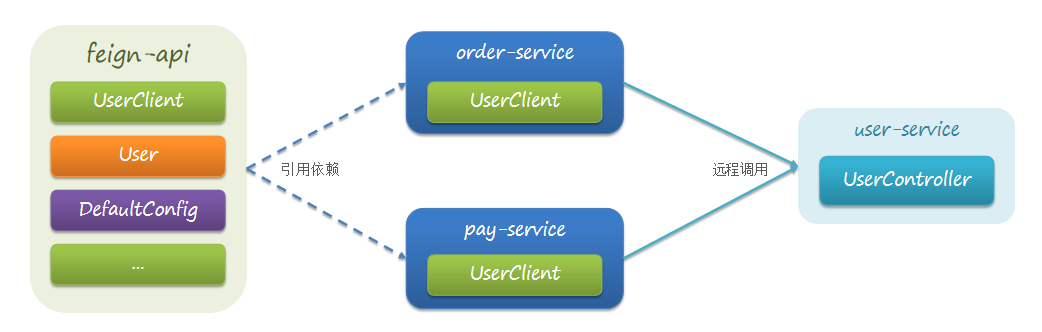
Feign的最佳实践:
① 让Controller和FeignClient继承同一接口
② 将FeignClient、POJO、Feign的默认配置都定义到一个项目中,供所有消费者使用
抽取FeignClient
实现最佳实践方式二的步骤如下:
1.首先创建一个module,命名为feign-api,然后引入feign的starter依赖
2.将order-service中编写的UserClient、User、DefaultFeignConfiguration都复制到feign-api项目中
3.在order-service中引入feign-api的依赖
4.修改order-service中的所有与上述三个组件有关的import部分,改成导入feign-api中的包
5.重启测试
当定义的FeignClient不在SpringBootApplication的扫描包范围时,这些FeignClient无法使用。有两种方式解决:
方式一:指定FeignClient所在包
@EnableFeignClients(basePackages = "cn.itcast.feign.clients")
方式二:指定FeignClient字节码
@EnableFeignClients(clients = {
    UserClient.class})
不同包的FeignClient的导入有两种方式:
① 在@EnableFeignClients注解中添加basePackages,指定FeignClient所在的包
② 在@EnableFeignClients注解中添加clients,指定具体FeignClient的字节码
感谢参与:
视频地址:https://www.bilibili.com/video/BV1LQ4y127n4?p=30
边栏推荐
- VBA divides strings, stores them in an array, writes them to a file, and saves them
- SVN中的回退操作
- Is the fund of futures account safe?
- Fabric.js 锁定背景图,不受缩放和拖拽的影响
- Fabric. JS centered element
- 消除业务代码中if....else的五种方式
- AIChE | 集成数学规划方法和深度学习模型的从头药物设计框架
- Web3最全搞钱秘籍,看这一篇就够了
- 厉害了,工信部推出 “一键解绑” 手机号绑定的互联网账号,堪称神器
- 每日一题-1287. 有序数组中出现次数超过25%的元素
猜你喜欢

It has become a unicorn since its establishment one year ago. Tencent didi is the "backer". This year's new unicorn is not simple

Swift 3pThread tool Promise Pipeline Master/Slave Serial Thread confinement Serial queue

仅需三步学会使用低代码ThingJS与森数据DIX数据对接

新思科技助力以色列Visuality Systems推进安全“左移”

Intelligent scenic spot video monitoring 5g intelligent light pole gateway networking integrated pole

Flood control and drainage monitoring automatic monitoring and telemetering terminal for flood control and drainage

目标客户匹配数据表格成功案例展示

The children in the deep mountains are seeing the stars farther away

厉害了,工信部推出 “一键解绑” 手机号绑定的互联网账号,堪称神器

Under the "plastic ban order", does the Hong Kong stock exchange pay for the deep excavation of degradable plastics by Zhongbao new materials?
随机推荐
Richard Behrman, the founder of dynamic planning
Fabric.js 居中元素 ️
SVN中的回退操作
关于透视投影变换及相关应用的详细推导
Flood control and drainage monitoring automatic monitoring and telemetering terminal for flood control and drainage
品牌难立,IPO难行,中国茶企困于“传统”?
Primekg: building a knowledge map to achieve precision medicine
web集群基础知识学习(1)
2022年焊工(初级)试题模拟考试平台操作
每日一题-1287. 有序数组中出现次数超过25%的元素
Swift 3pThread tool Promise Pipeline Master/Slave Serial Thread confinement Serial queue
What are the differences between domain name filing and ICP filing?
【报表工具的第二次革命】基于SPL语言优化报表结构、提升报表运算性能
Redis operation set, Zset, hash data types and use of visualization tools
Smart Scenic Spot Video Monitoring 5G Smart lamp Gateway Network Integrated pole
How MySQL modifies field type and field length
Cap version 6.1 Release Notice
AlphaFold 和 NMR 测定溶液中蛋白质结构的准确性
创建 Visual Studio 离线安装包并安装
Complete AHK function commands