当前位置:网站首页>地图找房的实例
地图找房的实例
2022-07-27 16:18:00 【猫的幻想曲】
1.功能说明:
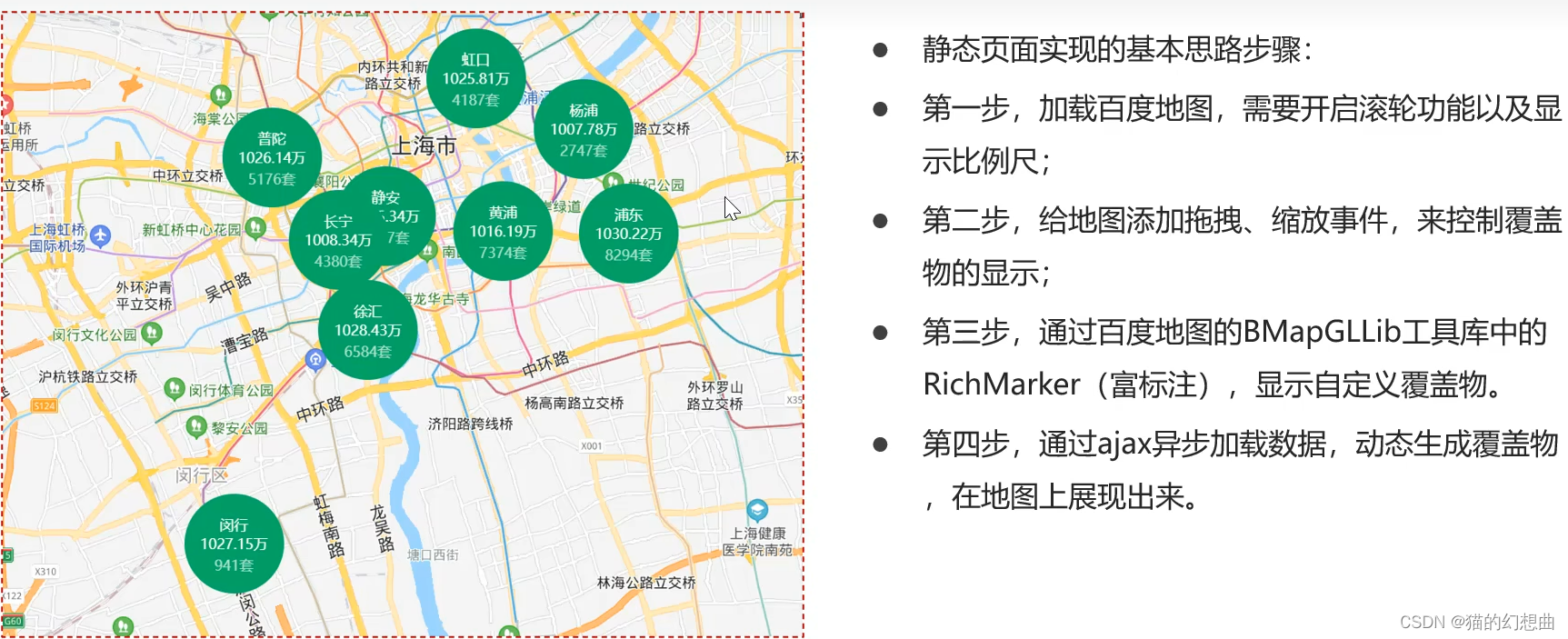
- 在房源信息类网站中,为了方便用户查找房源,推出了地图找房的功能,房源数据展示更加的直观。
- 例如:链家网:上海地图找房_上海小区地图_上海房产地图(上海链家)


BMapGLLib:
- BMapGLLib是基于百度地图JSAPI GL版的JavaScript开源工具库。
- 代码地址:GitHub - huiyan-fe/BMapGLLib: 百度地图JSAPI GL版JavaScript开源工具库

静态页面:
<!DOCTYPE html>
<html>
<head>
    <meta name="viewport" content="initial-scale=1.0, user-scalable=no"/>
    <meta http-equiv="Content-Type" content="text/html; charset=utf-8"/>
    <title>地图找房 - 地图搜索 </title>
    <style type="text/css">
        html {
            height: 100%
        }

        body {
            height: 100%;
            margin: 0px;
            padding: 0px
        }

        #container {
            height: 100%
        }

        .district {
            width: 84px;
            height: 84px;
            line-height: 16px;
            font-size: 12px;
            display: flex;
            flex-direction: column;
            justify-content: center;
            border: 1px solid transparent;
            border-radius: 50%;
            overflow: hidden;
            text-align: center;
            font-family: PingFangSC-Semibold;
            color: #fff;
            background: #00ae66 !important;
            box-sizing: border-box;
        }

        .district i {
            font-size: 12px;
            color: hsla(0, 0%, 100%, .7);
            line-height: 12px;
            margin-top: 4px;
            font-style: normal;
        }

        #platform > div > div > div {
            background: none !important;
        }
    </style>
    <script type="text/javascript" src="jquery-3.6.0.min.js"></script>
    <script type="text/javascript"
            src="http://api.map.baidu.com/api?v=1.0&type=webgl&ak=XdBGuSs0p90SNRM3dtpGGbvEygzfQyte"></script>
    <script src="http://mapopen.bj.bcebos.com/github/BMapGLLib/RichMarker/src/RichMarker.min.js"></script>
</head>
<body>
<div id="container"></div>
<script type="application/javascript">
    function showInfo(map) {
        let bound = map.getBounds(); //可视范围矩形坐标,其中sw表示矩形区域的西南角,参数ne表示矩形区域的东北角
        let zoom = map.getZoom(); //缩放级别
        console.log(bound);
        // $.ajax({
        //     url: "/house/search",
        //     data: {
        //         maxLongitude: bound.ne.lng,
        //         minLongitude: bound.sw.lng,
        //         maxLatitude: bound.ne.lat,
        //         minLatitude: bound.sw.lat,
        //         zoom: zoom
        //     },
        //     success: function (data) {
        //         showMapMarker(data, map);
        //     }
        // });

        //测试效果:
        let data = [{"name":"徐汇","price":"1028.43","total":"6584","longitude":121.43676,"latitude":31.18831},{"name":"黄浦","price":"1016.19","total":"7374","longitude":121.49295,"latitude":31.22337},{"name":"长宁","price":"1008.34","total":"4380","longitude":121.42462,"latitude":31.22036},{"name":"静安","price":"1005.34","total":"8077","longitude":121.4444,"latitude":31.22884},{"name":"普陀","price":"1026.14","total":"5176","longitude":121.39703,"latitude":31.24951},{"name":"金山","price":"1099.67","total":"6","longitude":121.34164,"latitude":30.74163},{"name":"松江","price":"1017.71","total":"14","longitude":121.22879,"latitude":31.03222},{"name":"青浦","price":"1038.11","total":"751","longitude":121.12417,"latitude":31.14974},{"name":"奉贤","price":"1108.63","total":"35","longitude":121.47412,"latitude":30.9179},{"name":"浦东","price":"1030.22","total":"8294","longitude":121.5447,"latitude":31.22249},{"name":"嘉定","price":"1041.45","total":"1620","longitude":121.2655,"latitude":31.37473},{"name":"宝山","price":"1050.65","total":"102","longitude":121.4891,"latitude":31.4045},{"name":"闵行","price":"1027.15","total":"941","longitude":121.38162,"latitude":31.11246},{"name":"杨浦","price":"1007.78","total":"2747","longitude":121.526,"latitude":31.2595},{"name":"虹口","price":"1025.81","total":"4187","longitude":121.48162,"latitude":31.27788}];
        showMapMarker(data, map);
    }

    //显示覆盖物
    function showMapMarker(data, map) {
        for (let vo of data) {
            let html = "<div class=\"district\">" + vo.name + "<span>" + vo.price + "万</span><i>" + vo.total + "套</i></div>";
            let marker = new BMapGLLib.RichMarker(html, new BMapGL.Point(vo.longitude, vo.latitude));
            map.addOverlay(marker);
        }
    }

    //清除覆盖物
    function clearMapMarker(map) {
        let markers = map.getOverlays(); //获取到地图上所有的覆盖物
        for (let marker of markers) { //循环将其删除
            map.removeOverlay(marker);
        }
    }

    $(function () {
        //地图默认位置,上海市
        let defaultX = 121.48130241985999;
        let defaultY = 31.235156971414239;
        let defaultZoom = 12; //默认缩放比例

        let map = new BMapGL.Map("container");          // 创建地图实例
        let point = new BMapGL.Point(defaultX, defaultY);  // 创建点坐标
        map.centerAndZoom(point, defaultZoom);                 // 初始化地图,设置中心点坐标和地图级别
        map.enableScrollWheelZoom(true);     //开启鼠标滚轮缩放
        //显示比例尺
        map.addControl(new BMapGL.ScaleControl({anchor: BMAP_ANCHOR_BOTTOM_RIGHT}));

        map.addEventListener("dragstart", () => {  //拖动开始事件
            clearMapMarker(map)
        });
        map.addEventListener("dragend", () => { //拖动结束事件
            showInfo(map)
        });
        map.addEventListener("zoomstart", () => { //缩放开始事件
            clearMapMarker(map)
        });
        map.addEventListener("zoomend", () => { //缩放结束事件
            showInfo(map)
        });
        //初始显示数据
        showInfo(map);
    });
</script>
</body>
</html>
搭建MongoDB环境:

application.properties文件中的配置:
spring.application.name = itcast-baidumap
server.port = 8899

#springboot MongoDB配置
spring.data.mongodb.username=house
spring.data.mongodb.password=********
spring.data.mongodb.authentication-database=admin
spring.data.mongodb.database=house
spring.data.mongodb.port=27017
spring.data.mongodb.host=192.168.31.81
spring.data.mongodb.auto-index-creation=true
构造数据:
为了数据真实性,我们从网上抓取一些小区的数据,小区的位置数据可以通过百度地图API数据

案例以上海为例,其有16个行政区
构造完成的数据如下:

商圈数据是行政区的下级分类:

构造完成后有198条数据

小区数据抓取网上的数据。
抓取完成后,共有20510条数据(建议使用提供的数据即可,无需重新抓取)

由于房源数据仅仅是展现数量,所以就不再进行数据抓取,按照小区数据进行构造即可
每个小区随机构造1~20个房源数据
最终构造完成有106094条数据。

MongoDB的聚合操作:
- MongoDB的聚合操作是以管道的形式完成的,在一个管道处理完毕后将结果传递给下一个管道处理
- 常用的聚合操作有:

MongoDB的聚合操作符:

实现搜索:
实现搜索的关键点:
通过矩形的对角的坐标可以确定矩形搜索范围。
需要按照不同的地图比例尺进行分组聚合查询,通过按照行政区、商圈或小区名进行分组,聚合数量、价格等数据。
响应数据:

pom文件:
<?xml version="1.0" encoding="UTF-8"?>
<project xmlns="http://maven.apache.org/POM/4.0.0"
         xmlns:xsi="http://www.w3.org/2001/XMLSchema-instance"
         xsi:schemaLocation="http://maven.apache.org/POM/4.0.0 http://maven.apache.org/xsd/maven-4.0.0.xsd">
    <modelVersion>4.0.0</modelVersion>

    <!--通过继承的方式集成SpringBoot-->
    <parent>
        <groupId>org.springframework.boot</groupId>
        <artifactId>spring-boot-starter-parent</artifactId>
        <version>2.3.4.RELEASE</version>
    </parent>

    <groupId>cn.itcast</groupId>
    <artifactId>itcast-baidumap</artifactId>
    <version>1.0-SNAPSHOT</version>

    <!-- 集中定义依赖版本号 -->
    <properties>
        <mongo.version>4.0.3</mongo.version>
        <lombok.version>1.18.4</lombok.version>
    </properties>

    <dependencies>
        <dependency>
            <groupId>junit</groupId>
            <artifactId>junit</artifactId>
            <version>4.12</version>
            <scope>test</scope>
        </dependency>
        <dependency>
            <groupId>org.springframework.boot</groupId>
            <artifactId>spring-boot-starter-test</artifactId>
            <scope>test</scope>
        </dependency>
        <dependency>
            <groupId>org.springframework.boot</groupId>
            <artifactId>spring-boot-starter-web</artifactId>
        </dependency>
        <dependency>
            <groupId>cn.hutool</groupId>
            <artifactId>hutool-all</artifactId>
            <version>5.5.2</version>
        </dependency>
        <!--springdata对于mongodb支持-->
        <dependency>
            <groupId>org.springframework.boot</groupId>
            <artifactId>spring-boot-starter-data-mongodb</artifactId>
        </dependency>
        <dependency>
            <groupId>org.projectlombok</groupId>
            <artifactId>lombok</artifactId>
            <optional>true</optional>
            <version>${lombok.version}</version>
        </dependency>

        <dependency>
            <groupId>us.codecraft</groupId>
            <artifactId>webmagic-core</artifactId>
            <version>0.7.3</version>
        </dependency>
        <dependency>
            <groupId>us.codecraft</groupId>
            <artifactId>webmagic-extension</artifactId>
            <version>0.7.3</version>
        </dependency>
    </dependencies>

    <build>
        <plugins>
            <!-- java编译插件 -->
            <plugin>
                <groupId>org.apache.maven.plugins</groupId>
                <artifactId>maven-compiler-plugin</artifactId>
                <version>3.2</version>
                <configuration>
                    <source>1.8</source>
                    <target>1.8</target>
                    <encoding>UTF-8</encoding>
                </configuration>
            </plugin>
        </plugins>
    </build>

</project>
实现service:
package cn.itcast.baidumap.service;

import cn.hutool.core.collection.CollUtil;
import cn.hutool.core.convert.Convert;
import cn.hutool.core.util.NumberUtil;
import cn.itcast.baidumap.pojo.BusinessCircle;
import cn.itcast.baidumap.pojo.Community;
import cn.itcast.baidumap.pojo.District;
import cn.itcast.baidumap.pojo.House;
import cn.itcast.baidumap.vo.HouseResultVo;
import org.bson.types.ObjectId;
import org.springframework.beans.factory.annotation.Autowired;
import org.springframework.data.geo.Box;
import org.springframework.data.mongodb.core.MongoTemplate;
import org.springframework.data.mongodb.core.aggregation.*;
import org.springframework.data.mongodb.core.query.Criteria;
import org.springframework.data.mongodb.core.query.Query;
import org.springframework.stereotype.Service;

import java.util.ArrayList;
import java.util.Collections;
import java.util.List;

/**
 * @Description:
 * @Author : Jerry
 * @create : 2022-07-19 18:50
 */
@Service
public class HouseSearchService {

    @Autowired
    private MongoTemplate mongoTemplate;

    /**
     * 地图找房搜索服务
     * @param maxLongitude  最大经度
     * @param minLongitude  最小经度
     * @param maxLatitude   最大纬度
     * @param minLatitude   最小纬度
     * @param zoom          地图缩放比例值
     * @return
     */
    public List<HouseResultVo> search(Double maxLongitude,
                                      Double minLongitude,
                                      Double maxLatitude,
                                      Double minLatitude,
                                      Double zoom) {
        //收集聚合查询条件
        List<AggregationOperation> operationList = new ArrayList<>();

        //在可视范围内搜索
        Box box = new Box(new double[]{maxLongitude,maxLongitude},new double[]{minLongitude,minLatitude});
        MatchOperation matchOperation = Aggregation.match(Criteria.where("location").within(box));
        operationList.add(matchOperation);

        int type;
        GroupOperation groupOperation;
        //根据地图得缩放比例进行分组
        if(zoom < 13.5){ //2公里以上
            //按照行政区分组
            groupOperation = Aggregation.group("districtCode");
            type = 1;
        }else if(zoom < 15.5){ //200米以上
            //按照商圈分组
            groupOperation = Aggregation.group("businessCircleCode");
            type = 2;
        }else{  //200米以下
            //按照小区分组
            groupOperation = Aggregation.group("communityId");
            type = 3;
        }
        groupOperation = groupOperation.count().as("total")
                .avg("price").as("price");
        operationList.add(groupOperation);

        //生成最终的聚合条件
        Aggregation aggregation = Aggregation.newAggregation(operationList);

        //执行查询
        AggregationResults<HouseResultVo> aggregationResults = this.mongoTemplate.aggregate(aggregation, House.class, HouseResultVo.class);

        List<HouseResultVo> houseResultVoList = aggregationResults.getMappedResults();
        if(CollUtil.isEmpty(houseResultVoList)){
            return Collections.emptyList();
        }

        //填充数据
        switch (type){
            case 1:{
                //查询行政区数据
                for(HouseResultVo houseResultVo:houseResultVoList){
                    District district = this.queryDistrictByCode(Convert.toInt(houseResultVo.getCode()));
                    houseResultVo.setName(district.getName());
                    houseResultVo.setLongitude(district.getLocation().getX());
                    houseResultVo.setLatitude(district.getLocation().getY());
                    //价格保留两位小数
                    houseResultVo.setPrice(NumberUtil.roundStr(houseResultVo.getPrice(),2));
                }
                break;
            }
            case 2:{
                //查询商圈数据
                for(HouseResultVo houseResultVo:houseResultVoList){
                    BusinessCircle businessCircle = this.queryBusinessCircleByCode(Convert.toInt(houseResultVo.getCode()));
                    houseResultVo.setName(businessCircle.getName());
                    houseResultVo.setLongitude(businessCircle.getLocation().getX());
                    houseResultVo.setLatitude(businessCircle.getLocation().getY());
                    //价格保留两位小数
                    houseResultVo.setPrice(NumberUtil.roundStr(houseResultVo.getPrice(),2));
                }
                break;
            }
            case 3:{
                //查询商圈数据
                for(HouseResultVo houseResultVo:houseResultVoList){
                    Community community = this.queryCommunityById(new ObjectId(houseResultVo.getCode()));
                    houseResultVo.setName(community.getName());
                    houseResultVo.setLongitude(community.getLocation().getX());
                    houseResultVo.setLatitude(community.getLocation().getY());
                    //价格保留两位小数
                    houseResultVo.setPrice(NumberUtil.roundStr(houseResultVo.getPrice(),2));
                }
                break;
            }
            default: return Collections.emptyList();
        }

        return houseResultVoList;
    }

    /**
     * 根据code查询行政区数据
     * @param code
     * @return
     */
    private District queryDistrictByCode(Integer code){
        Query query = Query.query(Criteria.where("code").is(code));
        return this.mongoTemplate.findOne(query,District.class);
    }

    /**
     * 根据code查询商圈数据
     * @param code
     * @return
     */
    private BusinessCircle queryBusinessCircleByCode(Integer code){
        Query query = Query.query(Criteria.where("code").is(code));
        return this.mongoTemplate.findOne(query,BusinessCircle.class);
    }

    /**
     * 根据code查询小区数据
     * @param id
     * @return
     */
    private Community queryCommunityById(ObjectId id){
        return this.mongoTemplate.findById(id,Community.class);
    }

}
controller:
package cn.itcast.baidumap.controller;

import cn.itcast.baidumap.service.HouseSearchService;
import cn.itcast.baidumap.vo.HouseResultVo;
import org.springframework.beans.factory.annotation.Autowired;
import org.springframework.web.bind.annotation.*;

import java.util.List;

/**
 * @Description:
 * @Author : Jerry
 * @create : 2022-07-19 18:40
 */
@RequestMapping("house/search")
@RestController
public class HouseSearchController {

    @Autowired
    private HouseSearchService houseSearchService;

    @GetMapping
    public List<HouseResultVo> search(@RequestParam("maxLongitude") Double maxLongitude,
                                      @RequestParam("minLongitude") Double minLongitude,
                                      @RequestParam("maxLatitude") Double maxLatitude,
                                      @RequestParam("minLatitude") Double minLatitude,
                                      @RequestParam("zoom") Double zoom){

        return this.houseSearchService.search(maxLongitude,minLongitude,maxLatitude,minLatitude,zoom);

    }

}
实现效果:根据缩放的程度,显示不同的寻房的信息。


边栏推荐
- org.apache.catalina.core.StandardContext. startInternal Context [] startup failed due to previous err
- Random talk on GIS data (V) - geographic coordinate system
- Login page tablelayout
- MySQL code database creation parking management system foreign key
- 2021.7.22 note constraints
- 机器学习分类任务效果评估指标大全(包含ROC和AUC)
- Preliminary introduction to C miscellaneous lecture linked list
- Let's move forward together, the 10th anniversary of Google play!
- 2021.8.6 notes jsoup
- 这样的API网关查询接口优化,我是被迫的
猜你喜欢

Run the uniapp to the mobile phone (real machine debugging)

What should I do if MySQL master-slave replication data is inconsistent?

V-bind and V-for
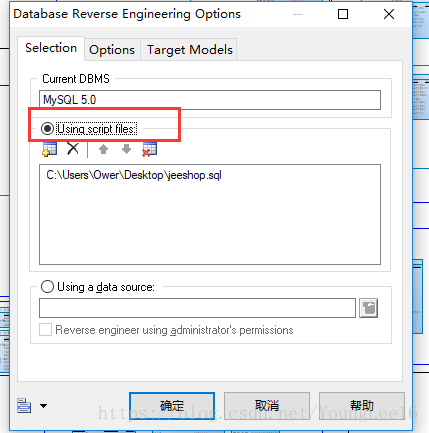
Navicat 导出表生成PDM文件

搭建一个简单的知识问答系统

Use mobaxtermto establish a two-tier springboard connection

全身多功能按摩仪芯片-DLTAP602SD
Generate PDM file from Navicat export table

低噪负离子风扇触摸IC

js实现简易表单验证与全选功能
随机推荐
nacos显示服务注册地址错误
JPA connection database password field blob
知识图谱 — jieba、pyhanlp、smoothnlp工具实现中文分词(词性表)
2021.7.28 notes
知识图谱 — pyhanlp实现命名体识别(附命名体识别代码)
The combination of text and words perfectly explains the implementation process of MySQL logical backup
Wechat applet wechat payment overview
百度地图鹰眼轨迹服务
Must the MySQL query column be consistent with the group by field?
2021.7.31笔记 视图
Matplotlib(基本用法)
JS tool - Cookie simple encapsulation
Preliminary introduction to C miscellaneous lecture linked list
Visual studio code installation tutorial (super detailed)
2021.7.12笔记 内外连接
USB充电式暖手宝芯片-DLTAP602SC-杰力科创
uniapp H5跨域问题
rsa加解密(兼容微信小程序环境)
Let's move forward together, the 10th anniversary of Google play!
MySQL 主从复制数据不一致,怎么办?