当前位置:网站首页>JWT学习与使用
JWT学习与使用
2022-06-12 04:30:00 【程序员小徐同学】
1. 什么是JWT?
JSON Web Token (JWT)是⼀个开放标准(RFC 7519),它定义了⼀种紧凑的、⾃包含的⽅式,⽤于
作为JSON对象在各⽅之间安全地传输信息。该信息可以被验证和信任,因为它是数字签名的。
1.1 什么时候应该⽤JWT?
Authorization (授权) : 这是使⽤JWT的最常⻅场景。⼀旦⽤⼾登录,后续每个请求都将包含
JWT,允许⽤⼾访问该令牌允许的路由、服务和资源。单点登录是现在⼴泛使⽤的JWT的⼀个特
性,因为它的开销很⼩,并且可以轻松地跨域使⽤。Information Exchange (信息交换) : 对于安全的在各⽅之间传输信息⽽⾔,JSON Web Tokens⽆
疑是⼀种很好的⽅式。因为JWT可以被签名,例如,⽤公钥/私钥对,你可以确定发送⼈就是它们
所说的那个⼈。另外,由于签名是使⽤头和有效负载计算的,您还可以验证内容没有被篡改。
1.2. 认证流程

1.后端核对⽤⼾名和密码成功后,将⽤⼾的id等其他信息作为JWT Payload (负载),将其与头部分别
进⾏Base64编码拼接后签名,形成⼀个JWT(Token)。形成的JWT就是⼀个形同11. zzz. xxx的字符
串。token head.payload.signature
2.后端将JWT字符串作为登录成功的返回结果返回给前端。 前端可以将返回的结果保存在
localStorage或sessionStorage上, 退出登录时前端删除保存的JWT即可。
3. 前端在每次请求时将JWT放⼊HTTP Header中的Authorization位。 (解决XSS和XSRF问题)
4. 后端检查是否存在,如存在验证JWT的有效性。
◦ 检查签名是否正确;
◦ 检查Token是否过期;
◦ 检查Token的接收⽅是否是⾃⼰(可选)
5. 验证通过后后端使⽤JWT中包含的⽤⼾信息进⾏其他逻辑操作,返回相应结果。
1.3 JWT优势在哪?
- 简洁(Compact): 可以通过URL,POST参数或者在HTTP header发送,数据量⼩,传输速度快
- ⾃包含(Self-contained):负载中包含了所有⽤⼾所需要的信息,避免了多次查询数据库
因为Token是 以JSON加密的形式保存在客⼾端的,所以JWT是跨语⾔的,原则上任何web形式都
⽀持。 - 不需要在服务端保存会话信息,特别适⽤于分布式微服务。
1.4 JWT具体包含信息 - header
标头通常由两部分组成: 令牌的类型(即JWT) 和所使⽤的签名算法,例如HMAC、SHA256或RSA。 它
会使⽤Base64 编码组成JWT 结构的第⼀部分。
注意:Base64是⼀ 种编码,也就是说,它是可以被翻译回原来的样⼦来的。它并不是⼀种加密过程。
{

"alg":"HS256",
"typ":"JWT"
}
- Payload
令牌的第⼆部分是有效负载,其中包含声明。声明是有关实体(通常是⽤⼾)和其他数据的声明。同样
的,它会使⽤Base64 编码组成JWT结构的第⼆部分
{

"sub" : "HS256"
"name" : "yjiewei"
"admin" : "true"
}
- Signature
header和payload都是结果Base64编码过的,中间⽤.隔开,第三部分就是前⾯两部分合起来做签
名,密钥绝对⾃⼰保管好,签名值同样做Base64编码拼接在JWT后⾯。(签名并编码)
HMACSHA256 (base64Ur1Encode(header) + "." + base64Ur1Encode(payload) , secret);
2.整合pom进行系统测试
<dependencies>
<dependency>
<groupId>org.springframework.boot</groupId>
<artifactId>spring-boot-starter-web</artifactId>
</dependency>
<!--引⼊mybatis-->
<dependency>
<groupId>org.mybatis.spring.boot</groupId>
<artifactId>mybatis-spring-boot-starter</artifactId>
<version>2.1.0</version>
</dependency>
<!--引⼊jwt-->
<dependency>
<groupId>com.auth0</groupId>
<artifactId>java-jwt</artifactId>
<version>3.10.3</version>
</dependency>
<!--引⼊mysql-->
<dependency>
<groupId>mysql</groupId>
<artifactId>mysql-connector-java</artifactId>
<version>8.0.16</version>
</dependency>
<!--引⼊druid-->
<dependency>
<groupId>com.alibaba</groupId>
<artifactId>druid</artifactId>
<version>1.2.0</version>
</dependency>
<dependency>
<groupId>org.projectlombok</groupId>
<artifactId>lombok</artifactId>
<optional>true</optional>
</dependency>
<dependency>
<groupId>org.springframework.boot</groupId>
<artifactId>spring-boot-starter-test</artifactId>
<scope>test</scope>
</dependency>
</dependencies>
2.2 测试JWT加密过程
public class Jwt {

/** * 获取JWT令牌 */
@Test
public void getToken() {

Map<String, Object> map = new HashMap<>();
Calendar instance = Calendar.getInstance();
instance.add(Calendar.SECOND, 2000)
/** * header可以不写有默认值 * payload 通常⽤来存放⽤⼾信息 * signature 是前两个合起来的签名值 */
String token = JWT.create().withHeader(map) //header
.withClaim("userId", 21)//payload
.withClaim("username", "yjiewei")//payload
.withExpiresAt(instance.getTime())//指定令牌的过期时间
.sign(Algorithm.HMAC256("!RHO4$%*^fi$R")); //签名,密钥⾃⼰记住
System.out.println(token);
}
/** * 令牌验证:根据令牌和签名解析数据 * 常⻅异常: * SignatureVerificationException 签名不⼀致异常 * TokenExpiredException 令牌过期异常 * AlgorithmMismatchException 算法不匹配异常 * InvalidClaimException 失效的payload异常 */
@Test
public void tokenVerify() {

// token值传⼊做验证
String token =
"eyJ0eXAiOiJKV1QiLCJhbGciOiJIUzI1NiJ9.eyJleHAiOjE2MjkyMDg0NjgsInVzZXJJZCI6MjEsIn
VzZXJuYW1lIjoieWppZXdlaSJ9.e4auZWkykZ2Hu8Q20toaks-4e62gerPlDEPHvhunCnQ";
/** * ⽤⼾Id:21 * ⽤⼾名:yjiewei * 过期时间:Tue Aug 17 21:54:28 CST 2021 */
JWTVerifier jwtVerifier =
JWT.require(Algorithm.HMAC256("!RHO4$%*^fi$R")).build();
DecodedJWT decodedJWT = jwtVerifier.verify(token); // 验证并获取解码后的
token
System.out.println("⽤⼾Id:" + decodedJWT.getClaim("userId").asInt());
System.out.println("⽤⼾名:" +
decodedJWT.getClaim("username").asString());
System.
- 封装⼯具类
Java就是封装抽象封装抽象…所以这⾥也封装⼀个⼯具类。
public class JWTUtil {

/** * 密钥要⾃⼰保管好 */
private static String SECRET = "privatekey#^&^%!save";
/** * 传⼊payload信息获取token * @param map payload * @return token */
public static String getToken(Map<String, String> map) {

JWTCreator.Builder builder = JWT.create();
//payload
map.forEach(builder::withClaim);
Calendar instance = Calendar.getInstance();
instance.add(Calendar.DATE, 3); //默认3天过期
builder.withExpiresAt(instance.getTime());//指定令牌的过期时间
return builder.sign(Algorithm.HMAC256(SECRET));
}
/** * 验证token */
public static DecodedJWT verify(String token) {

//如果有任何验证异常,此处都会抛出异常
return JWT.require(Algorithm.HMAC256(SECRET)).build().verify(token);
}
/** * 获取token中的payload */
public static Map<String, Claim> getPayloadFromToken(String token) {

return
JWT.require(Algorithm.HMAC256(SECRET)).build().verify(token).getClaims();
}
}
- JWT 整合SpringBoot
我们要对每个请求都去验证实现单点登录,通过拦截器拦截请求对JWT做验证。
4.1 登录并获取token
4.2 在请求头中添加token
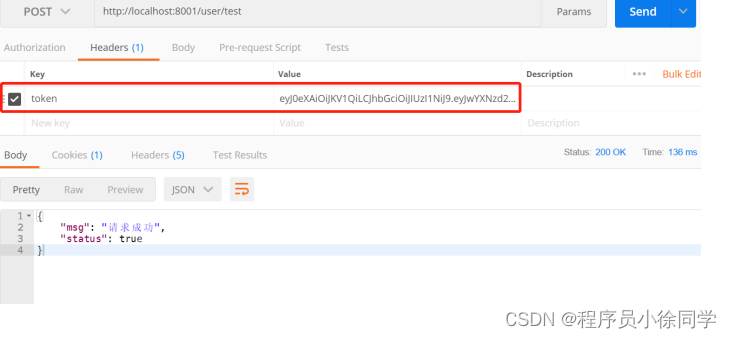
4.3 将冗余代码放入拦截器中使用
// 拦截器
@Slf4j
public class JWTInterceptor implements HandlerInterceptor {

@Override
public boolean preHandle(HttpServletRequest request,
HttpServletResponse response,
Object handler) throws Exception {

//获取请求头中的令牌
String token = request.getHeader("token");
log.info("当前token为:{}", token);
Map<String, Object> map = new HashMap<>();
try {

JWTUtil.verify(token);
return true;
} catch (SignatureVerificationException e) {

e.printStackTrace();
map.put("msg", "签名不⼀致");
} catch (TokenExpiredException e) {

e.printStackTrace();
map.put("msg", "令牌过期");
} catch (AlgorithmMismatchException e) {

e.printStackTrace();
map.put("msg", "算法不匹配");
} catch (InvalidClaimException e) {

e.printStackTrace();
map.put("msg", "失效的payload");
} catch (Exception e) {

e.printStackTrace();
map.put("msg", "token⽆效");
}
map.put("status", false);
//响应到前台: 将map转为json
String json = new ObjectMapper().writeValueAsString(map);
response.setContentType("application/json;charset=UTF-8");
response.getWriter().println(json);
return false;
}
}
// 指定拦截路径
@Configuration
public class InterceptorConfig implements WebMvcConfigurer {

@Override
public void addInterceptors(InterceptorRegistry registry) {

registry.addInterceptor(new JWTInterceptor())
.addPathPatterns("/user/test")
.excludePathPatterns("/user/login");
}
}
// 拦截请求并验证请求头中的token
@PostMapping("/user/test")
public Map<String, Object> test(HttpServletRequest request) {

String token = request.getHeader("token");
DecodedJWT verify = JWTUtil.verify(token);
String id = verify.getClaim("id").asString(); // 我前⾯存的时候转字符串了
String name = verify.getClaim("name").asString();
log.info("⽤⼾id:{}", id);
log.info("⽤⼾名: {}", name);
//TODO:业务逻辑
Map<String, Object> map = new HashMap<>();
map.put("status", true);
map.put("msg", "请求成功");
return map;
}
边栏推荐
- mysqld: Can‘t create directory ‘D: oftinstall\mysql57 (Errcode: 2 - No such file or directory)
- Zabbix6.0 new feature GEOMAP map marker can you use it?
- Enterprise Architect v16
- 疫情数据分析平台工作报告【3】网站部署
- Epidemic data analysis platform work report [8.5] additional crawlers and drawings
- Kotlin starts the process, the difference between launch and async, and starts the process in sequence
- 路灯照明物联网技术方案,ESP32-S3芯片通信应用,智能WiFi远程控制
- Encapsulation manuelle d'un foreach et d'une carte
- 智能面板WiFi联动技术,ESP32无线芯片模组,物联网WiFi通信应用
- 请用递归的方法计算下列函数的值:px(x,n)=x-x^2 +x^3- x^4+… ((-1)n-1)(xn) n>0 **输入格式要求:“%lf%d“ 提示信息:“Enter X and N:”
猜你喜欢

Raspberry pie 4B uses Intel movidius NCS 2 for inference acceleration

DS18B20 digital thermometer (I) electrical characteristics, power supply and wiring mode

QT compiling security video monitoring system 44 video uploading
windows如何安装多个版本mysql,如何同时启动
![[official testerhome] MTSC 2021 Shanghai and Shenzhen PPT download addresses](/img/a0/d1170b20d01a7a586d8ff68279f1d4.jpg)
[official testerhome] MTSC 2021 Shanghai and Shenzhen PPT download addresses

Tasks in C #

【FPGA+FFT】基于FPGA的FFT频率计设计与实现
![[FPGA chaos] implementation of FPGA based chaotic system Verilog](/img/c0/cda4644168264b7531b67ef16e801a.png)
[FPGA chaos] implementation of FPGA based chaotic system Verilog

Successfully solved: warning: there was an error checking the latest version of pip
![Work report on epidemic data analysis platform [7] Alibaba cloud related](/img/e2/acc79256f8f90ca730c39ffb941dab.png)
Work report on epidemic data analysis platform [7] Alibaba cloud related
随机推荐
Detailed explanation of Command Execution Vulnerability
SQL注入上传一句话木马(转)
【C语言】程序的内存四区模型
【FPGA+FFT】基于FPGA的FFT频率计设计与实现
图解 Apache SkyWalking UI 的使用
Epidemic data analysis platform work report [2] interface API
leetcode797. All possible paths (medium)
Enterprise Architect v16
From science to startup
树莓派4B使用Intel Movidius NCS 2来进行推断加速
[SC] OpenService FAILED 5: Access is denied.
Is it safe for Guojin Securities Commission Jinbao to open an account? How should we choose securities companies?
命令执行漏洞详解
疫情数据分析平台工作报告【6】可视化绘图
Epidemic data analysis platform work report [8.5] additional crawlers and drawings
动规(14)-三角形最佳路径问题
[automation] generate xlsx report based on openstack automated patrol deployed by kolla
Labor
C# Task. Waitall method
Summary of sequential, modulelist, and moduledict usage in pytorch