当前位置:网站首页>PyTorch的自动求导
PyTorch的自动求导
2022-07-24 15:18:00 【强强学习】
文章目录
1. 基本概念
1.1 requires_grad
如果需要对某个张量进行求导,则在初始化时必须赋值requires_grad=True,例如
a = torch.tensor(2.3, requires_grad=True)
1.2 计算图
在计算图中,数据用椭圆表示,加减乘除等操作用矩形表示。通过计算图将数据和操作表示成了二叉树结构。
1.3 叶子节点
在计算图中,由用户自己创建的数据就叫叶子节点,比如上图的w, x, b,也可以说未经过计算得出来的数据就是叶子节点。可以用 a.is_leaf(注意是属性,而不是方法)判断是否为叶子节点。
print(a.is_leaf)
1.4 grad_fn
z.grad_fn输出的是<AddBackward0 at 0x8ea34d2cd342>,表示的是z对应的直接操作运算。
tensor由某个操作获得,在PyTorch每个操作的反向传播函数是已经被定义好的,比如z是由add即加操作得到的,那么z.grad_fn得到的就是add函数的反向传播函数(求导函数)。注意我们的得到的是AddBackward0 后面有个0,说明一个计算图中可以出现很多次add,每个add的反向传播函数是不一样的。
1.5 next_functions
z.grad_fn.next_functions 输出的是
(<AccumulateGrad at 0x7fb73c7cdad0>, 0L))
((<MulBackward0 at 0x7fb73c7cd7d0>, 0L),
z是由add操作得到的,那么add操作的输入是b和 y,输出的就是b.grad_fn和y.grad_fn。
AccumulateGrad是什么?a.grad是什么?为什么梯度要置0?
对于y.grad_fn我们可以知道MulBackward就是乘积操作对应的反向传播函数。
b只是一个叶子结点,是一个Tensor,它的grad_fn即Accumlate_Grad表示这个b的导数是可积累的。比如你第一次方向传播一次,我们得出b的导数为3,即a.grad为3,但是你再求导一次,就会发现a.grad为6,这就是所谓的可累加。所以在Pytorch里面,每一个batch即每一次反向传播前都会把梯度下降即grad都置为0。
1.6 retain_graph=True backward()
z.backward(retain_graph=True)
z.backward()表示从z求出来的是z对各个变量的导数。
retain_graph=True表示保存中间变量。比如我们计算z对w的导数发现导数就是y,注意这个y在我们上面举例的计算图中不是我们自己指定的,是中间求出来的,我们第一次z.backward()求z对w的导数会取到y的值。但是如果我们这次传播完立刻在想传播一次,那么就会报错,因为一次梯度玩会自动把中间的计算东西释放掉,也就是第二次传播时候就没有y了,除非你再前向传播一次。所以我们可以提前指定这个保证第一次传播完中间变量仍然存在。
1.7 hook函数
非叶子节点的导求出来后会被释放,如果想看其导数,可以用autograd.grad或者hook函数。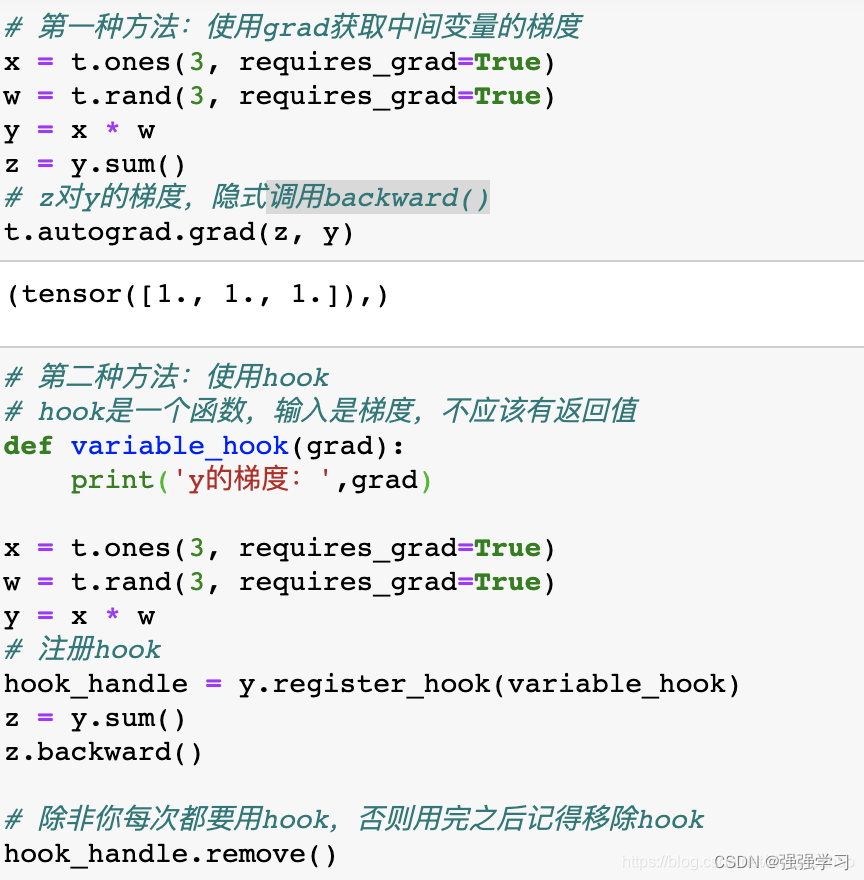
2. 总结
关于autograd,我们需要知道的就是我们可以在创建tensor的时候指定 requires_grad = True 使得可求导,然后在最终函数用 z.backward()。用a.grad查看导数(梯度)。
边栏推荐
- ZABBIX administrator forgot login password
- Route planning method for UAV in unknown environment based on improved SAS algorithm
- [matlab] matlab drawing Series II 1. Cell and array conversion 2. Attribute cell 3. delete Nan value 4. Merge multiple figs into the same Fig 5. Merge multiple figs into the same axes
- Getting started with mongodb
- Outlook tutorial, how to create tasks and to DOS in outlook?
- Spark: specify the date and output the log of the corresponding date (entry level - simple implementation)
- Wildfire STM32 domineering, through the firmware library to achieve water light
- Preparation of mobile end test cases
- Various searches (⊙▽⊙) consolidate the chapter of promotion
- 野火stm32霸道,通过固件库实现流水灯
猜你喜欢

VAE(变分自编码器)的一些难点分析
Existence form and legitimacy of real data in C language (floating point number)

Getting started with mongodb
Kubectl_好用的命令行工具:oh-my-zsh_技巧和窍门

2022 RoboCom 世界机器人开发者大赛-本科组(省赛)-- 第二题 智能服药助手 (已完结)

Intuitive understanding of various normalization

Decrypt "sea Lotus" organization (domain control detection and defense)

2022 RoboCom 世界机器人开发者大赛-本科组(省赛)-- 第三题 跑团机器人 (已完结)

Fastjson code execution cve-2022-25845

spark学习笔记(三)——sparkcore基础知识
随机推荐
Explain the edge cloud in simple terms | 2. architecture
JSON file editor
使用 Fiddler Hook 报错:502 Fiddler - Connection Failed
Kali concise language transformation method (illustration)
Strongly connected component
DS sort -- quick sort
PrestoUserError: PrestoUserError(type=USER_ERROR, name=INVALID_FUNCTION_ARGUMENT, message=“Escape st
kali简洁转换语言方法(图解)
File upload and download and conversion between excel and data sheet data
Existence form and legitimacy of real data in C language (floating point number)
Sword finger offer II 001. integer division
pip 安装报错 error in anyjson setup command: use_2to3 is invalid.
[300 opencv routines] 238. Harris corner detection in opencv
Preparation of mobile end test cases
哈夫曼树(最优二叉树)
2022 RoboCom 世界机器人开发者大赛-本科组(省赛)---第一题 不要浪费金币 (已完结)
DS diagram - the shortest path of the diagram (excluding the code framework)
2022 RoboCom 世界机器人开发者大赛-本科组(省赛)RC-u4 攻略分队 (已完结)
MySql函数
Here comes the problem! Unplug the network cable for a few seconds and plug it back in. Does the original TCP connection still exist?