当前位置:网站首页>Review of vsftp, TFTP, samba and NFS
Review of vsftp, TFTP, samba and NFS
2022-06-30 00:11:00 【XUPT-BDAL-LAB-ML&OP】
vsftp


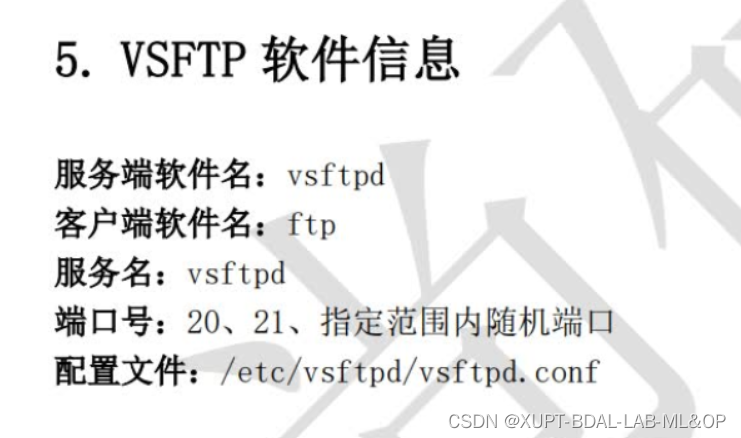
experiment
Anonymous access mode
 anonymous_enable=YES
 anon_umask=022
 anon_upload_enable=YES
 anon_mkdir_write_enable=YES
 anon_other_write_enable=YES
 local_enable=YES
 write_enable=YES
 local_umask=022
 dirmessage_enable=YES
 xferlog_enable=YES
 connect_from_port_20=YES
 xferlog_std_format=YES
 listen=NO
 listen_ipv6=YES
 pam_service_name=vsftpd
 userlist_enable=YES

chown -Rf ftp /var/ftp/pub

[[email protected] ~]# ftp 192.168.10.10
Connected to 192.168.10.10 (192.168.10.10).
220 (vsFTPd 3.0.3)
Name (192.168.10.10:root): anonymous
331 Please specify the password.
Password: Click enter here
230 Login successful.
Remote system type is UNIX.
Using binary mode to transfer files.
ftp> cd pub
250 Directory successfully changed.
ftp> mkdir files
550 Permission denied.
Local access mode
 anonymous_enable=NO
 local_enable=YES
 write_enable=YES
 local_umask=022
 dirmessage_enable=YES
 xferlog_enable=YES
 connect_from_port_20=YES
 xferlog_std_format=YES
 listen=NO
 listen_ipv6=YES
 pam_service_name=vsftpd
 userlist_enable=YES

cat /etc/vsftpd/user_list  #  Remove the desired user
cat /etc/vsftpd/ftpusers
Virtual user mode
#  Create for FTP Authenticated user database file , The odd number is the account name , Even behavior code . for example , Create separate zhangsan and lisi Two users , All passwords are redhat:
[[email protected] ~]# cd /etc/vsftpd/
[[email protected] vsftpd]# vim vuser.list
zhangsan
redhat
lisi
redhat

#  Because plaintext information is not secure , It's not in line with Jean vsftpd Service program directly loaded format , So you need to use db_load Command with hash (hash) The algorithm transforms the original plaintext information file into a database file , And reduce the database file permissions ( Avoid other people seeing the contents of the database file ), Then delete the original plaintext information file .

[[email protected] vsftpd]# db_load -T -t hash -f vuser.list vuser.db
[[email protected] vsftpd]# chmod 600 vuser.db
[[email protected] vsftpd]# rm -f vuser.list

#  For the convenience of management FTP Data on the server , You can set the home directory of local users of this system to /var Catalog ( This directory is used to store frequently changed data ). And for the sake of safety , Set the local user of this system to not allow login FTP The server , This does not affect virtual user login , It can also prevent hackers from logging in through local users of the system .

[[email protected] ~]# useradd -d /var/ftproot -s /sbin/nologin virtual
[[email protected] ~]# ls -ld /var/ftproot/
drwx------. 3 virtual virtual 74 Jul 14 17:50 /var/ftproot/
[[email protected] ~]# chmod -Rf 755 /var/ftproot/

#  Create a new... For virtual user authentication PAM file vsftpd.vu, among PAM In file “db=” The parameter is use db_load The path of the account password database file generated by the command , But don't write the suffix of the database file :

[[email protected] ~]# vim /etc/pam.d/vsftpd.vu
auth       required     pam_userdb.so db=/etc/vsftpd/vuser
account    required     pam_userdb.so db=/etc/vsftpd/vuser

[[email protected] ~]# vim /etc/vsftpd/vsftpd.conf
  anonymous_enable=NO
  local_enable=YES
  write_enable=YES
  guest_enable=YES
  guest_username=virtual
  allow_writeable_chroot=YES
  local_umask=022
  dirmessage_enable=YES
  xferlog_enable=YES
 connect_from_port_20=YES
 xferlog_std_format=YES
 listen=NO
 listen_ipv6=YES
 pam_service_name=vsftpd.vu
 userlist_enable=YES
 # user_config_dir=/etc/vsftpd/vusers_dir

# The first 5 Step : Set different permissions for virtual users . Although the account zhangsan and lisi All for vsftpd A virtual account certified by a service program , But we still want to treat them differently . such as , Allow Zhang San to upload 、 establish 、 modify 、 see 、 Delete file , Li Si is only allowed to view the documents . This can be done by vsftpd Service program to achieve . Just create a new directory , Create two in order to zhangsan and lisi Named file , One of them is called zhangsan Write the permission in the file ( Use anonymous user parameters ):

# [[email protected] ~]# mkdir /etc/vsftpd/vusers_dir/
# [[email protected] ~]# cd /etc/vsftpd/vusers_dir/
# [[email protected] vusers_dir]# touch lisi
# [[email protected] vusers_dir]# vim zhangsan
# anon_upload_enable=YES
# anon_mkdir_write_enable=YES
# anon_other_write_enable=YES

topic
https://www.linuxprobe.com/basic-learning-11.html#1121
TFTP
Simple file transfer protocol (Trivial File Transfer Protocol,TFTP) It's based on UDP Protocol a protocol for simple file transfer between a client and a server . seeing the name of a thing one thinks of its function , It offers uncomplicated 、 Low cost file transfer service , Think of it as FTP A simplified version of the protocol .
TFTP The command function of is not as good as FTP Powerful service , You can't even traverse directories , It's also less secure than FTP service . and , because TFTP When transferring files, we use UDP agreement , The port number occupied is 69, So the file transfer process is not like FTP The agreement is so reliable . however , because TFTP There is no need for client authentication , It also reduces unnecessary system and network bandwidth consumption , So the transmission is trivial (trivial) Small documents , More efficient .
Next, install the relevant software package on the system , Experience . among ,tftp-server It's a service program ,tftp Is a client tool for connection testing ,xinetd It's management services ( I'll talk about it later ):
[[email protected] ~]# dnf install tftp-server tftp xinetd

[[email protected] ~]# vim /etc/xinetd.d/tftp
service tftp
{

        socket_type             = dgram
        protocol                = udp
        wait                    = yes
        user                    = root
        server                  = /usr/sbin/in.tftpd
        server_args             = -s /var/lib/tftpboot
        disable                 = no
        per_source              = 11
        cps                     = 100 2
        flags                   = IPv4
}

[[email protected] ~]# systemctl restart tftp
[[email protected] ~]# systemctl enable tftp
[[email protected] ~]# systemctl restart xinetd
[[email protected] ~]# systemctl enable xinetd

TFTP The root directory of is /var/lib/tftpboot. You can use the just installed tftp The command attempts to access the file , firsthand experience TFTP The file transfer process of the service . In the use of tftp Command access file , Tables may be used 11-6 Parameters in .

 surface 11-6                                         tftp Parameters and functions available in the command

 Parameters 	 effect
?	 Help information
put	 Upload files
get	 Download the file
verbose	 Display detailed processing information
status	 Display current status information
binary	 Use binary for transmission
ascii	 Use ASCII Code transmission
timeout	 Set the timeout for retransmission
quit	 sign out
samba
1987 year , Microsoft and Intel have jointly formulated SMB(Server Messages Block, Server message block ) agreement , It aims to solve the problem of sharing files or printers in LAN , This also makes it easier to share files among multiple hosts . here we are 1991 year , I was still in college Tridgwell In order to solve Linux System and Windows File sharing between systems , be based on SMB The protocol developed SMBServer Service program . This is an open source file sharing software , It can be realized through simple configuration Linux System and Windows File sharing between systems . at that time ,Tridgwell Want to put the name of this software SMBServer To register as a trademark , However, it was recognized by the trademark office “SMB Is a meaningless character ” Refused the application on the grounds of . later Tridgwell Keep going through the dictionary , Suddenly I saw the name of a Latin dance —Samba, And this passionate dance name just contains “SMB”, therefore Samba The name of the service program was born ( See the picture 12-1).Samba The service program is now in Linux System and Windows Sharing files between systems The best choice .


experiment
The server
 yum install -y samba samba-client

vim /etc/samba/smb.conf
[global]
	workgroup = SAMBA
 	security = user
	passdb backend = tdbsam
[database]	 The share name is database
	comment = Do not arbitrarily modify the database file
	path = /database
	public = no
	writable = yes

pdbedit -a -u linuxprobe

smbclient -U syh -L 192.168.222.110 #  see
windows mount
\192.168.222.110
Linux mount
dnf install cifs-utils
mount -t cifs -o username=linuxprobe,password=redhat //192.168.10.10/database /database
nfs


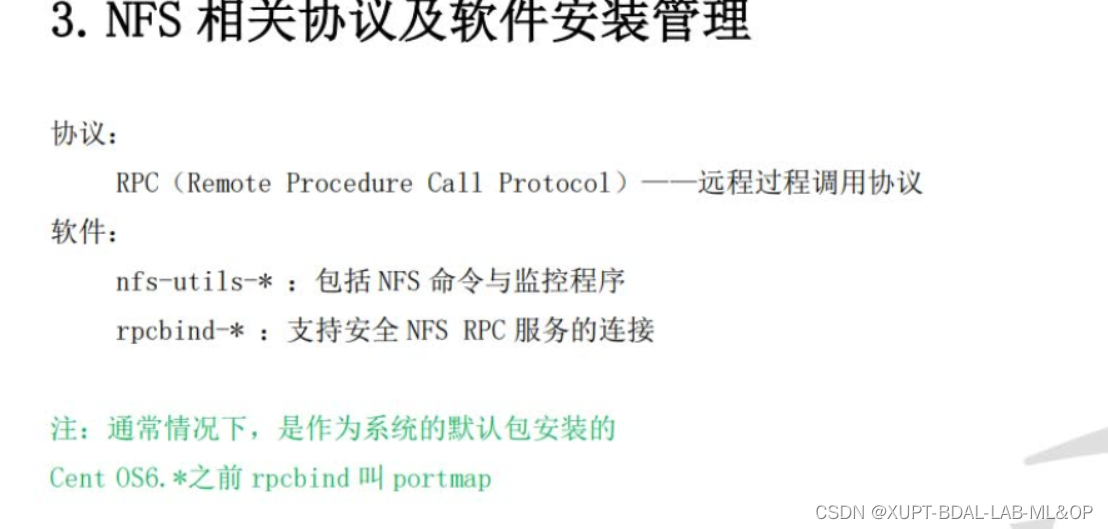
vim /etc/exports
/nfsfile 192.168.10.*(rw,sync,root_squash)
showmount -e 192.168.10.10
mount -t nfs 192.168.10.10:/nfsfile /nfsfile
边栏推荐
- Halcon practical: design idea of solder joint detection
- Root cause of glideexception: failed decodepath{directbytebuffer- > gifdrawable- > drawable}
- Vulnhub target -moriartycorp
- QT learning 06 widgets and window types
- Golang6 reflection
- Introduction to reptiles: data capture of Betta barrage, with 11 introductory notes attached
- Solr basic operations 15
- 手机开户后多久才能通过?另外,手机开户安全么?
- [advanced C language] address book implementation
- Stack space of JVM
猜你喜欢

FPGA Development (1) -- serial port communication

JS draw polar color gradient

Machine learning: the concept and application of VC dimension

數莓派 4怎麼樣?可能的玩法有哪些?
![[advanced C language] address book implementation](/img/e6/8a51d519d31ec323cf04c59a556325.png)
[advanced C language] address book implementation

Serialization of binary tree 297 Serialization and deserialization of binary tree 652 Find duplicate subtrees

ThinkPad VMware installation virtual machine: this host supports Intel VT-x, but Intel VT-x is disabled (problem resolution)

Root cause of glideexception: failed decodepath{directbytebuffer- > gifdrawable- > drawable}

Golang6 reflection

After 8 years of polishing, "dream factory of game design" released an epic update!
随机推荐
Solr basic operations 14
Solr基础操作15
Siemens low code version 9.14: meet different needs
蛇形矩阵(数组模拟方向, d代表转弯)
Zhongkang holdings opens the offering: it plans to raise HK $395million net, and it is expected to be listed on July 12
QT learning 04 Hello QT
After 8 years of polishing, "dream factory of game design" released an epic update!
Golang6 reflection
Web APIs environment object - dark horse programmer
Embedded development: Hardware in the loop testing
Shell positional parameter variables and predefined variables
koa2学习和使用
Divisor
Solr基础操作11
QT learning 07 coordinate system in QT
Solr basic operations 9
Solr基础操作9
Solr basic operations 13
Code analysis platform sonarqube actual combat
Exploration and Practice on the future direction of byte cloud database