当前位置:网站首页>web--信息泄漏
web--信息泄漏
2022-06-23 09:14:00 【K00sec】
信息泄漏
### 目录遍历
开启题目,点击开始寻找 flag,发现进入了另外一个目录下。

试着点了几个目录,发现下面还有一层目录,但是很容易就发现问题了。
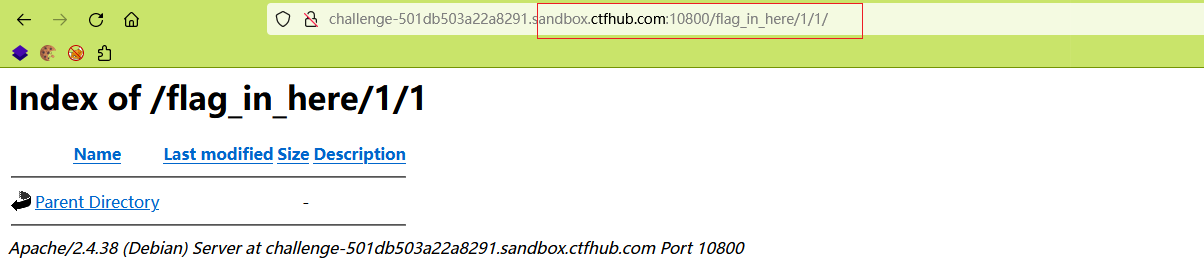

每个 第一层目录下还有第二层,都是 1,2,3,4,如果一个一个找,岂不是找的眼花了,这时候脚本小子的作用就出来了。
#!/usr/bin/env python3
# -*- coding: utf-8 -*-

import requests


url = 'http://challenge-501db503a22a8291.sandbox.ctfhub.com:10800/flag_in_here/'

for x in range(1,5):
	for i in range(1,5):
		re = requests.get(url + ('%d/%d' % (x, i)))
		print(f'payload:{
      re.url}')
		print(f'返回长度:{
      len(re.text)}\n')
找出返回的数据长度,长度越长说明返回的内容越多。


PHPINFO
phpinfo() 是php环境配置信息的页面,里面注明了当前环境的版本信息、开启的模块等等敏感信息。
顶栏php的版本信息

php的当前系统环境信息,包括 操作系统信息、

一点一点看看就找到flag了,当然如果是冲着flag来的就直接 ctrl + f 吧

备份文件泄漏
网站源码泄漏
开启靶机,直接用 dirsearch 扫一下。
root*on30ay/tools/dirsearch(master*)» python3 dirsearch.py -u http://challenge-6460870a1eaf48fc.sandbox.ctfhub.com:10800/ -e tar,zip,tar.gz,rar -w ./db/bakfile_self.txt
Missing required dependencies to run.
Do you want dirsearch to automatically install them? [Y/n] y
Installing required dependencies...

  _|. _ _  _  _  _ _|_    v0.4.2.4
 (_||| _) (/_(_|| (_| )

Extensions: tar, zip, tar.gz, rar | HTTP method: GET | Threads: 25 | Wordlist size: 42

Output File: /home/on30ay/tools/dirsearch/reports/challenge-6460870a1eaf48fc.sandbox.ctfhub.com_10800/__22-05-20_17-45-38.txt

Target: http://challenge-6460870a1eaf48fc.sandbox.ctfhub.com:10800/

[17:45:38] Starting:
[17:45:39] 200 -    1KB - /www.zip		# 扫出来的文件
[17:45:39] 503 -  605B  - /back.bak
[17:45:39] 503 -  605B  - /wwwroot.bakup
[17:45:39] 503 -  605B  - /temp.tar.gz
[17:45:39] 503 -  605B  - /wwwroot.zip
[17:45:39] 503 -  605B  - /temp.rar
提供一下此次扫描文件使用的字典和代码
#!/usr/bin/env python3
# -*- coding: utf-8 -*-

import requests

url = 'http://challenge-6460870a1eaf48fc.sandbox.ctfhub.com:10800/'
filename_list = ['www', 'web', 'website', 'backup', 'back', 'wwwroot', 'temp']
fileexe_list = ['tar', 'tar.gz', 'zip', 'rar', 'bak', 'bakup']

for name in filename_list:
	for exe in fileexe_list:
		payload = (url + '/%s.%s') % (name, exe)
		re = requests.get(payload)
		if re.status_code == 200:
			print('存在备份文件的url:%s' % payload)
			continue

下载源码,找了一下 发现没有找到flag

最终访问txt文件名就得到了flag

bak文件
找 index.php 源代码,还是一样,扫描下源代码

如果不是很复杂的备份文件的话 dirsearch 还是很厉害的
python3 dirsearch.py -u http://challenge-1a178c346247e62e.sandbox.ctfhub.com:10800/ -e tar,zip,tar.gz,rar -x 503
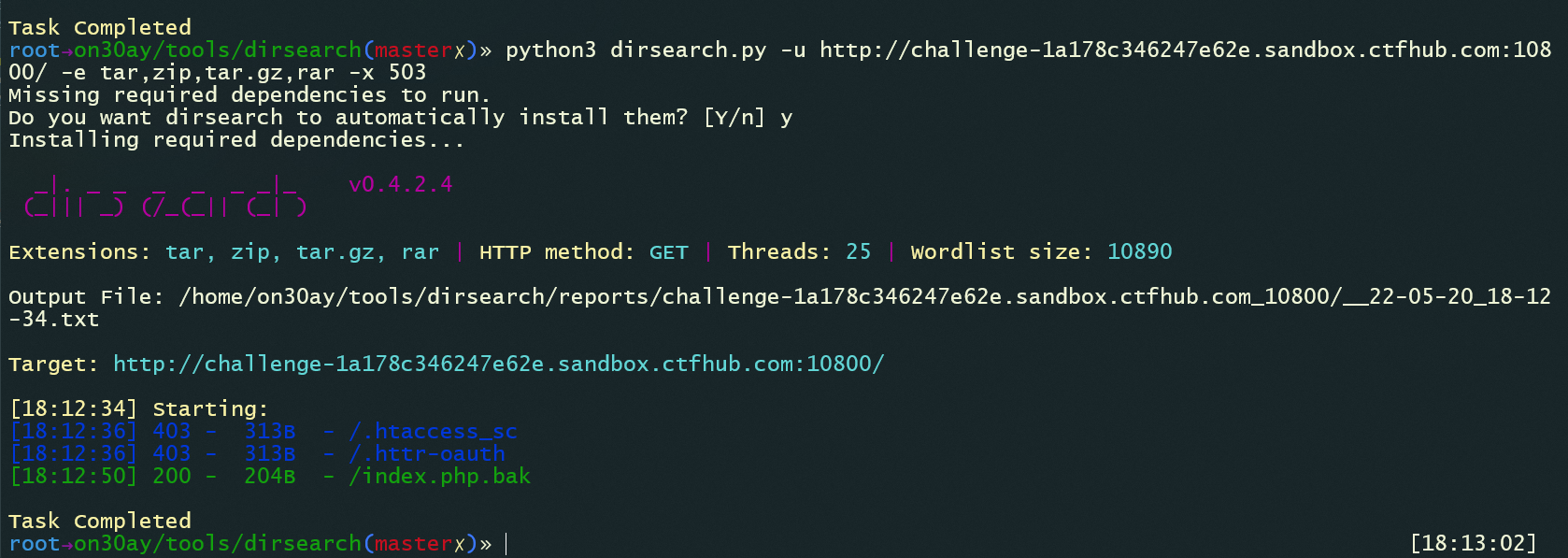
拿到flag

vim 缓存
象征性的截个图

虽然没扫出来,但是可以看到 字典中是存在的,不知道为啥没扫出来,但是我还是手动下载下来了

虽然打开也都是一堆乱码,但是没关系 还是有flag的,正常应该放在 linux 中恢复一下。
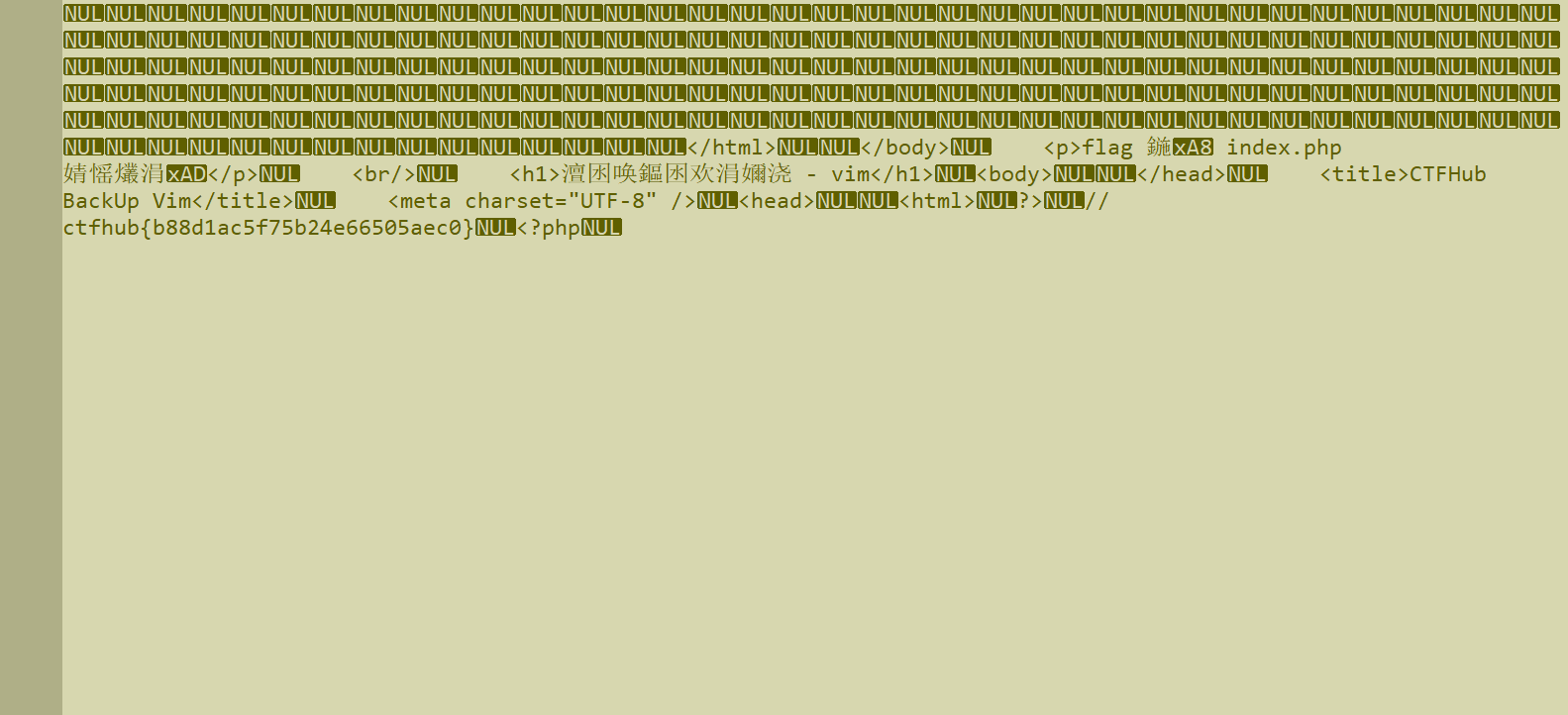
使用 vim 恢复读取 swp 文件内容。
$ vim -r .index.php.swp

.DS_Store
.DS_Store 是 Mac OS 保存文件夹的自定义属性的隐藏文件。通过.DS_Store可以知道这个目录里面所有文件的清单。
下载下来看看,发现最后可以看得出一个txt文件,估计苹果上可以正常看。


访问一下这个 txt 文件

Git泄漏
log
下载工具GitHack,使用 GitHack 克隆源代码。

默认克隆下来的源代码在 dist/domain.com/ 下
[email protected]:~/tools/GitHack_Bug$ cd dist/challenge-e84bf7331a96c5ee.sandbox.ctfhub.com_10800/	# 进入克隆下来的网站目录
[email protected]:~/tools/GitHack_Bug/dist/challenge-e84bf7331a96c5ee.sandbox.ctfhub.com_10800$
ll
total 20
drwxr-xr-x 3 on30ay on30ay 4096 May 22 10:35 ./
drwxr-xr-x 4 on30ay on30ay 4096 May 22 10:35 ../
drwxr-xr-x 8 on30ay on30ay 4096 May 22 10:35 .git/
-rw-r--r-- 1 on30ay on30ay  494 May 22 10:35 50x.html
-rw-r--r-- 1 on30ay on30ay  143 May 22 10:35 index.html
[email protected]:~/tools/GitHack_Bug/dist/challenge-e84bf7331a96c5ee.sandbox.ctfhub.com_10800$
cd .git/		# 进入 .git 目录下
[email protected]:~/tools/GitHack_Bug/dist/challenge-e84bf7331a96c5ee.sandbox.ctfhub.com_10800/.git$ ls
COMMIT_EDITMSG  ORIG_HEAD  config       hooks  info  objects
HEAD            branches   description  index  logs  refs
[email protected]:~/tools/GitHack_Bug/dist/challenge-e84bf7331a96c5ee.sandbox.ctfhub.com_10800/.git$ git log		# 查看历史修改记录
commit c064b3814d7cfb62f1d70681b3561dc919c7e088 (HEAD -> master)
Author: CTFHub <[email protected]>
Date:   Sun May 22 01:57:20 2022 +0000

    remove flag			# 删除了 flag

commit f2ac6a8a5a2077a55b20c094d6e150212583d5f2
Author: CTFHub <[email protected]>
Date:   Sun May 22 01:57:20 2022 +0000

    add flag			# 添加了一个 flag

commit db166fa8eec351179df0977922f0dd6cc58cc8cf
Author: CTFHub <[email protected]>
Date:   Sun May 22 01:57:20 2022 +0000

    init
[email protected]:~/tools/GitHack_Bug/dist/challenge-e84bf7331a96c5ee.sandbox.ctfhub.com_10800/.git$ cd ..	# 返回上一层目录下
[email protected]:~/tools/GitHack_Bug/dist/challenge-e84bf7331a96c5ee.sandbox.ctfhub.com_10800$ git reset --hard f2ac6a8		# 回滚到相应的版本中
HEAD is now at f2ac6a8 add flag
[email protected]:~/tools/GitHack_Bug/dist/challenge-e84bf7331a96c5ee.sandbox.ctfhub.com_10800$ ls	# 看到已经恢复了一个文件
174342731420349.txt  50x.html  index.html
[email protected]:~/tools/GitHack_Bug/dist/challenge-e84bf7331a96c5ee.sandbox.ctfhub.com_10800$ cat 174342731420349.txt	# 查看得到 flag
[email protected]:~/tools/GitHack_Bug/dist/challenge-e84bf7331a96c5ee.sandbox.ctfhub.com_10800$ cat 174342731420349.txt
ctfhub{
    1c66b2c7914c6c6f4d128002}
Stash
这是一个 git 缓存的学习过程,还是先用工具克隆源代码。

进入到 .git 目录下。
[email protected]:~/tools/GitHack_Bug$ cd dist/challenge-0c746a1b5778fb28.sandbox.ctfhub.com_10800/.git/
[email protected]:~/tools/GitHack_Bug/dist/challenge-0c746a1b5778fb28.sandbox.ctfhub.com_10800/.git$ ll
total 56
drwxr-xr-x  8 on30ay on30ay 4096 May 22 11:25 ./
drwxr-xr-x  3 on30ay on30ay 4096 May 22 11:25 ../
-rw-r--r--  1 on30ay on30ay   12 May 22 11:25 COMMIT_EDITMSG
-rw-r--r--  1 on30ay on30ay   23 May 22 11:25 HEAD
-rw-r--r--  1 on30ay on30ay   41 May 22 11:25 ORIG_HEAD
drwxr-xr-x  2 on30ay on30ay 4096 May 22 11:25 branches/
-rw-r--r--  1 on30ay on30ay   92 May 22 11:25 config
-rw-r--r--  1 on30ay on30ay   73 May 22 11:25 description
drwxr-xr-x  2 on30ay on30ay 4096 May 22 11:25 hooks/
-rw-r--r--  1 on30ay on30ay  217 May 22 11:25 index
drwxr-xr-x  2 on30ay on30ay 4096 May 22 11:25 info/
drwxr-xr-x  3 on30ay on30ay 4096 May 22 11:25 logs/
drwxr-xr-x 16 on30ay on30ay 4096 May 22 11:25 objects/
drwxr-xr-x  5 on30ay on30ay 4096 May 22 11:25 refs/
[email protected]:~/tools/GitHack_Bug/dist/challenge-0c746a1b5778fb28.sandbox.ctfhub.com_10800/.git$ git log --pretty=oneline
0bd686ee93d24317c48d1d420d35ac3bfb5726e0 (HEAD -> master) remove flag		# 最后一次修改记录
a15e4ba19b5815c316996b1b7f7f6ccf20e50c55 add flag
33647c0dbde87bff4c6c38ef5599f42dd131fcb4 init
看到记录中有添加过 flag ,通过git命令回滚到上一个版本中。
[email protected]:~/tools/GitHack_Bug/dist/challenge-0c746a1b5778fb28.sandbox.ctfhub.com_10800/.git$ cd ..
[email protected]:~/tools/GitHack_Bug/dist/challenge-0c746a1b5778fb28.sandbox.ctfhub.com_10800$ git reset --hard a15e4ba19b58
HEAD is now at a15e4ba add flag
[email protected]:~/tools/GitHack_Bug/dist/challenge-0c746a1b5778fb28.sandbox.ctfhub.com_10800$ ls
1590169501646.txt  50x.html  index.html
[email protected]:~/tools/GitHack_Bug/dist/challenge-0c746a1b5778fb28.sandbox.ctfhub.com_10800$ cat 1590169501646.txt
where is flag
发现回滚之后并没有flag,查看一下 git stash pop
[email protected]:~/tools/GitHack_Bug/dist/challenge-0c746a1b5778fb28.sandbox.ctfhub.com_10800$ git stash pop
CONFLICT (modify/delete): 1590169501646.txt deleted in Updated upstream and modified in Stashed changes. Version Stashed changes of 1590169501646.txt left in tree.
The stash entry is kept in case you need it again.

# 存在一个被删了的文件,查看一下 git log
[email protected]:~/tools/GitHack_Bug/dist/challenge-0c746a1b5778fb28.sandbox.ctfhub.com_10800$ git log
commit 0bd686ee93d24317c48d1d420d35ac3bfb5726e0 (HEAD -> master)
Author: CTFHub <[email protected]>
Date:   Sun May 22 03:10:59 2022 +0000

    remove flag

commit a15e4ba19b5815c316996b1b7f7f6ccf20e50c55
Author: CTFHub <[email protected]>
Date:   Sun May 22 03:10:59 2022 +0000

    add flag

commit 33647c0dbde87bff4c6c38ef5599f42dd131fcb4
Author: CTFHub <[email protected]>
Date:   Sun May 22 03:10:59 2022 +0000

    init
[email protected]:~/tools/GitHack_Bug/dist/challenge-0c746a1b5778fb28.sandbox.ctfhub.com_10800$ git reset --hard a15e4ba19b58 # 回滚到版本
HEAD is now at a15e4ba add flag
[email protected]:~/tools/GitHack_Bug/dist/challenge-0c746a1b5778fb28.sandbox.ctfhub.com_10800$ ls
1590169501646.txt  50x.html  index.html
[email protected]:~/tools/GitHack_Bug/dist/challenge-0c746a1b5778fb28.sandbox.ctfhub.com_10800$ git stash pop	# 查看未提交的缓存
On branch master
Changes not staged for commit:
  (use "git add <file>..." to update what will be committed)
  (use "git restore <file>..." to discard changes in working directory)
        modified:   1590169501646.txt

no changes added to commit (use "git add" and/or "git commit -a")
Dropped refs/[email protected]{
    0} (5343cf0653958640b9d75f344a50f28fb1dd9c66)
[email protected]:~/tools/GitHack_Bug/dist/challenge-0c746a1b5778fb28.sandbox.ctfhub.com_10800$ cat 1590169501646.txt
ctfhub{
    c7ec6e393fb7747d8d31befe}
Index
用 GitHack 克隆下来后,哈,这就有了?

svn泄漏
SVN 是一个开放源代码的版本控制系统,通过采用分支管理系统的高效管理,简而言之就是用于多个人共同开发同一个项目,实现共享资源,实现最终集中式的管理。SVN 泄漏就是在开发者开发的过程中,使用 SVN管理本地代码的过程中,使用命令 svn checkout 后会自动生成一个隐藏文件夹 .svn ,其中包含重要的源代码信息。网站的发布者如果没有注意将 .svn 所在目录作为网站的根目录就会造成这个重要的隐藏目录暴露在外网中。如果一些人获取到了这个目录,依据目录下的文件等重要信息,摸清网站的结构。利用 .svn 的泄漏,可以获取网站的源码版本等信息。
svn 1.6 之前的版本会在项目的每个文件夹下面都生成一个 .svn 目录,包含了所有文件的备份信息,文件名为 .svn/text-base/文件名.svn-base 。
svn 1.7 之后的版本只会在项目的根目录生成一个 .svn 隐藏目录,在 pristine 目录中包含了所有文件的备份信息。
访问靶场地址,提示 flag在旧版源代码中

利用工具,扫描svn目录,将源码还原。
# 工具安装
git clone https://github.com/kost/dvcs-ripper.git

# 安装依赖
sudo apt-get install perl libio-socket-ssl-perl libdbd-sqlite3-perl libclass-dbi-perl libio-all-lwp-perl -y

# 工具使用
[email protected]:~/tools/dvcs-ripper$ ./rip-svn.pl -h
DVCS-Ripper: rip-svn.pl. Copyright (C) Kost. Distributed under GPL.

Usage: ./rip-svn.pl [options] -u [svnurl]

 -c     perform 'checkout' on end (default)
 -b <s> Use branch <s> (default: trunk)
 -a <s> Use agent <s> (default: Mozilla/5.0 (Macintosh; Intel Mac OS X 10.7; rv:10.0.2) Gecko/20100101 Firefox/10.0.2)
 -s     ignore SSL certification verification
 -v     verbose (-vv will be more verbose)

Example: ./rip-svn.pl -v -u http://www.example.com/.svn/
Example: ./rip-svn.pl # with url and options in /home/on30ay/.rip-svn
使用 ctfhub 提供的工具 dvcs-ripper 还原svn中的源代码。
[email protected]:~/tools/dvcs-ripper$ ./rip-svn.pl -v -u http://challenge-de1df6a8e1abcfaa.sandbox.ctfhub.com:10800/.svn
[i] Found new SVN client storage format!
REP INFO => 1:file:///opt/svn/ctfhub:e43e7ef8-82fb-4194-9673-81c29de69c33
[i] Trying to revert the tree, if you get error, upgrade your SVN client!

[email protected]:~/tools/dvcs-ripper$ ls -a
.  ..  .git  .gitignore  .svn  LICENSE  README.md  hg-decode.pl  rip-bzr.pl  rip-cvs.pl  rip-git.pl  rip-hg.pl  rip-svn.pl

[email protected]:~/tools/dvcs-ripper$ cd .svn/

[email protected]:~/tools/dvcs-ripper/.svn$ ls
entries  format  pristine  text-base  tmp  wc.db

[email protected]:~/tools/dvcs-ripper/.svn$ cd pristine/

[email protected]:~/tools/dvcs-ripper/.svn/pristine$ ls
bf  fb

[email protected]:~/tools/dvcs-ripper/.svn/pristine$ cd bf/

[email protected]:~/tools/dvcs-ripper/.svn/pristine/bf$ ls
bf45c36a4dfb73378247a6311eac4f80f48fcb92.svn-base

[email protected]:~/tools/dvcs-ripper/.svn/pristine/bf$ cat bf45c36a4dfb73378247a6311eac4f80f48fcb92.svn-base
<html>

<head>
    <meta charset="UTF-8" />
    <title>CTFHub 信息泄露 SVN</title>
</head>

<body>
    <h1>信息泄露 - Subversion</h1>
    <br/>
    <p>Flag 在服务端旧版本的源代码中</p>
</body>

</html>[email protected]:~/tools/dvcs-ripper/.svn/pristine/bf$ cd ..
[email protected]:~/tools/dvcs-ripper/.svn/pristine$ ls
bf  fb

[email protected]:~/tools/dvcs-ripper/.svn/pristine$ cd  fb/
[email protected]:~/tools/dvcs-ripper/.svn/pristine/fb$ ls
fb67951d9255bf5816821ff085f97b12e0d5696a.svn-base

[email protected]:~/tools/dvcs-ripper/.svn/pristine/fb$ cat fb67951d9255bf5816821ff085f97b12e0d5696a.svn-base
ctfhub{
    bf4138074bc50321301a52a7}
参考文章:
Hg 泄漏
Mercurial 是一种轻量级分布式版本控制系统,采用 Python 语言实现,易于学习和使用,扩展性强。相对于传统的版本控制。
使用
hg init的时候会默认生成 .hg 目录文件,一样是使用 dvcs-ripper 工具进行利用。
[email protected]:~/tools/dvcs-ripper$ ./rip-hg.pl -v -u http://challenge-bd6c0340351945de.sandbox.ctfhub.com:10800/.hg
[i] Downloading hg files from http://challenge-bd6c0340351945de.sandbox.ctfhub.com:10800/.hg
[i] Auto-detecting 404 as 200 with 3 requests
[i] Getting correct 404 responses
[d] found 00changelog.i
[d] found dirstate
[d] found requires
[!] Not found for branch: 404 Not Found
[!] Not found for branchheads.cache: 404 Not Found
[d] found last-message.txt
[!] Not found for tags.cache: 404 Not Found
[d] found undo.branch
[d] found undo.desc
[d] found undo.dirstate
[d] found store/00changelog.i
[!] Not found for store/00changelog.d: 404 Not Found
[d] found store/00manifest.i
[!] Not found for store/00manifest.d: 404 Not Found
[d] found store/fncache
[d] found store/undo
[!] Not found for .hgignore: 404 Not Found
[i] Running hg status to check for missing items
cannot find hg: No such file or directory at ./rip-hg.pl line 140.
[email protected]:~/tools/dvcs-ripper$ ll -a
total 104
drwxr-xr-x  5 on30ay on30ay  4096 Jun  1 15:06 ./
drwxr-xr-x 21 on30ay on30ay  4096 Jun  1 14:39 ../
drwxr-xr-x  8 on30ay on30ay  4096 Jun  1 14:39 .git/
-rw-r--r--  1 on30ay on30ay   149 Jun  1 14:39 .gitignore
drwxr-xr-x  3 on30ay on30ay  4096 Jun  1 15:09 .hg/
drwxr-xr-x  5 on30ay on30ay  4096 Jun  1 14:48 .svn/
-rw-r--r--  1 on30ay on30ay 18027 Jun  1 14:39 LICENSE
-rw-r--r--  1 on30ay on30ay  5597 Jun  1 14:39 README.md
-rw-r--r--  1 on30ay on30ay  3855 Jun  1 14:39 hg-decode.pl
-rwxr-xr-x  1 on30ay on30ay  6401 Jun  1 14:39 rip-bzr.pl*
-rwxr-xr-x  1 on30ay on30ay  4717 Jun  1 14:39 rip-cvs.pl*
-rwxr-xr-x  1 on30ay on30ay 15114 Jun  1 14:39 rip-git.pl*
-rwxr-xr-x  1 on30ay on30ay  6102 Jun  1 14:39 rip-hg.pl*
-rwxr-xr-x  1 on30ay on30ay  6157 Jun  1 14:39 rip-svn.pl*
[email protected]:~/tools/dvcs-ripper$ cd .hg/
[email protected]:~/tools/dvcs-ripper/.hg$ ls
00changelog.i  dirstate  last-message.txt  requires  store  undo.branch  undo.desc  undo.dirstate
[email protected]:~/tools/dvcs-ripper/.hg$ cat requires
dotencode
fncache
generaldelta
revlogv1
sparserevlog
store
[email protected]:~/tools/dvcs-ripper/.hg$ cat last-message.txt
add [email protected]:~/tools/dvcs-ripper/.hg$ cat dirstate
��Wu�Ur����VPT�n���^c50x.htmln��
                                  ^K�*
index.htmln��!b��flag_437517074.txt

[email protected]:~/tools/dvcs-ripper/.hg$
使用工具找到了一些文件,查看了一下这些文件,找到了一个 flag_xxxx.txt 的文件在网站目录下。访问文件找到了flag

边栏推荐
- Redis learning notes - data type: Set
- Community article | mosn building subset optimization ideas sharing
- 如何在 FlowUs、Notion 等笔记软件中使用矩阵分析法建立你的思维脚手架
- 进入小公司的初级程序员要如何自我提高?
- Precautions for map interface
- JSP入门总结
- JS mask important data of ID card and mobile phone number with * *
- Combination sum of leetcode topic analysis
- 如何在 FlowUs、Notion 等笔记软件中使用「番茄工作法」?
- 一元函数求极限三大方法---洛必达法则,泰勒公式
猜你喜欢
![[GXYCTF2019]BabyUpload](/img/82/7941edd523d86f7634f5532ab97717.png)
[GXYCTF2019]BabyUpload

Learn SCI thesis drawing skills (f)

JSP入门总结

扫码登录基本流程
Typora设置图片上传服务
【NanoPi2试用体验】裸机第一步
![[learning resources] understand and love mathematics](/img/a3/e1b0915c48c85d17c48a4bee523424.png)
[learning resources] understand and love mathematics
Set the CPU to have 16 address lines and 8 data lines, and use mreq as the access control line number Connection between memory and CPU

学习SCI论文绘制技巧(E)

Flink error --caused by: org apache. calcite. sql. parser. SqlParseException: Encountered “time“

随机推荐
An idea of using keep alive to cache data in vue3 form pages
Best time to buy and sell stock
【NanoPi2试用体验】裸机第一步
自定义标签——jsp标签基础
Combination sum II of leetcode topic analysis
Leetcode topic analysis contains duplicate II
ionic5錶單輸入框和單選按鈕
[GYCTF2020]Blacklist
力扣之滑动窗口《循序渐进》(209.长度最小的子数组、904. 水果成篮)
也无风雨也无晴
Redis learning notes - traverse key
Basic use of lua
Redis学习笔记—数据类型:集合(set)
MySQL fault case | mysqldump: couldn't execute 'select column_ NAME
65. Valid Number
ARM中常见的英文解释
点击添加下拉框
2022-06-22:golang选择题,以下golang代码输出什么?A:3;B:1;C:4;D:编译失败。
Best time to buy and sell stock II
Bit binding