当前位置:网站首页>ECS 7-day practical training camp (Advanced route) -- day03 -- ecs+slb load balancing practice
ECS 7-day practical training camp (Advanced route) -- day03 -- ecs+slb load balancing practice
2022-06-25 19:07:00 【Student Zhao who loves learning】
ECS+SLB Load balancing practice
Server load balancing (Server Load Balancing), Can be seen as HSRP( Hot backup router protocol ) An extension of , Achieve load balancing between multiple servers .
A virtual server represents a cluster of real servers , When a client initiates a connection to a virtual server , Through some kind of load balancing algorithm , Forward to a real server .
There are two load balancing algorithms :
Weighted round robin(WRR) and Weighted least connections(WLC),
WRR Use weighted polling algorithm to allocate connections ,WLC Through certain weight , Assign the next connection to a server with a small number of active connections .
Configuration is divided into two parts ,
The first part is to use slb serverfarm serverfarm_name Command definition SLB Options , Including specifying the real server address ;
The second part is the use of ip slb vserver virtual_server-name To specify the virtual server address .
Load balancing checks the ECS pool by default ECS The health of the instance , Automatic isolation of abnormal state ECS example , Eliminates the need for a single machine ECS Single point of failure of the instance , Improve the overall service ability of the application .
Besides , Load balancing also has the ability to resist DDoS Ability to attack , Enhance the protection ability of application services .
There are three core concepts of load balancing service :
Load balancing instance (Server Load Balancer instances)
A load balancing instance is a running load balancing service , Used to receive traffic and allocate it to back-end servers . To use load balancing services , You must create a load balancing instance , And add at least one monitor and two ECS example .
monitor (Listeners)
Listening is used to check client requests and forward them to back-end servers . Monitoring will also check the health of the back-end server .
Back end servers (Backend Servers)
A set of ECS example . You can add... Separately ECS Instance to server pool , It can also be added and managed in batches through virtual server group or primary and standby server group .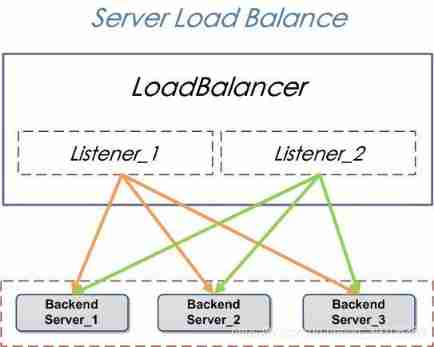
From Baidu Encyclopedia : What is? SLB
Let's do one here today SLB Load balancing practice , The platform used is still the online experiment module of Alibaba training camp , I think it's very good , There are the introduction and operation steps of the experiment , It's more suitable for Xiaobai entry , In addition, you don't need to apply for it yourself Ecs resources , This platform can provide online resources , But there is a quota every day , Interested partners can learn about : Ali training camp
Don't talk much , Let's start today's experiment : First, enter the advanced route of Ali training camp ( Here, you are considered to have registered an alicloud account and passed the authentication , Of course, if you have your own server, you can follow suit ), Click to enter today's experiment  Click to enter the experiment ( Because I've done it before , So here's another experiment , Click in the same interface )
 The steps of applying for resources after entering and ecs Refer to the previous tutorial for the meaning of each parameter : Quickly build Docker Environmental Science
Careful partners may have found that the resources applied for today are not the same as before , The difference is that after applying for resources today, we will be given two ecs example , Many people think that the system is wrong ? Actually, it's not what you think , Today's experiment is the load balancing experiment , In fact, to put it bluntly, it means to distribute things from one server to multiple servers to jointly handle various tasks 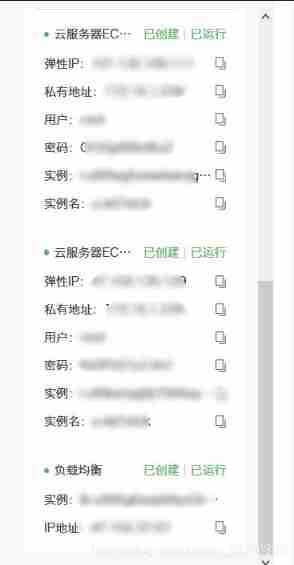 After applying for resources, we need to put two ecs The public ip Copy and paste them into the browser to see if they work properly , Then we will find two ip The contents are similar , Just back-end servers IP It's different there , This means that the task can be run on two servers respectively
  After verification, we will find that only when we enter two different ip To access different pages , In fact, the two servers are still running independently . Then we will think , Can you enter one of them ip We can visit two different pages at the same time ? Certainly. , We need to configure it first , Associate the two servers , The configuration operation is as follows :
Load balancing configuration
The main content of this section : Mount the two servers to the back end of load balancing , such , Users only need to access one IP Address or domain name , The load balancing server will automatically forward the user request to the corresponding back-end server according to the weight .
1. Through the following steps , Check the alicloud load balancing console :
1) Click... On the left navigation bar Cloud product resources View resource information , Click on One click Copy url, Invisible window with browser ( Or traceless mode ) Log in to the console ,
2) Enter the information provided by the experiment Subuser name and Subuser password , Click when finished Sign in . Alicloud login management console .( This is not the account and password of the server . It is recommended that you log in with a new privacy window or another server , Otherwise, it will squeeze the main account we logged in before , It is not convenient for subsequent operations )
 3) Click... On the left navigation bar Products and services , Drop down menu , stay Elastic calculation Under the entry, choose Load balancing .
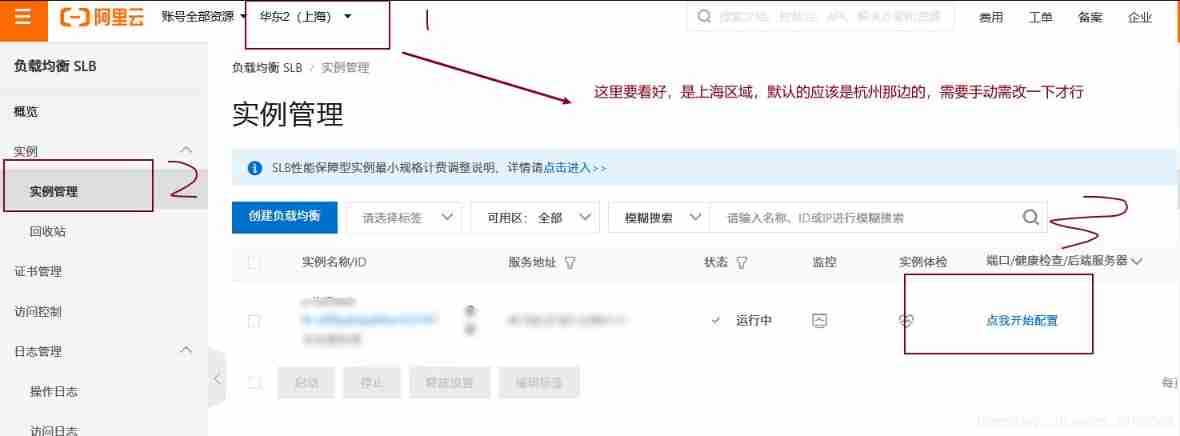
 2. Click on the left Instance management , Then open the example provided by the experiment , On the instance list page , Click... To the right of the target instance Click I start to configure .( Here we need to pay attention to the area )
 3. Through the load balancing business configuration wizard , Configure load balancing Listening port 、 Back end servers and health examination :
1) stay agreement & monitor page , Enter the following information , After completion , Click on next step .
 Load balancing protocol : choice  HTTP
 Listening port : Set to  80
 Advanced configuration remains the default
 2) stay Back end servers page , Listening requests are forwarded to Default server group , Click... At the added server Continue to add .
 3) In the pop-up server to be added page , Check the two pre configured cloud servers to select , And then click next , Then click add to ;
 4) In the list of added servers in the backend server interface , You can see the two new cloud servers , Separately port Set to 80, And click the next step .
explain : The load balancer will distribute requests in proportion to the weight of the input . 5) stay health examination Configuration in progress , Turn on the health check button in green On state , Click on next step .
 6) stay Configuration audit page , Confirm that the above configuration is operating correctly , Click on Submit ; The following interface appears , After successful configuration , Click on got it ;
 7) here , The page will display a status of Running Load balancing monitoring instance of , Two back end server groups have been added ECS The server , And health examination The status of is normal .
Be careful : Usually waiting for 1 About 20 minutes, the state of health check became normal , Click on the right Refresh see .
 Load balancing verification
The main contents of this section are as follows :
 Verify how load balancing works ;
 Verify by configuring different back-end server weights , Distribute users' requests to different back-end servers in proportion ;
 Verify that when a back-end server opens a session request , Requests will only be distributed to this server during session opening time .
- here , The weight ratio of the two back-end servers is the same . Through the following steps , Verify that the load balancing server is polling to access the back-end cloud server ECS example :
1) Click on the left side of the console Instance management , In the red box on the right page, you can see the load balanced Service address ( That is to say Cloud product resources Provided Load balancing Of IP Address ) ;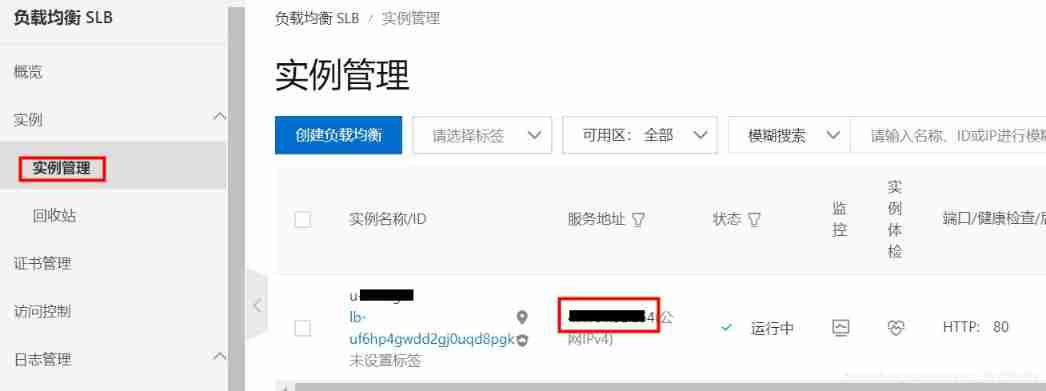 2) Create a new page in the browser , And access Load balancing Of Service address . The interface shows Back end servers IP by Cloud server ECS-1( or Cloud server ECS-2) Of Intranet address .
explain : The address displayed on the interface is the intranet address , This is because load balancing accesses the back end ECS example , It's through the intranet .
 3) Refresh Browse page , According to the Back end servers IP It's going to change , Turn into Cloud server ECS-2( or Cloud server ECS-1) Of Intranet address ;
 4) Repeat the refresh operation , Observe Back end servers IP It's on two cloud servers Intranet address Take turns to change .
5) The above results prove that : Load balancing will send users' requests to different back-end servers for processing . such , It can reduce the load pressure of a single server , To ensure business continuity .
- Through the following steps , Modify the back-end server weight , Verify that the proportion of requests sent by load balancing to the back-end server is adjusted in proportion to the weight .
1) return Instance management page , Click on the Default server group ; 3) Pop up dialog , Check Set different weights .
4) Set two instances of The weight Respectively 30 ,90 .
explain : The weights are configured as above , Load balancing through user access ,1/4 A request sent to a back end server ,3/4 The request is sent to another back-end server .
5) After completing the above configuration , Click on determine , Effective configuration information .
 7) Browser , Refresh multiple load balancing Service address The page of , And record what the page shows Back end servers IP . You can find : Every time 4 Refresh times , There will be 3 visit The weight by 90 Of ECS example ,1 The weight of each visit is 30 Of ECS example .
8) The above results prove that : Users can adjust the load balancer's request distribution according to the actual situation , Generally, set the weight of the server with high configuration , Lower the weight of server settings . This can avoid high concurrency , The server with lower configuration is under high pressure, and service exception occurs .
- Follow these steps , Turn on load balancing Conversation retention function .
1) Click on the left side of the monitor , On the monitor page, click... On the right To configure .
 2) Configure the Advanced configuration It's about , Click on modify ;
 3) Turn on Conversation retention , Timeout time Input 180 ( namely 3 minute ); Click when finished next step .
 4) Below Back end servers 、 health examination and Configuration audit All pages have default values , Complete the configuration in turn .
 5) Back to monitor page , Conversation retention state Enabled .
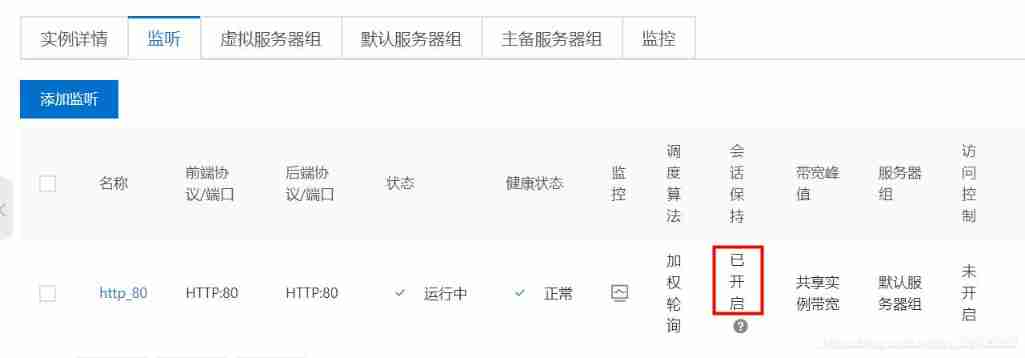 4. Enter... Again in the browser Load balancing Of IP Address , Refresh many times , It is found that during the timeout period of session persistence, requests will only be distributed to one station ECS On ( Which one is it ECS There's no rule ), After the time has passed , Redistribute according to weight ratio .
 5. We turn it off and turn it on Conversation retention The one ECS . Default server group page , Added servers , Click on the target ECS The highlight of ( namely Cloud server ID).
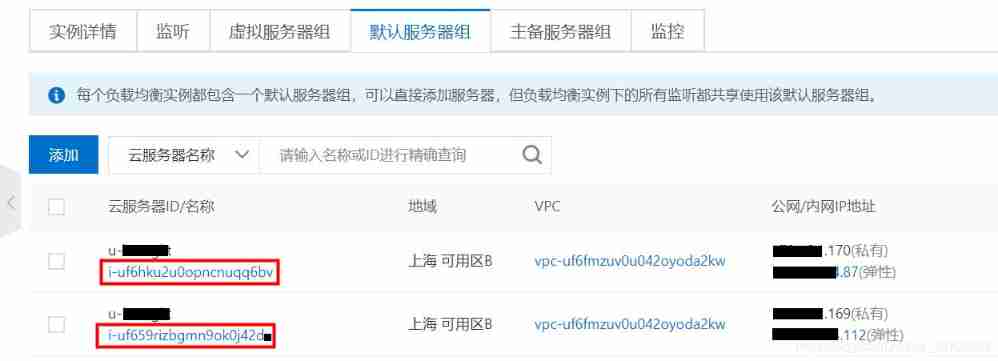 6. Instance details page , Click on... In the upper right corner 【 stop it 】 , Click on the pop-up page 【 determine 】 Close the current ECS.
 wait for 1 About minutes , The state of the instance changes to Has stopped .
 7. Return to the load balancing management console , On the default server group page, click on... In the upper right corner 【 Refresh 】, The page is stopped after refreshing ECS Of state Turn into Has stopped .
 【 monitor 】 page , Also appear abnormal Tips .
 alike , Click on the top left 【 Instance management 】, Return to the main page of the load balancing management console , abnormal The alarm will also appear .
 8. Refresh the browser again Load balancing Of IP Address , here , Request to Health check status by normal Of ECS On .
 9. it turns out to be the case that , When one of them ECS After exception , Load balancing will automatically send the request to the health check status normal ECS On .
边栏推荐
- R language plot visualization: plot visualization of two-dimensional histogram contour (basic 2D histogram contour)
- How to sort massive data? How to process data between memory and hard disk?
- 谈谈CNN中的位置和尺度问题
- GenICam GenTL 标准 ver1.5(1)
- Trend ea- fixed stop loss and profit per order
- Uncover ges super large scale graph computing engine hyg: Graph Segmentation
- Network security detection and prevention test questions (I)
- [elt.zip] openharmony paper Club - witness file compression system erofs
- Current situation and development suggestions of China's green PPP project industry: the investment scale is expanding, and the existing problems need to be improved to further promote the healthy dev
- Tcp/ip test questions (4)
猜你喜欢
![Analysis on policy, output and market scale of China's natural gas hydrogen production industry in 2020 [figure]](/img/f2/ec0fe8bec503c8788d6d549845b95c.jpg)
Analysis on policy, output and market scale of China's natural gas hydrogen production industry in 2020 [figure]

Why are life science enterprises on the cloud in succession?

Lilda Bluetooth air conditioning receiver helps create a more comfortable road life

焕新出发,利尔智达天下
![QQ robot epidemic situation query / epidemic situation concern [latest beta2 version]](/img/25/298dc7b79dddd05914d5f3ba070555.png)
QQ robot epidemic situation query / epidemic situation concern [latest beta2 version]
![Analysis on development scale and development trend of China's night economy industry in 2021 [figure]](/img/57/d6821fca9a608bf33e78287cf26bae.jpg)
Analysis on development scale and development trend of China's night economy industry in 2021 [figure]

削足适履 - 谈谈赛道上的坡道改造

云上弹性高性能计算,支持生命科学产业高速发展、降本增效

一晚上做了一个xpath终结者:xpath-helper-plus

Basic operation details of binary search tree (BST) (complete code, including test cases)
随机推荐
JVM|运行时数据区(堆空间)
Training of long and difficult sentences in postgraduate entrance examination day81
QQ robot: self forbidden words management of group members [latest beta2 version]
Tcp/ip test questions (II)
[C language practice - print the upper triangle and its deformation (with blank version)]
Do you want to know how new investors open accounts? Is online account opening safe?
Basic operations and basic data types of MySQL database
QQ机器人疫情查询/疫情关注等【最新beta2版本】
PHP数据库连接version1.1
Network security detection and prevention test questions (V)
网络安全检测与防范 测试题(五)
为什么生命科学企业都在陆续上云?
Redis 5.0 data structure double end linked list source code analysis
JS some small problems about adding and accessing values to arrays
Command records of common data types for redis cli operations
2021 development status of China's cloud game industry and analysis of major service providers: Although cloud games are still in their infancy, the market prospect is huge [figure]
Is it safe for tongdaxin to open an account?
Basic operation details of binary search tree (BST) (complete code, including test cases)
跳一跳小游戏辅助(手动版本)py代码实现
Solve the problem that sublime Text3 package control cannot install plug-ins