当前位置:网站首页>C # use log4net plug-in to output logs to files
C # use log4net plug-in to output logs to files
2022-07-26 06:42:00 【Hibiscus jasminoides】
One log file a day , It includes time , The log level , type , Information
Log output style :

stay Visual Studio in Nuget Search and download in package management log4Net plug-in unit

Use log4net You have to configure it yourself log4net Configuration file for , at present , The configuration file is XML Compiling . There are generally two ways , One is to use log4net Automatically generated “log4net.xml” To configure , The other is embedded directly into the running program app.config In file .
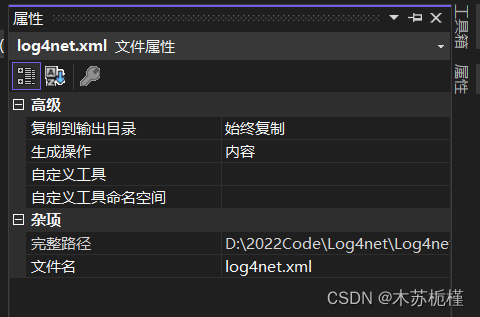
Creating log4net.xml After that, you need to set the copy output directory in the file attribute : Always copy
Log will be output to xml Under the folder specified in
<?xml version="1.0" encoding="utf-8" ?>
<log4net>
	<root>
		<level value="DEBUG" />
		<appender-ref ref="RollingLogFileAppender" />
		<appender-ref ref="ColoredConsoleAppender" />
	</root>
	<appender name="LogFileAppender" type="log4net.Appender.RollingFileAppender">
		<param name="File" value="logs/cmm.log" />
		<param name="AppendToFile" value="true" />
		<rollingStyle value="Size" />
		<maxSizeRollBackups value="10" />
		<maximumFileSize value="1MB" />
		<staticLogFileName value="true" />
		<layout type="log4net.Layout.PatternLayout">
			<conversionPattern value="%date [%02thread] %-5level %logger: %message%newline" />
		</layout>
	</appender>
	<appender name="RollingLogFileAppender" type="log4net.Appender.RollingFileAppender">
		<!-- Define file storage location -->
		<file value="Log\\" />
		<appendToFile value="true" />
		<rollingStyle value="Date" />
		<datePattern value="yyyyMMdd'.txt'" />
		<staticLogFileName value="false" />
		<param name="MaxSizeRollBackups" value="100" />
		<layout type="log4net.Layout.PatternLayout">
			<!-- The text at the end of each log -->
			<!-- Output format -->
			<!-- Examples :2008-03-26 13:42:32,111 [10] INFO MainClass - info-->
			<conversionPattern value="%newline%date [%thread] [%-5level] [%logger] :%message" />
		</layout>
	</appender>
	<appender name="ColoredConsoleAppender" type="log4net.Appender.ColoredConsoleAppender">
		<mapping>
			<level value="ERROR" />
			<foreColor value="Red, HighIntensity" />
		</mapping>
		<mapping>
			<level value="Warn" />
			<foreColor value="Yellow,HighIntensity" />
		</mapping>
		<mapping>
			<level value="Info" />
			<foreColor value="White" />
		</mapping>
		<mapping>
			<level value="Debug" />
			<foreColor value="Purple, HighIntensity" />
		</mapping>

		<layout type="log4net.Layout.PatternLayout">
			<conversionPattern value="%date [%thread] %-5level %logger: %message%newline" />
		</layout>
	</appender>
</log4net>
Add another Log Log tool class , Customize the output content format
using log4net;
using System;
namespace Log4net
{
    public static class Log
    {
        private static ILog log;
        public static void Init(string name)
        {
            log = LogManager.GetLogger(name);
        }
        public static void Info(object message)
        {
            log.Info(message);
        }
        public static void InfoFormat(string format, object arg0)
        {
            log.InfoFormat(format, arg0);
        }
        public static void InfoFormat(string format, object arg0, object arg1)
        {
            log.InfoFormat(format, arg0, arg1);
        }
        public static void InfoFormat(string format, object arg0, object arg1, object arg2)
        {
            log.InfoFormat(format, arg0, arg1, arg2);
        }
        public static void InfoFormat(string format, params object[] args)
        {
            log.InfoFormat(format, args);
        }
        public static void Warning(object message)
        {
            log.Warn(message);
        }
        public static void WarningFormat(string format, object arg0)
        {
            log.WarnFormat(format, arg0);
        }
        public static void WarningFormat(string format, object arg0, object arg1)
        {
            log.WarnFormat(format, arg0, arg1);
        }
        public static void WarningFormat(string format, object arg0, object arg1, object arg2)
        {
            log.WarnFormat(format, arg0, arg1, arg2);
        }
        public static void WarningFormat(string format, params object[] args)
        {
            log.WarnFormat(format, args);
        }
        public static void Error(object message)
        {
            log.Error(message);
        }
        public static void ErrorFormat(string format, object arg0)
        {
            log.ErrorFormat(format, arg0);
        }
        public static void ErrorFormat(string format, object arg0, object arg1)
        {
            log.ErrorFormat(format, arg0, arg1);
        }
        public static void ErrorFormat(string format, object arg0, object arg1, object arg2)
        {
            log.ErrorFormat(format, arg0, arg1, arg2);
        }
        public static void ErrorFormat(string format, params object[] args)
        {
            log.ErrorFormat(format, args);
        }
        public static void Fatal(object message)
        {
            log.Fatal(message);
        }
        public static void FatalFormat(string format, object arg0)
        {
            log.FatalFormat(format, arg0);
        }
        public static void FatalFormat(string format, object arg0, object arg1)
        {
            log.FatalFormat(format, arg0, arg1);
        }
        public static void FatalFormat(string format, object arg0, object arg1, object arg2)
        {
            log.FatalFormat(format, arg0, arg1, arg2);
        }
        public static void FatalFormat(string format, params object[] args)
        {
            log.FatalFormat(format, args);
        }
    }
}
Initialize when the code is running
    using System.IO;

    public class Program
    {
        static void Main(string[] args)
        {
            FileInfo fi = new FileInfo("log4net.xml");
            log4net.Config.XmlConfigurator.ConfigureAndWatch(fi);
            Log.Init(" Initialize log plug-in !");
            Log.Info(" Output log information !");
        }
    }
Log plugin
边栏推荐
- [Hangzhou][15k-20k] medical diagnosis company recruits golang development engineers without overtime! No overtime! No overtime!
- Why the server is stuck
- 数据库性能测试(mysql)
- 将金额数字转换为大写
- 供应链的多目标协同决策
- [pytorch] picture enlargement
- "Niuke | daily question" inverse Polish expression
- Go 的切片与数组
- CS5801_ HDMI to EDP advantage replaces lt6711a solution
- How to open an account online for Guohai Securities? Is it safe to open an account
猜你喜欢

IP day 10 notes - BGP

深度学习——CV、CNN、RNN

"Final review" 16/32-bit microprocessor (8086) basic register

Show you the principle of IO multiplexing (select, poll and epoll)

Quick sort

【毕业季_进击的技术er】送别过去两年迷茫的自己。重整旗鼓,大三我来啦

28. Implement strStr()实现 strStr()
BPG笔记(四)
![[image hiding] digital image watermarking method technology based on hybrid dwt-hd-svd with matlab code](/img/2a/b5214e9fa206f1872293c9b9d7bdb6.png)
[image hiding] digital image watermarking method technology based on hybrid dwt-hd-svd with matlab code
Deep learning - CV, CNN, RNN
随机推荐
Input the records of 5 students (each record includes student number and grade), form a record array, and then output them in order of grade from high to low The sorting method adopts selective sortin
JVM class loading and GC garbage collection mechanism
[1] Basic knowledge of mathematical modeling
III Actual combat - current time representation and world standard time format
『牛客|每日一题』点击消除
28. Implement strStr()实现 strStr()
CS5801_ HDMI to EDP advantage replaces lt6711a solution
mysql优化之索引及索引失效
数据库中varchar和Nvarchar区别与联系
力扣5: 最长回文子串
Gdown Access denied:Cannot retrieve the public link of the file.
Experimental flags: --disable_ admission_ control=false --enable_ rm=false --llama_ callback_ port=28000
Slice and array of go
Gdown Access denied:Cannot retrieve the public link of the file.
UIToolkit中显示汉字
FastDFS-支持双IP、IPV6
Map dictionary and constraints of go
Database and the future of open source
PG vacuum auto vacuum
Resume considerations