当前位置:网站首页>Illustration of ONEFLOW's learning rate adjustment strategy
Illustration of ONEFLOW's learning rate adjustment strategy
2022-06-26 04:49:00 【ONEFLOW deep learning framework】

writing | Li Jia
1
background
Learning rate adjustment strategies (learning rate scheduler), In fact, it's not difficult to take each one out alone , But because there are many methods , It's easy to get confused when you read the document , With OneFlow v0.7.0 For example ,oneflow.optim.lr_scheduler The module contains 14 Strategies .
Is there a better way to learn ? For example, visualize the change process of learning rate , here , It suddenly occurred to me that Convolution Arithmetic This classic project , The author will introduce all kinds of CNN Convolution operation to gif Form show , Be clear at a glance .

therefore , There is this article , Visualize learning rate adjustment strategies , Here are two examples (ConstantLR and LinearLR):
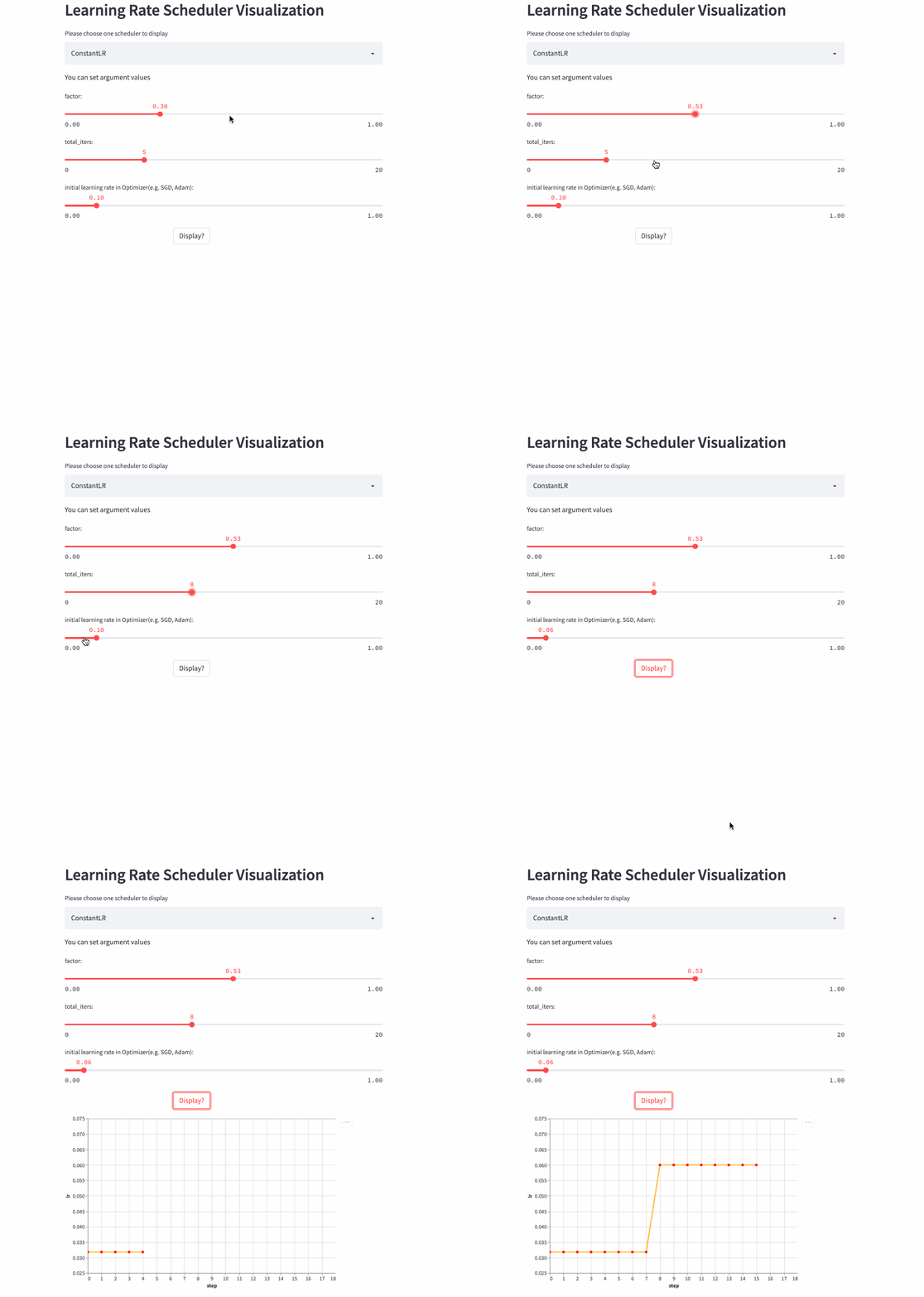
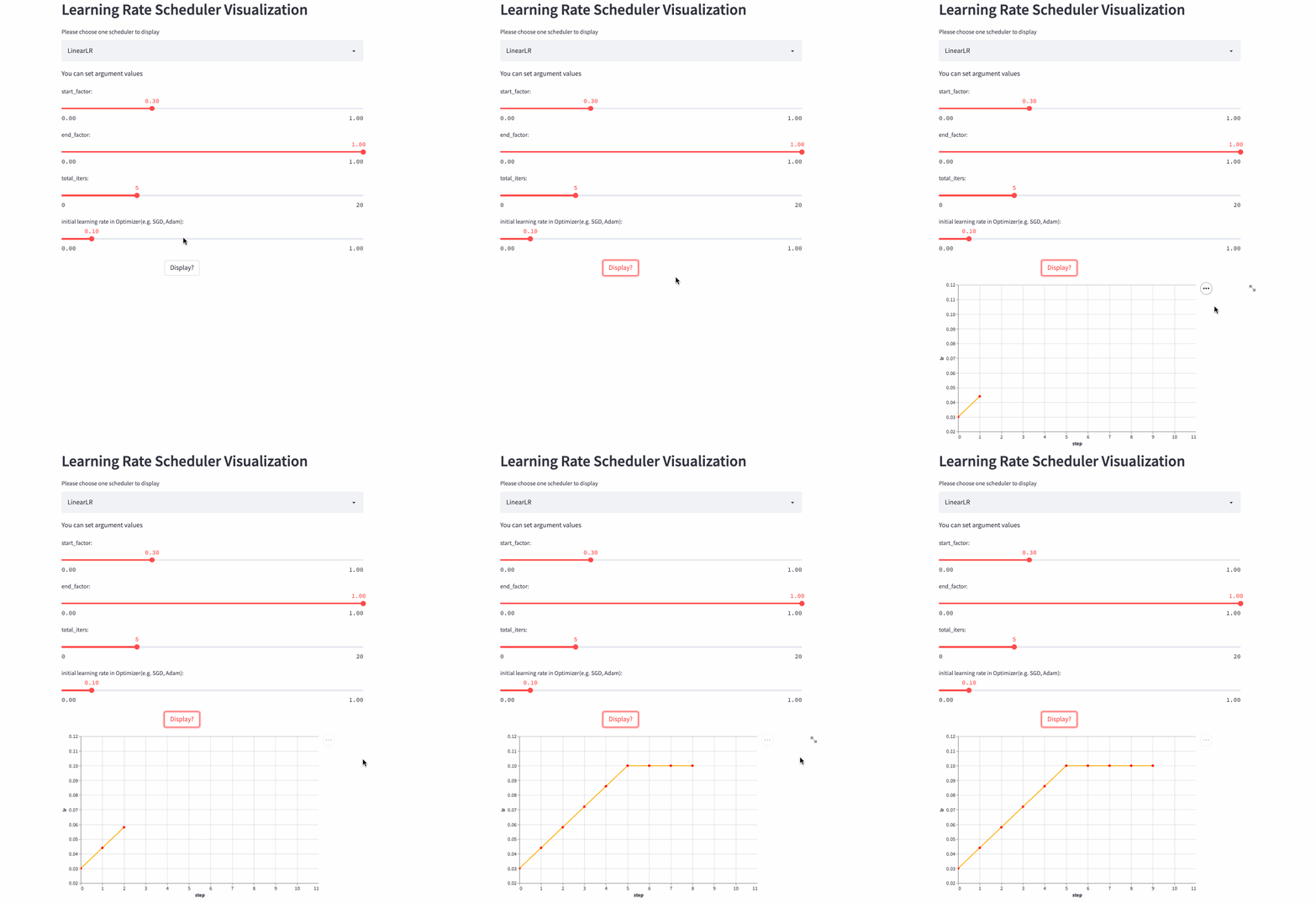
I have managed the visualization code separately in Hugging Face Spaces and Streamlit Cloud, You can choose any link to visit , Then adjust the parameters freely , Feel the changing process of learning rate .
https://huggingface.co/spaces/basicv8vc/learning-rate-scheduler-online
https://share.streamlit.io/basicv8vc/scheduler-online
2
Learning rate adjustment strategies
Learning rate is the most important parameter in training neural network ( One of ), At present, it has been accepted that the dynamic learning rate adjustment strategy is used to replace the fixed learning rate , Various learning rate adjustment strategies emerge in endlessly , So let's do that OneFlow v0.7.0 For example , Learn some common strategies .
Base class LRScheduler
LRScheduler(optimizer: Optimizer, last_step: int = -1, verbose: bool = False) Is the base class for all learning rate schedulers , Initialization parameters last_step and verbose You don't usually need to set it , The former is mainly related to checkpoint relevant , The latter is every time step() Print the learning rate when calling , It can be used for debug.LRScheduler The most important method in step(), The function of this method is to modify the initial learning rate set by the user , Then apply to the next Optimizer.step().
Some materials will say LRScheduler according to epoch or iteration/step To adjust the learning rate , Both statements are OK , actually ,LRScheduler I don't know how many times I have been training epoch Or the number iteration/step, Only calls are recorded step() The number of times (last_step), If each epoch Call once , That's the basis epoch To adjust the learning rate , If each mini-batch Call once , That's the basis iteration To adjust the learning rate . To train Transformer The model, for example , Need to be in every iteration call step().
Simply speaking ,LRScheduler According to the adjustment strategy itself 、 The current call step() The number of times (last_step) And the initial learning rate set by the user to get the learning rate at the next gradient update .
ConstantLR
oneflow.optim.lr_scheduler.ConstantLR(
    optimizer: Optimizer,
    factor: float = 1.0 / 3,
    total_iters: int = 5,
    last_step: int = -1,
    verbose: bool = False,
)
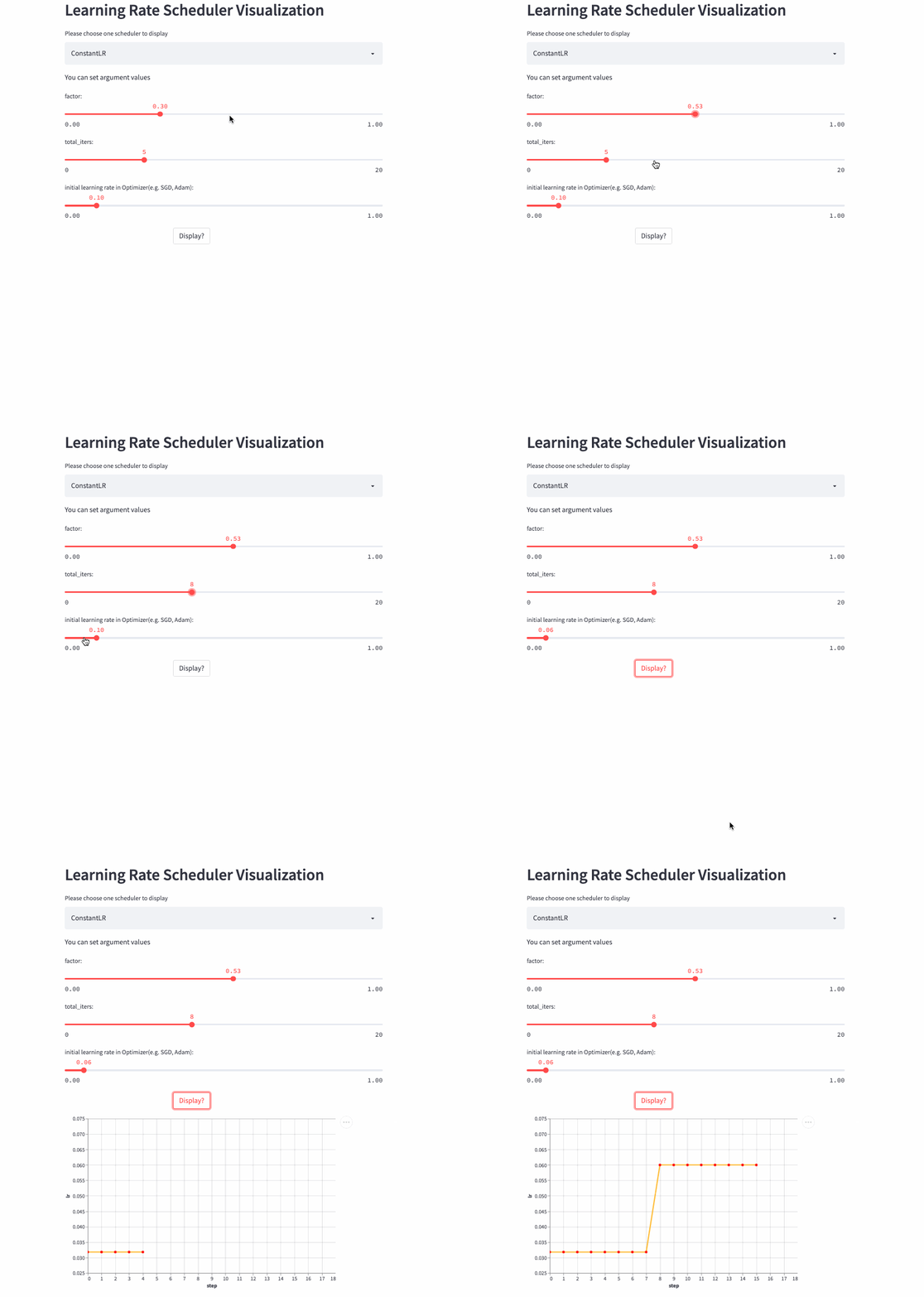
ConstantLR Similar to the fixed learning rate , The only difference is that before total_iters, The learning rate is the initial learning rate * factor.
Be careful : because factor Value [0, 1], So this is a strategy of increasing learning rate .
ConstantLR
LinearLR
oneflow.optim.lr_scheduler.LinearLR(
    optimizer: Optimizer,
    start_factor: float = 1.0 / 3,
    end_factor: float = 1.0,
    total_iters: int = 5,
    last_step: int = -1,
    verbose: bool = False,
)
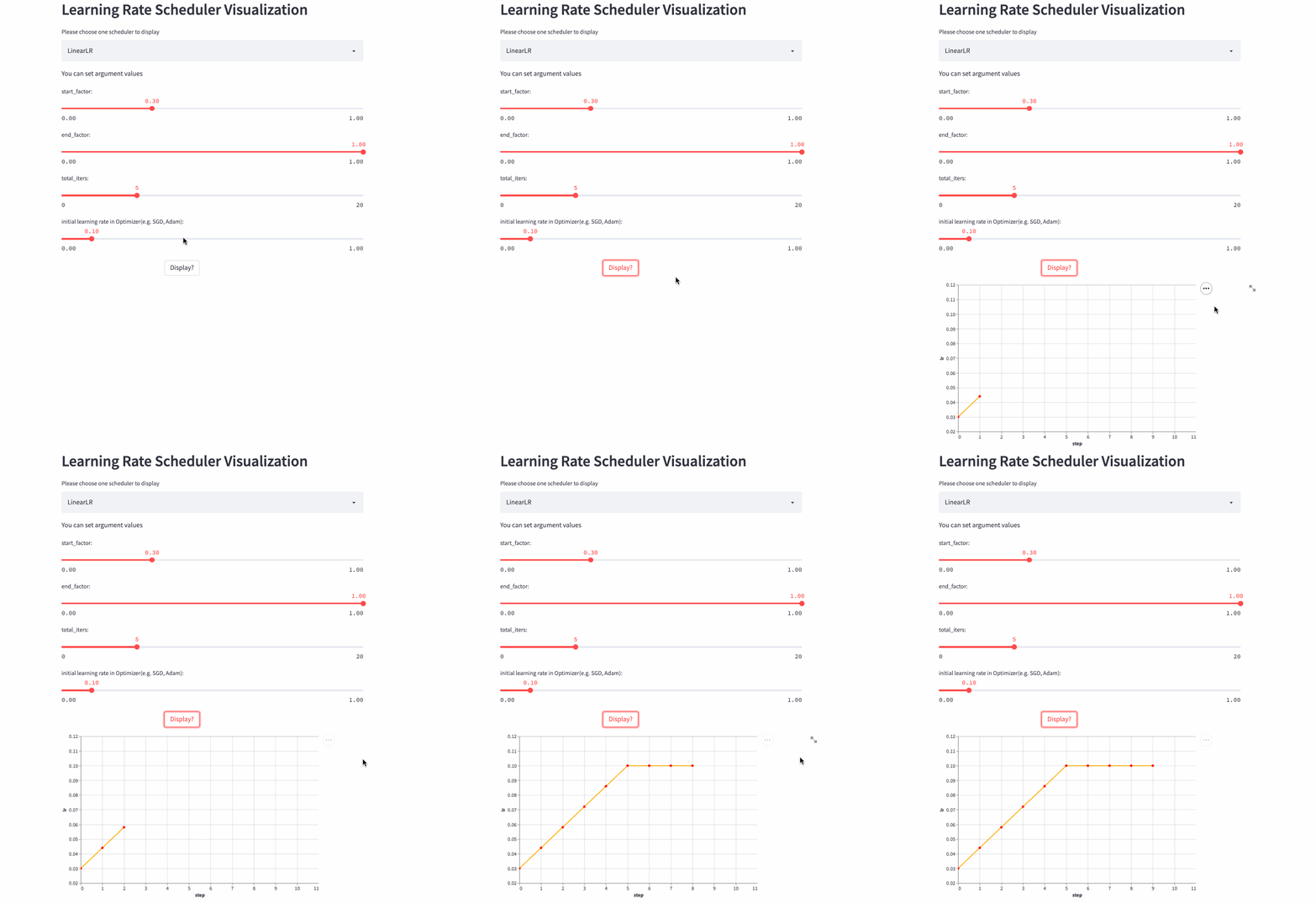
LinearLR It is similar to the fixed learning rate , The only difference is that before total_iters, Learn to take the lead in increasing or decreasing linearly , And then fixed to the initial learning rate * end_factor.

Be careful : The learning rate is in the top total_iters It's incremental or Decrement by start_factor and end_factor Size decides .
LinearLR
ExponentialLR
oneflow.optim.lr_scheduler.ExponentialLR(
    optimizer: Optimizer,
    gamma: float,
    last_step: int = -1,
    verbose: bool = False,
)
The learning rate decays exponentially , Of course, you can also gamma Set to >1, Increase exponentially , But no one is willing to do so .

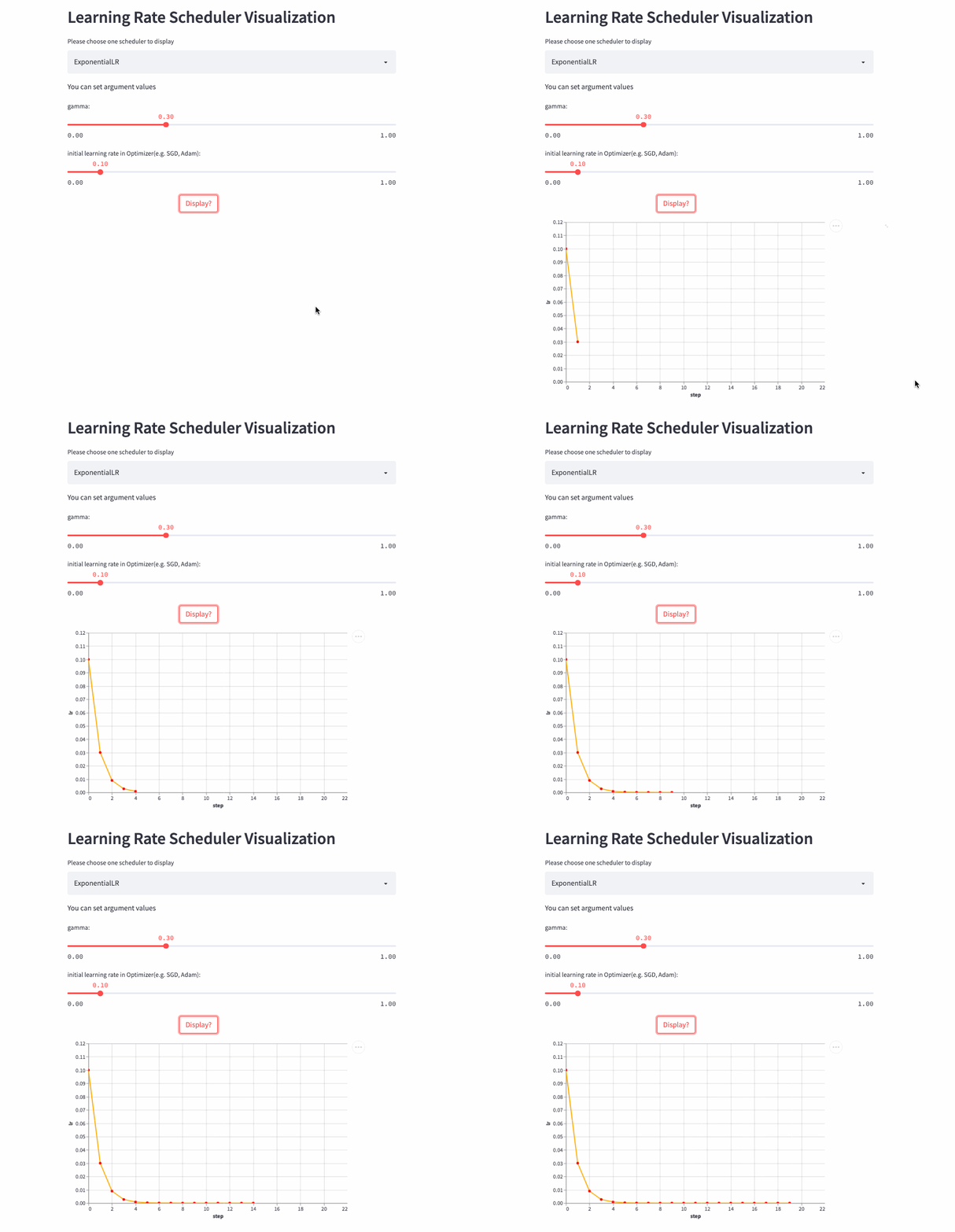
ExponentialLR
StepLR
oneflow.optim.lr_scheduler.StepLR(
    optimizer: Optimizer,
    step_size: int,
    gamma: float = 0.1,
    last_step: int = -1,
    verbose: bool = False,
)
StepLR and ExponentialLR almost , The difference is whether each call step() To adjust the learning rate , But every step_size Only once .
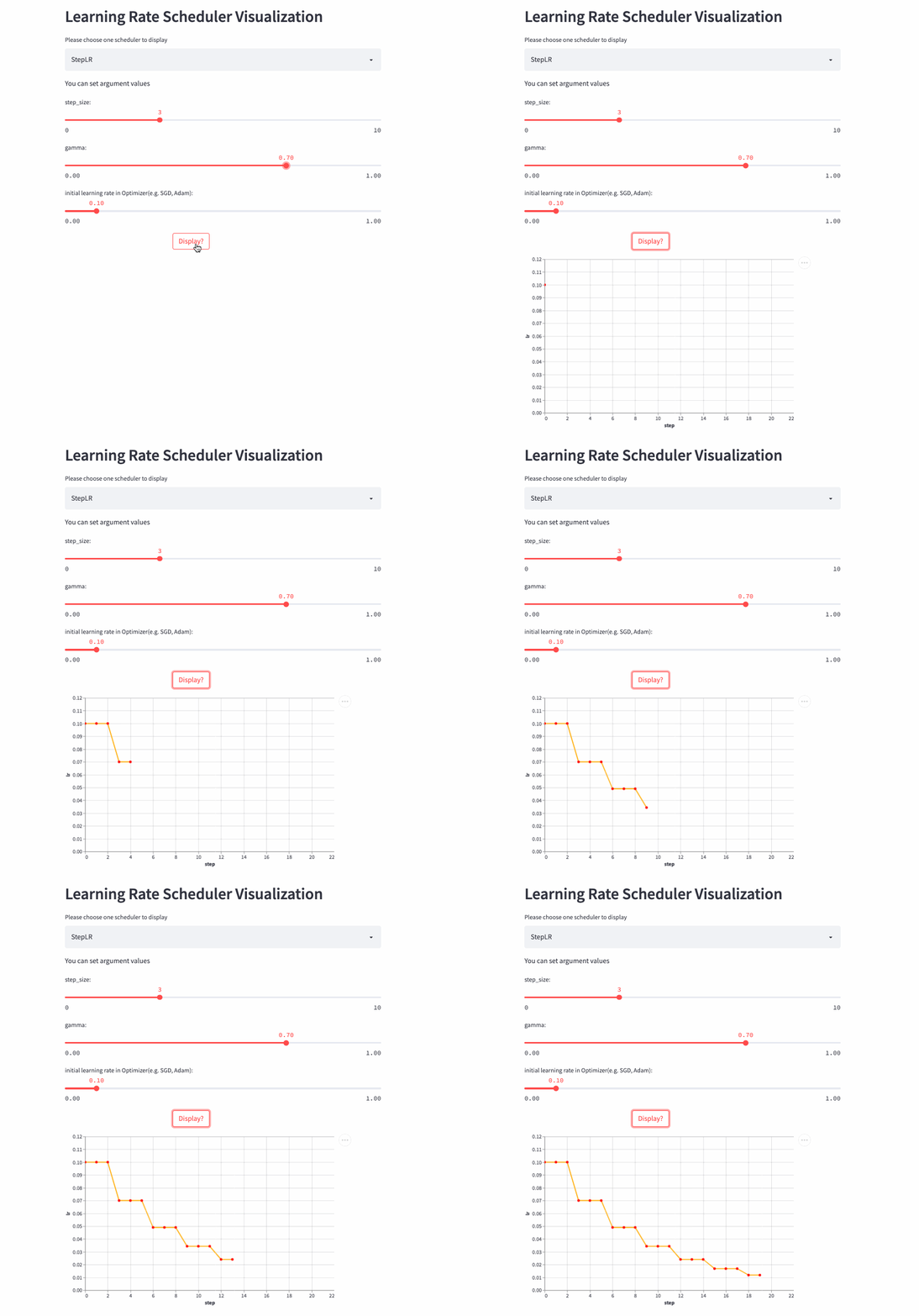
StepLR
MultiStepLR
oneflow.optim.lr_scheduler.MultiStepLR(
    optimizer: Optimizer,
    milestones: list,
    gamma: float = 0.1,
    last_step: int = -1,
    verbose: bool = False,
)
StepLR every other step_size Just adjust the learning rate once , and MultiStepLR According to the user specified milestones Adjustment , hypothesis milestones yes [2, 5, 9], stay [0, 2) yes lr, stay [2, 5) yes lr * gamma, stay [5, 9) yes lr * (gamma **2), stay [9, ) yes lr * (gamma **3).
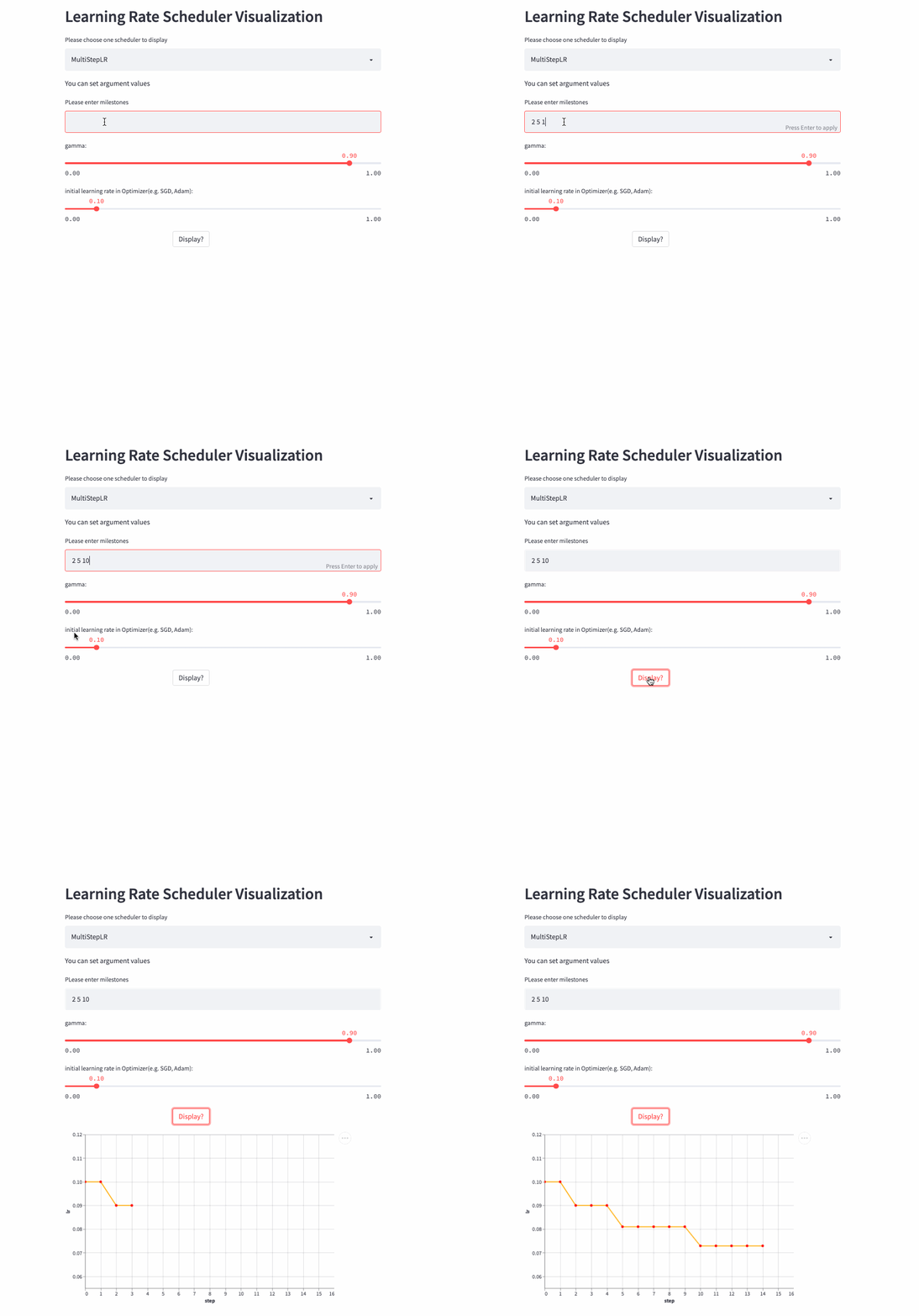
MultiStepLR
PolynomialLR
oneflow.optim.lr_scheduler.PolynomialLR(
    optimizer,
    steps: int,
    end_learning_rate: float = 0.0001,
    power: float = 1.0,
    cycle: bool = False,
    last_step: int = -1,
    verbose: bool = False,
)
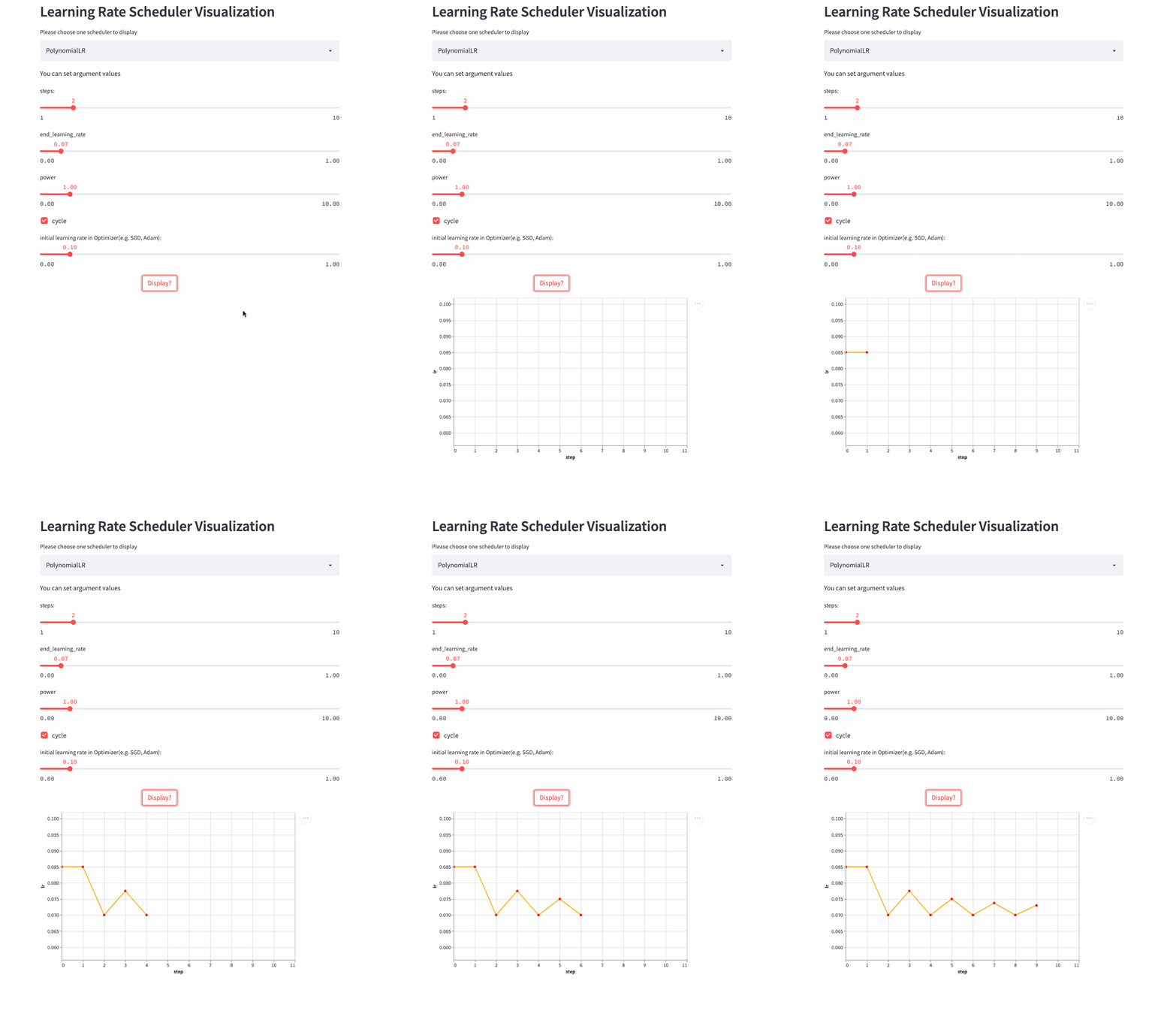
The previous learning rate adjustment strategy is nothing more than linear or exponential ,PolynomialLR Then adjust according to the polynomial , First look at cycle Parameters , The default is False, In this case, the learning rate is fixed after the polynomial decay , The formula is as follows :


notes : Formula decay_batch Namely steps,current_batch It's the latest last_step.
If cycle yes True, It's a little more complicated , Similar to steps Change for the period , Decay from a maximum learning rate to end_learning_rate, The maximum learning rate of each cycle also decreases gradually , The formula is as follows :


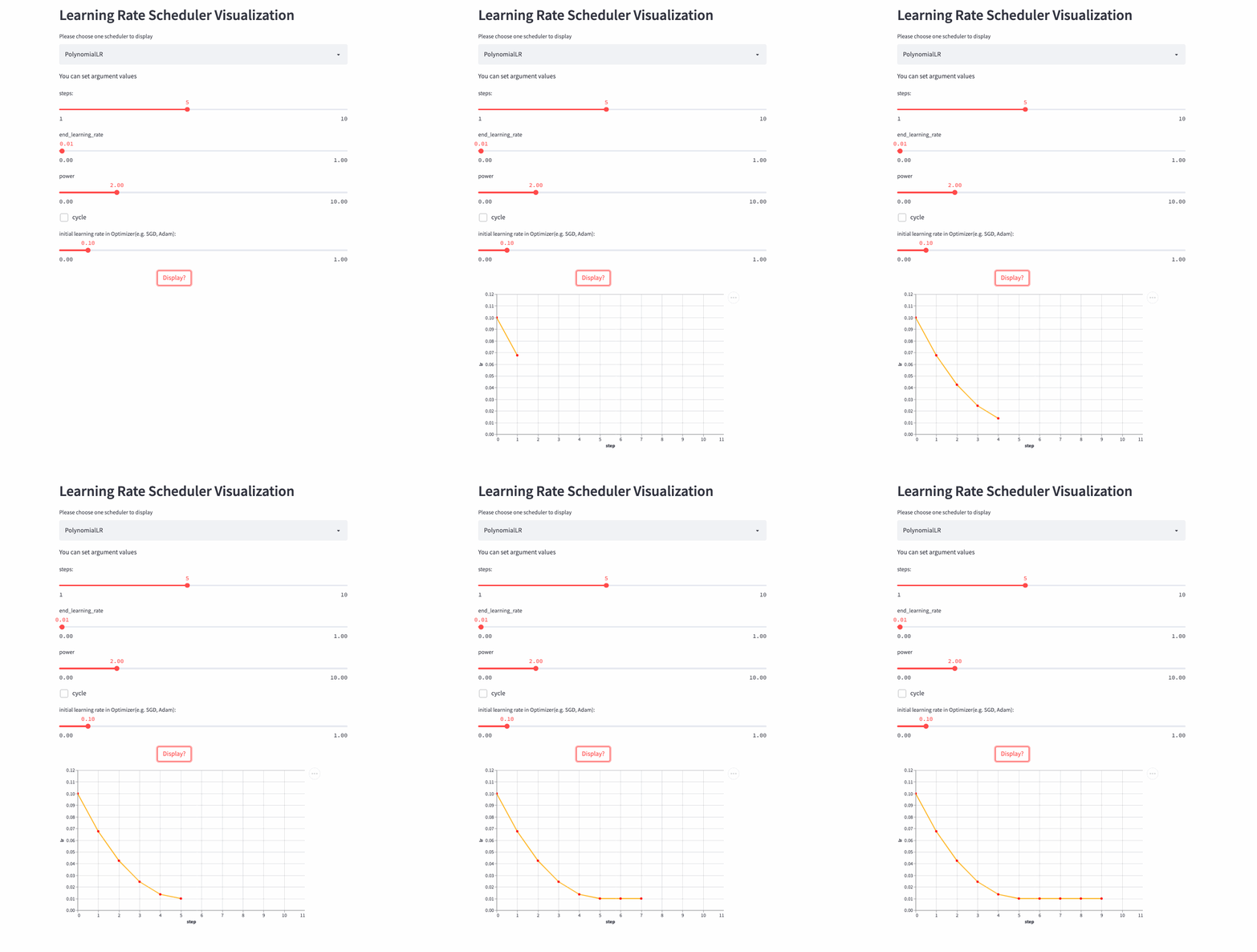
PolynomialLR
look down cycle=True Example ,
CosineDecayLR
oneflow.optim.lr_scheduler.CosineDecayLR(
    optimizer: Optimizer,
    decay_steps: int,
    alpha: float = 0.0,
    last_step: int = -1,
    verbose: bool = False,
)
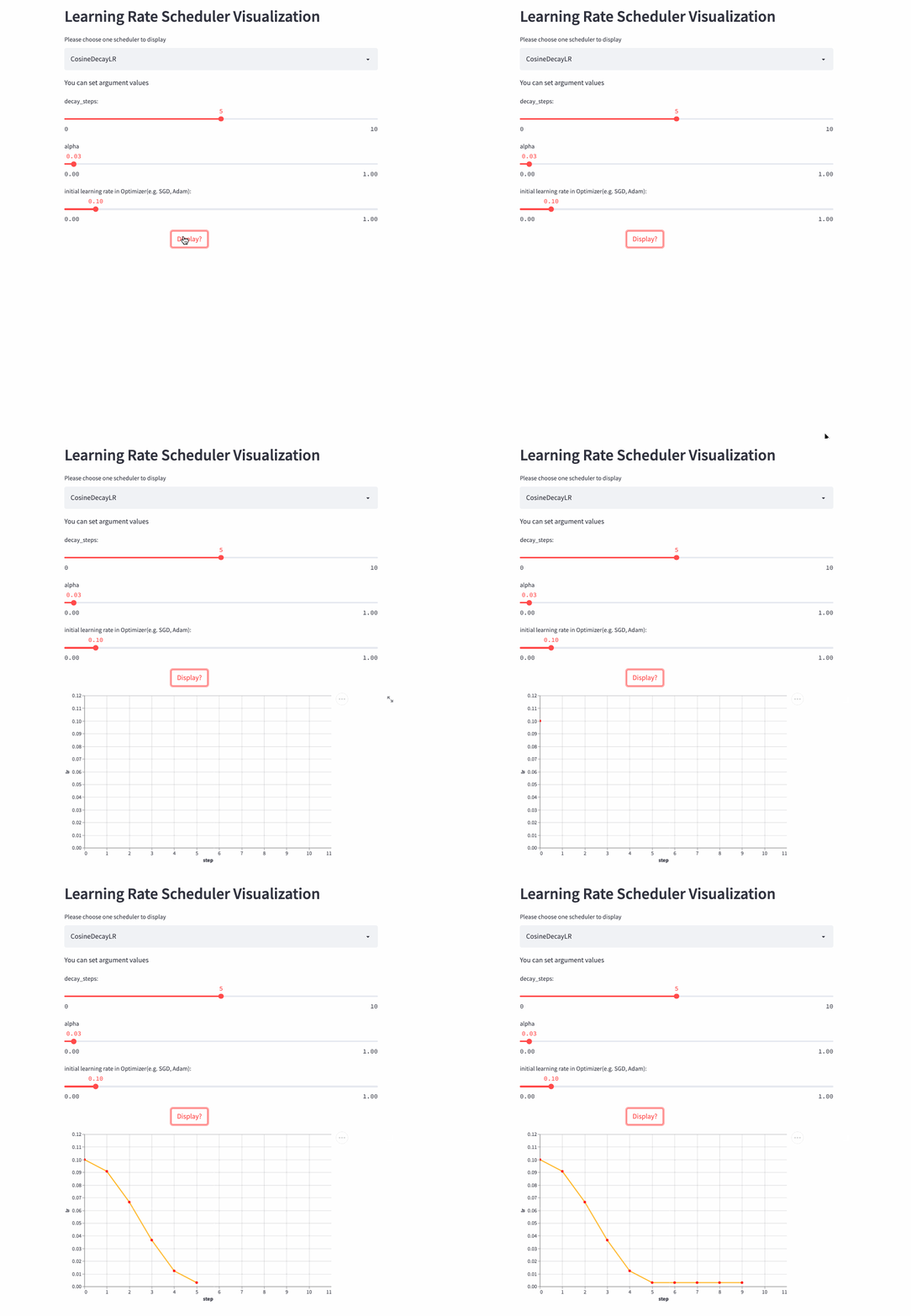
before decay_steps Step , The learning rate is determined by lr The cosine decays to lr * alpha, Then fix it as lr*alpha.
notes :CosineDecayLR To align TensorFlow Medium CosineDecay.

CosineAnnealingLR
oneflow.optim.lr_scheduler.CosineAnnealingLR(
    optimizer: Optimizer,
    T_max: int,
    eta_min: float = 0.0,
    last_step: int = -1,
    verbose: bool = False,
)
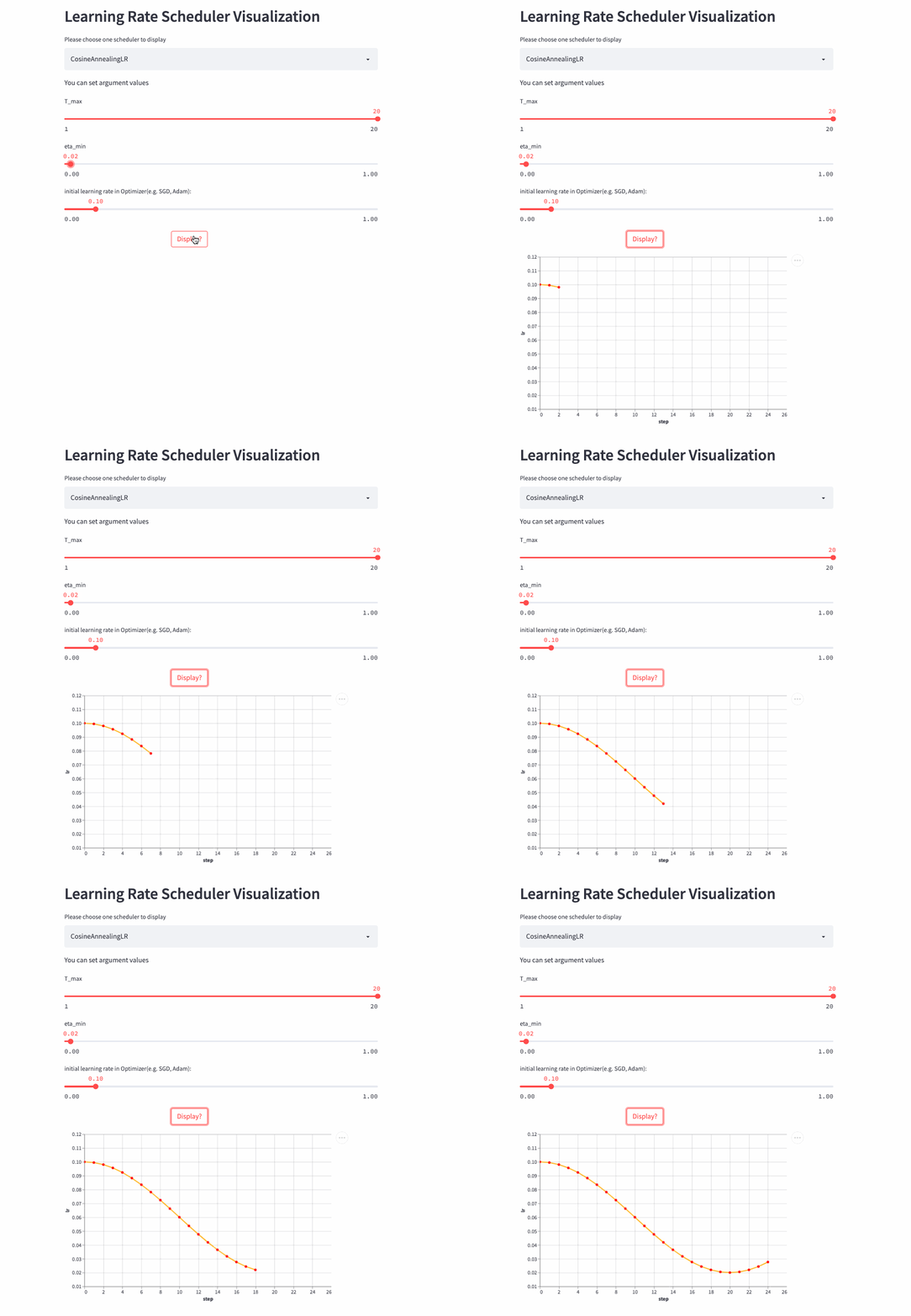
CosineAnnealingLR and CosineDecayLR It's like , The difference is that the former includes not only the process of cosine attenuation , It can also include cosine increase , before T_max Step , The learning rate is determined by lr The cosine decays to eta_min, If cur_step > T_max, Then the cosine is increased to lr, Repeat the process over and over again .
CosineAnnealingLR
CosineAnnealingWarmRestarts
oneflow.optim.lr_scheduler.CosineAnnealingWarmRestarts(
    optimizer: Optimizer,
    T_0: int,
    T_mult: int = 1,
    eta_min: float = 0.0,
    decay_rate: float = 1.0,
    restart_limit: int = 0,
    last_step: int = -1,
    verbose: bool = False,
)
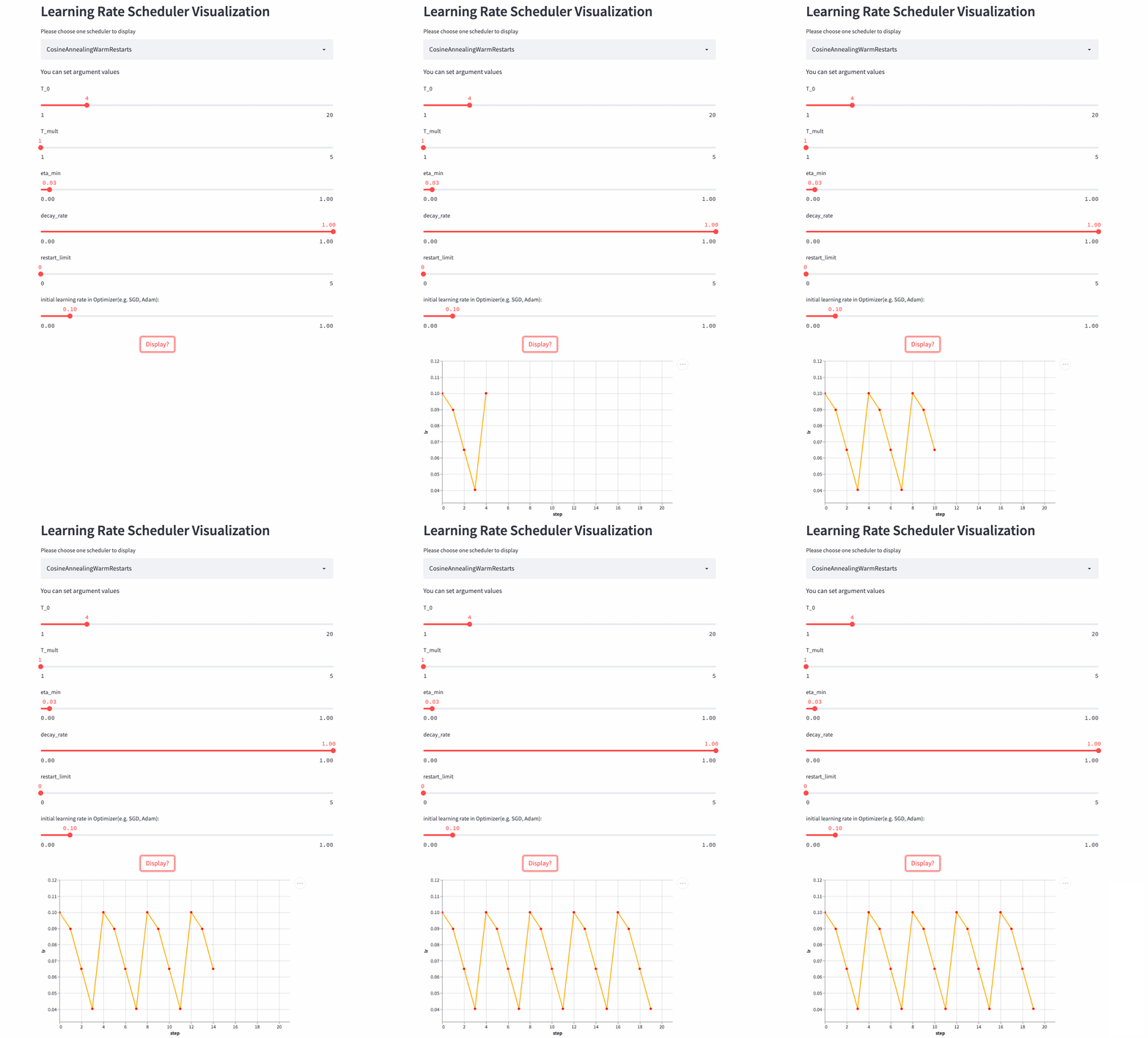
The three above Cosine dependent LRScheduler From the same paper (SGDR: Stochastic Gradient Descent with Warm Restarts), There are many parameters , First of all to see T_mul, If T_mul=1, Then the learning rate changes periodically , The size of the period is T_0, That is, the number of steps from the maximum learning rate to the minimum learning rate (steps), Note that if decay_rate<1, Then the maximum learning rate and the minimum learning rate of each cycle are declining , The first cycle consists of lr Start decaying , The second cycle consists of lr * decay_rate Start decaying , The third cycle consists of lr * (decay_rate ** 2) Start decaying .
If T_mult>1, Then the learning rate does not change in an equal period , The size of each cycle is the size of the previous cycle T_mult, The first cycle is T_0, The second cycle is T_0 * T_mult, The third cycle is T_0 * T_mult * T_mult.
Look again. restart_limit, The default value is 0, That's the process above , If >0, The physical meaning is the number of cycles , Assuming that 3, Then there are only three decays from maximum to minimum , Then the learning rate has been eta_min, It doesn't change periodically .
Let's have a look T_mult=1 Example , here decay_rate=1,
T_mult=1, decay_rate=1
Another look T_mult=1,decay_rate=0.5 Example , Note that this combination is not commonly used .
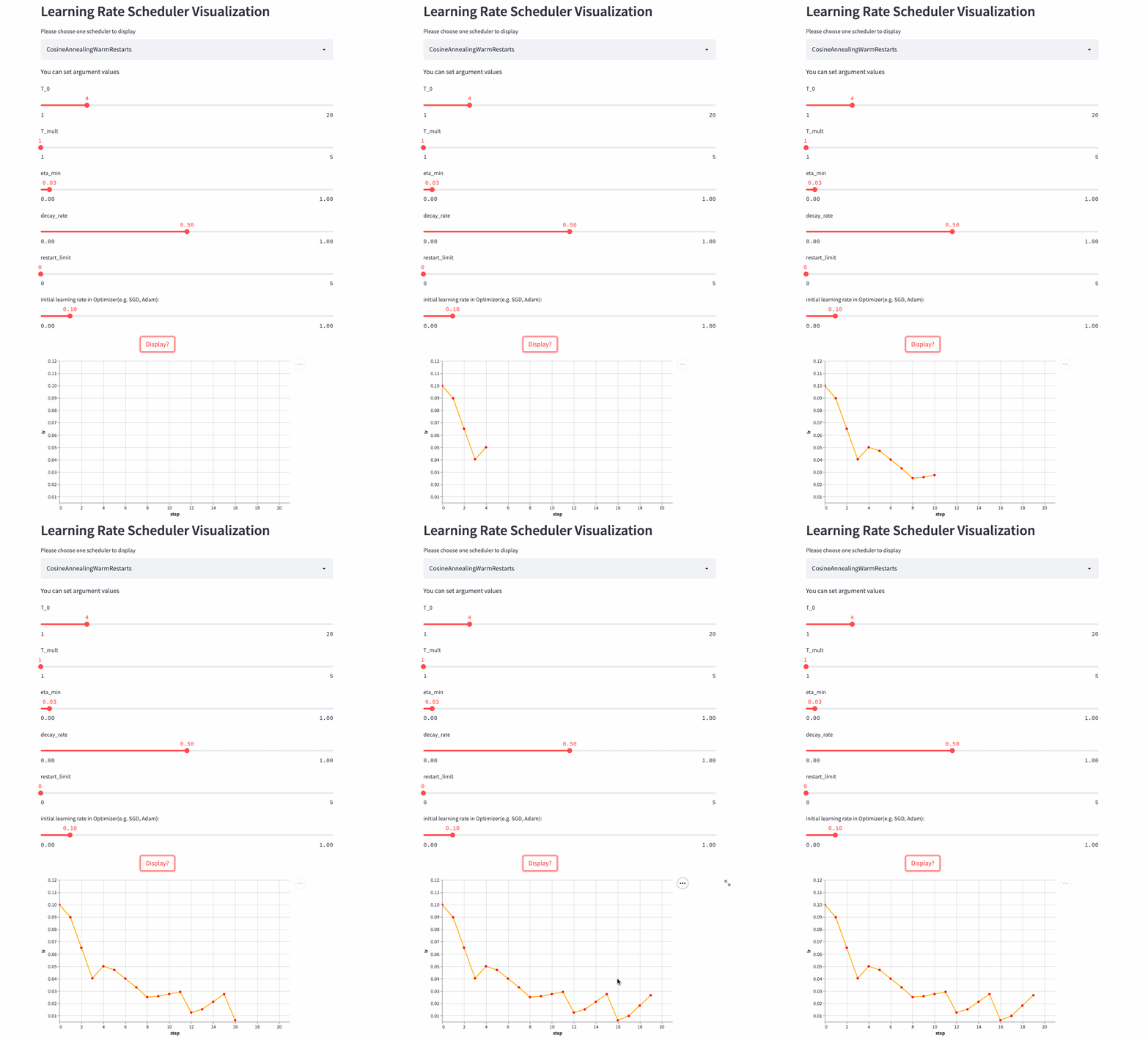
T_mult=1, decay_rate=0.5
Look again. T_mult >1 Example ,
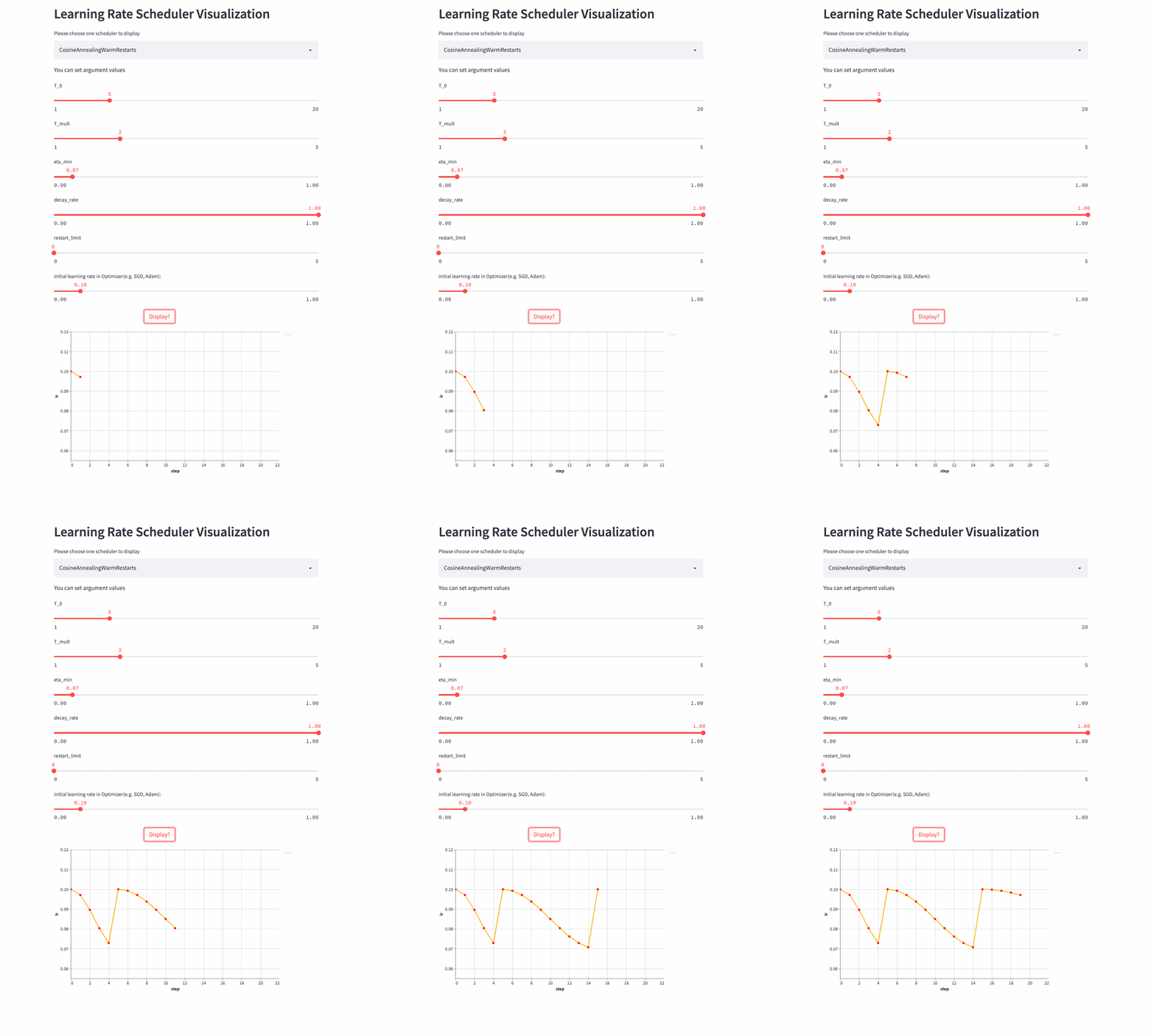
Last , Another look restart_limit != 0 Example ,
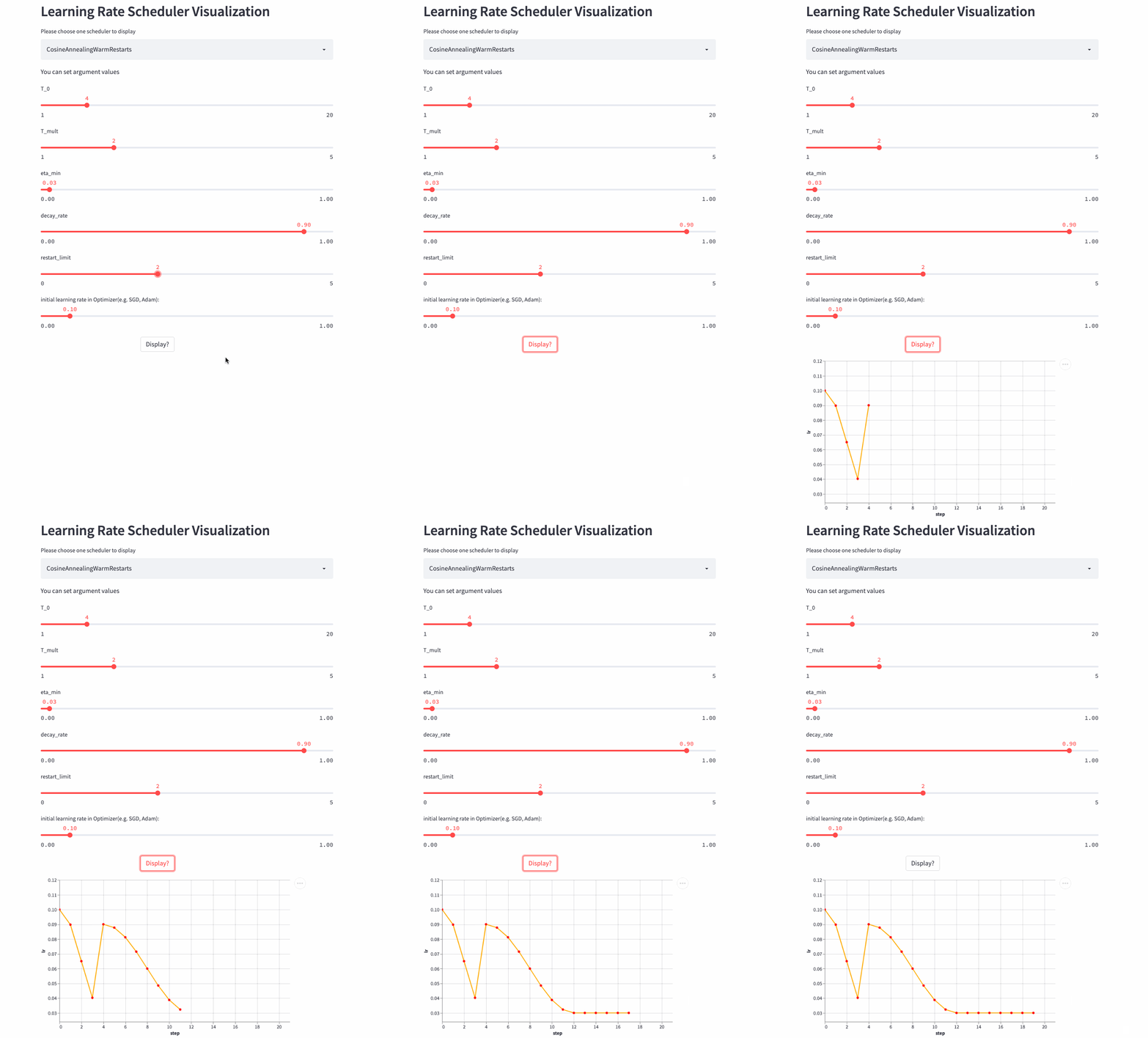
3
Combined scheduling strategy
All the above are single learning rate scheduling strategies , Let's look at several learning rate combined scheduling strategies , Like training Transformer frequently-used Noam scheduler You need to increase linearly and then decay exponentially , Can pass LinearLR and ExponentialLR Combine to get . It can also be used directly LambdaLR Incoming learning rate change function .
LambdaLR
oneflow.optim.lr_scheduler.LambdaLR(optimizer, lr_lambda, last_step=-1, verbose=False)LambdaLR It can be said to be the most flexible strategy , Because the specific method is based on the function lr_lambda Designated . Such as the implementation Transformer Medium Noam Scheduler:
def rate(step, model_size, factor, warmup):
    """
    we have to default the step to 1 for LambdaLR function
    to avoid zero raising to negative power.
    """
    if step == 0:
        step = 1
    return factor * (
        model_size ** (-0.5) * min(step ** (-0.5), step * warmup ** (-1.5))
    )


model = CustomTransformer(...)
optimizer = flow.optim.Adam(
    model.parameters(), lr=1.0, betas=(0.9, 0.98), eps=1e-9
)
lr_scheduler = LambdaLR(
    optimizer=optimizer,
    lr_lambda=lambda step: rate(step, d_model, factor=1, warmup=3000),
)
Be careful :OneFlow Of Graph Mode does not support LambdaLR.
SequentialLR
oneflow.optim.lr_scheduler.SequentialLR(
    optimizer: Optimizer,
    schedulers: Sequence[LRScheduler],
    milestones: Sequence[int],
    interval_rescaling: Union[Sequence[bool], bool] = False,
    last_step: int = -1,
    verbose: bool = False,
)
Support the transfer of multiple LRScheduler, Every LRScheduler The scope of action of (step range) from milestones Appoint , Let's see interval_rescaling This parameter , The default is False, The purpose is to make two adjacent scheduler The learning rate is relatively smooth when connecting , such as milestones=[5], When last_step=5 when , the second schduler From last_step=5 Start calculating the new learning rate , And so last_step=4( Previous scheduler Calculate the learning rate ) There will be no big difference in the learning rate , and interval_rescaling=True when , Then this scheduler Of last_step from 0 Start .
WarmupLR
oneflow.optim.lr_scheduler.WarmupLR(
    scheduler_or_optimizer: Union[LRScheduler, Optimizer],
    warmup_factor: float = 1.0 / 3,
    warmup_iters: int = 5,
    warmup_method: str = "linear",
    warmup_prefix: bool = False,
    last_step=-1,
    verbose=False,
)
WarmupLR yes SequentialLR Subclasses of , Contains two LRScheduler, And the first one is either ConstantLR, Or LinearLR.
ChainedScheduler
oneflow.optim.lr_scheduler.ChainedScheduler(schedulers)The combined scheduling strategy mentioned above , In every one of them step, only one LRScheduler Play a role , and ChainedScheduler, In every one of them step When calculating the learning rate , be-all LRScheduler All involved , It's like a pipe (pipeline)
lr ==> LRScheduler_1 ==> LRScheduler_2 ==> ... ==> LRScheduler_NReduceLROnPlateau
oneflow.optim.lr_scheduler.ReduceLROnPlateau(
    optimizer,
    mode="min",
    factor=0.1,
    patience=10,
    threshold=1e-4,
    threshold_mode="rel",
    cooldown=0,
    min_lr=0,
    eps=1e-8,
    verbose=False,
)
All the above mentioned LRScheduler Are based on the current step To calculate the learning rate , In the process of model training , We are most concerned about the indicators on the training set and the verification set , Can we use these indicators to guide the change of learning rate ? You can use ReduceLROnPlateau, If there are multiple indicators step Have not changed significantly , The learning rate decays linearly .
optimizer = flow.optim.SGD(model.parameters(), lr=0.1, momentum=0.9)
scheduler = flow.optim.lr_scheduler.ReduceLROnPlateau(optimizer, 'min')
for epoch in range(10):
    train(...)
    val_loss = validate(...)
    #  Be careful , This step should be done at validate() Then call .
    scheduler.step(val_loss)
4
practice
If you see here, you still have a sense of meaning , It's better to practice , The following is my rewriting based on the official image classification example CIFAR-100 Example , You can set different learning rate scheduling strategies to feel the difference
https://github.com/basicv8vc/oneflow-cifar100-lr-scheduler
( This document is issued after authorization , original text :
https://zhuanlan.zhihu.com/p/520719314 )
Everyone else is watching
The journey of an operator in the framework of deep learning
The optimal parallel strategy of distributed matrix multiplication is derived by hand
About concurrency and parallelism ,Go and Erlang My father is mistaken ?
OneFlow v0.7.0 Release : New distributed interface ,LiBai、Serving Everything
Welcome to experience OneFlow v0.7.0:OneFlow · GitHubOneFlow has 87 repositories available. Follow their code on GitHub. https://github.com/Oneflow-Inc/oneflow
边栏推荐
猜你喜欢

Yapi cross domain request plug-in installation

1.19 learning summary
![PHP design function getmaxstr to find the longest symmetric string in a string - [original]](/img/45/d8dae9e605a2f411683db7a2d40d0b.jpg)
PHP design function getmaxstr to find the longest symmetric string in a string - [original]

mysql高级学习(跟着尚硅谷老师周阳学习)

天才制造者:独行侠、科技巨头和AI|深度学习崛起十年

Multipass Chinese document - setup driver

记录一次循环引用的问题
2022 talent strategic transformation under the development trend of digital economy

0622 horse palm fell 9%

Sixtool- source code of multi-functional and all in one generation hanging assistant
随机推荐
numpy 数据输入输出
Motivational skills for achieving goals
Introduction to markdown grammar
2.8 learning summary
Numpy random number
LeetCode 94. Middle order traversal of binary tree
Comment enregistrer une image dans une applet Wechat
[H5 development] 02 take you to develop H5 list page ~ including query, reset and submission functions
Créateur de génie: cavalier solitaire, magnat de la technologie et ai | dix ans d'apprentissage profond
Simple application of KMP
2022.2.11
LISP programming language
Laravel file stream download file
1.19 learning summary
Multipass Chinese document - setup driver
ROS notes (07) - Implementation of client and server
Nightmare
An unexpected attempt (Imperial CMS list template filters spaces and newlines in smalltext introduction)
A ZABBIX self discovery script (shell Basics)
Svn error command revert error previous operation has not finished; run ‘ cleanup‘ if