当前位置:网站首页>[Zhongyi Xinsheng] 5 SPI interface test TF Card
[Zhongyi Xinsheng] 5 SPI interface test TF Card
2022-06-28 14:19:00 【Birds hate fish】
List of articles
1 Preface
Tests in this chapter spi tf Card example , Realization txt Reading and writing of documents .
2 Source code
Source path :
https://gitee.com/CMIOT-XinShengTech/CMIOT.CM32M4xxR_Library/tree/main/Projects/CM32M4xxR_LQFP128_STB/Examples/SPI/SPI_SD_CARD
Pay attention to the , It's used here CM32M4xxR_LQFP128_STB, The development board is CM32M433R-START, Compare the two codes , Little difference , among uart Serial printing log Use different ports ,START It's using uart4, and LQFP128_STB yes uart5.
If you are creating a project using CM32M433R-START, This serial port difference can be ignored . If you use CM32M4xxR_LQFP128_STB, It needs to use uart5, The corresponding mouth is pin8、9.
See https://gitee.com/CMIOT-XinShengTech/CMIOT.CM32M4xxR_Library/blob/main/Projects/CM32M4xxR_LQFP128_STB/BSP/Include/log.h.
Use CM32M4xxR_LQFP128_STB You can select when creating spi Related examples , And then sdcard Of main Copy the contents of the file .
In addition, we need to copy FatFs_User and FatFs Folder to Application Under the same category .
3 Add header file

Add the header file according to the above figure , You can compile , Otherwise it will be reported h The file could not be found .
4 Hardware
spi sdcard The example USES spi1.
Be careful not to connect the wires incorrectly , If the connection is wrong f_open Will return an error status , Such as return 3 It is The physical drive cannot work.
See ff.h Medium FRESULT.
5 Code
The code is spi sdcard Example , Only two return values are added for error analysis .
main.c
#include <main.h>
#include <stdio.h>
#include "log.h"
#include "fatfs.h"
#include "user_diskio.h" /* defines USER_Driver as external */

/** @addtogroup CM32M4xxR_StdPeriph_Examples * @{ */


/** @addtogroup SPI_CRC * @{ */


#define BufferSize (32)
#define SPICRC

volatile SPI_InitType SPI_InitStructure;
void RCC_Configuration(void);
void GPIO_Configuration(void);

volatile FATFS fs;
volatile FATFS *pfs;
volatile FIL fil;
volatile FRESULT fres;
volatile DWORD fre_clust;
volatile uint32_t totalSpace, freeSpace;
volatile char buffer[100];


volatile char USERPath[4];   /* USER logical drive path */


/** * @brief Main function. */
int main(void)
{

    /*!< At this stage the microcontroller clock setting is already configured, this is done through SystemInit() function which is called from startup file (startup_cm32m4xxr.s) before to branch to application main. To reconfigure the default setting of SystemInit() function, refer to system_cm32m4xxr.c file */
	log_init();
	log_info("This is a SPI_SD_CARD demo-----------------------------------\r\n");
	SysTick_Config(144000000/100);
    /* System clocks configuration ---------------------------------------------*/
    RCC_Configuration();

    /* GPIO configuration ------------------------------------------------------*/
    GPIO_Configuration();

    /* SPI1 configuration ------------------------------------------------------*/
    SPI_InitStructure.DataDirection = SPI_DIR_DOUBLELINE_FULLDUPLEX;
    SPI_InitStructure.SpiMode       = SPI_MODE_MASTER;
    SPI_InitStructure.DataLen       = SPI_DATA_SIZE_8BITS;
    SPI_InitStructure.CLKPOL        = SPI_CLKPOL_LOW;
    SPI_InitStructure.CLKPHA        = SPI_CLKPHA_FIRST_EDGE;
    SPI_InitStructure.NSS           = SPI_NSS_SOFT;
    SPI_InitStructure.BaudRatePres  = SPI_BR_PRESCALER_16;
    SPI_InitStructure.FirstBit      = SPI_FB_MSB;
    SPI_InitStructure.CRCPoly       = 0x0007;
    SPI_Init(SPI1, (SPI_InitType*)&SPI_InitStructure);

    /* Enable SPI1 */
    SPI_Enable(SPI1, ENABLE);

    uint8_t ret = 1;
    ret = FATFS_LinkDriver((Diskio_drvTypeDef*)&USER_Driver, (char*)USERPath);
    if(ret == 0)
    	printf("fatfs init ok\r\n");
    else
    	printf("fatfs init error\r\n");

    delay_ms(500);

    ret = f_mount((FATFS*)&fs, "", 0);
    printf("mount = %d\r\n",ret);
    if( ret != FR_OK)
    {

    	printf("error %s,line %d\r\n",__FILE__, __LINE__);
    }

    /* Open file to write */
    ret = f_open((FIL*)&fil, "first.txt", FA_OPEN_APPEND | FA_READ | FA_WRITE);
    printf("open = %d\r\n",ret);
    if(ret != FR_OK)
    {

    	printf("error %s,line %d\r\n",__FILE__, __LINE__);
    }

    /* Check freeSpace space */
   	if(f_getfree("", (DWORD*)&fre_clust, (FATFS **)&pfs) != FR_OK)
    {

    	printf("error %s,line %d\r\n",__FILE__, __LINE__);
    }

    totalSpace = (uint32_t)((pfs->n_fatent - 2) * pfs->csize * 0.5);
    freeSpace = (uint32_t)(fre_clust * pfs->csize * 0.5);

    /* free space is less than 1kb */
    if(freeSpace < 1)
    {

    	printf("error %s,line %d\r\n",__FILE__, __LINE__);
    }

    /* Writing text */
    f_puts("XinSheng Tech SD Card I/O Example via SPI\n", (FIL*)&fil);
    f_puts("test!!!\n", (FIL*)&fil);

    /* Close file */
    if(f_close((FIL*)&fil) != FR_OK)
    {

    	printf("error %s,line %d\r\n",__FILE__, __LINE__);
    }

    /* Open file to read */
    if(f_open((FIL*)&fil, "first.txt", FA_READ) != FR_OK)
    {

    	printf("error %s,line %d\r\n",__FILE__, __LINE__);
    }

    while(f_gets((char*)buffer, sizeof(buffer), (FIL*)&fil))
    {

    	/* SWV output */
    	printf("%s", buffer);
    	fflush(stdout);
    }

    /* Close file */
    if(f_close((FIL*)&fil) != FR_OK)
    {

    	printf("error %s,line %d\r\n",__FILE__, __LINE__);
    }

    /* Unmount SDCARD */
    if(f_mount(NULL, "", 1) != FR_OK)
    {

    	printf("error %s,line %d\r\n",__FILE__, __LINE__);
    }
    while (1)
    {

    }
}

/** * @brief Configures the different system clocks. */
void RCC_Configuration(void)
{

    /* Enable peripheral clocks --------------------------------------------------*/
    /* GPIOA, GPIOB and SPI1 clock enable */
    RCC_EnableAPB2PeriphClk(RCC_APB2_PERIPH_GPIOA | RCC_APB2_PERIPH_GPIOB | RCC_APB2_PERIPH_SPI1, ENABLE);

    /* SPI2 Periph clock enable */
    RCC_EnableAPB1PeriphClk(RCC_APB1_PERIPH_SPI2, ENABLE);
}

/** * @brief Configures the different GPIO ports. */
void GPIO_Configuration(void)
{

    GPIO_InitType GPIO_InitStructure;

    /* Configure SPI1 pins: SCK, MISO and MOSI ---------------------------------*/
    /* Confugure SCK and MOSI pins as Alternate Function Push Pull */
    GPIO_InitStructure.Pin        = GPIO_PIN_5 | GPIO_PIN_7;
    GPIO_InitStructure.GPIO_Speed = GPIO_Speed_2MHz;
    GPIO_InitStructure.GPIO_Mode  = GPIO_Mode_AF_PP;
    GPIO_Init(GPIOA, &GPIO_InitStructure);

    /* Confugure MISO pin as Input Floating */
    GPIO_InitStructure.Pin       = GPIO_PIN_6;
    GPIO_InitStructure.GPIO_Mode = GPIO_Mode_IN_FLOATING;
    GPIO_Init(GPIOA, &GPIO_InitStructure);

    /* Confugure NSS pin as Output Push Pull */
    GPIO_InitStructure.Pin       = GPIO_PIN_4;
    GPIO_InitStructure.GPIO_Mode = GPIO_Mode_Out_PP;
    GPIO_Init(GPIOA, &GPIO_InitStructure);
}
6 result
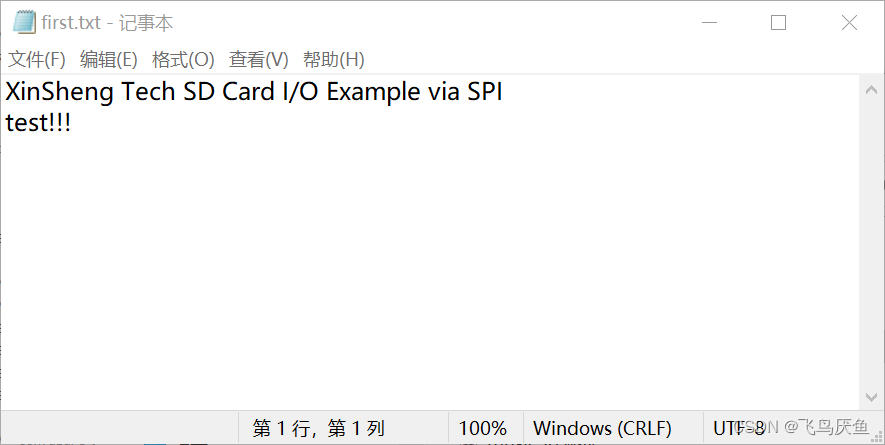
from log Let's see if the file is read successfully , from sd Read from the card and confirm that the writing is successful .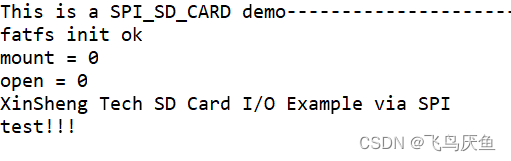
边栏推荐
- 2022金属非金属矿山安全检查(地下矿山)复训题库及在线模拟考试
- 2022金属非金属矿山(地下矿山)主要负责人考试模拟100题模拟考试平台操作
- Open source invites you to participate in openinfra days China 2022. Topic collection is in progress ~
- 华泰证券app 怎么办理开户最安全
- Mulan open work license 1.0 open to the public for comments
- Why will the new 5g standard bring lower TCO to the technology stack
- NPOI导出Excel并下载到客户端
- VPS是干嘛用的?有哪些知名牌子?与云服务器有什么区别?
- 线程终止的 4 种方式
- 《畅玩NAS》家庭 NAS 服务器搭建方案「建议收藏」
猜你喜欢

2022下半年软考考试时间安排已确定!

IonQ联合GE Research证实:量子计算在风险聚合上有巨大潜力

Work study management system based on ASP

Adding virtual environments to the Jupiter notebook

Practice of constructing ten billion relationship knowledge map based on Nebula graph
How to count dimensions of foreign trade E-mail Promotion

3. Overall UI architecture of the project

Can your code talk? (upper)

Tencent cloud international ECS has no network after logging in. How to troubleshoot?
3、项目的整体UI架构
随机推荐
Kubernetes in-depth understanding of kubernetes (I)
Flutter series: offstage in flutter
由两个栈组成的队列
Explanation of sprintf function in C language
Ruijie switch configuration SSH password login command [easy to understand]
Play NAS home NAS server setup scheme "suggestions collection"
ArcGIS vector center point generates rectangle and cuts TIF image for deep learning sample training
单一职责原则
线程的生命周期以及其中的方法
基于 Nebula Graph 构建百亿关系知识图谱实践
力扣解法汇总522-最长特殊序列 II
2022 recurrent training question bank and online simulation examination for safety inspection of metal and nonmetal mines (underground mines)
Robot range of motion (DFS)
木兰开放作品许可证1.0面向社会公开征求意见
【二叉树】从叶结点开始的最小字符串
G : 最大流问题
N皇后问题
【中移芯昇】5. spi接口测试tf卡
荐书丨《大脑通信员》:如果爱情只是化学反应,那还能相信爱情吗?
Numbers that only appear once