当前位置:网站首页>FLASH read / write operation and flash upload file of esp8266
FLASH read / write operation and flash upload file of esp8266
2022-07-25 09:51:00 【F l e】
1、Flash Read and write operations
Esp8266 Of Flash by 4M, among 1M For storing programs , Some of the other spaces are used for the system ,3M Most of the space left in the can be used to store files .
#include <FS.h>
String file_name = "/Fle/note.txt"; // The location and name of the file being read , Put it in /Fle Under the folder

void setup() {

  Serial.begin(9600);
  Serial.println("");

  Serial.println("SPIFFS format start");
  SPIFFS.format();    //  format SPIFFS
  Serial.println("SPIFFS format finish");

  if (SPIFFS.begin()) {
     //  start-up SPIFFS
    Serial.println("SPIFFS Started.");
  } else {

    Serial.println("SPIFFS Failed to Start.");
  }
  file_write(file_name, "1111");
  file_read(file_name);
  file_add(file_name, "2222");
  file_read(file_name);
}
void loop() {

}

// Write operations
void file_write(String file_name, String content)
{

  /***************************************** Write the contents of the flash file *************************************************/
  File dataFile = SPIFFS.open(file_name, "w");//  establish File Object is used to SPIFFS Medium file object ( namely /notes.txt) Write information
  dataFile.println(content);       //  towards dataFile Write string information
  dataFile.close();                           //  Close the file after writing
  Serial.print(" The contents of the flash file have been written :");
  Serial.println(content);
}
// Read operations
void file_read(String file_name)
{

  // Confirm whether there is file_name file
  File dataFile;
  if (SPIFFS.exists(file_name))
  {

    // establish File Object to be used from SPIFFS Read files from
    dataFile = SPIFFS.open(file_name, "r");
    // Read the contents of the file and output the file information through the serial port monitor
    Serial.println(" Read the contents of the file :");
    for (int i = 0; i < dataFile.size(); i++)
    {

      Serial.print((char)dataFile.read());
    }
  }
  else
  {

    Serial.print(file_name);
    Serial.print(" NOT FOUND.");
  }
  // Close the file after reading it
  dataFile.close();
}
// Additional operations
void file_add(String file_name, String content)
{

  if (SPIFFS.exists(file_name))
  {

    File dataFile = SPIFFS.open(file_name, "a");//  establish File Object is used to SPIFFS Medium file object ( namely /notes.txt) Write information
    dataFile.println(content); //  towards dataFile Add string information
    dataFile.close();                           //  Close the file after completing the file operation
    Serial.println(" Content has been added :");
    Serial.println(content);
  }
  else
  {

    Serial.print(file_name);
    Serial.print(" NOT FOUND.");
  }
}

2、Flash Upload the file and read the display , To verify whether it is really uploaded
Here is to upload to Flash The task of , You need to download one based on esp8266 and Arduino Of Flash File upload plugin
Here is the installation Flash Specific steps of file upload plug-in :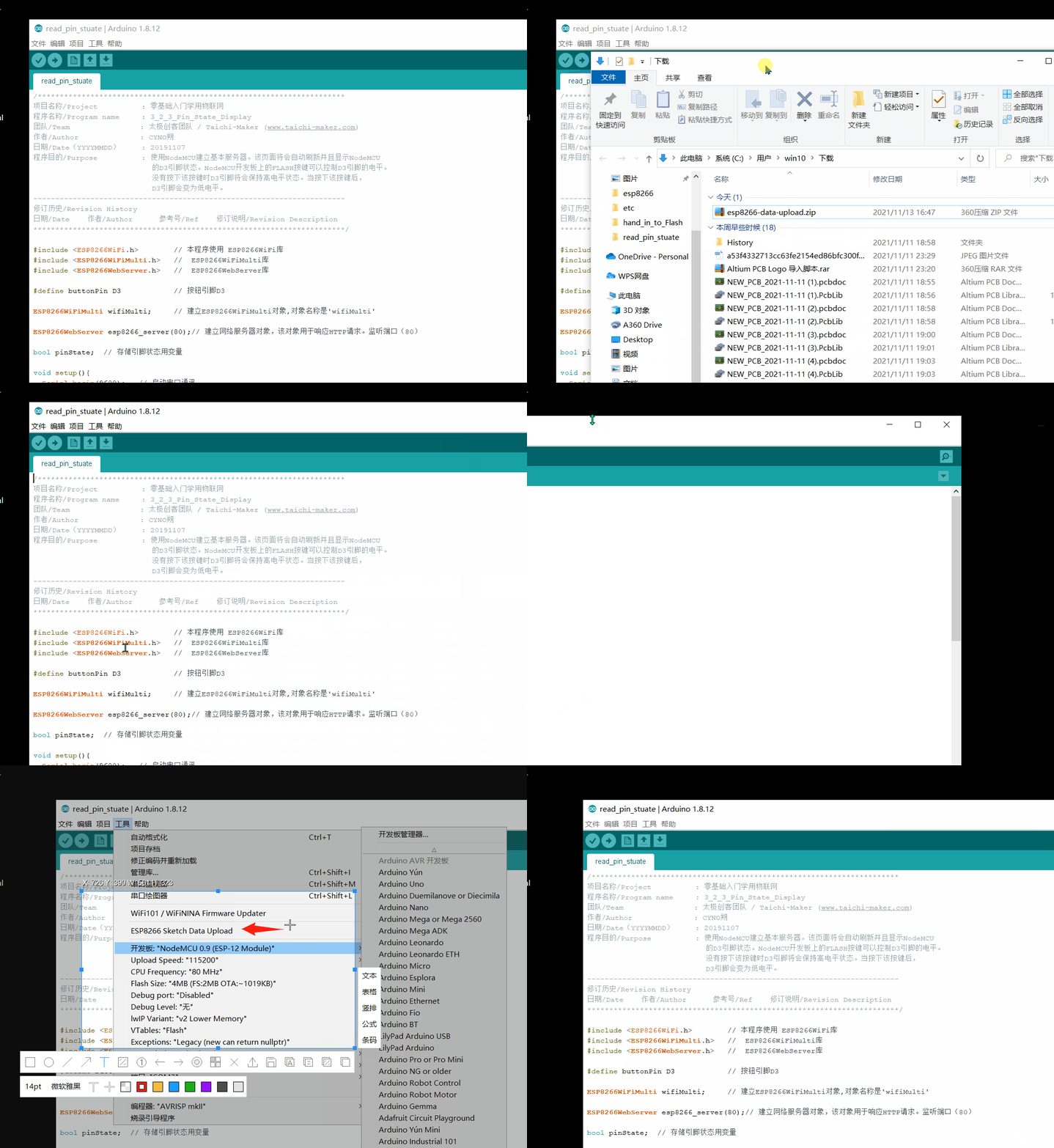
tools Folders should be created by yourself , Put it in tools Under folder ESP8266FS The folder is the unzipped folder . Remember to restart after setting Arduino IDE Software can take effect .
Now use this plug-in Flash Upload and verify the file :
First, create a new one under the project folder data Folder , Put the file to be uploaded in data Under the folder . open Arduino IDE Then click Tools -----ESP8266 Sketch Data Upload, Click to see Esp8266 The blue light is flashing . After burning, the file has been saved in Esp8266 Of Flash In the .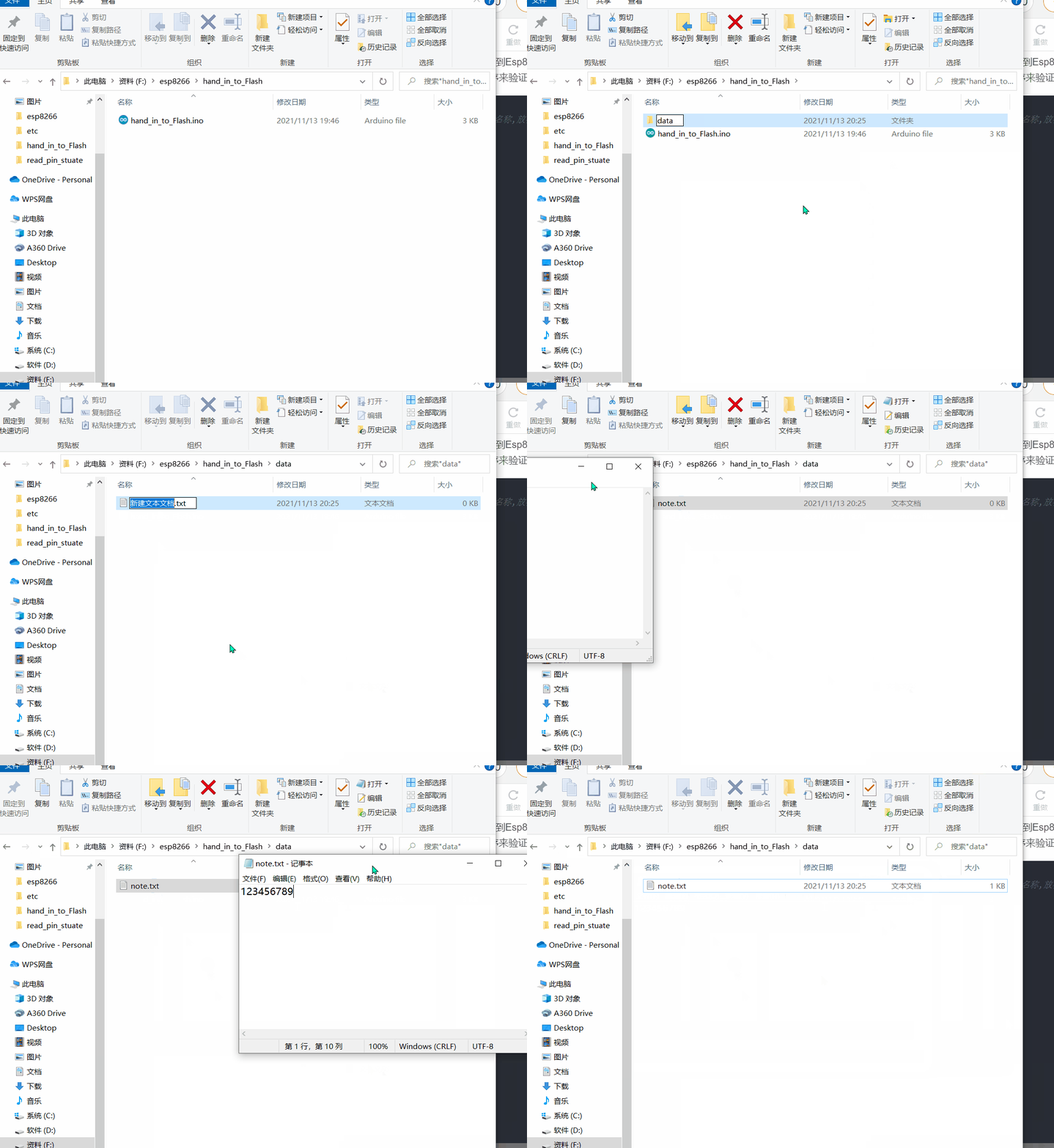
Now use the following procedure to verify :
#include <FS.h>
String file_name = "/note.txt"; // The location and name of the file being read , Put it in the root directory

void setup() {

  Serial.begin(9600);
  Serial.println("");

  if (SPIFFS.begin()) {
     //  start-up SPIFFS
    Serial.println("SPIFFS Started.");
  } else {

    Serial.println("SPIFFS Failed to Start.");
  }
  file_read(file_name);
  file_add(file_name, "\n2222");
  file_read(file_name);
}
void loop() {

}


void file_write(String file_name, String content)
{

  /***************************************** Write the contents of the flash file *************************************************/
  File dataFile = SPIFFS.open(file_name, "w");//  establish File Object is used to SPIFFS Medium file object ( namely /notes.txt) Write information
  dataFile.println(content);       //  towards dataFile Write string information
  dataFile.close();                           //  Close the file after writing
  Serial.print(" The contents of the flash file have been written :");
  Serial.println(content);
}
void file_read(String file_name)
{

  // Confirm whether there is file_name file
  File dataFile;
  if (SPIFFS.exists(file_name))
  {

    // establish File Object to be used from SPIFFS Read files from
    dataFile = SPIFFS.open(file_name, "r");
    // Read the contents of the file and output the file information through the serial port monitor
    Serial.println(" Read the contents of the file :");
    for (int i = 0; i < dataFile.size(); i++)
    {

      Serial.print((char)dataFile.read());
    }
  }
  else
  {

    Serial.print(file_name);
    Serial.print(" NOT FOUND.");
  }
  // Close the file after reading it
  dataFile.close();
}
void file_add(String file_name, String content)
{

  if (SPIFFS.exists(file_name))
  {

    File dataFile = SPIFFS.open(file_name, "a");//  establish File Object is used to SPIFFS Medium file object ( namely /notes.txt) Write information
    dataFile.println(content); //  towards dataFile Add string information
    dataFile.close();                           //  Close the file after completing the file operation
    Serial.println(" Content has been added :");
    Serial.println(content);
  }
  else
  {

    Serial.print(file_name);
    Serial.print(" NOT FOUND.");
  }
}
The above procedure cannot be carried out SPIFFS.format() Format operation , Otherwise, the newly saved files will be cleared , And notice the place data The files under the folder are placed in esp8266 Of Flash Under the root directory of , So the file directory in the program should also use /note.txt. At the same time, we should also pay attention not to /note.txt Write files , Otherwise, it will also be covered 123456789 This information .
Running results :
As can be seen from the above , except 123456789, There are two more in the back 2222, This is because the program will run again after the download , In order to make the serial port display data, I press the reset button once , So the program ran twice , Added twice 2222.
边栏推荐
- 深度估计自监督模型monodepth2论文总结和源码分析【理论部分】
- 低功耗和UPF介绍
- Minkowskiengine installation
- Solve the problem that esp8266 cannot connect mobile phones and computer hotspots
- Customize the view to realize the background of redeeming lottery tickets [elementary]
- @1-1 CCF 2021-04-1 gray histogram
- [data mining] Chapter 3 basis of data analysis
- ¥ 1-3 SWUST OJ 942: reverse sequence table
- 初识Opencv4.X----方框滤波
- Server CUDA toolkit multi version switching
猜你喜欢
Minkowskiengine installation
Esp8266的Flash读写操作以及Flash上传文件

Solve the problem that esp8266 cannot connect mobile phones and computer hotspots

T5论文总结

Android & kotlin: puzzle solution

@3-2 optimal threshold of CCF 2020-12-2 final forecast
![[deep learning] convolutional neural network](/img/36/081f9e38886f5a7ed4d641761db4b7.png)
[deep learning] convolutional neural network

Get to know opencv4.x for the first time --- add salt and pepper noise to the image

matlab绘图|坐标轴axis的一些常用设置

【深度学习】自编码器
随机推荐
matlab如何导入大量数据
ADC简介
@3-2 optimal threshold of CCF 2020-12-2 final forecast
pytorch使用tensorboard实现可视化总结
First knowledge of opencv4.x --- image histogram drawing
基于PackNet的演进——丰田研究院(TRI)深度估计文章盘点(上)
matlab如何导入大量数据
CCF 201509-3 模板生成系统
Get to know opencv4.x for the first time --- add salt and pepper noise to the image
*7-2 CCF 2015-09-2 date calculation
AI模型风险评估 第1部分:动机
1094 - Google recruitment
初识Opencv4.X----均值滤波
数据分析业务核心
CDA Level1多选题精选
卷积神经网络发展历程(部分)
Defect detection network -- hybrid supervision (kolektor defect data set reproduction)
基于机智云平台的温湿度和光照强度获取
初识Opencv4.X----图像直方图均衡
【深度学习】自编码器