当前位置:网站首页>【FreeSwitch开发实践】使用SIP客户端Yate连接FreeSwitch进行VoIP通话
【FreeSwitch开发实践】使用SIP客户端Yate连接FreeSwitch进行VoIP通话
2022-07-26 08:29:00 【小小马车夫】
作 者:小小马车夫
所属专栏:FreeSwitch开发实践
专栏介绍:主要介绍博主在实际项目中使用FreeSwitch开发外呼类项目的一些经验心得,主要涉及FreeSwitch的基本安装编译、基本配置、ESL、WSS、录音、自定义模块、media bug、语音播放、MRCP及对接AI机器人等内容。内容在持续更新中,如果感兴趣可以对专栏进行订阅~
想对未来的自己说的话 |
|---|
间歇性的努力和蒙混过日子,都是对之前努力的清零 |

前言
常见的SIP客户端有很多,比如Yate、Xlite、Linephone、Zopier等,本文主要介绍Yate的使用,通过连接FreeSwitch,进行VoIP通话体验。
1、环境介绍
Yate: 4.2.0.2 Windows 10.0.14393 64位FreeSwitch: 1.10.7 CentOS 3.10.0-1160.62.1.el7.x86_64
二、FreeSwitch安装
参考:【FreeSwitch开发实践】centos7下编译安装freeswitch及常见编译问题的解决
三、Yate下载安装
官网下载链接:http://voip.null.ro/tarballs/yate4/yate-4.2.0-2-setup.exe
Windows下安装按提示一直点下一步就可以,安装完成打开Yate主界面: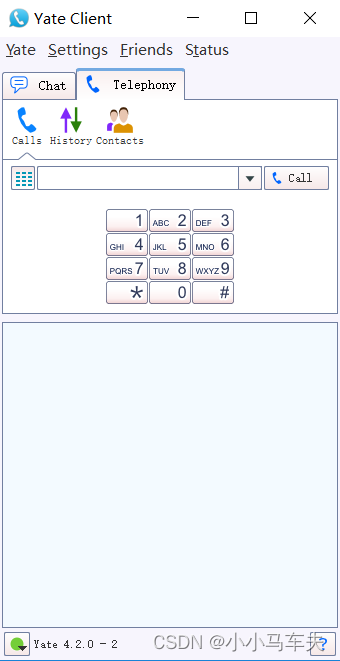
四、Yate配置
1、首先单击菜单:Settings–> Accounts,打开SIP帐号配置界面:
2、单击 "New"按钮新建SIP帐户:
3、配置SIP帐户
Username:(帐户名称) FreeSwitch有1000-1019默认帐户
Password:(密码) FreeSwitch默认帐户连接密码是 1234
Server:(FreeSwitch服务器IP地址)
详细配置如下:
4、单击“OK”,完成配置,查看是否连接成功:
显示“online”则连接成功
五、Yate相互拨打测试
找两台同一网段局域网的电脑,安装配置Yate如上步骤,就可以相互进行通话测试了。
六、单机与FreeSwitch通话测试
如果你没有多余的电脑可供测试, 也可以在FreeSwitch上拨打内置账号如5000,或内置app如echo(回音测试):
在FreeSwitch命令行输入: originate user/1000 &echo
在Yate中接通软件电话后,说话FreeSwitch的echo程序就会把你说的话返回来,这样就能听到自己的回音。
总结
以上就是Yate安装配置进行VoIP的全部内容了, 如果觉得有些帮助或觉得文章还不错,请关注一下博主,你的关注是我持续写作的动力。另外,如果有什么问题,可以在评论区留言,或者私信博主,博主看到后会第一时间回复。
边栏推荐
- 请问现在flinkcdc支持sqlserver实例名方式连接吗?
- QT note 2
- Matplotlib learning notes
- Shell第二天作业
- [endnote] compilation of document types and abbreviations of document types
- Flutter custom player progress bar
- Random distribution learning notes
- If Yi Lijing spits about programmers
- 23.10 Admin features
- Uninstallation of dual systems
猜你喜欢

B title: razlika priority queue approach

基于Raft共识协议的KV数据库

2022-7-5 personal qualifying 2 competition experience

Beauty naked chat for a while, naked chat over the crematorium!

Matplotlib learning notes

Special lecture 2 dynamic planning learning experience (should be updated for a long time)

The first ide overlord in the universe, replaced...

Mycat2 sub database and sub table

【C语言】程序员筑基功法——《函数栈帧的创建与销毁》

基于C语言的哈夫曼转化软件
随机推荐
Vscode utility shortcut
Kotlin variables and constants
Data validation typeerror: qiao Validate is not a function
Nodejs2day (modularization of nodejs, NPM download package, module loading mechanism)
Special lecture 2 dynamic planning learning experience (should be updated for a long time)
vscode 实用快捷键
Common Oracle functions
23.5 event listeners of application events and listeners
Write common API tools swagger and redoc
A little awesome, 130000 a month+
SPSS uses kmeans, two-stage clustering and RFM model to study the behavior law data of borrowers and lenders in P2P network finance
A summary of practical websites that won't brighten people's eyes
shell编程
【C语言】程序员筑基功法——《函数栈帧的创建与销毁》
Daily Note (11) -- word formula input arbitrary matrix
【时间复杂度空间复杂度】
Template summary
The second lesson is the construction of development environment
mysql函数汇总之日期和时间函数
22-07-12 personal training match 1 competition experience