当前位置:网站首页>Case sharing and implementation introduction of SAP field service management and wechat integration
Case sharing and implementation introduction of SAP field service management and wechat integration
2022-06-10 12:52:00 【WangZiXi】
SAP FSM(Field Service Management), Belong to SAP C/4HANA In five clouds Service Cloud.

This article introduces a project that the author has experienced in his work , contain SAP Field Service Management Functional requirements analysis and detailed technical implementation of a scenario integrated with wechat .
We need to be able to display in wechat FSM The data of , such as FSM Product and customer master data in :


An easy way is to use FSM Provided Query API.
open FSM Help document on the official website :
https://docs.coresystems.net/dev-index.html

Get into Query API Relevant parts of :
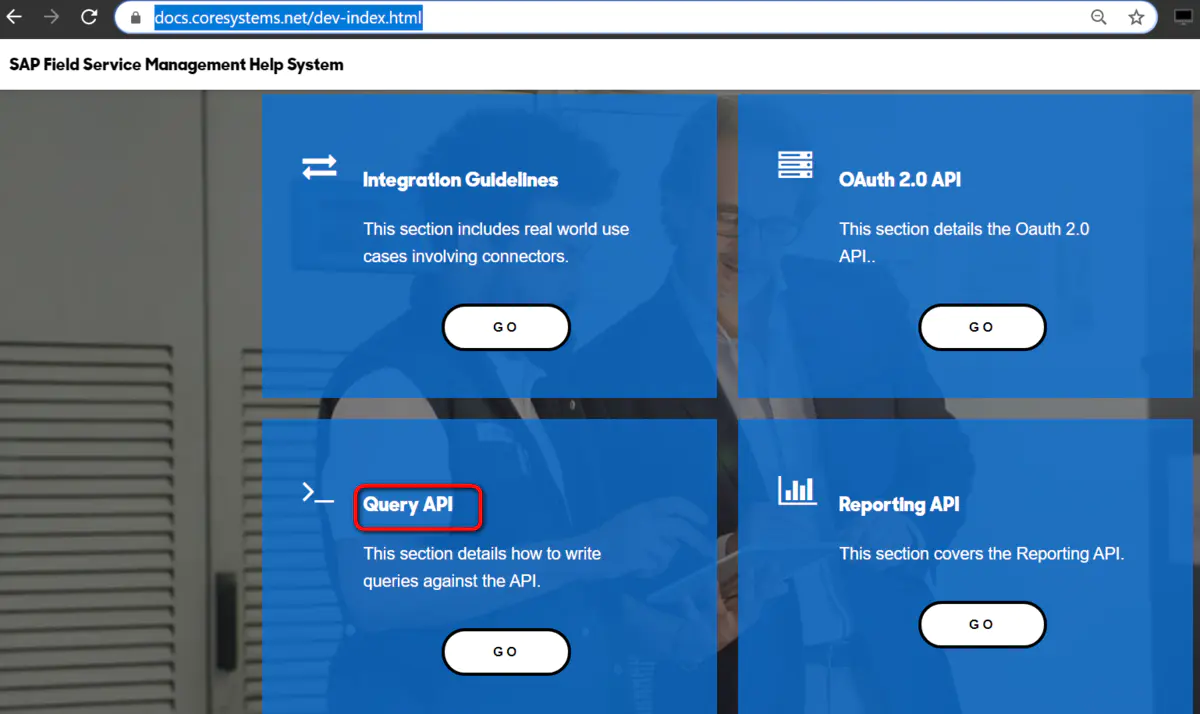
By reading the document , hear FSM Query API Adopt a and Facebook Query Language,SAP Hybris Flexible Search and ABAP Open SQL Similar thinking , Immediate imitation SQL Syntax query mode , from FSM Read data from the system .
The picture below is Facebook Query Language An example of :

The picture below is SAP Hybris Commerce Flexible Search Example :

ABAP Open SQL I will not post the example of , Everyone is so familiar with .
that FSM Of Query API How to use it ?
Sign in FSM, Click on Query API:

In the pop-up console , Input class SQL sentence :
SELECT bp FROM BusinessPartner bp
The default is back to the previous 40 Data :

So how to use code to trigger Query API Query? ? On the official website, a website based on nodejs Of SDK, It is easy to call with code Query API The needs of .

After clicking on the hyperlink , Will jump to github A warehouse in the city :

Follow the example code on the help documentation , Will oneself FSM Created in the system API client Corresponding credential Maintain in the code , Get one CoreAPIClient example .

ClientIdentifier and clientSecret etc. Credential Value of field , Can pass Admin TAB , Create a new one Client Acquired after :

Use CoreAPIClient Example of query Method direction FSM System initiation Query API request , Input parameter 1 is the class spliced in the application SQL Query statement , The second parameter is Data Transfer Object The name of , You can find it in the help file .

adopt Visual Studio Code The debugger looks at the above API The result returned by the call . Because of my 752 and 753 The lines of code specify Item and BusinessPartner Query for , therefore API The response returned by the call is an array , The two elements in it contain Item and BusinessPartner Before 40 Data .

Every Item and Business Partner The details of the instance are displayed in the debugger as follows :


Suppose our scenario is : I hope I can browse in wechat SAP FSM Service technicians available in , As shown in the figure below :

So first we have to design a Web application , In the Web In the application, it is introduced in the first article , Use SAP FSM Provided nodejs SDK To call API.
So , We developed a Vue application , stay Vue Life cycle hook function mounted in , Initiate right SAP FSM employee( technician ) Data request :

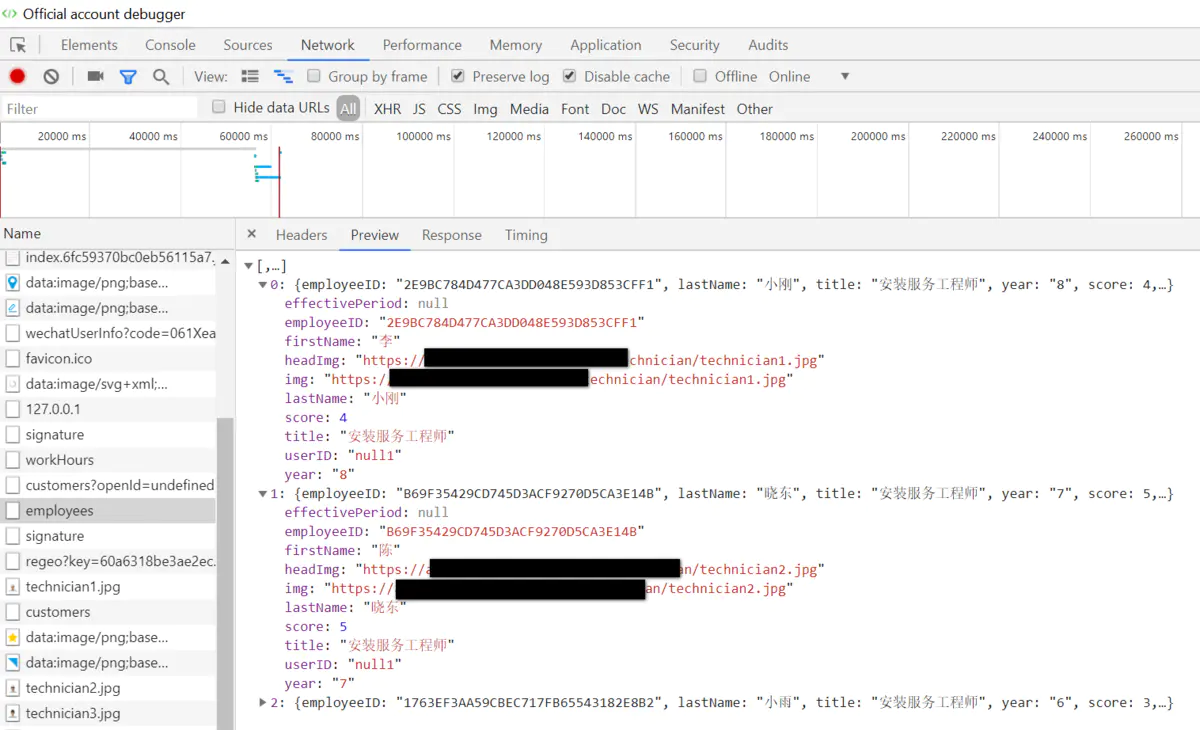
Within the time period specified in our wechat ,SAP FSM There are three technicians available , Its name , User rating , title , Service life and other data are passed FSM nodejs SDK Return to wechat , As shown in the wechat developer debugger above .
such as employeeID by 2E9BC784D477CA3DD048E593D853CFF1 This data of , Can be directly in FSM Through this url see :
https://de.coresystems.net/master-data-management/#/people/details/2E9BC784D477CA3DD048E593D853CFF1


This Vue After the application is done , Deploy to server , Generate a url, We assume that https://www.xxx.com/smart
How to put this url It is bound to wechat official account ?

In the customized menu of wechat official account , Create a new menu item “ make an appointment ”, Maintain a specific url.
Click this menu in the mobile wechat , Will jump to the corresponding url.

url Format :https://open.weixin.qq.com/connect/oauth2/authorize?appid=&redirect_uri=https%3a%2f%2fwww.xxx.com%2fsmart&response_type=code&scope=snsapi_userinfo&state=123#wechat_redirect
among appid Get from the official account development information behind the wechat official account :

and redirect_url Value after , by web application https://www.xxx.com/smart Conduct url encode After the value of .
When all this is set up , Jump from the wechat official account menu to web The application scenario will work .
If you want to debug the deployed on the server by simulating wechat access locally Web application , Just install wechat developer tools , Bind your personal wechat to the developer wechat list of wechat official account :

Then log in to the wechat developer tool with your wechat scanning code , In the address field, enter the above contents oauth 2.0 The long string of redefinitions url, Click on Allow Button :

It's like using Chrome Developer tools , Single step debugging of the front-end application code :

Let's use “ Door to door installation service ” This scenario illustrates , Suppose a customer buys a product from a company , I hope to make an appointment for door-to-door installation service at a certain time through wechat .
Click... From wechat official account “ make an appointment ” After the button , The front-end application we developed will automatically locate the geographical location of the current user : Wuhou garden people's Government , In the same way, we also provide a function that allows customers to manually modify the address , The following figure shows the characters at the end of the reservation address field 2, Namely Jerry Intentionally added to test manually modified functions .

Maintain the mobile phone number and the specific time period for door-to-door installation , Then you can select from the drop-down list the installation technicians who can provide services within this time period . Here we choose a technician named lixiaogang :

Click the OK button , The front-end application running in wechat is through the background service we developed , towards SAP FSM launch API call .
Look at the final result first : We received the notification message pushed by the official account on wechat , Tell us that the appointment has been made .

Click this message to view the appointment details :

When Li Xiaogang leaves for the customer , We can also view Li Xiaogang's real-time location sharing information on wechat , This is through SAP FSM The technician location service provided plus our little self-development has achieved the effect .

We repeat the above steps in the wechat developer tool , Observe the request details :

This url Point to a background service we developed ,/ticket/ The next string of numbers and letters is Jerry My personal wechat open ID,13911111111 It's the mobile number I left when I made an appointment , A long string after the mobile phone number contains % Fragments of , It's the address left when making an appointment url encode After the results of the .

The request body contains all the reservation information filled in the wechat , And Li Xiaogang FSM Inside GUID. CustomerID, The front-end application passes through my wechat open ID Call wechat API Obtained nickname ,Jerry Wang. “ Door mounted manipulator ”, We did it for demo convenient , A hardcoded appointment title .

API After the call is successful , Return to one ID To the consumer , This ID On behalf of SAP FSM Appointment records successfully created in .

Now let's go to SAP FSM According to these GUID, Go to check in detail API What records are generated in the system .
First , If a wechat user is SAP FSM There is no corresponding Business Partner Record , There is no business process , Therefore, our background service implementation , First, the wechat user will be detected in SAP FSM Is there a corresponding BP Record , without , Create a... Automatically .
The picture below is Jerry Your personal micro signal is SAP FSM Generated in BP Record ,Additional name That is my wechat open ID, In our prototype development , By micro signal open ID Same as SAP FSM BP Model Additional name This pair of fields is used to maintain wechat users and SAP FSM BP One to one correspondence . This BP Of ID by 36, Write it down. We'll use it later .

And lixiaogang, the technician we selected on the wechat appointment page , We observed it in the wechat developer tool GUID by 2E9BC784D477CA3DD048E593D853CFF1, This is exactly what Li Xiaogang is SAP FSM List of detailed pages in url One of the fragments of :

and SAP FSM API Back to ID:B0555705B9EC41009739D0111E16CC91, In the system, it is actually a Service Call Records of the GUID, This article Call Of ID by 175, Customer service for ID yes Jerry Wang,Code by 36, That is, based on micro signals mentioned above open ID Automatically created customer records .
This Service Call There is a with the same name Activity, The number is 205.

stay SAP FSM Of Activities The page can be found that this item is numbered 205 The record of , It belongs to Service Call by 175, It is shown in the above figure Call Content .

Service Call and Activities After creating , The dispatcher can dispatch workers accordingly , Then Li Xiaogang can set off . The figure below shows that Li Xiaogang has been assigned multiple installation tasks in the system , This is a Jerry Data created during repeated testing , A small white flag marked on the task display , The representative's task has been completed .

The dispatcher selects an appointment I just created on wechat , Click on Release Assignments, You can complete the dispatch .

In our background service implementation , Use SAP FSM nodejs SDK, Call... In turn Service Call,Activity The creation of API To create corresponding records . At the same time, the allocation relationship between installation technicians and installation tasks , By creating a new ServiceAssignment Object to maintain . These three API Your instructions are in SAP FSM There are documents on the official website :
https://docs.coresystems.net/dev-index.html
summary
This paper first introduces briefly SAP Field Service Management Technology architecture and Restful API, Then I share in detail an actual pass in the author's work project SAP FSM API Smart service scenarios realized through wechat integration .
边栏推荐
猜你喜欢


随机推荐
Stereo vision based semantic 3D object and ego motion tracking for automotive driving
2022年浙江省赛
Alibaba cloud ECS server builds MySQL database
VDO-SLAM源码阅读笔记[1] Track()中动态obj部分
從解讀 BDC 自動生成的代碼談起,講解 SAPGUI 的程序組成部分
H5 pop up prompt layer - top, bottom, left and right center
Can chip learning of max3051
colmap源码阅读笔记[1] threading.cc
六石编程学:以文字处理的位置,谈谈命名
好文分享|48小时敏捷开发攻略
Shadergraph - 301 bouncing ball
Use soapUI tool to generate SMS interface code
CMakeLists.txt 如何编写
TIDB 初级课程体验 8 (集群的管理维护, 添加一个TIKV节点)
VDMA调试总结
[raise bar C #] how to call the base of the interface
MAX3051的can芯片的学习
UML类图
PCB学习笔记(2)-3D封装相关
Daniel recommended and hanged the interviewer