当前位置:网站首页>Zero basic learning canoe panel (12) -- progress bar
Zero basic learning canoe panel (12) -- progress bar
2022-07-25 12:50:00 【Ant soldier】
- I am a Ant soldier , Focus on the field of on-board diagnosis , Especially good at CANoe Tool use
- Looking for organizations , Answer questions and solve doubts , Fishing and chatting , Blog source code , Click to add 【 Love each other and family 】
- Zero base learning CANoe Panel Summary of design catalogue , Click the jump
Preface
Progress bar (
Progress Bar) strip , whatever UI Design tools are available , Let me write a simpleBrush serviceTo demonstrate the use of the progress barDemonstrate hardware and software environment
Windows11 x64;CANoe 11 SP2 x64
Catalog

Progress bar (Progress Bar)
1️⃣ Next I pull three controls Button ,Input/Output box ,Progress Bar To simulate the download service
Button: Start the downloadInput/Output box: Download progress description , Property to set the transparent amount , So I can't see the screenshotProgress Bar: Download progress percentage

2️⃣ Because the purpose is to demonstrate the use of the progress bar , So here is a simple simulation of the download process , Here we define a timer , Add to 100, Simulate the progress of brushing .
/*@!Encoding:936*/
variables
{

  msTimer timer_demo;
  char  tempText[0x500];
  int step_counter;

}

on timer timer_demo
{

    step_counter = step_counter +1 ;

    snprintf(tempText,elCount(tempText),"Downloading %.2f%%......",(double)step_counter);
    sysSetVariableString (sysvar::Panel::ProgressBar_Log,tempText);
    sysSetVariableFloat(sysvar::Panel::ProgressBar_Self,(double)step_counter);

    if (step_counter < 100)
        setTimer(timer_demo,100);

}

on sysvar Panel::ProgressBar_Start
{

  if(@this)
  {

    snprintf(tempText,elCount(tempText),"Satrt Downloading......");
    sysSetVariableString (sysvar::Panel::ProgressBar_Log,tempText);
    StartDownload();
  }
}


void StartDownload()
{

   step_counter = 0;
   setTimer(timer_demo,1000);
}

/* When the above code Editor Control demo code */
3️⃣ Run rise CANoe, The test process is as follows :

Property settings
The above example , I didn't set any properties , Completely default
1️⃣ Hide the text of the progress bar itself
- Most of us don't use it , I will use the previous example , Therefore, it is the first choice to hide it
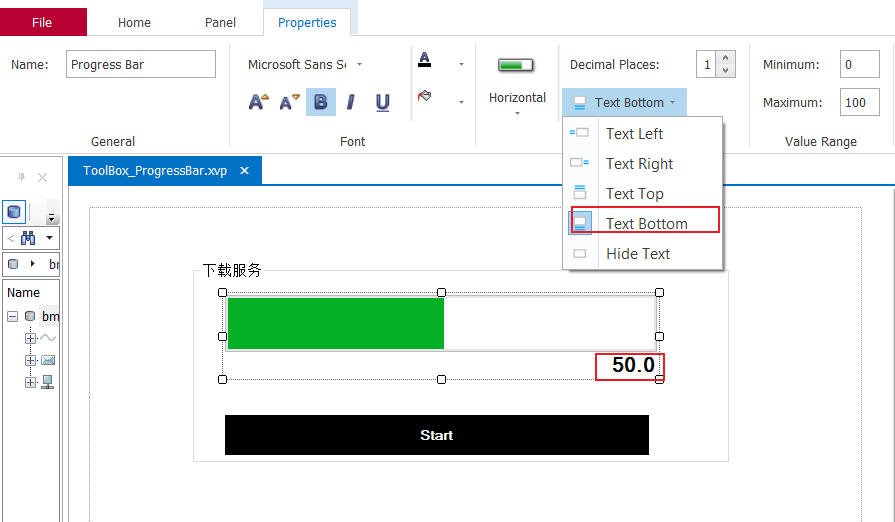
2️⃣ Progress bar direction
- You can choose vertical or horizontal progress bar

3️⃣ Text decimal places
- If you don't set hidden text , Then the setting is meaningful .

How to make the progress bar design colorful
1️⃣ Look at the picture below , Default Style Attribute matters Windows Style Of , The color of the progress bar and the background color are gray , Not set , So we need to design a good-looking progress bar , We need to change Style attribute

2️⃣ Now I choose Classic Style With Frame Pattern , And set the background color of the progress bar to light yellow , The progress bar is set to positive yellow , Here's the picture

3️⃣ Run the renderings

4️⃣ Odometer style (Level Meter Style)( Optional learn )
- Only
StyleAttribute select itsLevel Meter Style,Level Meter settingThe properties inside can be set , The progress bar is preceded by a vertical line with optional colors .


summary


- Have the most simple life , The furthest dream , Even if it's freezing tomorrow , Lu Yao's horse died !
- If this blog is helpful to you , please “ give the thumbs-up ” “ Comment on ”“ Collection ” One key, three links Oh ! It's not easy to code words , Everyone's support is my driving force to stick to it .

边栏推荐
- 【8】 Clever use of color finder
- If you want to do a good job in software testing, you can first understand ast, SCA and penetration testing
- More accurate and efficient segmentation of organs-at-risk in radiotherapy with Convolutional Neural
- 阿里云技术专家秦隆:可靠性保障必备——云上如何进行混沌工程?
- 什么是CI/CD?
- Spirng @Conditional 条件注解的使用
- 深度学习MEMC插帧论文列表paper list
- 【4】 Layout view and layout toolbar usage
- Keeping MySQL highly available
- Leetcode 1184. distance between bus stops
猜你喜欢

Detailed explanation of flex box

【Rust】引用和借用,字符串切片 (slice) 类型 (&str)——Rust语言基础12

Azure Devops (XIV) use azure's private nuget warehouse

“蔚来杯“2022牛客暑期多校训练营2 补题题解(G、J、K、L)
【问题解决】ibatis.binding.BindingException: Type interface xxDao is not known to the MapperRegistry.

交换机链路聚合详解【华为eNSP】

Moving Chinese figure liushenglan

Make a general cascade dictionary selection control based on jeecg -dictcascadeuniversal
Azure Devops(十四) 使用Azure的私有Nuget仓库

What is ci/cd?
随机推荐
mysql实现一张表数据插入另一张表
【3】 DEM mountain shadow effect
Clickhouse notes 03-- grafana accesses Clickhouse
ECCV 2022 | 登顶SemanticKITTI!基于二维先验辅助的激光雷达点云语义分割
请问一下,使用数据集成从postgreSQL导数据到Mysql数据库,有部分数据的字段中出现emoj
Leetcode 0133. clone diagram
2022.07.24 (lc_6125_equal row and column pairs)
感动中国人物刘盛兰
Visualize the training process using tensorboard
Does MySQL have flush privileges
"Wei Lai Cup" 2022 Niuke summer multi school training camp 2 supplementary problem solution (g, J, K, l)
2022.07.24(LC_6124_第一个出现两次的字母)
Perf performance debugging
【AI4Code】《GraphCodeBERT: Pre-Training Code Representations With DataFlow》 ICLR 2021
Want to go whoring in vain, right? Enough for you this time!
【AI4Code】《InferCode: Self-Supervised Learning of Code Representations by Predicting Subtrees》ICSE‘21
Introduction to the scratch crawler framework
软件测试流程包括哪些内容?测试方法有哪些?
Use of hystrix
【C语言进阶】动态内存管理