当前位置:网站首页>自定義 grpc 插件
自定義 grpc 插件
2022-07-01 11:33:00 【Yusan、】
前言
為了更好的閱讀體驗,請滑到最下面點擊閱讀原文。 由於文章包含比較多的代碼 導致閱讀體驗較差,故這裏删减了部分代碼,若需要源碼閱讀,請在 GitHub 查看源碼
yusank/protoc-gen-go-http
如果大家接觸過 grpc 和 protobuf ,那對 protoc 這個命令應該不陌生。
protoc 為基於 proto buffer 文件生成不同語言代碼的工具,在日常業務開發中能經常用到。那先拋出一個問題,你有沒有基於 pb 文件生成滿足自己特殊要求的需求?比如生成對應的 http 代碼或校驗參數等。
我個人需求為,除了生成正常的 grpc 代碼外,需要生成一套對應的 http 代碼,而且最好是能直接在 gin/iris 這種主流 web 框架內注册使用。
其實 golang/protobuf 包支持自定義插件的,而且還提供很多好用的方法,方便我們讀寫 pb 文件。我們寫好自己的插件安裝到 $GOPATH/bin 下,然後在調用 protoc 命令時,指定我們自己的插件名和輸出比特置即可。
關於這個插件:我現有的需求然後一直找不到比較好的解决方案,直到看到 kratos 項目的 http 代碼生成插件後豁然開朗,基於 kratos 的邏輯實現的自己需求,感謝 kratos 作者們。
效果
先看原始 pb 文件。
test.proto
syntax = "proto3";

package hello.service.v1;
option go_package = "api/hello/service/v1;v1";

// 下載 `github.com/googleapis/googleapis` 至`GOPATH`, 生成 http 代碼需要。
import "google/api/annotations.proto";

service Hello {
    rpc Add(AddRequest) returns (AddResponse) {
        option (google.api.http) = {
            post: "/api/hello/service/v1/add"
            body: "*"
        };
    }

    rpc Get(GetRequest) returns (GetResponse) {
        option (google.api.http) = {
            get: "/api/hello/service/v1/get"
        };
    }
}

// 結構定義忽略
因為我需要生成 http 代碼,所以定義 rpc 時,http 路由和method 需要在 pb 文件指定。
我實現的插件起碼叫 protoc-gen-go-http, 必須以 protoc-gen 開頭否則 protoc 不認。
執行命令:
# --go-http 為我自己的插件
# 其中參數是 key=v,key2=v2 方式傳,最後冒號後面寫輸出目錄
protoc -I$GOPATH/src/github.com/googleapis/googleapis --proto_path=$GOPATH/src:. --go_out=. --go-http_out=router=gin:. --micro_out=. test.proto
執行完命令後,會生成三個文件分別為 test.pb.go,test.pb.micro.go和test.http.pb.go, 生成的文件名是可以自定義的。
test.pb.micro.go 文件是由 go-micro 提供的工具生成 grpc 代碼文件。
看一下 test.http.pb.go 文件
// Code generated by protoc-gen-go-http. DO NOT EDIT.
// versions:
// protoc-gen-go-http v0.0.9

package v1

import (
    context "context"
    gin "github.com/gin-gonic/gin"
)

// This is a compile-time assertion to ensure that this generated file
// is compatible with the galaxy package it is being compiled against.
var _ context.Context
const _ = gin.Version

type HelloHTTPHandler interface {
    Add(context.Context, *AddRequest, *AddResponse) error
    Get(context.Context, *GetRequest, *GetResponse) error
}

// RegisterHelloHTTPHandler define http router handle by gin.
func RegisterHelloHTTPHandler(g *gin.RouterGroup, srv HelloHTTPHandler) {
    g.POST("/api/hello/service/v1/add", _Hello_Add0_HTTP_Handler(srv))
    g.GET("/api/hello/service/v1/get", _Hello_Get0_HTTP_Handler(srv))
}

func _Hello_Add0_HTTP_Handler(srv HelloHTTPHandler) func(c *gin.Context) {
    return func(c *gin.Context) {
        var (
            in  AddRequest
            out AddResponse
        )

        if err := c.ShouldBind(&in); err != nil {
            c.AbortWithStatusJSON(400, gin.H{"err": err.Error()})
            return
        }

        err := srv.Add(context.Background(), &in, &out)
        if err != nil {
            c.AbortWithStatusJSON(500, gin.H{"err": err.Error()})
            return
        }

        c.JSON(200, &out)
    }
}

func _Hello_Get0_HTTP_Handler(srv HelloHTTPHandler) func(c *gin.Context) {
    return func(c *gin.Context) {
        var (
            in  GetRequest
            out GetResponse
        )

        if err := c.ShouldBind(&in); err != nil {
            c.AbortWithStatusJSON(400, gin.H{"err": err.Error()})
            return
        }

        err := srv.Get(context.Background(), &in, &out)
        if err != nil {
            c.AbortWithStatusJSON(500, gin.H{"err": err.Error()})
            return
        }

        c.JSON(200, &out)
    }
}
重點是 RegisterHelloHTTPHandler 方法,這樣我就注册一個 gin.RouterGroup 和 HelloHTTPHandler 就可以直接提供一個 http 服務 HelloHTTPHandler 接口裏方法的簽名與go-micro生成的 grpc 方法保持了一致, 這樣我只需要實現 grpc 的代碼裏對應的 Interface{} 接口,就可以服用,完全不會產生多餘代碼。
go-micro 生成的 pb 代碼片段:
type HelloHandler interface {
    Add(context.Context, *AddRequest, *AddResponse) error
    Get(context.Context, *GetRequest, *GetResponse) error
}

func RegisterHelloHandler(s server.Server, hdlr HelloHandler, opts ...server.HandlerOption) error {}
我在 main 函數注册的時候也只需要多注册一次 http handler 即可,
main.go
// 它實現了 HelloHandler
type implHello struct{}

RegisterHelloHandler(micro.Server, &implHello)
g := gin.New()
// implHello 實現HelloHandler 那就是實現了HelloHTTPHandler
RegisterHelloHTTPHandler(g.Group("/"), &implHello)
所以我就很容易通過 http 接口調試 grpc 方法,甚至可以對外提供服務,一舉兩得。
如何實現
程序入口
main.go
package main

import (
    "flag"

    "google.golang.org/protobuf/compiler/protogen"
    "google.golang.org/protobuf/types/pluginpb"
)

// protoc-gen-go-http 工具版本
// 與 GalaxyMicroVersion 保持一致
const version = "v0.0.12"

func main() {
    // 1. 傳參定義
    // 即 插件是支持自定義參數的,這樣我們可以更加靈活,針對不同的場景生成不同的代碼
    var flags flag.FlagSet
    // 是否忽略沒有指定 google.api 的方法
    omitempty := flags.Bool("omitempty", true, "omit if google.api is empty")
    // 我這裏同時支持了 gin 和 iris 可以通過參數指定生成
    routerEngine := flags.String("router", "gin", "http router engine, choose between gin and iris")
    // 是否生校驗代碼塊
    // 發現了一個很有用的插件 github.com/envoyproxy/protoc-gen-validate
    // 可以在 pb 的 message 中設置參數規則,然後會生成一個 validate.go 的文件 針對每個 message 生成一個 Validate() 方法
    // 我在每個 handler 處理業務前做了一次參數校驗判斷,通過這個 flag 控制是否生成這段校驗代碼
    genValidateCode := flags.Bool("validate", false, "add validate request params in handler")
    // 生成代碼時參數 這麼傳:--go-http_out=router=iris,validate=true:.

    gp := &GenParam{
        Omitempty:       omitempty,
        RouterEngine:    routerEngine,
        GenValidateCode: genValidateCode,
    }
    // 這裏就是入口,指定 option 後執行 Run 方法 ,我們的主邏輯就是在 Run 方法
    protogen.Options{
        ParamFunc: flags.Set,
    }.Run(func(gen *protogen.Plugin) error {
        gen.SupportedFeatures = uint64(pluginpb.CodeGeneratorResponse_FEATURE_PROTO3_OPTIONAL)
        for _, f := range gen.Files {
            if !f.Generate {
                continue
            }
            // 這裏是我們的生成代碼方法
            generateFile(gen, f, gp)
        }
        return nil
    })
}

type GenParam struct {
    Omitempty       *bool
    RouterEngine    *string
    GenValidateCode *bool
}
讀取 pb 文件定義
http.go
import (
    "fmt"
    "strings"

    "google.golang.org/genproto/googleapis/api/annotations"
    "google.golang.org/protobuf/compiler/protogen"
    "google.golang.org/protobuf/proto"
    "google.golang.org/protobuf/types/descriptorpb"
)

const (
    contextPackage = protogen.GoImportPath("context")
    ginPackage     = protogen.GoImportPath("github.com/gin-gonic/gin")
    irisPackage    = protogen.GoImportPath("github.com/kataras/iris/v12")
)

var methodSets = make(map[string]int)

// generateFile generates a _http.pb.go file containing gin/iris handler.
func generateFile(gen *protogen.Plugin, file *protogen.File, gp *GenParam) *protogen.GeneratedFile {
    if len(file.Services) == 0 || (*gp.Omitempty && !hasHTTPRule(file.Services)) {
        return nil
    }
    // 這裏我們可以自定義文件名
    filename := file.GeneratedFilenamePrefix + ".pb.http.go"
    g := gen.NewGeneratedFile(filename, file.GoImportPath)
    // 寫入一些警告之類的 告訴用戶不要修改
    g.P("// Code generated by protoc-gen-go-http. DO NOT EDIT.")
    g.P("// versions:")
    g.P(fmt.Sprintf("// protoc-gen-go-http %s", version))
    g.P()
    g.P("package ", file.GoPackageName)
    g.P()
    generateFileContent(gen, file, g, gp)
    return g
}

// generateFileContent generates the _http.pb.go file content, excluding the package statement.
func generateFileContent(gen *protogen.Plugin, file *protogen.File, g *protogen.GeneratedFile, gp *GenParam) {
    if len(file.Services) == 0 {
        return
    }
    // import
    // 這裏有個插曲:其實 import 相關的代碼我們這麼不需要特殊指定,protogen 包會幫我們處理,
    // 但是import 的 path 前的別名默認取 path 最後一個 `/` 之後的字符,
    // 比如:github.com/kataras/iris/v12 被處理成 v12 "github.com/kataras/iris/v12"
    // 這個我不太願意接受 所以自己寫入 import
    g.P("// This imports are custom by galaxy micro framework.")
    g.P("import (")
    switch *gp.RouterEngine {
    case "gin":
        g.P("gin", " ", ginPackage)
    case "iris":
        g.P("iris", " ", irisPackage)
    }
    g.P(")")

    // 注: 我們難免有一些 _ "my/package" 這種需求,這其實不用自己寫 直接調 g.Import("my/package") 就可以

    // 這裏定義一堆變量是為了程序編譯的時候確保這些包是正確的,如果包不存在或者這些定義的包變量不存在都會編譯失敗
    g.P("// This is a compile-time assertion to ensure that this generated file")
    g.P("// is compatible with the galaxy package it is being compiled against.")
    // 只要調用這個 Ident 方法 就會自動寫入到 import 中 ,所以如果對 import 的包名沒有特殊要求,那就直接使用 Ident
    g.P("var _ ", contextPackage.Ident("Context"))

    // 像我自己自定義 import 的包就不要使用 Ident 方法,否則生成的代碼文件裏有兩個同一個包的引入導致語法錯誤
    switch *gp.RouterEngine {
    case "gin":
        g.P("const _ = ", "gin.", "Version")
    case "iris":
        g.P("const _ = ", "iris.", "Version")
    }
    g.P()

    // 到這裏我們就把包名 import 和變量寫入成功了,剩下的就是針對 rpc service 生成對應的 handler
    for _, service := range file.Services {
        genService(gen, file, g, service, gp)
    }
}


// rpc service 信息
type serviceDesc struct {
   // ...
}

// rpc 方法信息
type methodDesc struct {
    // ...
}

// 生成 service 相關代碼
func genService(gen *protogen.Plugin, file *protogen.File, g *protogen.GeneratedFile, service *protogen.Service, gp *GenParam) {
    // HTTP Server.
    // 服務的主要變量,比如服務名 服務類型等
    sd := &serviceDesc{
        ServiceType: service.GoName,
        ServiceName: string(service.Desc.FullName()),
        Metadata:    file.Desc.Path(),
        GenValidate: *gp.GenValidateCode,
    }
    // 開始遍曆服務的方法
    for _, method := range service.Methods {

        // annotations 這個就是我們在 rpc 方法裏 option 裏定義的 http 路由
        rule, ok := proto.GetExtension(method.Desc.Options(), annotations.E_Http).(*annotations.HttpRule)
        if rule != nil && ok {
            for _, bind := range rule.AdditionalBindings {
                // 拿到 option裏定義的路由, http method等信息
                sd.Methods = append(sd.Methods, buildHTTPRule(g, method, bind))
            }
            // 構造方法
            sd.Methods = append(sd.Methods, buildHTTPRule(g, method, rule))
        } else if !*gp.Omitempty {
            path := fmt.Sprintf("/%s/%s", service.Desc.FullName(), method.Desc.Name())
            sd.Methods = append(sd.Methods, buildMethodDesc(g, method, "POST", path))
        }
    }

    // 拿到了 n 個 rpc 方法,開始生成了
    if len(sd.Methods) != 0 {
        // 渲染
        g.P(sd.execute(*gp.RouterEngine))
    }
}

// 檢查是否有 http 規則 即
// option (google.api.http) = {
//      get: "/user/query"
//    };
func hasHTTPRule(services []*protogen.Service) bool {
    // 删减代碼
    return false
}

// 解析 http 規則,讀取內容
func buildHTTPRule(g *protogen.GeneratedFile, m *protogen.Method, rule *annotations.HttpRule) *methodDesc {
    //.. 篇幅原因删减一部分代碼
    md := buildMethodDesc(g, m, method, path)
    // .. 删减一部分代碼
    return md
}

// 構建 每個方法的基礎信息
// 到這裏我們拿到了 我們需要生成一個 handler 的所有信息
// 名稱,輸入,輸出,方法類型,路由
func buildMethodDesc(g *protogen.GeneratedFile, m *protogen.Method, method, path string) *methodDesc {
  // .. 删减部分代碼
}

// 處理 路由中 /api/user/{name} 這種情况
func buildPathVars(method *protogen.Method, path string) (res []string) {
    return
}
模板渲染
// execute 方法實現也其實不複雜,總起來就是 go 的 temple 包的使用
// 提前寫好模板文件,然後拿到所有需要的變量,進行模板渲染,寫入文件
func (s *serviceDesc) execute(routerEngine string) string {
    buf := new(bytes.Buffer)
    tmpl, err := template.New(name).Parse(strings.TrimSpace(tmp))
    if err != nil {
        panic(err)
    }
    if err = tmpl.Execute(buf, s); err != nil {
        panic(err)
    }

    return strings.Trim(buf.String(), "\r\n")
}
模板內容
// 篇幅原因删除這塊模板代碼
// // //
//
Go
// GRPC Custom Plugin by yusank
func main() {
    grpc.CustomPlugin().Generate()
}
a
iris 的模板基本類似。
到這裏代碼部分完全結束,做一個簡單的總結:
構思需求,即我需要什麼樣的插件,它需要給我生成什麼的代碼塊?
根據需求先自己寫一個預期代碼,然後把這份代碼拆解成一個模板,提取裏面的可以渲染的變量。
模板裏可以有邏輯,也就是可以做一些參數校驗的方式,生成不同的代碼,比如針對不同的 http 方法,做不同的處理,針對不同的插件參數生成不同的代碼塊。
程序入口到渲染文件前這段代碼,基本都用
protogen包提供的方法,可以對這個包做一些調研閱讀文檔,看看它都提供什麼能力, 說不定可以少走很多彎路。
基本就這些了,我也是各種琢磨琢磨出來的,建議大家多動手,只要不寫永遠學不到精髓。
边栏推荐
- Continuous delivery -pipeline getting started
- 力扣首页简介动画
- Numpy的矩阵
- 小米手机解BL锁教程
- 关于Keil编译程序出现“File has been changed outside the editor,reload?”的解决方法
- (POJ - 1456) supermarket
- The developer said, "this doesn't need to be tested, just return to the normal process". What about the testers?
- Face detection and recognition system based on mtcnn+facenet
- Dameng data rushes to the scientific innovation board: it plans to raise 2.4 billion yuan. Feng Yucai was once a professor of Huake
- Redis configuration environment variables
猜你喜欢

Matrix of numpy

About keil compiler, "file has been changed outside the editor, reload?" Solutions for

kubernetes之ingress探索实践

Redis的攻击手法

Compile and debug net6 source code

Harbor webhook从原理到构建

Tempest HDMI leak reception 4

Several cases of index failure

名创拟7月13日上市:最高发行价22.1港元 单季净利下降19%
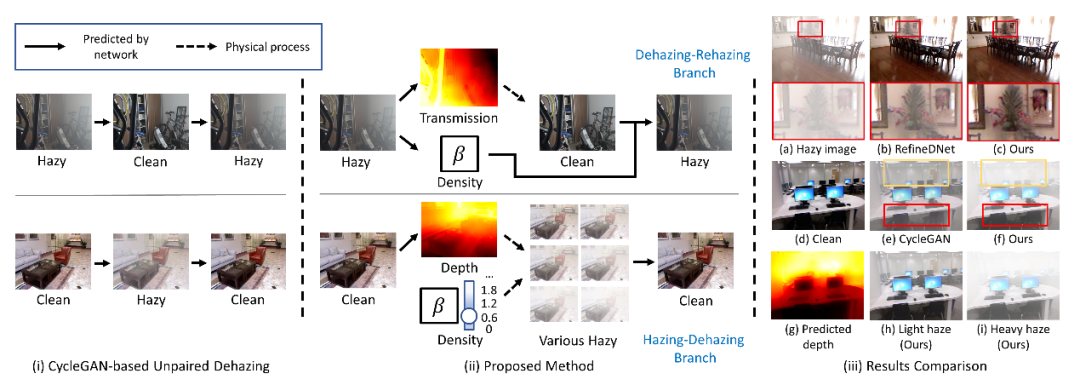
CVPR 2022 | self enhanced unpaired image defogging based on density and depth decomposition
随机推荐
Paxos 入门
金鱼哥RHCA回忆录:DO447使用Ansible与API通信--使用Ansible Tower API启动作业
y48.第三章 Kubernetes从入门到精通 -- Pod的状态和探针(二一)
Can servers bundled with flask be safely used in production- Is the server bundled with Flask safe to use in production?
Redis configuration environment variables
田溯宁投的天润云上市:市值22亿港元 年利润下降75%
树莓派4B安装tensorflow2.0[通俗易懂]
想问问,证券开户有优惠吗手机开户是安全么?
Tempest HDMI leak receive 5
(POJ - 1456) supermarket
Brief analysis of edgedb architecture
用实际例子详细探究OpenCV的轮廓检测函数findContours(),彻底搞清每个参数、每种模式的真正作用与含义
为什么一定要从DevOps走向BizDevOps?
对于mvvm和mvc的理解
VScode快捷键(最全)[通俗易懂]
8 best practices to protect your IAC security!
提问:测试工程师应该具备哪些职业素养?
Wechat applet development - user authorization to log in to "suggestions collection"
Technology sharing | introduction to linkis parameters
redis中value/String