当前位置:网站首页>Shooting games lesson 1-2: using sprites
Shooting games lesson 1-2: using sprites
2022-07-23 13:16:00 【acktomas】
Pygame The first 1-2 course : Use sprites
This is us. “ Use Pygame Develop games ” Tutorial Series No 2 part . You should start with The first 1 Part of it : introduction
What is the spirit ?
sprite Is a computer graphics term , Refers to any object that can be moved on the screen . When you play any 2D In the game , All the objects you see on the screen are sprites . Elves can be animated , They can be controlled by the player , They can even interact with each other .
We will be in the game cycle to update and draw Part is responsible for updating and drawing sprites . But you can probably imagine , If your game has a lot of sprites , Then these parts of the game cycle may become very long and complex . Fortunately, ,Pygame There is a good solution to this : Spirit group .
The elves group is just a collection of elves , You can perform all operations on them at the same time . Let's create a sprite group to save all the sprites in the game :
 clock = pygame.time.Clock()
 all_sprites = pygame.sprite.Group()
Now? , We can take advantage of this group by adding the following to the loop :
    # Update
    all_sprites.update()

    # Draw / render
    screen.fill(BLACK)
    all_sprites.draw(screen)
Now? , For every sprite we create , We just need to make sure to add it to all_sprites In the sprite group , It will automatically draw on the screen , And update each time through the cycle .
Create an elf
Now we are going to make our first elf . stay Pygame in , Elves are object . It is a convenient way to group data and code into a single entity . It may be a little confusing at first , But fortunately ,Pygame Elves are a good way to practice objects and get used to the way they work .
We first define our new elves :
class Player(pygame.sprite.Sprite):
class tell Python We are defining a new class , It will be the player spirit , The type is pygame.sprite.Sprite, That means it will be based on Pygame Predefined Sprite class
We are class The first code in the definition is __init__() Special functions , It defines what code will run whenever a new object of this type is created . Every Pygame Sprite There must also be two properties : One image And a rect :`
class Player(pygame.sprite.Sprite):
    def __init__(self):
        pygame.sprite.Sprite.__init__(self)
        self.image = pygame.Surface((50, 50))
        self.image.fill(GREEN)
        self.rect = self.image.get_rect()
first line pygame.sprite.Sprite.__init__(self) yes Pygame Necessary , It runs Built in Sprint class Initializers . Next , We define image attribute , ad locum , We're just creating one Surface, It is 50 x 50 Square and use GREEN Fill it with color . later , We will learn how to use image Create elves , For example, characters or spaceships , But now a square of fixed size is enough .
Next , We must define the spirit rect , It is “ rectangular ” Abbreviation . stay Pygame in , Rectangles are everywhere , To track the coordinates of the object .get_rect() Command calculation image The rectangular .
We can use rect Put the genie anywhere on the screen . Let the genie appear in the middle of the screen from the beginning :
class Player(pygame.sprite.Sprite):
    def __init__(self):
        pygame.sprite.Sprite.__init__(self)
        self.image = pygame.Surface((50, 50))
        self.image.fill(GREEN)
        self.rect = self.image.get_rect()
        self.rect.center = (WIDTH / 2, HEIGHT / 2)
Now we have defined Player spirit , We need to create Player Class example Come on “ Generate ” it . We also need to ensure that sprite Add to all_sprites In the group :
all_sprites = pygame.sprite.Group()
player = Player()
all_sprites.add(player)
Now? , If you run the program , You will see a green square in the center of the screen . Continue and add WIDTH``HEIGHT Set up , So that you will have enough space for the genie to move in the next step .

The spirit movement
please remember , In the game cycle , We have all_sprites.update() . This means for each sprite in the Group ,Pygame Will find a update() Function and run it . therefore , Let our elves move , We just need to define its update rules :
class Player(pygame.sprite.Sprite):
    def __init__(self):
        pygame.sprite.Sprite.__init__(self)
        self.image = pygame.Surface((50, 50))
        self.image.fill(GREEN)
        self.rect = self.image.get_rect()
        self.rect.center = (WIDTH / 2, HEIGHT / 2)

    def update(self):
        self.rect.x += 5
This means that every time you go through the game cycle , We will all be elves x Coordinates increase 5 Pixel . Keep running it , You will see the spirit disappear on the right side of the screen :

Let's solve this problem by making the spirit move around - Whenever it reaches the right side of the screen , We will all move it to the left . We can do this by rect Use a convenient “ Handle ” To do this easily :

therefore , If rect The left edge of leaves the screen , We set the right edge to 0:
class Player(pygame.sprite.Sprite):
    def __init__(self):
        pygame.sprite.Sprite.__init__(self)
        self.image = pygame.Surface((50, 50))
        self.image.fill(GREEN)
        self.rect = self.image.get_rect()
        self.rect.center = (WIDTH / 2, HEIGHT / 2)

    def update(self):
        self.rect.x += 5
        if self.rect.left > WIDTH:
            self.rect.right = 0
Now we can see that the genie will appear around the screen :
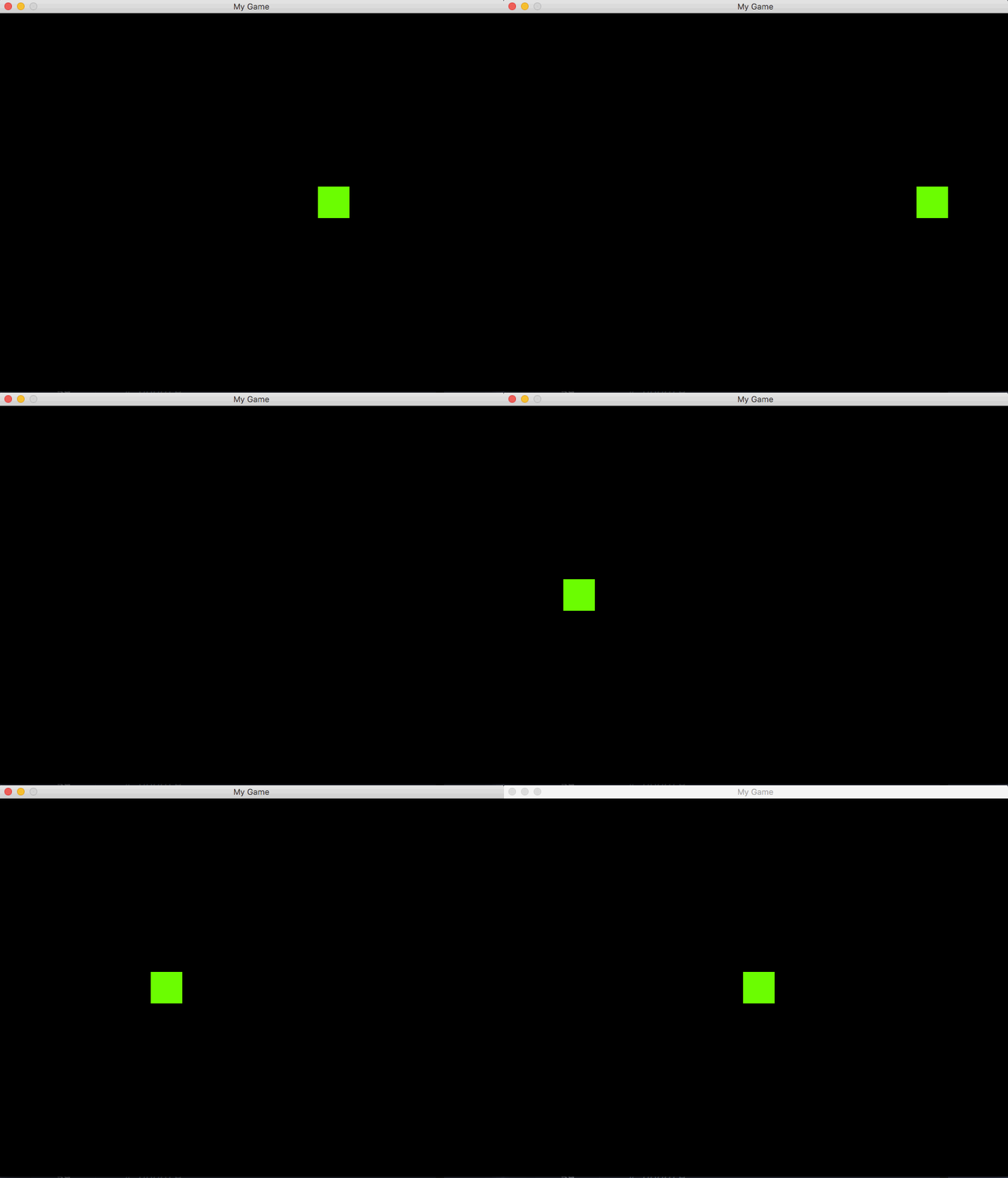
This will be done in this lesson . Continue to try to - Please note that , You are in the spirit update() Anything put into the method will happen at every frame . Try to make the spirit move up and down ( change y coordinate ) Or let it bounce off the wall ( When the rectangle reaches the edge, reverse the direction ).
In the next tutorial , We will show you how to use art for elves - Change it from a normal square to an animated character .
边栏推荐
- 信号完整性(SI)电源完整性(PI)学习笔记(三十一)电源分配网路(三)
- JVM内存模型简介
- Hcia---04 route static extension, VLAN
- 【JZOF】07 重建二叉树
- Static routing principle and configuration
- What happens when you enter the web address and the web page is displayed
- Paging collections using streams
- com.mysql.cj.jdbc.exceptions.MysqlDataTruncation: Data truncation: Truncated incorrect DOUBLE value:
- 雷达导论PART VII.4 SAR系统设计
- Why build a local Yum warehouse?
猜你喜欢

Confused, work without motivation? Career development hopeless? It's enough to read this article

OpenCV图像处理(上)几何变换+形态学操作

TI单芯片毫米波雷达代码走读(二十五)—— 角度维(3D)处理流程

Unity 模型显示到UI前面,后面的UI抖动
Summary of time complexity( Ο Is the asymptotic upper bound, Ω is the asymptotic lower bound, P, NP, NP hard, NPC problem)

What is the reason for the failure of video playback and RTMP repeated streaming on easygbs platform?

Signal integrity (SI) power integrity (PI) learning notes (32) power distribution network (4)
转行软件测试有学历要求吗?低于大专是真的没出路吗?

HCIA----07 ACL-Net

Opencv image processing (Part 2): edge detection + template matching + Hough transform
随机推荐
时间复杂度总结(Ο是渐进上界,Ω是渐进下界,p,np,np-hard,NPC问题)
How does redis implement persistence? Explain in detail the three triggering mechanisms of RDB and their advantages and disadvantages, and take you to quickly master RDB
力扣 729. 我的日程安排表 I
VLAN的划分以及通过DHCP给所有主机自动分配IP,以及通信全网可达
方法区、永久代、元空间的关系
问题解决:Script file ‘Scripts\pip-script.py‘ is not present.
射击 第 1-3 课:图像精灵
倍福PLC和C#通过ADS通信传输bool类型变量
图像处理 图像特征提取与描述
Signal integrity (SI) power integrity (PI) learning notes (XXXI) power distribution network (III)
高压MOS管KNX42150 1500V/3A 应用于变频器电源-逆变器等
Count different types of data according to different times (stored procedures)
Machine learning: Li Hang - statistical learning method (II) perceptron + code implementation (primitive + dual form)
【JZOF】07 重建二叉树
Numpy: quick start to basic operations
OpenVPN deployment
Quelle est la raison pour laquelle la plate - forme easygbs ne peut pas lire l'enregistrement vidéo et a un phénomène de streaming répété rtmp?
数据进行脱敏
Harbor deployment
Talk about study and work -- Qian Xuesen