当前位置:网站首页>Stm32cubeide1.9.0\stm32cubemx 6.5 f429igt6 plus lan8720a, configure eth+lwip
Stm32cubeide1.9.0\stm32cubemx 6.5 f429igt6 plus lan8720a, configure eth+lwip
2022-06-27 21:51:00 【Extremes will turn 1024】
Configured some time ago F107 Series and F7 Of LWIP function , Very smoothly , But here we are F4 series , choice ETH There was no PHY Address , Checked the ,MX 6.5 There are big changes , I sorted out various methods of various gods , Make one that can be used , Here I am. Cubeide For example
Cube When configuring, each peripheral chooses to generate its own .c .h Well organized
Some are generic SYS RCC Don't say anything about it , Open a serial port , Good configuration printf Function standby
1、 hardware configuration
Here we use the atomic development board ,F429IGT6+LAN8720A, The reset pin is connected to PCF8574 The seventh mouth of , Pin interface :
    PC1     ------> ETH_MDC
    PA1     ------> ETH_REF_CLK
    PA2     ------> ETH_MDIO
    PA7     ------> ETH_CRS_DV
    PC4     ------> ETH_RXD0
    PC5     ------> ETH_RXD1
    PB11     ------> ETH_TX_EN
    PG13     ------> ETH_TXD0
    PG14     ------> ETH_TXD1
PCF8574 Of IIC Interface
    PH4     ------> I2C2_SCL
    PH5     ------> I2C2_SDA
2、PCF8574 Program and configuration
2、1IIC To configure


The communication rate should not be too high , The rate I tried can
2、2 PCF8574 Program
/**********************  file name :PCF8574.c -------------------------------------------------------------  Instructions : 1、IIC IO Expansion chip  2、 Use  PCF8574_WriteBit(0, IO_Sta%2); IO_Sta++; 3、 It needs to be initialized IIC, And use a separate file  4、ETH: PCF8574_WriteBit(7,1);// Hardware reset LAN8720 HAL_Delay(50); PCF8574_WriteBit(7,0);// End reset  ------------------------------------------------------------ -------------------------------------------------------------  Running environment : ------------------------------------------------------------  edition :1.0  author :GPY  Time :2022-Jun 8, 2022-3:24:56 PM  describe :  Global variables : nothing   function :  External function : ********************************/
#include "PCF8574.h"
#include "i2c.h"

#ifdef __STM32F4xx_HAL_I2C_H

void PCF8574_WriteBit(uint8_t IO_Num,uint8_t IO_Sta)
{

	uint8_t IO_Sta_Get[2]={
    0};
	  HAL_I2C_Master_Receive(&hi2c2, 0x40, IO_Sta_Get, 1, 1000);
	  if(IO_Sta==0)// Zero clearing
	  {

		  IO_Sta_Get[0]=IO_Sta_Get[0]&(~(1<<IO_Num));
	  }else{

		  IO_Sta_Get[0]=IO_Sta_Get[0]|(1<<IO_Num);
	  }
	  HAL_I2C_Master_Transmit(&hi2c2, 0x40, IO_Sta_Get, 1, 1000);
}

uint8_t PCF8574_ReadBit(uint8_t IO_Num)
{

	uint8_t IO_Sta_Get[2]={
    0};
	HAL_I2C_Master_Receive(&hi2c2, 0x40, IO_Sta_Get, 1, 1000);
	return IO_Sta_Get[0];
}


#endif
/**********************  file name :PCF8574.h -------------------------------------------------------------  Instructions : 1、IIC IO Expansion chip  2、 Use  PCF8574_WriteBit(0, IO_Sta%2); IO_Sta++; 3、 It needs to be initialized IIC, And use a separate file  4、ETH: PCF8574_WriteBit(7,1);// Hardware reset LAN8720 HAL_Delay(50); PCF8574_WriteBit(7,0);// End reset  ------------------------------------------------------------ -------------------------------------------------------------  Running environment : ------------------------------------------------------------  edition :1.0  author :GPY  Time :2022-Jun 8, 2022-3:24:44 PM  describe :  Global variables : nothing   function :  External function : ********************************/
//#include "PCF8574.h"
#ifndef PCF8574_H_
#define PCF8574_H_

#include "main.h"


#ifdef __STM32F4xx_HAL_I2C_H

void PCF8574_WriteBit(uint8_t IO_Num,uint8_t IO_Sta);
uint8_t PCF8574_ReadBit(uint8_t IO_Num);

#endif


#endif /* PCF8574_H_ */
2、3 PCF8574 Use
ETH Add... After the pin initialization is completed
stay ethernetif.c Of documents HAL_ETH_MspInit
  /* USER CODE BEGIN ETH_MspInit 1 */
	PCF8574_WriteBit(7,1);// Hardware reset LAN8720
 	HAL_Delay(50);
	PCF8574_WriteBit(7,0);// End reset
  /* USER CODE END ETH_MspInit 1 */
3、ETH To configure
Use here LAN8720A It can be used directly LAN8742 Same register description 

Originally, this interface has a PHY Address of the , The new version is gone , This does not affect 
Direct use LAN8742A, Don't move the bottom .
Interruptions can be switched on , You can leave it alone , Suggest tick , Check the IO ETH_TXD0,EYH_TXD1 It may not be right , It is used here PG13 PG14, The speed is the highest by default 
4、LWIP To configure
There are many things to pay attention to here
Many are basically default , Here, in order to prevent any omission , I'll save all the interfaces 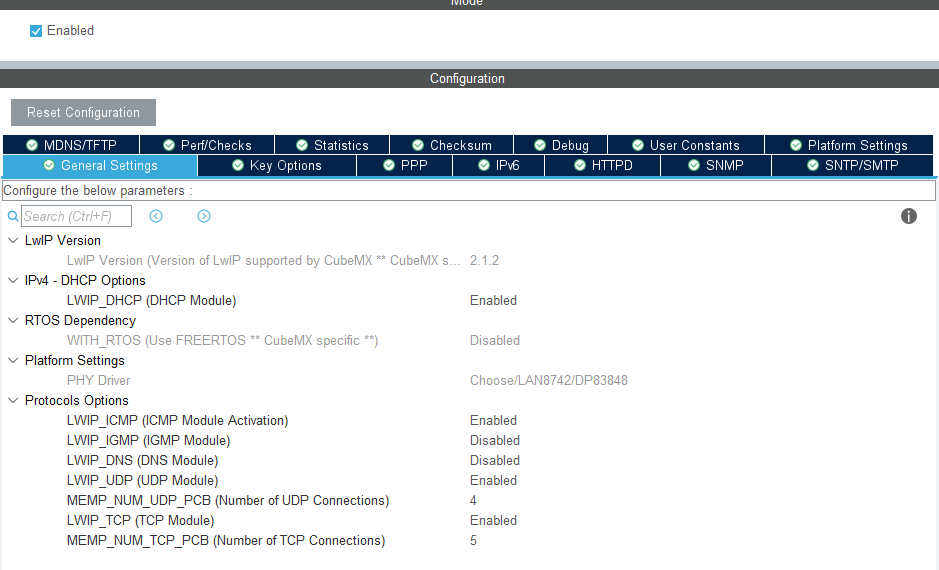
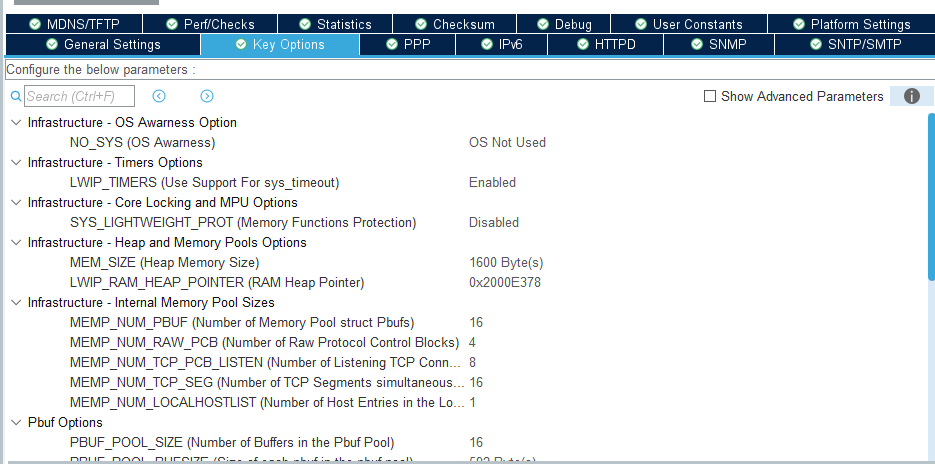


I've never opened this , Look at them all , Haven't studied 
Drive direct selection LAN8742
Then there are the things that need attention , First, remove the hardware verification 
Just remove the following two enablers , Just remove the first one and change it
Back up there Key options The part ,
This is not the default value , Turned out to be 0x30 At the beginning , It is said that from H7 Transplanted project , This address is the address of the external extension , Direct use will prompt , But I changed it here and it didn't work , Need to be in main Redefine
Assertion "netif is not up, old style port?" failed at line 744 in ../Middlewares/Third_Party/LwIP/src/core/ipv4/dhcp.c
This should be the configuration aspect , Some later changes to the program
PS: modify , This question and the following DHCP Tips "netif is not up, old style port?" Only when the program is just finished , Reset is gone , I don't know why it's unstable .
5、 Program changes
1、 redefinition PHY Address
because cube No address in the configuration interface , Then he gave it to himself LAN8742 Set an address 1u, If yours is not 1 You can redefine ,LWIP_RAM_HEAP_POINTER You can also redefine it here
int main(void)
{

  /* USER CODE BEGIN 1 */
	// redefinition PHY Address
#ifdef LAN8742A_PHY_ADDRESS
#undef LAN8742A_PHY_ADDRESS
#define LAN8742A_PHY_ADDRESS 0U
#endif

#ifdef LWIP_RAM_HEAP_POINTER
#undef LWIP_RAM_HEAP_POINTER
#define LWIP_RAM_HEAP_POINTER 0x2000E378
#endif

	uint32_t regvalue;
  /* USER CODE END 1 */
ethernetif.c Add it to the file LAN8720A Reset of
void HAL_ETH_MspInit(ETH_HandleTypeDef* ethHandle)
{

  GPIO_InitTypeDef GPIO_InitStruct = {
    0};
  if(ethHandle->Instance==ETH)
  {

  /* USER CODE BEGIN ETH_MspInit 0 */

  /* USER CODE END ETH_MspInit 0 */
    /* Enable Peripheral clock */
    __HAL_RCC_ETH_CLK_ENABLE();

    __HAL_RCC_GPIOC_CLK_ENABLE();
    __HAL_RCC_GPIOA_CLK_ENABLE();
    __HAL_RCC_GPIOB_CLK_ENABLE();
    __HAL_RCC_GPIOG_CLK_ENABLE();
    /**ETH GPIO Configuration PC1 ------> ETH_MDC PA1 ------> ETH_REF_CLK PA2 ------> ETH_MDIO PA7 ------> ETH_CRS_DV PC4 ------> ETH_RXD0 PC5 ------> ETH_RXD1 PB11 ------> ETH_TX_EN PG13 ------> ETH_TXD0 PG14 ------> ETH_TXD1 */
    GPIO_InitStruct.Pin = GPIO_PIN_1|GPIO_PIN_4|GPIO_PIN_5;
    GPIO_InitStruct.Mode = GPIO_MODE_AF_PP;
    GPIO_InitStruct.Pull = GPIO_NOPULL;
    GPIO_InitStruct.Speed = GPIO_SPEED_FREQ_VERY_HIGH;
    GPIO_InitStruct.Alternate = GPIO_AF11_ETH;
    HAL_GPIO_Init(GPIOC, &GPIO_InitStruct);

    GPIO_InitStruct.Pin = GPIO_PIN_1|GPIO_PIN_2|GPIO_PIN_7;
    GPIO_InitStruct.Mode = GPIO_MODE_AF_PP;
    GPIO_InitStruct.Pull = GPIO_NOPULL;
    GPIO_InitStruct.Speed = GPIO_SPEED_FREQ_VERY_HIGH;
    GPIO_InitStruct.Alternate = GPIO_AF11_ETH;
    HAL_GPIO_Init(GPIOA, &GPIO_InitStruct);

    GPIO_InitStruct.Pin = GPIO_PIN_11;
    GPIO_InitStruct.Mode = GPIO_MODE_AF_PP;
    GPIO_InitStruct.Pull = GPIO_NOPULL;
    GPIO_InitStruct.Speed = GPIO_SPEED_FREQ_VERY_HIGH;
    GPIO_InitStruct.Alternate = GPIO_AF11_ETH;
    HAL_GPIO_Init(GPIOB, &GPIO_InitStruct);

    GPIO_InitStruct.Pin = GPIO_PIN_13|GPIO_PIN_14;
    GPIO_InitStruct.Mode = GPIO_MODE_AF_PP;
    GPIO_InitStruct.Pull = GPIO_NOPULL;
    GPIO_InitStruct.Speed = GPIO_SPEED_FREQ_VERY_HIGH;
    GPIO_InitStruct.Alternate = GPIO_AF11_ETH;
    HAL_GPIO_Init(GPIOG, &GPIO_InitStruct);

    /* Peripheral interrupt init */
    HAL_NVIC_SetPriority(ETH_IRQn, 0, 0);
    HAL_NVIC_EnableIRQ(ETH_IRQn);
  /* USER CODE BEGIN ETH_MspInit 1 */
	PCF8574_WriteBit(7,1);// Hardware reset LAN8720
 	HAL_Delay(50);
	PCF8574_WriteBit(7,0);// End reset
  /* USER CODE END ETH_MspInit 1 */
  }
}
lwipopts.h Add debugging information , This is very useful
/* USER CODE BEGIN 1 */
#define LWIP_DEBUG 1
#if LWIP_DEBUG
#define LWIP_DBG_TYPES_ON LWIP_DBG_ON
/* USER CODE BEGIN 1 */
#define LWIP_DBG_MIN_LEVEL LWIP_DBG_LEVEL_OFF
//#define LWIP_DBG_MIN_LEVEL LWIP_DBG_LEVEL_WARNING
//#define LWIP_DBG_MIN_LEVEL LWIP_DBG_LEVEL_SERIOUS
//#define LWIP_DBG_MIN_LEVEL LWIP_DBG_LEVEL_SEVERE

#define LWIP_DBG_TYPES_ON LWIP_DBG_ON
//#define LWIP_DBG_TYPES_ON (LWIP_DBG_ON|LWIP_DBG_TRACE|LWIP_DBG_STATE|LWIP_DBG_FRESH)

#define ETHARP_DEBUG LWIP_DBG_ON
#define NETIF_DEBUG LWIP_DBG_ON
#define PBUF_DEBUG LWIP_DBG_ON
#define API_LIB_DEBUG LWIP_DBG_ON
#define API_MSG_DEBUG LWIP_DBG_ON
#define SOCKETS_DEBUG LWIP_DBG_ON
#define ICMP_DEBUG LWIP_DBG_ON
#define IGMP_DEBUG LWIP_DBG_ON
#define INET_DEBUG LWIP_DBG_ON
#define IP_DEBUG LWIP_DBG_ON
#define IP_REASS_DEBUG LWIP_DBG_ON
#define RAW_DEBUG LWIP_DBG_ON
#define MEM_DEBUG LWIP_DBG_ON
#define MEMP_DEBUG LWIP_DBG_ON
#define SYS_DEBUG LWIP_DBG_ON
#define TCP_DEBUG LWIP_DBG_ON
#define TCP_INPUT_DEBUG LWIP_DBG_ON
#define TCP_FR_DEBUG LWIP_DBG_ON
#define TCP_RTO_DEBUG LWIP_DBG_ON
#define TCP_CWND_DEBUG LWIP_DBG_ON
#define TCP_WND_DEBUG LWIP_DBG_ON
#define TCP_OUTPUT_DEBUG LWIP_DBG_ON
#define TCP_RST_DEBUG LWIP_DBG_ON
#define TCP_QLEN_DEBUG LWIP_DBG_ON
#define UDP_DEBUG LWIP_DBG_ON
#define TCPIP_DEBUG LWIP_DBG_ON
#define PPP_DEBUG LWIP_DBG_ON
#define SLIP_DEBUG LWIP_DBG_ON
#define DHCP_DEBUG LWIP_DBG_ON
#define AUTOIP_DEBUG LWIP_DBG_ON
#define SNMP_MSG_DEBUG LWIP_DBG_ON
#define SNMP_MIB_DEBUG LWIP_DBG_ON
#define DNS_DEBUG LWIP_DBG_ON
#endif //LWIP_DEBUG
/* USER CODE END 1 */
main Add it to the function MX_LWIP_Process();
	while (1)
	{

    /* USER CODE END WHILE */

    /* USER CODE BEGIN 3 */
		MX_LWIP_Process();
		if (TIM_N_10ms > 50)
		{

			TIM_N_10ms = 0;
			HAL_GPIO_TogglePin(LED_R_GPIO_Port, LED_R_Pin);
		}
	}
It's almost over , I have another question here , Use DHCP Automatic access to IP When , If you do not print debugging information, you will not get IP, This may be related to the retry time , Phenomena and LAN8720A Communication failure is the same , I will study it later .
Common error tips
Assertion "netif is not up, old style port?" failed at line 744 in ../Middlewares/Third_Party/LwIP/src/core/ipv4/dhcp.c
If DHCP Automatic access to IP Always remind you if you are an old device , You can use static first IP
6、 ETH Debugging skills
I've been working on LWIP Various transplants , Although I have failed all the time , But look at other people's examples , As long as the operating environment is OK ,LWIP There is no difficulty in migrating libraries , I also tried to change the program after successful transplantation Lwip library No mistake . Mainly PHY The interface must be connected , That is, the hardware interface , Here is a verification PHY How to adjust the hardware
First of all HAL library , Direct reading LAN8720A Each register of , If you don't adjust it properly , The return values of all registers will cause 0XFFFF perhaps 0x0000
printf("F429IG LWIP LAN8720A %s\r\n", __TIME__);
printf("LAN8742A_PHY_ADDRESS %d \r\n", LAN8742A_PHY_ADDRESS);
HAL_ETH_ReadPHYRegister(&heth, LAN8742A_PHY_ADDRESS, PHY_BCR, ®value);
printf("PHY_BCR %d: %X\r\n", PHY_BCR, (unsigned int) regvalue);
HAL_ETH_ReadPHYRegister(&heth, LAN8742A_PHY_ADDRESS, PHY_BSR, ®value);
printf("PHY_BSR %d: %X\r\n", PHY_BSR, (unsigned int) regvalue);
HAL_ETH_ReadPHYRegister(&heth, LAN8742A_PHY_ADDRESS, 2, ®value);
printf("PHY 1 %d: %X\r\n", 2, (unsigned int) regvalue);
HAL_ETH_ReadPHYRegister(&heth, LAN8742A_PHY_ADDRESS, 3, ®value);
printf("PHY2 %d: %X\r\n", 3, (unsigned int) regvalue);
HAL_ETH_ReadPHYRegister(&heth, LAN8742A_PHY_ADDRESS, 4, ®value);
printf(" %d: %X\r\n", 4, (unsigned int) regvalue);
HAL_ETH_ReadPHYRegister(&heth, LAN8742A_PHY_ADDRESS, 5, ®value);
printf(" %d: %X\r\n", 5, (unsigned int) regvalue);
HAL_ETH_ReadPHYRegister(&heth, LAN8742A_PHY_ADDRESS, 6, ®value);
printf(" %d: %X\r\n", 6, (unsigned int) regvalue);
HAL_ETH_ReadPHYRegister(&heth, LAN8742A_PHY_ADDRESS, 17, ®value);
printf(" %d: %X\r\n", 17, (unsigned int) regvalue);
HAL_ETH_ReadPHYRegister(&heth, LAN8742A_PHY_ADDRESS, 18, ®value);
printf(" %d: %X\r\n", 18, (unsigned int) regvalue);
HAL_ETH_ReadPHYRegister(&heth, LAN8742A_PHY_ADDRESS, 26, ®value);
printf(" %d: %X\r\n", 26, (unsigned int) regvalue);
HAL_ETH_ReadPHYRegister(&heth, LAN8742A_PHY_ADDRESS, 27, ®value);
printf(" %d: %X\r\n", 27, (unsigned int) regvalue);
HAL_ETH_ReadPHYRegister(&heth, LAN8742A_PHY_ADDRESS, 29, ®value);
printf(" %d: %X\r\n", 29, (unsigned int) regvalue);
HAL_ETH_ReadPHYRegister(&heth, LAN8742A_PHY_ADDRESS, 30, ®value);
printf(" %d: %X\r\n", 30, (unsigned int) regvalue);
HAL_ETH_ReadPHYRegister(&heth, LAN8742A_PHY_ADDRESS, 31, ®value);
printf(" %d: %X\r\n-------------------------------------------\r\n", 31,
(unsigned int) regvalue);
The old version of F1
printf("-------------------------------------\r\n");
			regvalue=ETH_ReadPHYRegister(LAN8720_PHY_ADDRESS, PHY_BCR);
			printf("PHY_BCR %d;%X\r\n",PHY_BCR,regvalue);
			regvalue=ETH_ReadPHYRegister(LAN8720_PHY_ADDRESS, PHY_BSR);
			printf("PHY_BSR %d;%X\r\n",PHY_BSR,regvalue);
			regvalue=ETH_ReadPHYRegister(LAN8720_PHY_ADDRESS, 2);
			printf("%d;%X\r\n",2,regvalue);
			regvalue=ETH_ReadPHYRegister(LAN8720_PHY_ADDRESS, 3);
			printf("%d;%X\r\n",3,regvalue);
			regvalue=ETH_ReadPHYRegister(LAN8720_PHY_ADDRESS, 4);
			printf("%d;%X\r\n",4,regvalue);
			regvalue=ETH_ReadPHYRegister(LAN8720_PHY_ADDRESS, 5);
			printf("%d;%X\r\n",5,regvalue);
			regvalue=ETH_ReadPHYRegister(LAN8720_PHY_ADDRESS, 6);
			printf("%d;%X\r\n",6,regvalue);
			regvalue=ETH_ReadPHYRegister(LAN8720_PHY_ADDRESS, 17);
			printf("%d;%X\r\n",17,regvalue);
			regvalue=ETH_ReadPHYRegister(LAN8720_PHY_ADDRESS, 18);
			printf("%d;%X\r\n",18,regvalue);
			regvalue=ETH_ReadPHYRegister(LAN8720_PHY_ADDRESS, 26);
			printf("%d;%X\r\n",26,regvalue);
			regvalue=ETH_ReadPHYRegister(LAN8720_PHY_ADDRESS, 27);
			printf("%d;%X\r\n",27,regvalue);
			regvalue=ETH_ReadPHYRegister(LAN8720_PHY_ADDRESS, 29);
			printf("%d;%X\r\n",29,regvalue);
			regvalue=ETH_ReadPHYRegister(LAN8720_PHY_ADDRESS, 30);
			printf("%d;%X\r\n",30,regvalue);
			regvalue=ETH_ReadPHYRegister(LAN8720_PHY_ADDRESS, 31);
			printf("%d;%X\r\n",31,regvalue);
边栏推荐
- Go from introduction to practice - Interface (notes)
- Special tutorial - Captain selection game
- Go from introduction to practice - polymorphism (note)
- excel读取文件内容方法
- Little known MySQL import data
- The difference between scrum and Kanban
- 01-Golang-环境搭建
- [LeetCode]30. 串联所有单词的子串
- SQL必需掌握的100个重要知识点:用通配符进行过滤
- SQL必需掌握的100个重要知识点:排序检索数据
猜你喜欢

熊市慢慢,Bit.Store提供稳定Staking产品助你穿越牛熊

win11桌面出现“了解此图片”如何删除

Go从入门到实战——Panic和recover(笔记)

SQL必需掌握的100个重要知识点:排序检索数据

跟我一起AQS SOS AQS
Go从入门到实战——行为的定义和实现(笔记)

100 important knowledge points that SQL must master: using functions to process data

快递e栈——数组篇小型项目
富文本 考试 填空题
![[leetcode] dynamic programming solution partition array i[red fox]](/img/b2/df87c3138c28e83a8a58f80b2938b8.png)
[leetcode] dynamic programming solution partition array i[red fox]
随机推荐
100 important knowledge points that SQL must master: creating calculation fields
GBase 8a数据库用户密码安全相关参数汇总
Quick excel export according to customized excel Title Template
100 important knowledge points for SQL: in operator
Go从入门到实战——仅需任意任务完成(笔记)
MYSQL和MongoDB的分析
qt base64加解密
Go from introduction to actual combat -- channel closing and broadcasting (notes)
Go from introduction to actual combat - all tasks completed (notes)
Codeforces Global Round 14
石子合并问题分析
Installing Oracle11g under Linux
于文文、胡夏等明星带你玩转派对 皮皮APP点燃你的夏日
[leetcode] dynamic programming solution partition array ii[arctic fox]
Knowledge sorting of exception handling
【MySQL】数据库函数通关教程下篇(窗口函数专题)
[leetcode] 508. Élément de sous - arbre le plus fréquent et
[LeetCode]动态规划解分割数组I[Red Fox]
"Apprendre cette image" apparaît sur le Bureau win11 comment supprimer
本周二晚19:00战码先锋第8期直播丨如何多方位参与OpenHarmony开源贡献