当前位置:网站首页>网络远程访问的方式使用树莓派
网络远程访问的方式使用树莓派
2022-06-25 12:52:00 【dedsec0x】
一、软件准备
1.树莓派镜像
官网:Raspberry Pi OS – Raspberry Pi
2.SDCardFormatterv5
SD Memory Card Formatter | SD Association (sdcard.org)
3.烧录工具Raspberry Pi
4.putty
Download PuTTY: latest release (0.77) (greenend.org.uk)
二、操作
SD卡格式化
打开下载好的SDCardFormatter将我们的SD卡进行格式化

格式化成功


烧录
打开我们的烧录工具,依次选择我们要烧录的镜像和烧录的SD卡点击烧录就可以了

等待了一段时间之后烧录成功

网络配置
打开SD卡,在boot目录建立一个SSH文件
建立一个空文本文件wpa_supplicant.conf
在文本中输入
country=CN
ctrl_interface=DIR=/var/run/wpa_supplicant GROUP=netdev
update_config=1

network={
	ssid="你的无线网名称"
	psk="你的无线网密码"
	key_mgmt=WPA-PSK
	priority=1
}

将SD卡拔出插入树莓派并给树莓派接上电源,可以在手机上看到树莓派已经连入,查看树莓派的ip地址,可以下载一个Advanced IP Scanner,打开终端输入ipconfig,查看无线热点的IP地址,然后在IP Scanner中搜索


确保我们电脑连接的也是手机热点,看到ip地址是192.168.79.57,在搜索时搜索192.168.79.1-255
这样就找到我们树莓派的IP地址了

putty远程连接
打开putty,在putty中输入刚才的ip,然后建立连接,输入默认的用户密码
默认的用户:pi
默认的密码:raspberry
如果默认的账号密码不对,可以在boot中建立一个userconf.txt文件,此文件是单行文本,由 username:用户名内容-password:密码 组成——即想要的用户名,紧跟一个冒号,紧跟一个要使用的密码的加密表示。
或者在开始写入镜像的时候配置账号和密码

然后再次输入我们的账号密码就进入系统了

进行树莓派配置sudo raspi-config 
然后选择interface options

打开VNC服务

然后打开VNC Viewer
输入树莓派的ip,然后输入账户和密码

这样就成功了。
三、创建账号并在个人文件夹中创建assert断言c程序
创建用户
打开终端输入命令
su -
useradd -m -s /bin/bash 用户名

//密码设置
passwd 用户名
权限不够的时候在 su前面加上sudo即可
然后进入创建的文件夹/home/用户名/中
创建文件assert.c,在文件中输入
#include <assert.h>
#include <stdio.h>

int main()
{
   int a;
   char str[50];

   printf("请输入一个整数值: ");
   scanf("%d", &a);
   assert(a >= 10);

   printf("输入的整数是: %d\n", a);

   printf("请输入字符串: ");
   scanf("%s", str);
   assert(str != NULL);

   printf("输入的字符串是: %s\n", str);

   return(0);
}
如果无法创建文件可以使用命令
sudo chmod -R 777 /工作目录
touch assert.c
vim asssert.c
然后就可以编辑了

然后就是使用gcc编译了

四、使用scp命令在两台Linux系统之间传输数据
scp
scp是secure copy的简写, 是 linux 系统下基于 ssh 登陆进行安全的远程文件拷贝命令。scp 是加密的,rcp 是不加密的,scp 是 rcp 的加强版。
因为scp传输是加密的,可能会稍微影响一下速度。另外,scp还非常不占资源,不会提高多少系统负荷,在这一点上,rsync就远远不及它了。虽然 rsync比scp会快一点,但当小文件众多的情况下,rsync会导致硬盘I/O非常高,而scp基本不影响系统正常使用。
基本语法shi
scp [-1246BCpqrv] [-c cipher] [-F ssh_config] [-i identity_file]
[-l limit] [-o ssh_option] [-P port] [-S program]
[[[email protected]]host1:]file1 [...] [[[email protected]]host2:]file2


//参数说明
-1: 强制scp命令使用协议ssh1
-2: 强制scp命令使用协议ssh2
-4: 强制scp命令只使用IPv4寻址
-6: 强制scp命令只使用IPv6寻址
-B: 使用批处理模式(传输过程中不询问传输口令或短语)
-C: 允许压缩。(将-C标志传递给ssh,从而打开压缩功能)
-p: 保留原文件的修改时间,访问时间和访问权限。
-q: 不显示传输进度条。
-r: 递归复制整个目录。
-v: 详细方式显示输出。scp和ssh(1)会显示出整个过程的调试信息。这些信息用于调试连接,验证和配置问题。
-c cipher:        以cipher将数据传输进行加密,这个选项将直接传递给ssh。
-F ssh_config:    指定一个替代的ssh配置文件,此参数直接传递给ssh。
-i identity_file: 从指定文件中读取传输时使用的密钥文件,此参数直接传递给ssh。
-l limit:         限定用户所能使用的带宽,以Kbit/s为单位。
-o ssh_option:    如果习惯于使用ssh_config(5)中的参数传递方式,
-P port:          注意是大写的P, port是指定数据传输用到的端口号
-S program:       指定加密传输时所使用的程序。此程序必须能够理解ssh(1)的选项。
实例
分别在虚拟机和树莓派上下载ssh

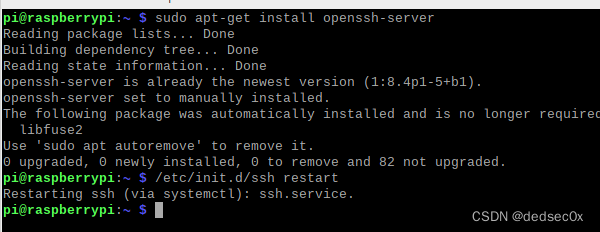
把树莓派上之前练习的assert.c文件上传到虚拟机中
scp -r [email protected]:/home/lm/assert.c ./
完成

五、参考
(126条消息) 树莓派无需显示屏的VNC Viewer方式的远程连接_HarrietLH的博客-CSDN博客_树莓派无屏幕vnc
边栏推荐
- Sword finger offer II 028 Flatten multi-level bidirectional linked list
- Fedora 35 deploys DNS master-slave and separation resolution -- the way to build a dream
- Method for wrapping multiple promise instances into a new promise instance
- Sword finger offer II 032 Effective anagrams
- The starting point for learning programming.
- [machine learning] what is machine learning?
- Confusion caused by the ramp
- 关于一道教材题的讲解
- Golang keyboard input statement scanln scanf code example
- NR-ARFCN和信道栅格、同步栅格和GSCN
猜你喜欢

“移动云杯”算力网络应用创新大赛火热报名中!

关于一个图书小系统的实现

关于数据在内存中存储的相关例题
![[data visualization] antv L7 realizes map visualization, drilldownlayer drill asynchronously obtains data, and suspends the warning box](/img/81/f8280f16efa314d736c3a869c32ef0.jpg)
[data visualization] antv L7 realizes map visualization, drilldownlayer drill asynchronously obtains data, and suspends the warning box

关于三子棋游戏的简易实现与N子棋胜利判断方法

Cesium learning notes
Implementation of a small book system

[pit avoidance means "difficult"] to realize editable drag and drop sorting of protable
![[machine learning] parameter learning and gradient descent](/img/28/bb0a66b5f0702c995ca9cd7546b678.jpg)
[machine learning] parameter learning and gradient descent
1251- client does not support authentication protocol MySQL error resolution
随机推荐
1251- client does not support authentication protocol MySQL error resolution
Conway's law can not be flexibly applied as an architect?
Maui的学习之路(二)--设置
论文阅读:Graph Contrastive Learning with Augmentations
On the simple realization of Sanzi chess game and the method of judging the victory of n-zi chess
Explanation of a textbook question
Stockage des données en mémoire
Related examples of data storage in memory
Introduction to string 18 lectures Collection 4
Insight into heap and stack stored in new string() /string() in JS
中国虚拟人哪家强?沙利文、IDC:小冰百度商汤位列第一梯队
15 basic SEO skills to improve ranking
Fedora 35 deploys DNS master-slave and separation resolution -- the way to build a dream
The priority of catch() and then (..., ERR) of promise
关于三子棋游戏的简易实现与N子棋胜利判断方法
Fedora 35 部署DNS主从和分离解析 —— 筑梦之路
Golang keyboard input statement scanln scanf code example
关于猜数字游戏的实现
Leetcode: Sword finger offer II 091 Painting house [2D DP]
Detailed explanation of string operation functions and memory functions