当前位置:网站首页>Zabbix部署说明(Server+Win客户端+交换机(H3C))
Zabbix部署说明(Server+Win客户端+交换机(H3C))
2022-06-27 07:59:00 【dog6507371】
部署Zabbix踩过几个坑,这篇文档比较详细的记录了部署的说明,也在每个步骤都有截图,比较适合新手操作。
服务器部署
环境准备:
Centos 7.0 X64
Shell登录root用户
1.关闭防火墙:
sed -i 's/SELINUX=enforcing/SELINUX=disabled/' /etc/selinux/config
systemctl disable --now firewalld

2.获取zabbix的下载源
rpm -Uvh https://repo.zabbix.com/zabbix/5.0/rhel/7/x86_64/zabbix-release-5.0-1.el7.noarch.rpm

3.更换zabbix.repo源,为阿里
sed -i 's#http://repo.zabbix.com#https://mirrors.aliyun.com/zabbix#' /etc/yum.repos.d/zabbix.repo
5.清空缓存,下载zabbix服务端
yum clean all

yum makecache

yum install zabbix-server-mysql zabbix-agent –y
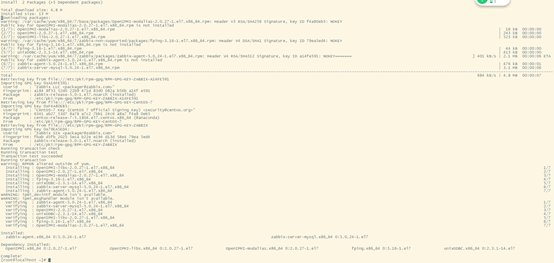
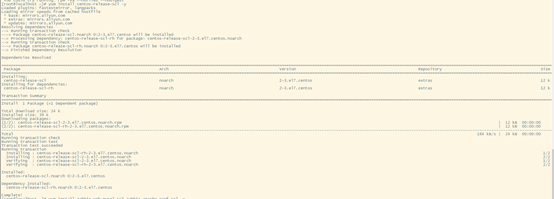
6.安装工具,可以在机器上,使用多个版本的软件,并且不会影响整个系统的依赖环境
yum install centos-release-scl -y
7.更改zabbix.repo中zabbix-frontend的数值
vi /etc/yum.repos.d/zabbix.repo
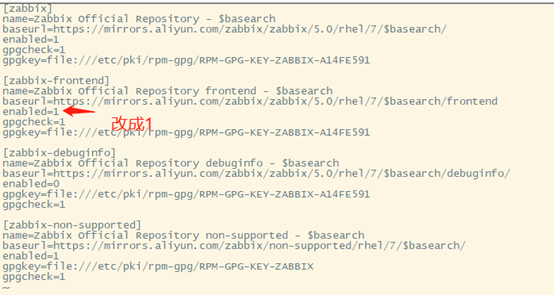
改完之后esx :wq 保存退出
8.安装zabbix前端环境,且是安装到scl环境下

yum install zabbix-web-mysql-scl zabbix-apache-conf-scl –y
9.安装zabbix所需的数据库,mariadb
yum install mariadb-server –y

10.配置数据库开机启动
systemctl enable --now mariadb

11.初始化数据库,并设置密码
mysql_secure_installation

mysql -u root -p 进入mysql数据库 输入密码
12.添加数据库用户 ##以下操作为数据库操作
# 进入数据库,创建一个zabbix数据库:
create database zabbix character set utf8 collate utf8_bin;
# 创建一个zabbix用户,密码123
create user [email protected] identified by '123';
# 修改权限
grant all privileges on zabbix.* to [email protected];
#退出
\quit
13.使用zabbix-mysql命令,导入数据库信息
# mysql -u 用户名 -p 数据库名
zcat /usr/share/doc/zabbix-server-mysql*/create.sql.gz | mysql -u zabbix -p zabbix
#输入密码123

14.修改zabbix server配置文件,修改数据库密码
# 进入/etc/zabbix/zabbix_server.conf中,修改DBPassword为数据库密码
vim /etc/zabbix/zabbix_server.conf
DBPassword=123

# 查看修改是否成功
grep '^DBPass' /etc/zabbix/zabbix_server.conf
15.修改zabbix PHP的配置文件
#进入/etc/opt/rh/rh-php72/php-fpm.d/zabbix.conf中最后一行改成php_value[date.timezone] = Asia/Shanghai

Vi /etc/opt/rh/rh-php72/php-fpm.d/zabbix.conf
systemctl restart rh-php72-php-fpm #重启PHP服务
16.启动zabbix相关服务器
systemctl restart zabbix-server zabbix-agent httpd rh-php72-php-fpm
systemctl enable zabbix-server zabbix-agent httpd rh-php72-php-fpm
17.访问zabbix入口
本机ip/zabbix
18.安装成功后默认用户名:Admin,密码是:zabbix
安装客户端
客户端安装(Win版本)
1、官网下载客户端
https://www.zabbix.com/cn/download_agents
2、安装客户端,更新配置信息
安装目录下conf文件编辑配置如下
# This is a configuration file for Zabbix agent service (Windows)
# To get more information about Zabbix, visit http://www.zabbix.com
LogFile=C:\Program Files\Zabbix Agent\zabbix_agentd.log #Log文件地址
Server=192.168.11.159 #服务器地址
ListenPort=10050
ServerActive=192.168.11.159 #服务器地址
Hostname=192.168.10.113 #客户端主机IP
Include=C:\Program Files\Zabbix Agent\zabbix_agentd.d\
3、服务端增加主机即可 主机名输入计算机名 IP地址输入IP地址 稍等几分钟自动添加成功
H3C交换机部署说明
开启snmp功能命令
Systemview视图:
snmp-agent
snmp-agent sys-info version v2
显示信息:SNMPv1 and SNMPv2c are insecure because they transmit the community string and data in plaintext form.
snmp-agent community read public
snmp-agent sys-info version v2c v3
显示信息:SNMPv1 and SNMPv2c are insecure because they transmit the community string and data in plaintext form.
snmp-agent trap enable
snmp-agent target-host trap address udp-domain 192.168.11.159 udp-port 161 params securityname public v2c
#192.168.11.159为zabbix的IP地址
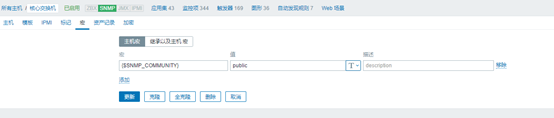
Zabbix添加主机如下图所示


边栏推荐
- 认识O(NlogN)的排序
- 什么是期货反向跟单?
- Preliminary understanding of C #
- R language analyzing wine data
- 2、项目使用的QT组件
- SQL Sever column name or number of supplied values does not match the table definition
- Rust async: SMOL source code analysis -executor
- JS to judge the odd and even function and find the function of circular area
- Error in idea connection database
- Win10 how to manage startup items?
猜你喜欢
![[c++ primer notes] Chapter 4 expression](/img/cb/d543dd1f461653e9adf399b42d1d26.png)
[c++ primer notes] Chapter 4 expression
![[batch dos-cmd command - summary and summary] - output / display command - echo](/img/44/cddad70eeb756db15c19100c25c61a.png)
[batch dos-cmd command - summary and summary] - output / display command - echo
【c ++ primer 笔记】第4章 表达式

野风药业IPO被终止:曾拟募资5.4亿 实控人俞蘠曾进行P2P投资

js用switch语句根据1-7输出对应英文星期几
Win10 how to manage startup items?

洛谷刷题心得记录

js判断用户输入的数是否为质数(多种方法)

cookie加密7 fidder分析阶段

八大误区,逐个击破(终篇):云难以扩展、定制性差,还会让管理员失去控制权?
随机推荐
Publications under nature, science and cell
[batch dos-cmd command - summary and summary] - output / display command - echo
js用while循环计算假如投资多年的利率为5%,试求从1000块增长到5000块,需要花费多少年
How can I import data from Oracle into fastdfs?
JS uses the while cycle to calculate how many years it will take to grow from 1000 yuan to 5000 yuan if the interest rate for many years of investment is 5%
What is futures reverse documentary?
Win10 how to manage startup items?
Error in idea connection database
All tutor information on one page
Rust async: SMOL source code analysis -executor
JS print 99 multiplication table
【批处理DOS-CMD命令-汇总和小结】-输出/显示命令——echo
R language analyzing wine data
[notes on c++ primer] Chapter 3 string, vector and array
LVGL GUI GUIDER移植代码到STM32
Recognize the ordering of O (nlogn)
Multi table associated query -- 07 -- hash join
[c++ primer notes] Chapter 4 expression
SQL attendance query interval: one hour
【13. 二进制中1的个数、位运算】