当前位置:网站首页>Opencv's practical learning of credit card recognition (4)
Opencv's practical learning of credit card recognition (4)
2022-07-28 07:52:00 【MioeC】
List of articles
Effect display

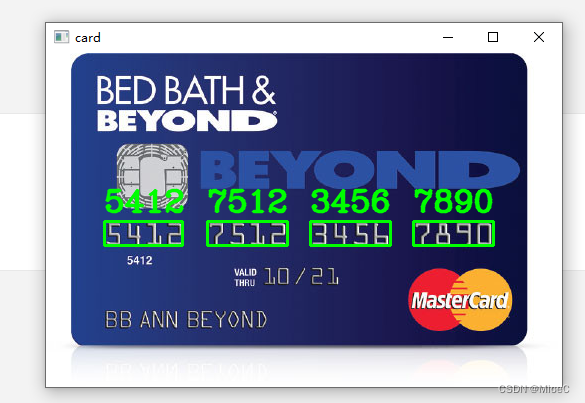
Process introduction
- First process the picture , Extract the digital part
- Divide the four numbers , And match the template
- Deal with numbers and areas , Marked on the original drawing
step
Do image processing
- The picture is too big , Need to zoom , When marking later, you need to zoom back .
- Perform a capping operation , Expansion characteristics
- use sobel Edge detection , It's used here x Direction detection , Then normalize , Control the value to 255 Inside
sobelX = cv.Sobel(top_hat, cv.CV_32F, 1, 0)
- cv_32F The goal is 32 Bit signed floating point number , because sobel The operator is to subtract the left from the right , It could be a negative number , So keep positive and negative numbers , Then perform the absolute value operation
sobelX = np.absolute(sobelX)
(min, max) = (np.min(top_hat), np.max(top_hat))
sobelX = (255 * ((sobelX - min)/ (max - min)))
sobelX = sobelX.astype('uint8')
- Carry out one-step closing operation , Remove noise
- Binary operation
- Do the closing operation , Connect into blocks
- Edge detection
- Filter selection area
- Carry out digital region segmentation and extraction
- Digital content recognition
def find_num(ori_path):
    card_path = ori_path

    card_img = cv.imread(card_path)
    card_img = cv.resize(card_img, None, fx=0.7, fy=0.7)
    #  Graying
    card_gray = cv.cvtColor(card_img, cv.COLOR_BGR2GRAY)
    kernel = cv.getStructuringElement(cv.MORPH_RECT, (5, 5))
    rectKernel = cv.getStructuringElement(cv.MORPH_RECT, (13, 3))
    top_hat = cv.morphologyEx(card_gray, cv.MORPH_TOPHAT, kernel)
    #  operator sobel
    sobelX = cv.Sobel(top_hat, cv.CV_32F, 1, 0)

    sobelX = np.absolute(sobelX)
    (min, max) = (np.min(top_hat), np.max(top_hat))
    sobelX = (255 * ((sobelX - min)/ (max - min)))
    sobelX = sobelX.astype('uint8')
    #  Two valued
    card_close = cv.morphologyEx(sobelX, cv.MORPH_CLOSE, rectKernel)
    ret, threshold = cv.threshold(card_close, 0, 255, cv.THRESH_BINARY | cv.THRESH_OTSU)

    card_gray = cv.morphologyEx(threshold, cv.MORPH_CLOSE, kernel, iterations=1)

    contours, hierachy = cv.findContours(card_gray, cv.RETR_TREE, cv.CHAIN_APPROX_SIMPLE)
    # cv.drawContours(card_img, contours, -1, (0, 255, 0), 4)
    list = []

    for cont in contours:
        #  Draw a rectangular
        x, y, w, h = cv.boundingRect(cont)
        rate = w/h
        if 2.7 < rate < 3.5:
            if (50 < w < 95) and (10 < h < 40):
                # rect = cv.rectangle(card_img, (x, y), (x+w, y+h), (0, 255, 0), 1)
                # cv.imshow('card1', card_img[y: y + h, x: x + w])
                list.append(([x, y, w, h], card_img[y: y + h, x: x + w]))
    #  Sort from left to right
    list = sorted(list, key= lambda a: a[0][0])
    num_list = []
    for cont, img in list:
        four_list = ""
        img1 = cv.cvtColor(img, cv.COLOR_BGR2GRAY)
        ret, img1 = cv.threshold(img1, 0, 255,  cv.THRESH_BINARY | cv.THRESH_OTSU)
        contours1, hierachy = cv.findContours(img1, cv.RETR_EXTERNAL, cv.CHAIN_APPROX_SIMPLE)
        # cv.drawContours(img, contours1, -1, (0, 255, 0), 1)
        temp_list = []
        for cont1 in contours1:
            #  Draw a rectangle
            x, y, w, h = cv.boundingRect(cont1)
            rect = cv.rectangle(img1, (x, y), (x+w, y+h), (0, 255, 0), 1)

            rect1 = img1[y: y + h , x : x + w ]
            temp_list.append(([x, y, w, h], rect1))
        temp_list = sorted(temp_list, key= lambda a: a[0][0])
        for i, img2 in temp_list:
            four_list += (match_img(img2))
        num_list.append(four_list)
    print(num_list)
    return list, num_list
Template processing
- Divide directly with normal operation
- Write local data
def split_template():
    reference_path = './data/reference.png'
    img_base = cv.imread(reference_path)
    img_gray = cv.cvtColor(img_base, cv.COLOR_BGR2GRAY)
    ret, threshold = cv.threshold(img_gray, 0, 255, cv.THRESH_BINARY_INV)

    contours, hierachy = cv.findContours(threshold, cv.RETR_EXTERNAL, cv.CHAIN_APPROX_SIMPLE)
    for i, cont in enumerate(contours):
        x, y, w, h = cv.boundingRect(cont)
        cv.imwrite('template/%s.png'%i, threshold[y- 5: y + h + 5, x - 5: x + w + 5])
Match template
- Because the image exported above is named

- So the number should be 9- Subscript , You should pay attention to .
import os
def match_img(img):
    max = 0
    max_index = 0
    for i,name in enumerate(os.listdir("./template")):
        img_bg = cv.imread('./template/%s'%name, 0)
        img = cv.resize(img, (img_bg.shape[1], img_bg.shape[0]))
        result = cv.matchTemplate(img_bg, img, cv.TM_CCOEFF_NORMED)
        if result > max:
            max = result
            max_index = 9 - i
    return str(max_index)
Show the matching effect
- Here you need to pass in the original image , Picture list , A list of numbers
- Traverse the annotation
def draw_card(img, list, num_list):
    #  Input coordinates list,  Numbers list (list, numList)
    for i, cont in enumerate(list):
        x, y, w, h = cont[0]
        x = int(x/0.7); y = int(y/0.7); w = int(w/0.7); h = int(h/0.7)
        print(x, y, w, h)
        cv.rectangle(img, (x, y), (x + w, y + h), (0, 255, 0), 2)
        num_str = num_list[i]
        cv.putText(img, num_str, (x, y - 10), cv.FONT_HERSHEY_COMPLEX, 1, (0, 255, 0), 2, cv.LINE_AA)
    cv.imshow('card', img)
    cv.waitKey(0)
    cv.destroyAllWindows()
Call the main function
def main():
    ori_path = './data/card3.png'
    split_template()
    list, num_list = find_num(ori_path)
    draw_card(cv.imread(ori_path), list, num_list)
main()
effect

defects

- Here is a silver one with reflective effect , It's not handled very well , And the following English is also very similar to the ratio of numbers .
- There are students who have found a solution , Leave a comment
The resource acquisition
Complete code
import numpy as np
import cv2 as cv
from PIL import Image

import os
def match_img(img):
    max = 0
    max_index = 0
    for i,name in enumerate(os.listdir("./template")):
        img_bg = cv.imread('./template/%s'%name, 0)
        img = cv.resize(img, (img_bg.shape[1], img_bg.shape[0]))
        result = cv.matchTemplate(img_bg, img, cv.TM_CCOEFF_NORMED)
        if result > max:
            max = result
            max_index = 9 - i

    return str(max_index)
def draw_card(img, list, num_list):
    #  Input coordinates list,  Numbers list (list, numList)
    for i, cont in enumerate(list):
        x, y, w, h = cont[0]
        x = int(x/0.7); y = int(y/0.7); w = int(w/0.7); h = int(h/0.7)
        print(x, y, w, h)
        cv.rectangle(img, (x, y), (x + w, y + h), (0, 255, 0), 2)
        num_str = num_list[i]
        cv.putText(img, num_str, (x, y - 10), cv.FONT_HERSHEY_COMPLEX, 1, (0, 255, 0), 2, cv.LINE_AA)
    cv.imshow('card', img)
    cv.waitKey(0)
    cv.destroyAllWindows()

def find_num(ori_path):
    card_path = ori_path

    card_img = cv.imread(card_path)
    card_img = cv.resize(card_img, None, fx=0.7, fy=0.7)
    #  Graying
    card_gray = cv.cvtColor(card_img, cv.COLOR_BGR2GRAY)
    kernel = cv.getStructuringElement(cv.MORPH_RECT, (5, 5))
    rectKernel = cv.getStructuringElement(cv.MORPH_RECT, (13, 3))
    top_hat = cv.morphologyEx(card_gray, cv.MORPH_TOPHAT, kernel)
    #  operator sobel
    sobelX = cv.Sobel(top_hat, cv.CV_32F, 1, 0)
    sobelX = np.absolute(sobelX)
    (min, max) = (np.min(top_hat), np.max(top_hat))
    sobelX = (255 * ((sobelX - min)/ (max - min)))
    sobelX = sobelX.astype('uint8')
    #  Two valued
    card_close = cv.morphologyEx(sobelX, cv.MORPH_CLOSE, rectKernel)
    ret, threshold = cv.threshold(card_close, 0, 255, cv.THRESH_BINARY | cv.THRESH_OTSU)

    card_gray = cv.morphologyEx(threshold, cv.MORPH_CLOSE, kernel, iterations=1)

    contours, hierachy = cv.findContours(card_gray, cv.RETR_TREE, cv.CHAIN_APPROX_SIMPLE)
    # cv.drawContours(card_img, contours, -1, (0, 255, 0), 4)
    list = []

    for cont in contours:
        #  Draw a rectangular
        x, y, w, h = cv.boundingRect(cont)
        rate = w/h
        if 2.7 < rate < 3.5:
            if (50 < w < 95) and (10 < h < 40):
                # rect = cv.rectangle(card_img, (x, y), (x+w, y+h), (0, 255, 0), 1)
                # cv.imshow('card1', card_img[y: y + h, x: x + w])
                list.append(([x, y, w, h], card_img[y: y + h, x: x + w]))
    #  Sort from left to right
    list = sorted(list, key= lambda a: a[0][0])
    num_list = []
    for cont, img in list:
        four_list = ""
        img1 = cv.cvtColor(img, cv.COLOR_BGR2GRAY)
        ret, img1 = cv.threshold(img1, 0, 255,  cv.THRESH_BINARY | cv.THRESH_OTSU)
        contours1, hierachy = cv.findContours(img1, cv.RETR_EXTERNAL, cv.CHAIN_APPROX_SIMPLE)
        # cv.drawContours(img, contours1, -1, (0, 255, 0), 1)
        temp_list = []
        for cont1 in contours1:
            #  Draw a rectangle
            x, y, w, h = cv.boundingRect(cont1)
            rect = cv.rectangle(img1, (x, y), (x+w, y+h), (0, 255, 0), 1)

            rect1 = img1[y: y + h , x : x + w ]
            temp_list.append(([x, y, w, h], rect1))
        temp_list = sorted(temp_list, key= lambda a: a[0][0])
        for i, img2 in temp_list:
            four_list += (match_img(img2))
        num_list.append(four_list)
    print(num_list)
    return list, num_list

def split_template():
    reference_path = './data/reference.png'
    img_base = cv.imread(reference_path)
    img_gray = cv.cvtColor(img_base, cv.COLOR_BGR2GRAY)
    ret, threshold = cv.threshold(img_gray, 0, 255, cv.THRESH_BINARY_INV)

    contours, hierachy = cv.findContours(threshold, cv.RETR_EXTERNAL, cv.CHAIN_APPROX_SIMPLE)
    for i, cont in enumerate(contours):
        x, y, w, h = cv.boundingRect(cont)
        cv.imwrite('template/%s.png'%i, threshold[y- 5: y + h + 5, x - 5: x + w + 5])
def main():
    ori_path = './data/card4.png'
    split_template()
    list, num_list = find_num(ori_path)
    draw_card(cv.imread(ori_path), list, num_list)
main()
边栏推荐
- The first common node of two linked lists -- two questions per day
- 5g commercial third year: driverless "going up the mountain" and "going to the sea"
- ArcGIS JS map internal and external network environment judgment
- 使用FFmpeg来批量生成单图+单音频的一图流视频
- ESD防护为何对集成电路如此重要?又该如何防护?
- MySQL view the memory size of a table
- MySQL基础知识学习(二)
- ArcGIS JS customizes the accessor and uses the watchutils related method to view the attribute
- MPLS --- 多协议标签交换技术
- DNA修饰贵金属纳米颗粒|DNA脱氧核糖核酸修饰金属钯Pd纳米颗粒PdNPS-DNA
猜你喜欢

近红外二区AgzS量子点包裹脱氧核糖核酸DNA|DNA-AgzSQDs(齐岳)

快速搭建DMHS DM之间双向同步
![[JVM optimization ultra detailed] common JVM tuning scenarios](/img/dd/3fed0b2bb6f00e5719982e38495e5c.jpg)
[JVM optimization ultra detailed] common JVM tuning scenarios

DNA-Ag2SQDs脱氧核糖核酸DNA修饰硫化银Ag2S量子点的合成方法

EMC整改思路

Redis的RDB持久化和AOF持久化的底层原理

Learn software testing in two weeks? I was shocked!

2022年湖南工学院ACM集训第五次周测AD题题解

Matplotlib绘图笔记基础直线、折线、曲线

ArcGIS JS自定义Accessor,并通过watchUtils相关方法watch属性
随机推荐
滴滴SQL面试题之打车业务问题如何分析
EMC整改思路
通过sed 修改conf文件
EMC rectification ideas
Eventbus of guava
EMC design strategy - clock
微信小程序隐藏滚动条的方法
基于单例模式的yaml参数配置
[JVM optimization] online JVM tuning practice
Niuke MySQL - SQL must know and know
【着色器实现Negative反色效果_Shader效果第十一篇】
Matplotlib绘图笔记基础直线、折线、曲线
Method of hiding scroll bar in wechat applet
ESD静电不用怕,本文告诉你一些解决方法
Summary of RFID radiation test
Mysql中有哪些不同的表格?
XMPP Service Research (II) prosody create account
Deeply analyze the implementation of singleton mode
C language explanation series - array explanation, one-dimensional array, two-dimensional array
深度学习基础宝典---激活函数、Batch Size、归一化