当前位置:网站首页>Drop down refresh conflicts with recyclerview sliding (swiperefreshlayout conflicts with recyclerview sliding)
Drop down refresh conflicts with recyclerview sliding (swiperefreshlayout conflicts with recyclerview sliding)
2022-07-03 12:39:00 【liuhaha1015】
SwipeRefreshLayout nesting RecyclerView When sliding down and up , Sometimes they conflict with each other .
First of all, the online solution is :
to RecyclerView Add slide monitor (addOnScrollListener), stay onScrolled Get the first one in item Of top, When sliding up and down top Only negative , When the first one item When fully displayed top by 0.
When top by 0 when . It means that it slides to the end , And then SwipeRefreshLayout Of Enabled Set to true......
RecyclerView Of id yes home_recyclerView,SwipeRefreshLayout Of id yes home_refresh
home_recyclerView.addOnScrollListener(object : RecyclerView.OnScrollListener() {
    override fun onScrollStateChanged(recyclerView: RecyclerView, newState: Int) {
        LogUtils.e("onScrollStateChanged = ")
   }

    override fun onScrolled(recyclerView: RecyclerView, dx: Int, dy: Int) {
        LogUtils.e("onScrolled = ")

        if (recyclerView != null && recyclerView.getChildCount() > 0) {
            val firstChild = recyclerView.getChildAt(0)
            val firstChildPosition = if(firstChild == null) 0 else firstChild.top
            LogUtils.e("onScrolled = "+ firstChild.top)
            // If firstChild At the first position in the list , And top>=0, Then the drop-down refresh control is available
            home_refresh.setEnabled(firstChildPosition >= 0)
        }

    }
})
The disadvantage is :
But this is the case RecyclerView It works only when the height of is relatively fixed , If RecyclerView Height is wrap_content The above method does not work .....recyclerView.getChildAt(0).top by 0 Whether it is the first item, Will trigger the pull-down refresh .....
My solution is :
Let's look at the layout first :
In the project SwipeRefreshLayout nesting ScrollView,ScrollView Inside RecyclerView,RecyclerView Height is wrap_content.
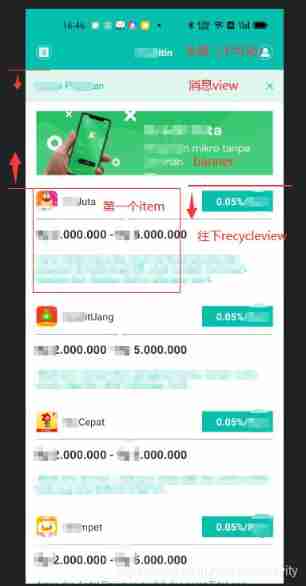
Above is the head of the layout ( green ), Next is the scrolling message view( Light green ),banner, And blank padding, At the bottom is RecyclerView.
The effect to be achieved is , Except for the head of the layout , The rest should be able to slide , When the news view Show them all and then make SwipeRefreshLayout start-up .
The solution is :
When RecyclerView After drawing, calculate the first item To the head of the layout ( Dark green ) Distance of y, When RecyclerView so One of the first item by 0 when , And visible first item The distance from the head is greater than or equal to the previous y when , Set again if yes SwipeRefreshLayout You can use ~
( Coordinates are used to calculate the distance )
Specific code :
var rvFirstItemDistanceHomeHead: Int = 0 // Record view When finished, the first item  distance home_head  Distance from the bottom

home_recyclerView.viewTreeObserver.addOnGlobalLayoutListener {
    LogUtils.e("addOnGlobalLayoutListener = ")
    //RecyclerView Finish drawing . Measure the first visible item  distance home_head  Distance from the bottom
    if(rvFirstItemDistanceHomeHead == 0){
        val distanceFirstItem = getDistanceFirstItem(refuseMarket)
        val firstChildY = distanceFirstItem.get(0)
        val headLocationY = distanceFirstItem.get(1)

        if ((firstChildY - headLocationY) > 0) rvFirstItemDistanceHomeHead =
            (firstChildY - headLocationY)
        LogUtils.e("rvFirstItemDistanceHomeHead = " + rvFirstItemDistanceHomeHead)
    }

}


home_recyclerView.addOnScrollListener(object : RecyclerView.OnScrollListener() {
    override fun onScrollStateChanged(recyclerView: RecyclerView, newState: Int) {
        //LogUtils.e("onScrollStateChanged = " + if (newState == 0) " No scrolling " else if (newState == 1) " Dragged by the outside " else " Auto scroll ")
        LogUtils.e("onScrollStateChanged = ")
        // Judge the first visible item Is it the first item
        val layoutManager = recyclerView.layoutManager as LinearLayoutManager
        val firstCompletelyVisibleItemPosition =
            layoutManager!!.findFirstCompletelyVisibleItemPosition()
        LogUtils.e("onScrollStateChanged = " + firstCompletelyVisibleItemPosition)

        // Judge the first visible in real time item  distance home_head  Distance from the bottom
        val distanceFirstItem = getDistanceFirstItem(recyclerView)
        val firstChildY = distanceFirstItem.get(0)
        val headLocationY = distanceFirstItem.get(1)
        LogUtils.e("onScrolled = " + (firstChildY - headLocationY))

        // When RecyclerView  so   One of the first item  by  0( by RecyclerView  The first data of ) when , And visible first item  The distance from the head is greater than or equal to the previous y when , Set to available
        home_refresh.setEnabled((firstCompletelyVisibleItemPosition == 0) && (firstChildY - headLocationY >= rvFirstItemDistanceHomeHead))
    }

    override fun onScrolled(recyclerView: RecyclerView, dx: Int, dy: Int) {
        LogUtils.e("onScrolled = ")
    }
})
Among them getDistanceFirstItem Method is :
private fun getDistanceFirstItem(recyclerView: RecyclerView): ArrayList {
    val distanceList = ArrayList()// Used to store recycleView The first is visible item  At the top of the Y coordinate 、  Head view Under   Of Y coordinate
    if (recyclerView != null && recyclerView.getChildCount() > 0) {
        val layoutManager = recyclerView.layoutManager as LinearLayoutManager
        val firstCompletelyVisibleItemPosition =
            layoutManager!!.findFirstCompletelyVisibleItemPosition()
        val firstChild =
            layoutManager.findViewByPosition(firstCompletelyVisibleItemPosition)

        var firstChildY = 0//recycleView The first is visible item  At the top of the Y coordinate
        var headLocationY = 0// Head view Under   Of Y coordinate
        if (firstChild != null) {
            // Get coordinates
            val firstChildLocation = IntArray(2)
            firstChild.getLocationInWindow(firstChildLocation)
            //                firstChildLocation[0]//x coordinate
            firstChildY = firstChildLocation[1] // y  coordinate
        }

        // Get coordinates
        val headLocation = IntArray(2)
        home_head.getLocationInWindow(headLocation)
        //                firstChildLocation[0]//x coordinate
        headLocationY = headLocation[1] // y  coordinate

        distanceList.add(firstChildY)
        distanceList.add(headLocationY)
    }
    return distanceList
}
The main code is done . This is in recycleView It is also effective when the height is fixed .
in addition :
control SwipeRefreshLayout Whether it is available is in onScrollStateChanged() Method , because recycleView Height is wrap_content Of , And nested ScrollView, It won't walk when sliding onScrolled() Of .
Even if recycleView Fixed height , Only when the data display slides more than one screen onScrolled(), It can be displayed on one screen, and the sliding will not be adjusted onScrolled(), It should be like this ....
If there is something wrong, please give me some advice ~
边栏推荐
- 社交社区论坛APP超高颜值UI界面
- Exploration of sqoop1.4.4 native incremental import feature
- Introduction to concurrent programming (I)
- 最新版抽奖盲盒运营版
- 剑指Offer09. 用两个栈实现队列
- repo Manifest Format
- 写一个简单的nodejs脚本
- Nodejs+express+mysql realizes login function (including verification code)
- 2020-11_ Technical experience set
- Is it safe to open an account for online stock speculation? Who can answer
猜你喜欢
Integer int compare size
2021 autumn Information Security Experiment 1 (password and hiding technology)

强大的头像制作神器微信小程序

The latest version of blind box mall thinkphp+uniapp

Implement verification code verification
Idea packages the web project into a war package and deploys it to the server to run
![[ManageEngine] the role of IP address scanning](/img/dc/df353da0e93e4d936c39a39493b508.png)
[ManageEngine] the role of IP address scanning

剑指Offer04. 二维数组中的查找【中等】
Public and private account sending prompt information (user microservice -- message microservice)
If you can't learn, you have to learn. Jetpack compose writes an im app (I)
随机推荐
剑指Offer03. 数组中重复的数字【简单】
写一个简单的nodejs脚本
JVM memory model
【附下载】密码获取工具LaZagne安装及使用
Flinksql can directly create tables and read MySQL or Kafka data on the client side, but how can it automatically flow and calculate?
RedHat5 安装Socket5代理服务器
elastic_ L04_ introduction. md
Openstack node address change
Enable SASL authentication for memcached
十條職場規則
最新版抽奖盲盒运营版
The latest version of blind box mall thinkphp+uniapp
Tianyi ty1208-z brush machine detailed tutorial (free to remove)
云计算未来 — 云原生
Swift Error Handling
TOGAF认证自学宝典V2.0
How to convert a decimal number to binary in swift
Swift5.7 扩展 some 到泛型参数
Fundamentals of concurrent programming (III)
Apache Mina Development Manual