当前位置:网站首页>ROS node name duplicate
ROS node name duplicate
2022-07-27 06:19:00 【Three assassins】
scene :ROS The node created in has a name ,C++ Initialize the node by API:
ros::init(argc,argv,"xxxx");To define the node name , stay Python The initialization node in is throughrospy.init_node("yyyy")To define the node name . stay ROS Network topology , Nodes with duplicate names cannot appear , Because it is assumed that duplicate names can exist , Then there will be confusion when calling , That means , You cannot start a node with the same name or start the same node multiple times , You bet , stay ROS If you start the node with the same name , Previously existing nodes will be closed directly , But if there is such a need , How to optimize ?
stay ROS The solution strategy given in is to use Namespace or name remapping .
A namespace is a prefix to a name , Name remapping is aliasing a name . Both of these strategies can solve the problem of node name duplication , There are many ways to realize the two strategies :
- rosrun command
- launch file
- coded
All of the above three ways can be through namespace or name remapping , To avoid duplicate node names , This section will demonstrate the use of the three one by one , The requirements of the three are similar .
Case study
Start two turtlesim_node node , Of course, if you directly open two terminals , Direct start , Then the node that is started for the first time will shut down , And give tips :
[ WARN] [1578812836.351049332]: Shutdown request received.
[ WARN] [1578812836.351207362]: Reason given for shutdown: [new node registered with same name]
1 rosrun Set namespace and remap
1.rosrun Set namespace
1.1 Set namespace presentation
grammar : rosrun Package name The node name __ns:= New name
rosrun turtlesim turtlesim_node __ns:=/xxx
rosrun turtlesim turtlesim_node __ns:=/yyyexample
rosrun turtlesim turtlesim_node __ns:=ergouzi
rosrun turtlesim turtlesim_node __ns:=maolvzi
Both nodes can operate normally
1.2 Running results
[email protected]:~$ rosnode list
/ergouzi/turtlesim
/first/my_turtle
/maolvzi/turtlesim
/my_turtle
/rosout
/second/my_turtle
2.rosrun Name remapping
2.1 Alias the node
grammar : rosrun Package name The node name __name:= New name
rosrun turtlesim turtlesim_node __name:=t1
rosrun turtlesim turtlesim_node __name:=t2
example
rosrun turtlesim turtlesim_node __name:=daqiang
rosrun turtlesim turtlesim_node __name:=xiaoqiang
2.2 Running results
rosnode list View node information , Show results :
[email protected]:~$ rosnode list
/daqiang
/xiaoqiang
3.rosrun Namespace and name remapping overlay
3.1 The namespace name is also remapped
grammar : rosrun Package name The node name __ns:= New name __name:= New name
rosrun turtlesim turtlesim_node __name:=daqiang __ns:=ergouzi
rosrun turtlesim turtlesim_node __name:=xiaoqiang __ns:=maolvzi
[email protected]:~$ rosnode list
/ergouzi/daqiang
/rosout
/maolvzi/xiaoqiang
2 launch File set namespace and remap
Introduce launch When using the syntax of the file , stay node There are two properties in the tag : name and ns, They are used to realize name remapping and namespace setting respectively . Use launch It is also relatively simple to remap file namespace and name .
1.launch file
Create a new function pack rename01_node, Then create a new launch Folder , New under this path start_turtle.launch
<!--  Need to start multiple turtles GUI node  -->
<launch>
    <node pkg="turtlesim" type="turtlesim_node" name="turtlesim" />
    <!--   Name remapping  -->
    <node pkg="turtlesim" type="turtlesim_node" name="t1" />
    <!--  Namespace  -->
    <node pkg="turtlesim" type="turtlesim_node" name="turtlesim" ns="ergouzi" />
    <!--  Namespace  +  Name remapping  -->
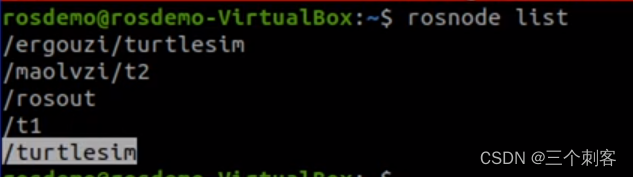
    <node pkg="turtlesim" type="turtlesim_node" name="t2" ns="maolvzi" />

</launch>
roscore
roslaunch renaame01_node start_turtle.launch
3 Encoding setting namespace and remapping
If the custom node implements , Then you can set the namespace and remap more flexibly .
1.C++ Realization : Remap
1.1 Name alias settings
Core code ros::init(argc,argv,"zhangsan",ros::init_options::AnonymousName);
1.2 perform
Time stamp will be added after the name .
2.C++ Realization : Namespace
2.1 Namespace settings
Core code
std::map<std::string, std::string> map;
map["__ns"] = "xxxx";
ros::init(map,"wangqiang");
2.2 perform
The node name has a namespace .
边栏推荐
猜你喜欢

IP核之PLL
The principle of hash table and the solution of hash conflict
Acwing the number of square arrays of one question per day

Robot navigation

Remote sensing image recognition misclassification under multi class recognition
Unity 菜单界面的简单介绍

Unity hub login no response

力扣每日一题(链表模拟)

遥感影像识别进展2022/5/5

Learning the operation environment needs to be equipped during software testing

随机推荐
[5.20 special] MATLAB, I'm confessing to you
Chapter for software testing
5G网络身份识别---详解5G-GUTI
Li Kou 236. the nearest common ancestor of binary tree
ROS通信机制进阶
人月神话阅读笔记
Dynamic planning for solving problems (5)
Force deduction problem solving monotonous stack
Unityshader depth texture (understanding and problems encountered)
5g's past and present life -- a brief introduction to the development of mobile communication
Wireshark packet modification -- adding or modifying message fields (2)
Brief introduction to unity menu interface
Force buckle 160. intersecting linked list
多线程的知识补充
One of the usage of operator()
租用香港服务器时单线与三线有什么区别?
机器人导航实现
Three ways to get RPM packages using yum
一张图看懂指针
力扣 110. 平衡二叉树