当前位置:网站首页>@FeignClient使用详细教程(图解)
@FeignClient使用详细教程(图解)
2022-07-23 09:29:00 【杰拉德·皮克·谢】
@FeignClient使用详细教程图解
作用
@FeignClient用于创建声明是API接口,该接口是RESTful风格的。Feign被设计成插拔式的,可注入其他组件和Feign一起使用。最典型的是如果Ribbon可用,Feign会和Ribbon相结合进行负载均衡。
@FeignClient标签的常用属性
- 源码截图

name(和value相同):指定FeignClient的名称,如果项目使用了Ribbon,name属性会作为微服务(某个中心的名字)的名称,用于服务发现(图解如下)- url: url一般用于调试,可以手动指定@FeignClient调用的地址(图解如下)
- decode404()即404是被解码,还是抛异常。
- configuration()指明FeignClient的配置类,默认的配置类为FeignClientsConfiguration类,在缺省情况下,这个类注入了默认的Decoder、Encoder和Constant等配置的bean。
- fallback()为配置熔断器的处理类。

- FeignClient的配置类(configuration())
public class FeignUserSupportConfig
{

    @Bean
    @Primary
    @Scope("prototype")
    public Encoder multipartFormEncoder() {

        return new SpringFormEncoder(new SpringEncoder(new ObjectFactory<HttpMessageConverters>() {

            @Override
            public HttpMessageConverters getObject() throws BeansException
            {

                return new HttpMessageConverters(new RestTemplate().getMessageConverters());
            }
        }));
    }

    @Bean
    public feign.Logger.Level multipartLoggerLevel() {

        return feign.Logger.Level.FULL;
    }
}
使用流程
- 1.在启动类增加
@EnableFeignClients
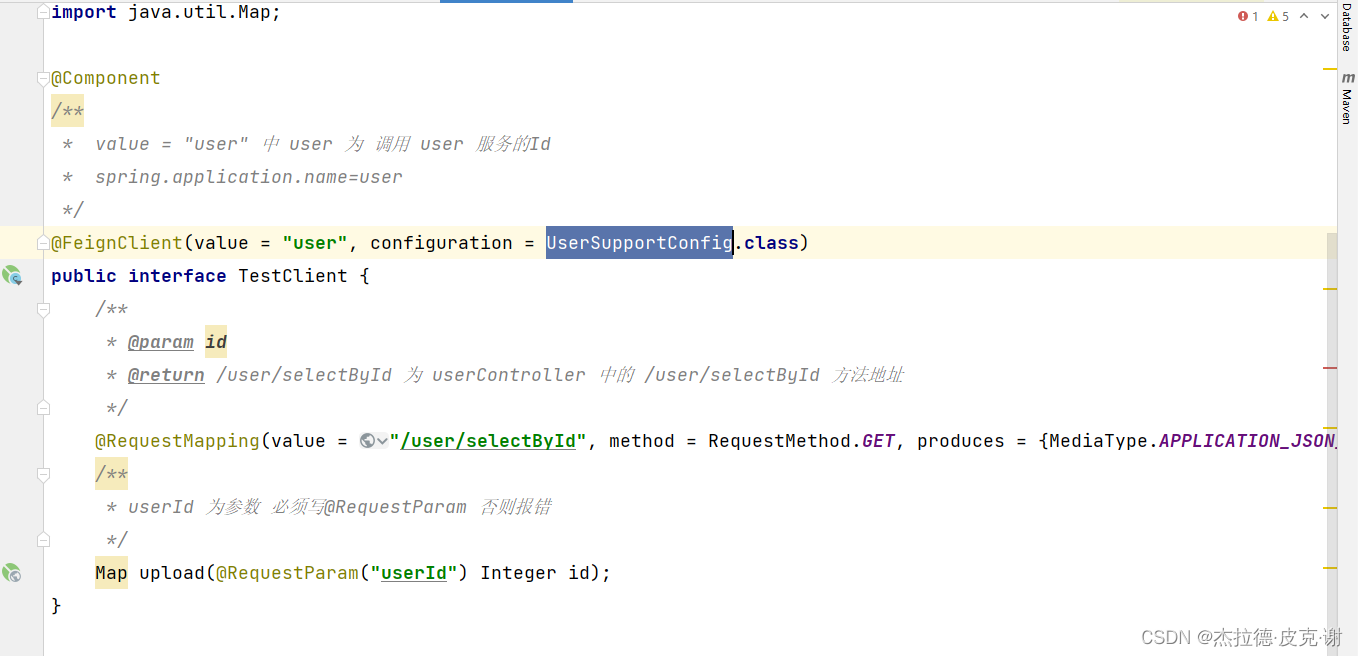
- 2.定义接口
package com.xxx.xxx.client;


import org.springframework.cloud.openfeign.FeignClient;
import org.springframework.http.MediaType;
import org.springframework.stereotype.Component;
import org.springframework.web.bind.annotation.RequestMapping;
import org.springframework.web.bind.annotation.RequestMethod;
import org.springframework.web.bind.annotation.RequestParam;

import java.util.Map;

@Component
/** * value = "user" 中 user 为 调用 user 服务的Id * spring.application.name=user */
@FeignClient(value = "user", configuration = UserSupportConfig.class)
public interface TestClientService {

    /** * @param id * @return /user/selectById 为 userController 中的 /user/selectById 方法地址 */
    @RequestMapping(value = "/user/selectById", method = RequestMethod.GET, produces = {
    MediaType.APPLICATION_JSON_UTF8_VALUE}, consumes = MediaType.MULTIPART_FORM_DATA_VALUE)
    /** * userId 为参数 必须写@RequestParam 否则报错 */
    Map upload(@RequestParam("userId") Integer id);
}
- 3.定义熔断类,发生错误时回调:
import java.util.List;
import org.springframework.stereotype.Component;
@Component
public class Hysitx implements TestClientService {

	@Override
	public List<String> test(String[] names) {

		System.out.println("接口调用失败");
		return null;
	}
}
- 4.调用
和基本的service调用一致
1.先引入 @Autowired
2.在方法中直接调用
通俗解释可以把它当成一个spring Bean 可以直接当成一个Service
给@FeignClient 添加Header信息
1.在@RequestMapping中添加
@FeignClient(name="custorm",fallback=Hysitx.class)
public interface IRemoteCallService {

	@RequestMapping(value="/user/selectById",method = RequestMethod.POST,
		headers = {
    "Content-Type=application/json;charset=UTF-8"})
    Map test(@RequestParam("userId") int id);
}
2.在方法参数前面添加@RequestHeader注解:
@FeignClient(name="custorm",fallback=Hysitx.class)
public interface IRemoteCallService {

	@RequestMapping(value="/user/selectById",method = RequestMethod.POST,
		headers = {
    "Content-Type=application/json;charset=UTF-8"})
    List<String> test(@RequestParam("userId")@RequestHeader("Authorization") int id);
}
3.使用@Header注解
@FeignClient(name="custorm",fallback=Hysitx.class)
public interface IRemoteCallService {

	@RequestMapping(value="/user/selectById",method = RequestMethod.POST)
	@Headers({
    "Content-Type: application/json;charset=UTF-8"})
    List<String> test(@RequestParam("userId") int id);
}
边栏推荐
- (heavy chain dissection) Magic Tree
- 建议思源笔记能够兼容第三方同步盘
- 因为资源限制,导致namenode启动失败,报错unable to create new native thread
- 工作小记:一次抓包
- Palindrome related topics
- Transferred from Yuxi information disclosure: products such as mRNA covid-19 vaccine and Jiuzhou horse tetanus immunoglobulin are expected to be on the market within this year.
- Solve a series of problems in using Bert encoder
- [test platform development] 23. interface assertion function - save interface assertion and edit echo
- Right click to create a new TXT. The new text file is missing. You can solve it by adding a registry. Find the ultimate solution that can't be solved
- Chapter 2 basic query and sorting
猜你喜欢

【 langage c】 devinez jeux numériques + applet d'arrêt

Towhee 每周模型

About flex layout justify content: the last solution to the misalignment of space around and why it is solved like this is a discussion

【论文笔记】基于分层深度强化学习的移动机器人导航方法

Using shell script to block IP with high scanning frequency

R语言实战应用案例:绘图篇(三)-多种组合图型绘制
R language practical application case: drawing part (III) - drawing of multiple combination patterns

OpenCV计算外包矩形

Several hole filling methods of point cloud (mesh) (1)

【无标题】
随机推荐
直播课堂系统01-数据库表设计
JS software unloading prompt expression changes with the mouse JS special effect
Zhongwang CAD professional 2022 software installation package download and installation tutorial
Yunna - how to strengthen fixed asset management? How to strengthen the management of fixed assets?
Authing 支持 Zadig 啦!云原生用户统一认证快速对接
什么是Per-Title编码?
cmake笔记
LeetCode-227-基本计算器||
[software test] MQ abnormal test encountered in disk-to-disk work
【PyQt5安装以及使用】
CSDN写文方法(二)
Quick introduction to PKI system
【论文笔记】基于分层深度强化学习的移动机器人导航方法
【软件测试】盘一盘工作中遇到的 Redis 异常测试
Wacom firmware update error 123, digital board driver cannot be updated
俄方希望有效落实农产品外运“一揽子”协议
Uni app knowledge points and records of problems and solutions encountered in the project
LZ77文件压缩
【我可以做你的第一个项目吗?】GZIP的细节简介和模拟实现
Ffmpeg 2 - use of ffplay, ffprobe, ffmpeg commands