当前位置:网站首页>k8s部署mysql
k8s部署mysql
2022-06-22 18:12:00 【Dream_it_possible!】
目录
编写PersistentVolume和PersistentVolumeClaim
单节点
nfs挂载方式
镜像使用mysql:5.7, imagePullPolicy设置为IfNotPresent, 表示有镜像的话不会从remote registry重新拉取。
部署mysql时,我们需要使用数据挂载,否则会出现数据丢失的情况,这里采用nfs挂载的方式, 我们需要给挂载的目标文件路径/data/dev/mysql授权777, 同时设置为nfs对该路径mount时为insecure,编写mysql-dev-nfs.yaml文件:
---
apiVersion: v1
kind: Service
metadata:
  name: mysql-dev
spec:
  ports:
    - port: 3306
      nodePort: 30060
  selector:
    app: mysql-dev
  type: NodePort
---
apiVersion: apps/v1
kind: Deployment
metadata:
  name: mysql-dev
  labels:
    app: mysql-dev
spec:
  replicas: 1 # pod数量
  selector:
    matchLabels:
      app: mysql-dev
  template:
    metadata:
      labels:
        app: mysql-dev
    spec:
      containers:
        - name: mysql-dev
          image: mysql:5.7
          imagePullPolicy: IfNotPresent
          resources:
            limits:
              memory: "512Mi"
              cpu: "1500m"
          ports:
            - containerPort: 3306
          env:
            - name: MYSQL_ROOT_PASSWORD
              value: "123456"
          volumeMounts:
            - name: mysql-data
              mountPath: /var/lib/mysql
            - name: mysql-dev-conf
              mountPath: /etc/mysql
      volumes:
        - name: mysql-data
          nfs:
            server: localhost
            path: /data/dev/mysql
        - name: mysql-dev-conf
          configMap:
            name: my.cnf
---
apiVersion: v1
kind: ConfigMap
metadata:
  name: my.cnf
data:
  my.cnf: |
    [mysqld]
    port = 3306
    character-set-server=utf8mb4
    collation-server=utf8mb4_unicode_ci
    skip-character-set-client-handshake=1
    default-storage-engine=INNODB
    max_allowed_packet = 500M
    explicit_defaults_for_timestamp=1
    long_query_time = 10
暴露端口为30060,执行mysql-dev-nfs.yaml,命令:
kubectl apply -f mysql-dev-nfs.yaml

对外的端口使用30060, 测试是否能连接成:

注意: 如果使用nfs挂载方式,那么需要将挂载nfs的pod停止后,centos才能关机, 否则在关机时会出现如下报错: A stop job is running for ...

此问题是因为nfs的资源在被占用,与关机需要的请求资源相竞争,形式一种死锁的形态,暂时没有好的解决方式,只能先通过停止Pod的方式先解决。
pvc挂载方式
采用pvc挂载方式,那么需要先声明pv卷,然后绑定pvc卷,Pvc启动成功后,mysql才能使用。
建议将pvc与mysql的pod分开编写,便于管理,如果把pv和pvc的脚本和mysql放一起,在停mysql pod时,会出现卡顿的情况。
编写PersistentVolume和PersistentVolumeClaim
编写persistVolume.yaml文件,声明pv和pvc
---
apiVersion: v1
kind: PersistentVolumeClaim
metadata:
  name: mysql-01-pvc
spec:
  accessModes:
    - ReadWriteOnce   # 只能被一个容器访问,如果能被多个容器访问那么设置为ReadWriteMany
  resources:
    requests:
      storage: 3Gi
  storageClassName: standard
---
apiVersion: v1
kind: PersistentVolume
metadata:
  name: 3g-pv-1
spec:
  capacity:
    storage: 3Gi
  volumeMode: Filesystem
  accessModes:
    - ReadWriteOnce
  persistentVolumeReclaimPolicy: Delete
  storageClassName: standard
  cinder:
    volumeID: a198bce4-ba0f-4d13-8f0c-55e31212a8c9 # 改路径为映射到本机的  /var/lib/kubelet/plugins/kubernetes.io/cinder/mounts
    fsType: ext4
注意:
1 . pv 的storageClassName和pvc的storageClassName要保持一致,否则绑定不上。
2 . 按需要分配 storage。
3 . 使用cinder挂载时,会将指定的volumID挂载到 /var/lib/kubelet/plugins/kubernetes.io/cinder/mounts 目录下,如果没有该目录,那么需要手动创建 /var/lib/kubelet/plugins/kubernetes.io/cinder/mounts 目录。volumeID的值为/var/lib/kubelet/plugins/kubernetes.io/cinder/mounts 下的目录名。

4. accessModes 设置为 ReadWriteOnce,表示该pv或pvc只能被一个容器所使用。
编写mysql-pvc.yaml文件
---
apiVersion: v1
kind: Service
metadata:
  name: mysql-01
spec:
  ports:
    - port: 3306
      nodePort: 30060
  selector:
    app: mysql-01
  type: NodePort
---
apiVersion: apps/v1
kind: Deployment
metadata:
  name: mysql-01
  labels:
    app: mysql-01
spec:
  replicas: 1 # pod数量
  selector:
    matchLabels:
      app: mysql-01
  template:
    metadata:
      labels:
        app: mysql-01
    spec:
      containers:
        - name: mysql-01
          image: mysql:5.7
          imagePullPolicy: IfNotPresent
          resources:
            limits:
              memory: "512Mi"
              cpu: "1500m"
          ports:
            - containerPort: 3306
          env:
            - name: MYSQL_ROOT_PASSWORD
              value: "123456"
          volumeMounts:
            - name: mysql-01-persistent-storage
              mountPath: /var/lib/mysql
            - name: mysql-01-conf
              mountPath: /etc/mysql
      volumes:
        - name: mysql-01-persistent-storage
          persistentVolumeClaim:
            claimName: mysql-01-pvc
        - name: mysql-01-conf
          configMap:
            name: my.cnf
---
apiVersion: v1
kind: ConfigMap
metadata:
  name: my.cnf
data:
  my.cnf: |
    [mysqld]
    skip-grant-tables
    port = 3306
    character-set-server=utf8mb4
    collation-server=utf8mb4_unicode_ci
    skip-character-set-client-handshake=1
    default-storage-engine=INNODB
    max_allowed_packet = 500M
    explicit_defaults_for_timestamp=1
    long_query_time = 10
可在[mysqlId] 里加入 skip-grant-tables跳过权限验证。
执行kubectl apply -f mysql-pvc.yaml 命令。
可使用 kubectl get pv 和 kubectl get pvc查看pv和pvc。

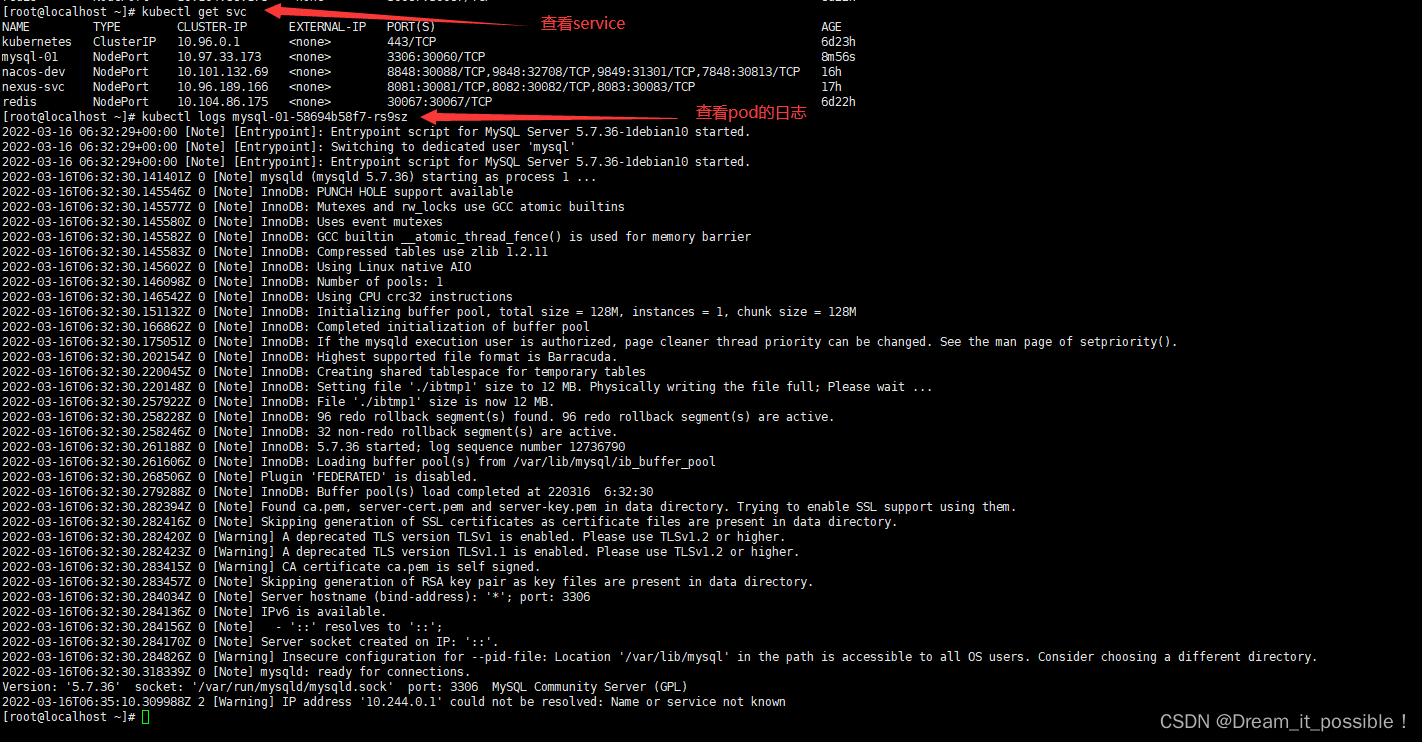
查看service和pod的状态。
[[email protected] ~]# kubectl get svc
[[email protected] ~]# kubectl logs mysql-01-58694b58f7-rs9sz
停止mysql pod

边栏推荐
- std::enable_ shared_ from_ This error: error: expected template name before '<' token
- 基于云架构的业务稳定性建设思路
- shell脚本详解(四)——循环语句之while循环和until循环(附加例题及解析)
- 【建议收藏】消息队列常见的使用场景
- 200亿VS 50亿,“脱水”小红书,到底值多钱?
- IPLOOK 5GC与亚信国际CHF(计费功能)对接成功
- Digital enabling machinery manufacturing industry, supply chain collaborative management system solution helps enterprises upgrade their supply chain
- A homekit enabled camera? Zhiting IPC camera IC1 unpacking experience
- Service practice: use service to complete a download task
- After reading the hated courage
猜你喜欢
加工制造业智慧采购系统解决方案:助力企业实现全流程采购一体化协同
![K个一组翻转链表[链表拆解/翻转/拼装]](/img/70/fb783172fa65763f031e6bd945cbd9.png)
K个一组翻转链表[链表拆解/翻转/拼装]

Iplook, as a member of o-ran alliance, will jointly promote the development of 5g industry

Active Directory用户登录报告
Intelligent procurement system solution for processing and manufacturing industry: help enterprises realize integrated and Collaborative Procurement in the whole process

Method of activity jump to fragment (intent)

How much do you know about the bloom filter and cuckoo filter in redis?

Vs Code suddenly fails to jump
![Programmer's tool encyclopedia [continuous update]](/img/7e/b7fbc030f4bbded3ee6188360d7d54.png)
Programmer's tool encyclopedia [continuous update]

Robotframework installation tutorial
随机推荐
Iplook, as a member of o-ran alliance, will jointly promote the development of 5g industry
泡泡玛特:空洞的灵魂需要故事
2年狂赚178亿元,中国游戏正在“收割”老外
智能家居不知如何选?不妨看下这篇选购指南
Makefile does not compile some files
TypeScript(7)泛型
《被讨厌的勇气》读后感
Digital supply chain centralized purchase platform solution for mechanical equipment industry: optimize resource allocation and realize cost reduction and efficiency increase
Detailed explanation of shell script (x) -- how to use sed editor
Sre is bound to move towards the era of chaotic engineering -- Huawei cloud chaotic engineering practice
AIOps 智能运维经验分享
antd tree 树状选择器 子类必填
20billion vs 5billion, how much is the "dehydration" little red book worth?
C#,入门教程——关于函数参数ref的一点知识与源程序
最长公共子序列
消息中间件(一)MQ详解及四大MQ比较
线程池:ThreadPoolExcutor源码阅读
一款支持HomeKit的摄像头?智汀 IPC摄像头IC1开箱体验
Typescript (7) generic
Shell script explanation (II) -- conditional test, if statement and case branch statement