当前位置:网站首页>Experiment 6 BGP federal comprehensive experiment
Experiment 6 BGP federal comprehensive experiment
2022-07-26 20:33:00 【Guan Bolan,】

Catalog
2. Configure the routing BGP IGP agreement
4. polymerization , Publish private network route
1. with IP Address
[r1]int l0
[r1-LoopBack0]ip address 192.168.1.1 24
[r1-LoopBack0]int l1
[r1-LoopBack1]ip address 10.0.0.1 24
[r1-LoopBack1]int g 0/0/0
[r1-GigabitEthernet0/0/0]ip address 12.0.0.1 24
[r2]int g 0/0/0
[r2-GigabitEthernet0/0/0]ip address 12.0.0.2 24
[r2-GigabitEthernet0/0/0]int g 0/0/1
[r2-GigabitEthernet0/0/1]ip address 172.16.1.1 29
[r2-GigabitEthernet0/0/1]int g 0/0/2
[r2-GigabitEthernet0/0/2]ip address 172.16.1.9 29
[r2-GigabitEthernet0/0/2]int l0
[r2-LoopBack0]ip address 172.16.2.1 24
[r3]int g 0/0/0
[r3-GigabitEthernet0/0/0]ip address 172.16.1.2 29
[r3-GigabitEthernet0/0/0]int g 0/0/1
[r3-GigabitEthernet0/0/1]ip address 172.16.1.17 29
[r3-GigabitEthernet0/0/1]int l0
[r3-LoopBack0]ip address 172.16.3.1 24
[r4]int g 0/0/0
[r4-GigabitEthernet0/0/0]ip address 172.16.1.18 29
[r4-GigabitEthernet0/0/0]int g 0/0/1
[r4-GigabitEthernet0/0/1]ip address 172.16.1.25 29
[r4-GigabitEthernet0/0/1]int l0
[r4-LoopBack0]ip address 172.16.4.1 24
[r5]int g 0/0/0
[r5-GigabitEthernet0/0/0]ip address 172.16.1.10 29
[r5-GigabitEthernet0/0/0]int g 0/0/1
[r5-GigabitEthernet0/0/1]ip address 172.16.1.33 29
[r5-GigabitEthernet0/0/1]int l0
[r5-LoopBack0]ip address 172.16.5.1 24
[r6]int g 0/0/0
[r6-GigabitEthernet0/0/0]ip address 172.16.1.34 29
[r6-GigabitEthernet0/0/0]int g 0/0/1
[r6-GigabitEthernet0/0/1]ip address 172.16.1.41 29
[r6-GigabitEthernet0/0/1]int l0
[r6-LoopBack0]ip address 172.16.6.1 24
[r7]int g 0/0/0
[r7-GigabitEthernet0/0/0]ip address 172.16.1.42 29
[r7-GigabitEthernet0/0/0]int g 0/0/1
[r7-GigabitEthernet0/0/1]ip address 172.16.1.26 29
[r7-GigabitEthernet0/0/1]int l0
[r7-LoopBack0]ip address 172.16.7.1 24
[r7-LoopBack0]int g 0/0/2
[r7-GigabitEthernet0/0/2]ip address 78.0.0.1 24
[r8]int g 0/0/0
[r8-GigabitEthernet0/0/0]ip address 78.0.0.2 24
[r8-GigabitEthernet0/0/0]int l0
[r8-LoopBack0]ip address 192.168.2.1 24
[r8-LoopBack0]int l1
[r8-LoopBack1]ip address 11.0.0.1 24
2. Configure the routing BGP IGP agreement
① To configure IGP agreement (R2-R3-R4-R5-R6-R7 The configuration method is the same )
[r2]ospf 1 router-id 2.2.2.2
[r2-ospf-1]a 0
[r2-ospf-1-area-0.0.0.0]network 172.16.0.0 0.0.255.255
display ip routing-table protocol ospf

② To configure BGP agreement
[r1]bgp 1
[r1-bgp]router-id 1.1.1.1
[r1-bgp]peer 12.0.0.2 as-number 2
[r2]bgp 64512
[r2-bgp]router-id 2.2.2.2
[r2-bgp]confederation id 2
[r2-bgp]confederation peer-as 64513
[r2-bgp]peer 12.0.0.1 as-number 1
[r2-bgp]peer 172.16.3.1 as-number 64512
[r2-bgp]peer 172.16.3.1 connect-interface LoopBack 0
[r2-bgp]peer 172.16.5.1 as-number 64513
[r2-bgp]peer 172.16.5.1 connect-interface LoopBack 0
[r2-bgp]peer 172.16.5.1 ebgp-max-hop
[r3]bgp 64512
[r3-bgp]router-id 3.3.3.3
[r3-bgp]confederation id 2
[r3-bgp]peer 172.16.2.1 as-number 64512
[r3-bgp]peer 172.16.2.1 connect-interface LoopBack 0
[r3-bgp]peer 172.16.4.1 as 64512
[r3-bgp]peer 172.16.4.1 connect-interface LoopBack 0
[r4]bgp 64512
[r4-bgp]router-id 4.4.4.4
[r4-bgp]confederation id 2
[r4-bgp]confederation peer-as 64513
[r4-bgp]peer 172.16.3.1 as 64512
[r4-bgp]peer 172.16.3.1 connect-interface LoopBack 0
[r4-bgp]peer 172.16.7.1 as 64513
[r4-bgp]peer 172.16.7.1 connect-interface LoopBack 0
[r4-bgp]peer 172.16.7.1 ebgp-max-hop
[r5]bgp 64513
[r5-bgp]router-id 5.5.5.5
[r5-bgp]confederation id 2
[r5-bgp]confederation peer-as 64512
[r5-bgp]peer 172.16.2.1 as-number 64512
[r5-bgp]peer 172.16.2.1 connect-interface LoopBack 0
[r5-bgp]peer 172.16.2.1 ebgp-max-hop
[r5-bgp]peer 172.16.6.1 as-number 64513
[r5-bgp]peer 172.16.6.1 connect-interface LoopBack 0
[r6]bgp 64513
[r6-bgp]router-id 6.6.6.6
[r6-bgp]confederation id 2
[r6-bgp]peer 172.16.5.1 as 64513
[r6-bgp]peer 172.16.5.1 connect-interface LoopBack 0
[r6-bgp]peer 172.16.7.1 as 64513
[r6-bgp]peer 172.16.7.1 connect-interface LoopBack 0
[r7]bgp 64513
[r7-bgp]router-id 7.7.7.7
[r7-bgp]confederation id 2
[r7-bgp]confederation peer-as 64512
[r7-bgp]peer 172.16.6.1 as 64513
[r7-bgp]peer 172.16.6.1 connect-interface LoopBack 0
[r7-bgp]peer 172.16.4.1
[r7-bgp]peer 172.16.4.1 as 64512
[r7-bgp]peer 172.16.4.1 connect-interface LoopBack 0
[r7-bgp]peer 172.16.4.1 ebgp-max-hop
[r7-bgp]peer 78.0.0.2 as 3
[r8]bgp 3
[r8-bgp]router-id 8.8.8.8
[r8-bgp]peer 78.0.0.1 as 2
3. Publish route
[r1]bgp 1
[r1-bgp]network 10.0.0.0 24
[r2]bgp 64512
[r2-bgp]peer 172.16.3.1 next-hop-local
[r2-bgp]peer 172.16.5.1 next-hop-local


because IBGP Horizontal segmentation , take R3-R6 Configure as routing reflector RR
[r3]bgp 64512
[r3-bgp]peer 172.16.2.1 reflect-client
[r6]bgp 64513
[r6-bgp]peer 172.16.7.1 reflect-client



Be careful : Two way configuration !
[r8]bgp 3
[r8-bgp]network 11.0.0.0 24
[r7]bgp 64513
[r7-bgp]peer 172.16.6.1 next-hop-local
[r7-bgp]peer 172.16.4.1 next-hop-local

4. polymerization , Publish private network route
[r2]ip route-static 172.16.0.0 21 NULL 0
[r2]bgp 64512
[r2-bgp]network 172.16.0.0 21
[r7]ip route-static 172.16.0.0 21 NULL 0
[r7]bgp 64513
[r7-bgp]network 172.16.0.0 21

5. To configure VPN
[r8]int t 0/0/0
[r8-Tunnel0/0/0]ip address 99.0.0.2 24
[r8-Tunnel0/0/0]tunnel-protocol gre
[r8-Tunnel0/0/0]source 11.0.0.1
[r8-Tunnel0/0/0]destination 10.0.0.1
[r8-Tunnel0/0/0]ip route-static 192.168.1.0 24 99.0.0.1
[r1]int t 0/0/0
[r1-Tunnel0/0/0]ip address 99.0.0.1 24
[r1-Tunnel0/0/0]tunnel-protocol gre
[r1-Tunnel0/0/0]source 10.0.0.1
[r1-Tunnel0/0/0]destination 11.0.0.1
[r1-Tunnel0/0/0]ip route-static 192.168.2.0 24 99.0.0.2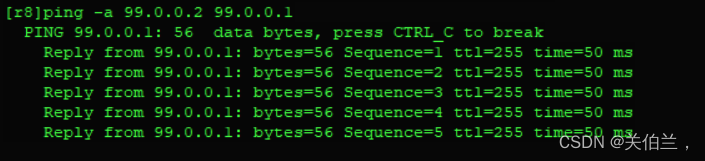
边栏推荐
- Exchange 2010 SSL certificate installation document
- SwiftUI 4 新功能之实时获取点击位置 .onTapGesture { location in} (教程含源码)
- Chat software project development 2
- The Sandbox 和艺术家 Alec Monopoly 达成合作
- 连接池快速入门
- Using questpdf operation to generate PDF is faster and more efficient!
- 文件上传的方式和下载
- shell脚本基础编程命令
- BGP的基本配置和聚合
- EasyCVR设备管理列表页面,分页数据不显示的问题修复
猜你喜欢

![Ue5 editor slate quick start [opening]](/img/88/9c6e8ff970b3138299ecbe79d90f2e.png)



随机推荐
Usage of Smoothscroll Polyfill plug-in
MySQL InnoDB engine (V)
BGP的路由黑洞和防环
猿辅导的科技硬实力:让AI从读懂孩子作业开始
【PyQt5基本控件使用解析】
EtherCAT 同步模式
【刷题记录】22. 括号生成
BUU刷题记3
Dio problem summary
smoothscroll-polyfill插件的用法
HM中如何获取CU块划分信息并用Matlab绘图
URL format
Game partner topic: breederdao and ultiverse have established a new metauniverse
20220726
Do employees have to compensate the company for losses when they resign? The 34 year old captain resigned and was claimed 10.66 million yuan by the company
7.25模拟赛总结
Gartner发布最新《中国AI初创企业市场指南》,弘玑Cyclone再次被评为代表性企业
Typescript asynchronous function promise use
Small scenes bring great improvement! Baidu PaddlePaddle easydl helps AI upgrade of manufacturing assembly line
[基础服务] [数据库] ClickHouse的安装和配置