当前位置:网站首页>Chat software project development 2
Chat software project development 2
2022-07-26 20:31:00 【Domineering Xiao Ming】
Catalog
2.4 Button add fault tolerance
2.7 The dialog interface inserts a background image
2.1 Nickname settings
ultimate objective
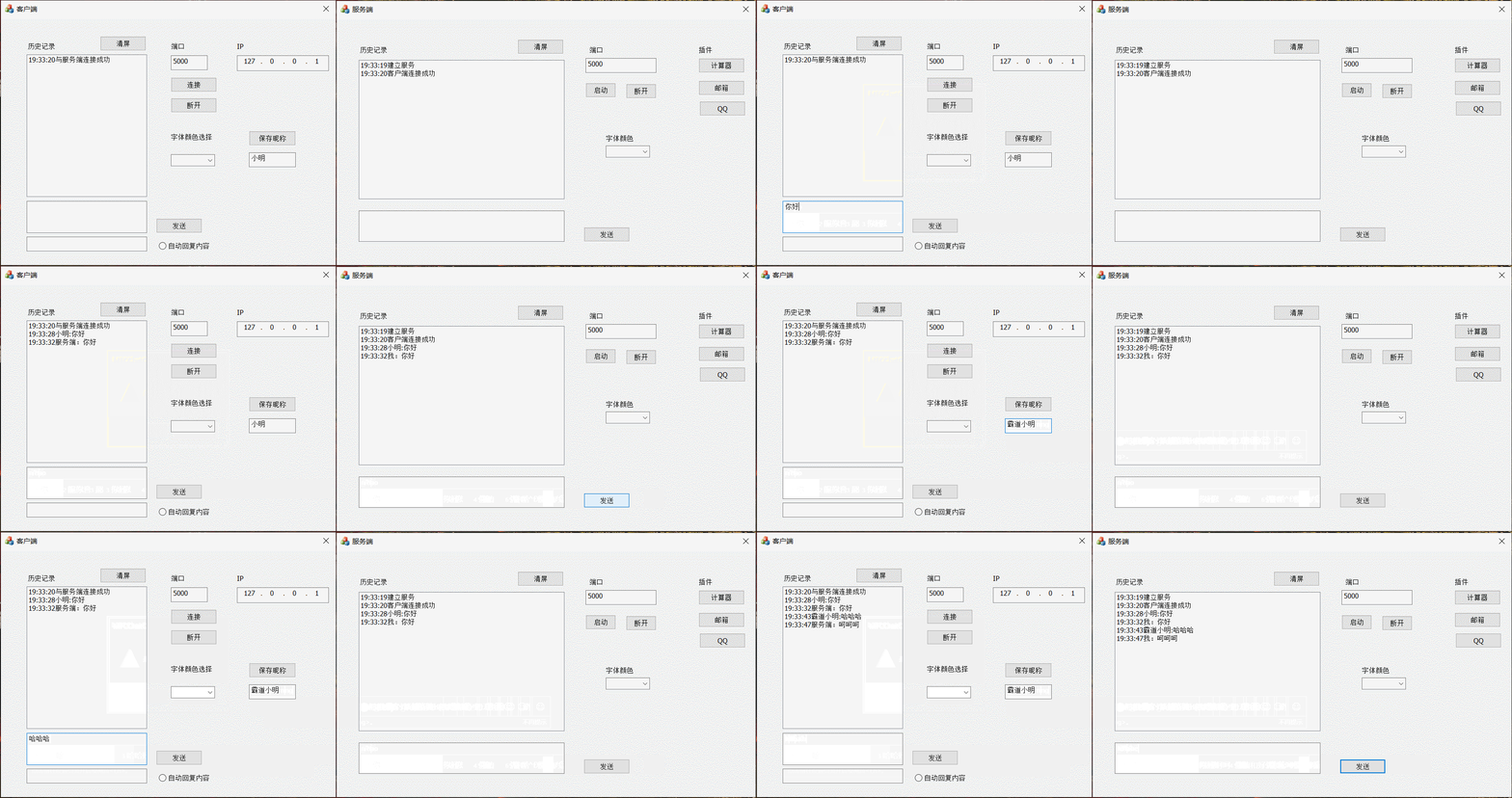
Configure nickname principle
1. Start client , There should be an operation to read the configuration file , Read the nickname from the configuration file to the control
2. Customer configuration nickname , Need to write to the configuration file
In the nickname save control function
void CMFCChatClientDlg::OnBnClickedSavenameBtn()
{
	// Get the contents of the text box
	CString strName;
	GetDlgItemText(IDC_NAME_EDIT, strName);
	// Determine whether the nickname box is empty
	if (strName.GetLength() <= 0) {
		MessageBox(_T(" The nickname cannot be empty !"));
		return;
	}
	//MB_OKCANCEL Indicates that the message box is OK/CANCEL key , User choice OK entering if sentence
	if (IDOK == AfxMessageBox(_T(" Whether to modify the nickname "), MB_OKCANCEL)) {
		// Save nicknames
		// About the definition of path array , Built in 260 size
		WCHAR strPath[MAX_PATH] = { 0 };
		// Get the current path
		GetCurrentDirectoryW(MAX_PATH, strPath);

		//L"%s" It also represents wide bytes , If it is "%ls" It is found that all contents cannot be output
		TRACE(L"#####strPath= %s", strPath);

		CString strFilePath;
		// Capitalization L Represents wide bytes ,.ini Represents a configuration file
		strFilePath.Format(L"%ls//Test.ini", strPath);

		// Write a string in the configuration file
		WritePrivateProfileStringW(_T("CLIENT"), _T("NAME"), strName, strFilePath);
		//WritePrivateProfileStringW(
		//	_In_opt_ LPCWSTR lpAppName,	 Item name
		//	_In_opt_ LPCWSTR lpKeyName,	 Key name
		//	_In_opt_ LPCWSTR lpString,
		//	_In_opt_ LPCWSTR lpFileName
		//);
	}

}
In the initialization frame function OnInitDlg
// Get nickname from configuration file
WCHAR strPath[MAX_PATH] = { 0 };
GetCurrentDirectoryW(MAX_PATH, strPath);
CString strFilePath;
strFilePath.Format(L"%ls//Test.ini", strPath);
// Get a nickname
WCHAR wszName[MAX_PATH] = { 0 };
DWORD dwNum = GetPrivateProfileStringW(_T("CLIENT"), _T("NAME"), NULL, wszName, MAX_PATH, strFilePath);
if (dwNum > 0) {
	// I read
	// Displayed in the nickname box
	GetDlgItem(IDC_NAME_EDIT)->SetWindowText(wszName);
}
else {
	// Not read or the file is damaged
	// First, write a casually in the file , Then display in the nickname box
	WritePrivateProfileStringW(_T("CLIENT"), _T("NAME"), _T(" client "), strFilePath);
	GetDlgItem(IDC_NAME_EDIT)->SetWindowText(_T(" client "));
}
//GetPrivateProfileStringW(
//	_In_opt_ LPCWSTR lpAppName,	 Item name
//	_In_opt_ LPCWSTR lpKeyName,	 Key name
//	_In_opt_ LPCWSTR lpDefault,	 The default value is
//	_Out_writes_to_opt_(nSize, return +1) LPWSTR lpReturnedString,	 One Buff, Get the content to buff in
//	_In_     DWORD nSize,
//	_In_opt_ LPCWSTR lpFileName
//);
2.2 Automatic recovery
In the receiving function of the client , If the user chooses to send messages automatically , Then send the content in the message box to the server , Then display this message in the history message box
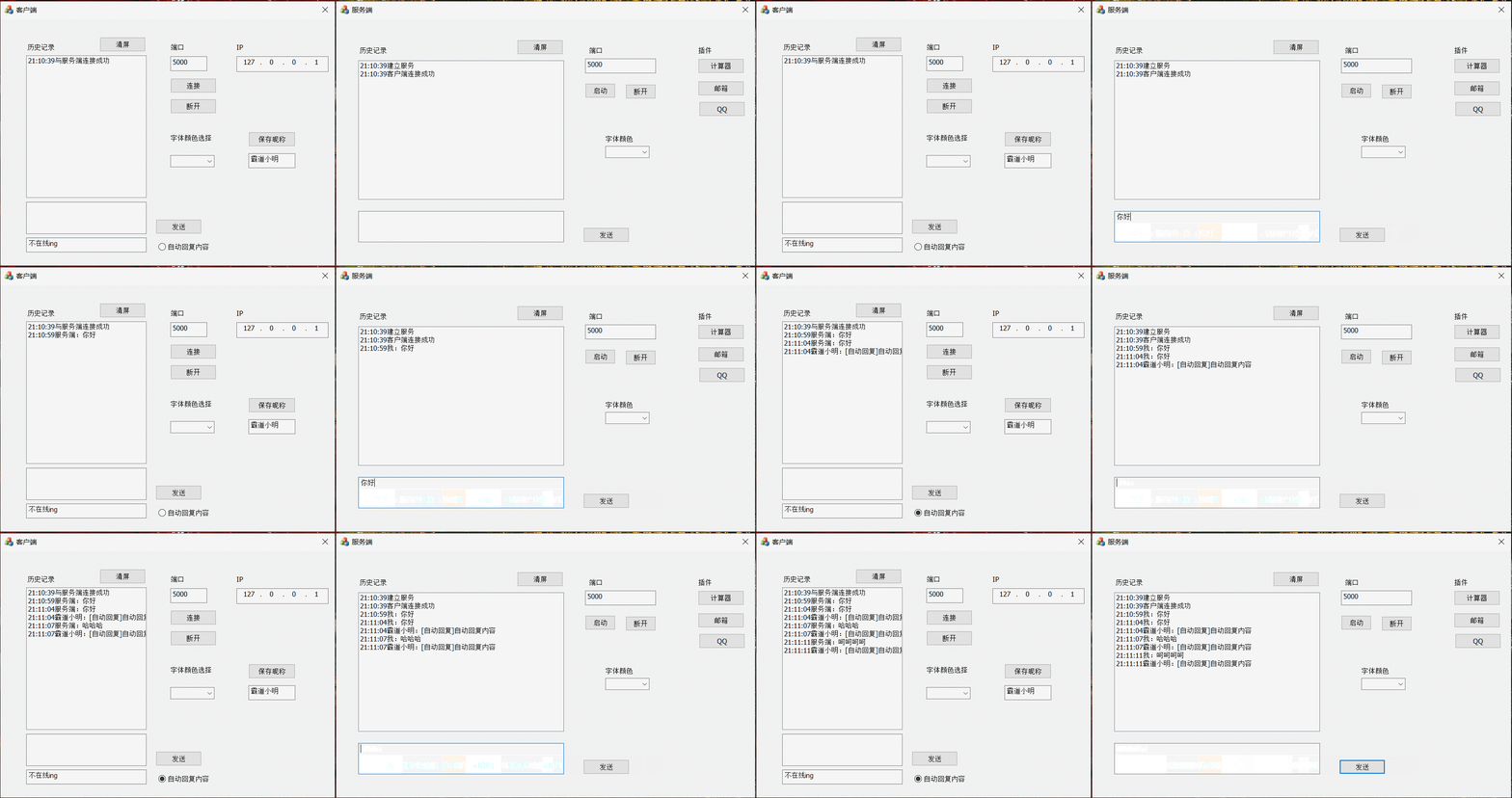
On the client side OnReceive Supplementary code in function
// Automatic recovery
// If checked,
if (((CButton*)dlg->GetDlgItem(IDC_AUTOSEND_RADIO))->GetCheck()) {
	//1. Read the contents of the edit box
	CString strAutoSendMsg;
	dlg->GetDlgItemText(IDC_AUTOSEND_RADIO, strAutoSendMsg);
	//2. Packet + Group format
	CString strName;
	dlg->GetDlgItemTextW(IDC_NAME_EDIT, strName);
	// Time + nickname +[ Automatic recovery ]+ Content
	CString strMsg = strName + _T(":") + _T("[ Automatic recovery ]") + strAutoSendMsg;
	char* szSendBuf = T2A(strMsg);
	// Send it to the server
	dlg->m_client->Send(szSendBuf, SEND_MAX_BUF, 0);
	// Displayed in the list box
	CString strShow;
	strShow = dlg->CatShowString(_T(""), strMsg);
	dlg->m_list.AddString(strShow);

}
Add the control function of automatic reply
// Automatic recovery
void CMFCChatClientDlg::OnBnClickedAutosendRadio()
{
	if (((CButton*)GetDlgItem(IDC_AUTOSEND_RADIO))->GetCheck()) {
		TRACE("#### Choose ");
		((CButton*)GetDlgItem(IDC_AUTOSEND_RADIO))->SetCheck(FALSE);
	}
	else {
		TRACE("##### For the selection ");
		((CButton*)GetDlgItem(IDC_AUTOSEND_RADIO))->SetCheck(TRUE);
	}
}
2.3 Clear the screen
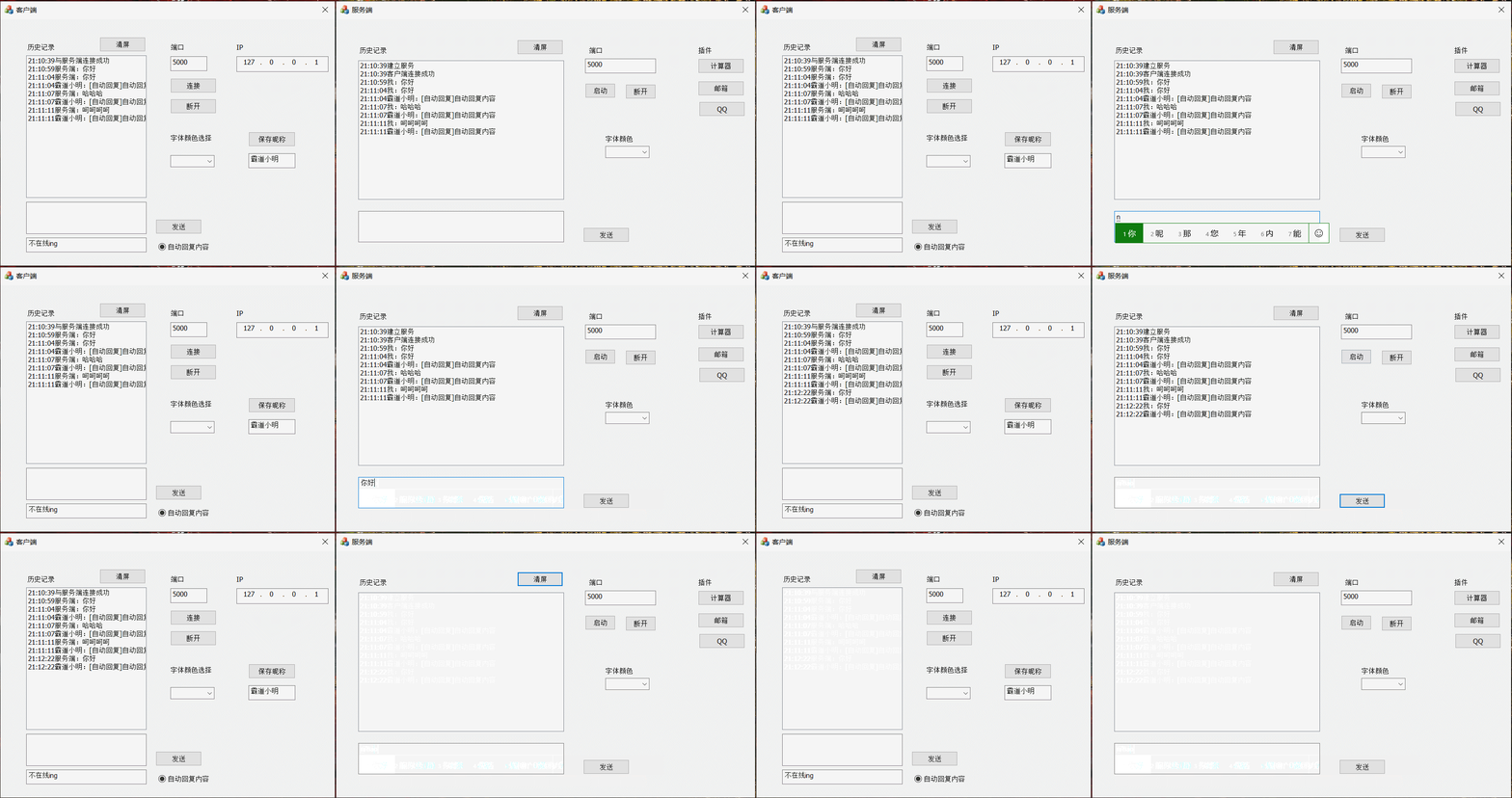
Only need to use under the corresponding control function ResetControl Function
2.4 Button add fault tolerance
When the client or server starts , Some buttons except the connection control should be grayed out , Prevent the program from crashing
GetDlgItem(IDC_SEND_BTN)->EnableWindow(FALSE);
// The disconnect button is grayed out
GetDlgItem(IDC_DISCONNECT_BTN)->EnableWindow(FALSE);
// Automatically reset the gray
GetDlgItem(IDC_AUTOSEND_CHECK)->EnableWindow(FALSE);
// The connect button is available
GetDlgItem(IDC_CONNECT_BTN)->EnableWindow(TRUE);
2.5 disconnect
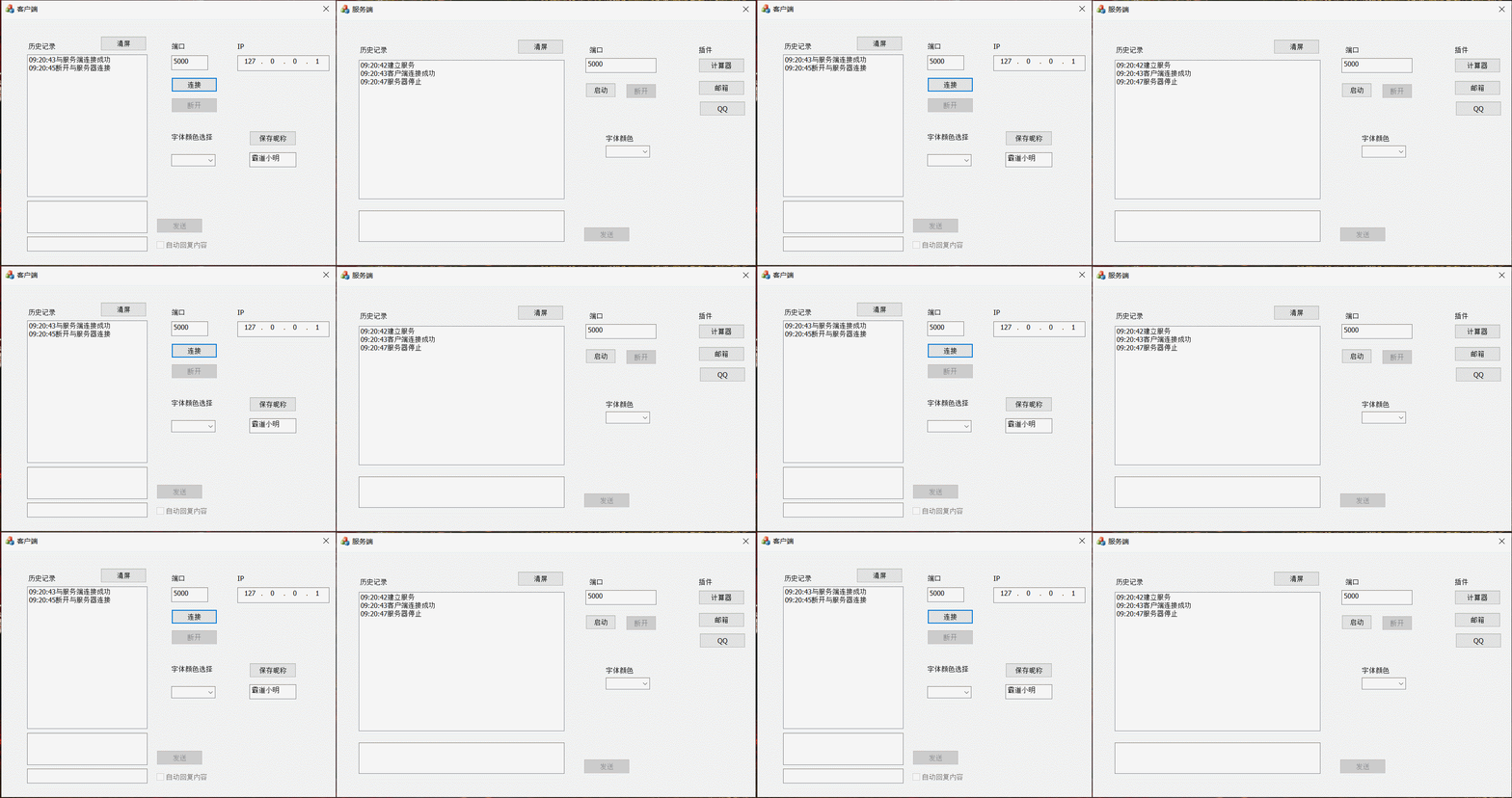
client
In the disconnect control function
void CMFCChatClientDlg::OnBnClickedDisconnectBtn()
{
	//1. Control controls

	GetDlgItem(IDC_SEND_BTN)->EnableWindow(FALSE);
	// The disconnect button is grayed out
	GetDlgItem(IDC_DISCONNECT_BTN)->EnableWindow(FALSE);
	// Automatically reset the gray
	GetDlgItem(IDC_AUTOSEND_CHECK)->EnableWindow(FALSE);
	// The connect button is available
	GetDlgItem(IDC_CONNECT_BTN)->EnableWindow(TRUE);

	//2. Recycle resources
	m_client->Close();
	if (m_client != NULL) {
		delete m_client;
		m_client = NULL;
	}

	//3. Display to the list box
	CString strShow;
	strShow = CatShowString(_T(""), _T(" Disconnect from the server "));
	m_list.AddString(strShow);
	UpdateData(FALSE);
}
Server side
In the disconnect control function
void CMFCChartServerDlg::OnBnClickedStopBtn()
{
	//1. Control controls
	GetDlgItem(IDC_START_BTN)->EnableWindow(TRUE);
	GetDlgItem(IDC_STOP_BTN)->EnableWindow(FALSE);
	GetDlgItem(IDC_SEND_BTN)->EnableWindow(FALSE);

	//2. Recycle resources
	m_server->Close();
	if (m_server != NULL) {
		delete m_server;
		m_server = NULL;
	}
	if (m_chat != NULL) {
		delete m_chat;
		m_chat = NULL;
	}

	//3. Displayed in the list box
	CString strShow;
	strShow = CatShowString(_T(""), _T(" The server stops "));
	m_list.AddString(strShow);
	UpdateData(FALSE);

}
2.6 Change font color
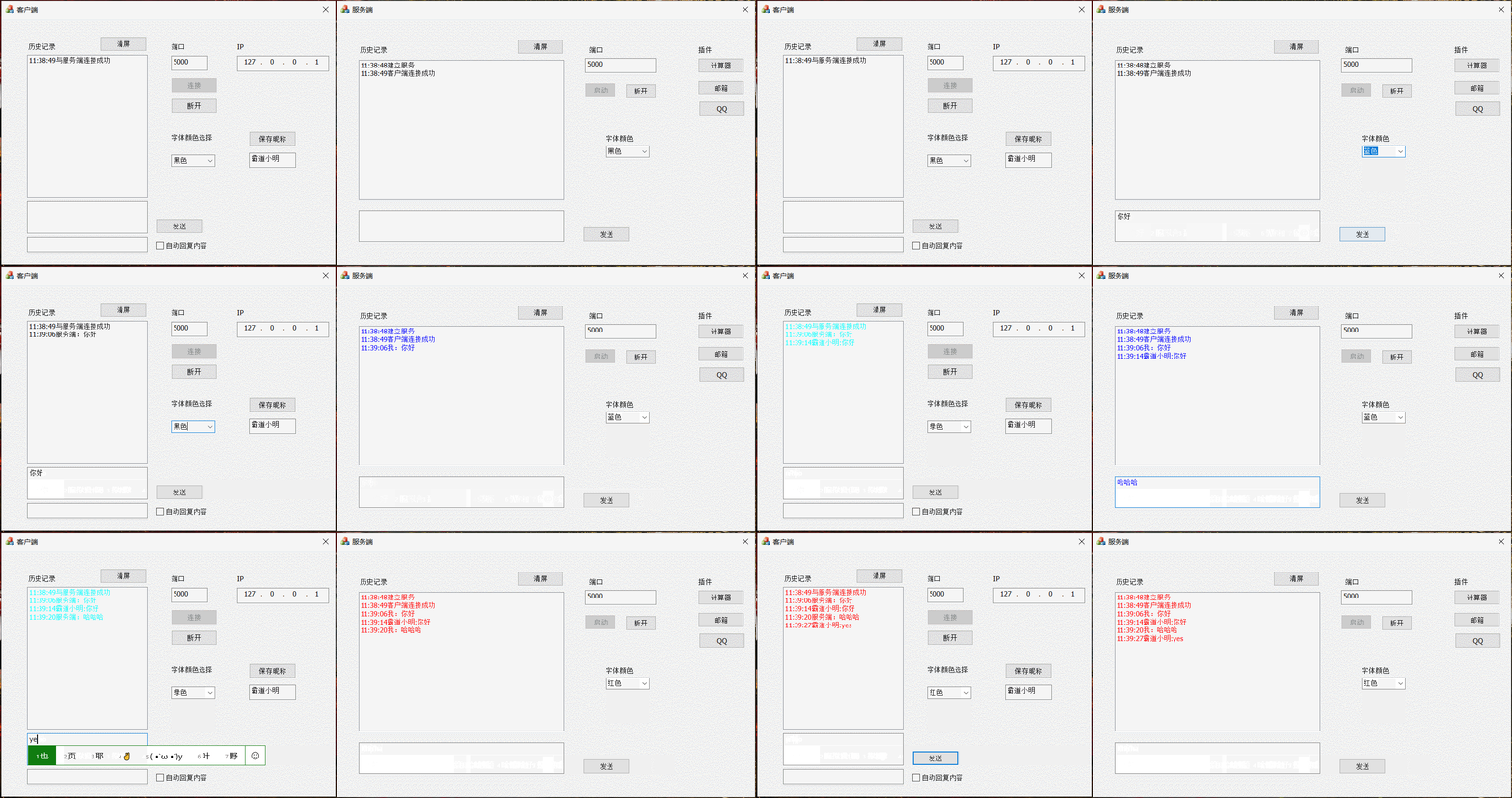
Bind member variables to the control , Add colors to the initialization function and set the default options
m_WordColorCombo.AddString(_T(" black "));
m_WordColorCombo.AddString(_T(" Red "));
m_WordColorCombo.AddString(_T(" Blue "));
m_WordColorCombo.AddString(_T(" green "));
// Set the current selection to 0 individual
m_WordColorCombo.SetCurSel(0);
SetDlgItemText(IDC_COLOUR_COMBO, _T(" black "));
Set the control color response function
HBRUSH CMFCChatClientDlg::OnCtlColor(CDC* pDC, CWnd* pWnd, UINT nCtlColor)
{
	HBRUSH hbr = CDialogEx::OnCtlColor(pDC, pWnd, nCtlColor);
	CString strColor;
	m_WordColorCombo.GetWindowTextW(strColor);
	//GetDlgCtrlID Returns a pointer to a given control or child window , There is no return NULL
	if (IDC_LIST1 == pWnd->GetDlgCtrlID() || IDC_SENDMSG_EDIT == pWnd->GetDlgCtrlID()) {
		if (strColor == L" black ") {
			pDC->SetTextColor(RGB(0, 0, 0));
		}
		else if (strColor == L" Red ") {
			pDC->SetTextColor(RGB(255, 0, 0));
		}
		else if (strColor == L" green ") {
			pDC->SetTextColor(RGB(0, 255, 255));
		}
		else if (strColor == L" Blue ") {
			pDC->SetTextColor(RGB(0, 0, 255));
		}
	}
	return hbr;
}
2.7 The dialog interface inserts a background image

stay OnPaint Function
// Determine the target area → Load the resource image and convert it to a memory device → mapping
		//1. Definition dc
		CPaintDC dc(this); //  Device context for drawing
		//2. Determine the drawing area
		CRect rect;
		GetClientRect(&rect);	// Get the dialog area
		//3. Create a memory device environment   Create compatibility dc
		CDC dcBmp;
		dcBmp.CreateCompatibleDC(&dcBmp);


		//4. Load resource pictures
		CBitmap bmpBackGround;
		bmpBackGround.LoadBitmap(IDB_BITMAP);
		//5. Load the picture Ziyun into the bitmap bBitMap Bitmap
		BITMAP bBitmap;
		bmpBackGround.GetBitmap(&bBitmap);

		//6. Select the bitmap into the temporary memory device environment
		CBitmap* pbmpOld = dcBmp.SelectObject(&bmpBackGround);

		//7. Began to draw
		dc.StretchBlt(0, 0, rect.Width(), rect.Height(), &dcBmp, 0, 0, bBitmap.bmWidth, bBitmap.bmHeight, SRCCOPY);
边栏推荐
猜你喜欢

Introduction to component functions of blueprism process business object Chapter 3 of RPA

vs如何读取mysql中的数据(顺便通过代码解决了中文乱码问题)

BUU刷题记3

QT信号与槽连接(松耦合)

第一次培训课完美成功(๑•ㅂ•)و*

URL format

gospel! Wechat personal official account can be renamed!

How to implement an asynchronous task queue system that can handle massive data (supreme Collection Edition)

Week 6 Convolutional Neural Networks (CNNs)
![[基础服务] [数据库] ClickHouse的安装和配置](/img/fe/5c24e4c3dc17a6a96985e4fe97024e.png)
[基础服务] [数据库] ClickHouse的安装和配置
随机推荐
STM32F103 active buzzer driver
cv2.resize()
What are the advantages of digital factory
Introduction to component functions of blueprism process business object Chapter 3 of RPA
数字化工厂的优势有哪些
Shell script basic programming commands
Bean注入和生命周期
This point - super classic interview questions
T246836 [LSOT-1] 暴龙的土豆
打字比赛圆满结束!
BUU刷题记-网鼎杯专栏2
How to implement an asynchronous task queue system that can handle massive data (supreme Collection Edition)
Nmap installation and use
SQL injection
被罚「带薪休假」一个月后,谷歌解雇了「爱」上 AI 的他
福音!微信个人公众号可以改名了!
QT signal and slot connection (loose coupling)
贴合课标新方向 猿辅导打造特色新概念内容体系
arpspoof 安装和使用
YGG 与 AMGI 的旗舰 NFT 项目 My Pet Hooligan 合作进入 The Rabbit Hole