当前位置:网站首页>Meeting seating & submission of meeting OA
Meeting seating & submission of meeting OA
2022-07-26 20:13:00 【I love coriander TVT】
Catalog
Recently, I have been sharing meetings with you OA project , Today, I will continue to share about the meeting OA A highlight of the project , Meeting row . And a submission function .
One 、 Meeting row
1、 Conference seating plug-in
In order to realize the function of meeting seating , We need to find a plug-in for meeting seating on the Internet . You can search on Baidu

A plug-in found on the Internet , But the following two problems were found :
①、 Found element overlap , It is impossible to determine how many people will participate ②、 The element block is too small to see clearly
So we can't use material directly , Need to be adapted to our project
After transformation :

Source code :
<html>

	<head>

		<title> Meeting seating </title>

		<style type="text/css">
			* {
				padding: 0;
				margin: 0;
			}

			.tips {
				/* position: absolute; */
				background: #eee;
				display: inline-block;
				height: 60px;
				width: 60px;
				line-height: 60px;
				text-align: center;
				margin: 5px;
			}

			.add {
				position: fixed;
				right: 0;
				top: 0
			}

			#tu {
				width: 564px;
				height: 330px;
				background: lightblue
					/*background: url('u=3318199716,2583790385&fm=26&gp=0.jpg');*/
			}
		</style>
		<script src="https://ajax.aspnetcdn.com/ajax/jquery/jquery-3.5.1.min.js"></script>
		<script type="text/javascript" src="http://html2canvas.hertzen.com/dist/html2canvas.js"></script>
	</head>

	<body>


		<div id="tu"></div>
		<!-- <div class="tips" id="tips1" onmouseover="dragF.drag('tips1');">
			<img src="/images/skinslogo.gif"><br> Pictures can be dragged </div>
		<div class="tips" id="tips2" onmouseover="dragF.drag('tips2');"> seat 1
		</div>
		<div class="tips" id="tips3" onmouseover="dragF.drag('tips3');"> seat 2
		</div> -->

		<div class="add">
			<input id="dan_input" type="text" value="">
			<button onclick="return addDanMu()"> Add seats </button>
			<input id="jie_input" type="button" value=' download '>
		</div>


	</body>

	<script type="text/javascript">
		var $id = function(id) {
			return document.getElementById(id);
		}

		var dragF = {
			locked: false,
			lastObj: undefined,
			drag: function(obj) {
				$id(obj).onmousedown = function(e) {
					var e = e ? e : window.event;
					if (!window.event) {
						e.preventDefault();
					} /*  Block annotation <a href='/site/js-5791-1.html' target='_blank'><u> browser </u></a> Drag down a,img Default event for  */
					dragF.locked = true;
					$id(obj).style.position = "absolute";
					$id(obj).style.zIndex = "100";
					if (dragF.lastObj && dragF.lastObj != $id(obj)) { /*  Multi element dragging needs to restore the last element state  */
						dragF.lastObj.style.zIndex = "1";
					}

					dragF.lastObj = $id(obj);
					var tempX = $id(obj).offsetLeft;
					var tempY = $id(obj).offsetTop;

					dragF.x = e.clientX;
					dragF.y = e.clientY;
					document.onmousemove = function(e) {
						var e = e ? e : window.event;
						if (dragF.locked == false) return false;
						$id(obj).style.left = tempX + e.clientX - dragF.x + "px";
						$id(obj).style.top = tempY + e.clientY - dragF.y + "px";
						if (window.event) {
							e.returnValue = false;
						} /*  prevent ie Next a,img Default event for  */

					}

					document.onmouseup = function() {
						dragF.locked = false;
					}
				}
			}
		}
	</script>
	<script>
		function addDanMu() {
			var dan = document.getElementById("dan_input").value;
			if (dan == "") {
				alert(" Please enter barrage ~");
				return false;
			} else {
				document.getElementById("dan_input").value = ""; // Empty   Bullet screen input box
				// var br = document.createElement("BR");  // <br />
				var node = document.createElement("DIV"); // <div>
				var tipsArr = document.getElementsByClassName('tips');
				var i;
				// console.log(parseInt(tipsArr[tipsArr.length-1].id.substr(4))+1);
				if (tipsArr.length == 0) {
					i = 1
				} else {

					i = parseInt(tipsArr[tipsArr.length - 1].id.substr(4)) + 1;
				}
				// var aNode = document.createElement("P");   // <p>
				node.setAttribute("class", "tips");
				node.setAttribute("id", "tips" + i);
				node.setAttribute("onmouseover", "dragF.drag('tips" + i + "');");
				var textnode = document.createTextNode(dan); //  Create a   Text node ,  A barrage of user input , Deposit in   Created   Element nodes  <p>   in
				// aNode.appendChild(textnode);
				node.appendChild(textnode);
				// document.body.appendChild(br);
				// document.body.appendChild(node);

				document.getElementById("tu").appendChild(node);
				return true;
			}


		}
	</script>

	<script type="text/javascript">
		$("#jie_input").on("click", function(event) {
			event.preventDefault();
			html2canvas(document.getElementById("tu")).then(function(canvas) {
				var dataUrl = canvas.toDataURL();
				var newImg = document.createElement("img");
				newImg.src = dataUrl;
				// document.body.appendChild(newImg);
				// console.log(dataUrl)
				this.downloadFile(' test .png', dataUrl);

			});
		});

		// download
		function downloadFile(fileName, content) {
			debugger;
			let aLink = document.createElement('a');
			let blob = this.base64ToBlob(content); //new Blob([content]);

			let evt = document.createEvent("HTMLEvents");
			evt.initEvent("click", true, true); //initEvent  The last two parameters are not added FF I'll make a mistake next time    Event type , Is it bubbling? , Whether to block the default behavior of the browser
			aLink.download = fileName;
			aLink.href = URL.createObjectURL(blob);

			// aLink.dispatchEvent(evt);
			//aLink.click()
			aLink.dispatchEvent(new MouseEvent('click', {
				bubbles: true,
				cancelable: true,
				view: window
			})); // Compatible with Firefox
		}
		//base64 turn blob
		function base64ToBlob(code) {
			let parts = code.split(';base64,');
			let contentType = parts[0].split(':')[1];
			let raw = window.atob(parts[1]);
			let rawLength = raw.length;

			let uInt8Array = new Uint8Array(rawLength);

			for (let i = 0; i < rawLength; ++i) {
				uInt8Array[i] = raw.charCodeAt(i);
			}
			return new Blob([uInt8Array], {
				type: contentType
			});
		}
	</script>

</html>
2、 Apply the conference seating plug-in to the project
We need to seat the meeting in html The format of is converted to jsp page , At the same time, when we click on meeting seating , It can pop up the page of meeting seating
2.1 Meeting row jsp page
<%@ page language="java" contentType="text/html; charset=UTF-8"
    pageEncoding="UTF-8"%>
<!DOCTYPE html PUBLIC "-//W3C//DTD HTML 4.01 Transitional//EN" "http://www.w3.org/TR/html4/loose.dtd">
<html>
<head>
<base href="${pageContext.request.contextPath }/"/>
<meta http-equiv="Content-Type" content="text/html; charset=UTF-8">
<link href="static/js/layui/css/layui.css" rel="stylesheet" type="text/css"/>
<script type="text/javascript" src="static/js/jquery-3.3.1.min.js"></script>
<script type="text/javascript" src="static/js/layui/layui.js"></script>
<script type="text/javascript" src="static/js/plugins/html2canvas/html2canvas.js"></script>
<title> Meeting seating </title>
</head>
<style type="text/css">
* {
	padding: 0;
	margin: 0;
}

body{
	width: 100%;
	height: 100%;
	/* background: red; */
}

.tips {
	/* position: absolute; */
	background: pink;
	display: inline-block;
	height: 60px;
	/* width: 60px; */
	line-height: 60px;
	text-align: center;
	margin: 5px;
	padding: 0 10px;
}

.add {
	position: fixed;
	right: 10px;
	top: 10px;
	display:inline;
}

#tu {
	width: 100%;
	height: 100%;
	/* background: lightblue; */
		/*background: url('u=3318199716,2583790385&fm=26&gp=0.jpg');*/
}
.layui-input{
	height:30px;
}
</style>
<body id="screen_body">
    <div id="tu"></div>
    <!--  Don't use layui Form inline mode , It can lead to canvas Of toDataURL() The data is  data:, -->
	<div class="add">
		<div style="display:inline-block;">
			<input id="dan_input" type="text" value="" class="layui-input">
		</div>
		<div style="display:inline-block;">
			<button onclick="return addDanMu()" class="layui-btn layui-btn-sm"> Add seats </button><input id="jie_input" type="button" class="layui-btn layui-btn-sm" value=' download '>
		</div>
	</div>
</body>
<script type="text/javascript">
var $id = function(id) {
	return document.getElementById(id);
}
// Drag and drop in the meeting row
var dragF = {
	locked: false,
	lastObj: undefined,
	drag: function(obj) {
		$id(obj).onmousedown = function(e) {
			var e = e ? e : window.event;
			if (!window.event) {
				e.preventDefault();
			} /*  Block annotation <a href='/site/js-5791-1.html' target='_blank'><u> browser </u></a> Drag down a,img Default event for  */
			dragF.locked = true;
			$id(obj).style.position = "absolute";
			$id(obj).style.zIndex = "100";
			if (dragF.lastObj && dragF.lastObj != $id(obj)) { /*  Multi element dragging needs to restore the last element state  */
				dragF.lastObj.style.zIndex = "1";
			}

			dragF.lastObj = $id(obj);
			var tempX = $id(obj).offsetLeft;
			var tempY = $id(obj).offsetTop;

			dragF.x = e.clientX;
			dragF.y = e.clientY;
			document.onmousemove = function(e) {
				var e = e ? e : window.event;
				if (dragF.locked == false) return false;
				$id(obj).style.left = tempX + e.clientX - dragF.x + "px";
				$id(obj).style.top = tempY + e.clientY - dragF.y + "px";
				if (window.event) {
					e.returnValue = false;
				} /*  prevent ie Next a,img Default event for  */

			}

			document.onmouseup = function() {
				dragF.locked = false;
			}
		}
	}
}
</script>

<script type="text/javascript">
var layer;
layui.use(['layer'],function(){
	layer=layui.layer;

    // Initialize meeting seating : According to the meeting ID Get the names of all participants ( host + Participants + People in attendance )
	initMeetingUsers();

	// Draw pictures of meeting seating
	$("#jie_input").on("click", function(event) {
		$('.add').hide();
		event.preventDefault();
		html2canvas(document.getElementById("screen_body")).then(function(canvas) {
			var dataUrl = canvas.toDataURL();
			console.log(dataUrl);
			var param = {};
			param['seatPic'] = dataUrl;
			param['id'] = '${param.id}';
			param['methodName']='updateSeatPicById';
			console.log(param);
			// Here you need to upload the pictures of meeting seating
			$.post('${pageContext.request.contextPath }/info.action',param,function(rs){
				if(rs.success){
					// Get the current status first iframe Layer index
					var index = parent.layer.getFrameIndex(window.name);
					// And then close it
					parent.layer.close(index);
					// Call the refresh method of the parent page
					parent.query();
				}else{
					layer.msg(rs.msg,{icon:5},function(){});
				}
			},'json');
		});
	});
});

function initMeetingUsers(){
	//http://localhost:8080/xxx/seatPic.jsp?id=12  -> ${param.id}
	$.getJSON('${pageContext.request.contextPath }/user.action',{
		'methodName':'queryUserByMeetingId',
		'meetingId':'${param.id}'
	},function(rs){
		console.log(rs);
		let data=rs.data;
		$.each(data,function(i,e){
			$('#dan_input').val(e.name);
			addDanMu();
		});
	});
}


// Add meeting seating
function addDanMu() {
	var dan = document.getElementById("dan_input").value;
	if (dan == "") {
		alert(" Please enter barrage ~");
		return false;
	} else {
		document.getElementById("dan_input").value = ""; // Empty   Bullet screen input box
		// var br = document.createElement("BR");  // <br />
		var node = document.createElement("DIV"); // <div>
		var tipsArr = document.getElementsByClassName('tips');
		var i;
		// console.log(parseInt(tipsArr[tipsArr.length-1].id.substr(4))+1);
		if (tipsArr.length == 0) {
			i = 1
		} else {

			i = parseInt(tipsArr[tipsArr.length - 1].id.substr(4)) + 1;
		}
		// var aNode = document.createElement("P");   // <p>
		node.setAttribute("class", "tips");
		node.setAttribute("id", "tips" + i);
		node.setAttribute("onmouseover", "dragF.drag('tips" + i + "');");
		var textnode = document.createTextNode(dan); //  Create a   Text node ,  A barrage of user input , Deposit in   Created   Element nodes  <p>   in
		// aNode.appendChild(textnode);
		node.appendChild(textnode);
		// document.body.appendChild(br);
		// document.body.appendChild(node);

		document.getElementById("tu").appendChild(node);
		return true;
	}
}
	</script>
</html>
2.2 In my meeting js Add the code to open the meeting row ajax Method layer.open
// Open the meeting seating dialog box
function open(id){
	layer.open({
        type: 2,                    //layer Provides 5 Layer type . The values that can be passed in are :0( Message box , Default )1( Page layer )2(iframe layer )3( Loading layer )4(tips layer )
        title: ' Meeting row ',                   // Dialog title
        area: ['460px', '340px'],   // Wide and high
        skin: 'layui-layer-rim',    // Style class name
        content: $("#ctx").val()+'/jsp/meeting/seatPic.jsp?id='+id,                // Pop up content . You can pass in ordinary html Content , You can also specify DOM, With more type Different but different
    });
}
2.3 Running effect :

3、 Conference participant user data initialization
Now we have successfully applied the plug-in to the project , But in fact, we should get the participant data of the meeting and bind it to the interface of meeting seating , Then drag the elements to arrange seats .
3.1 To write SQL sentence
SQL Statements contrast
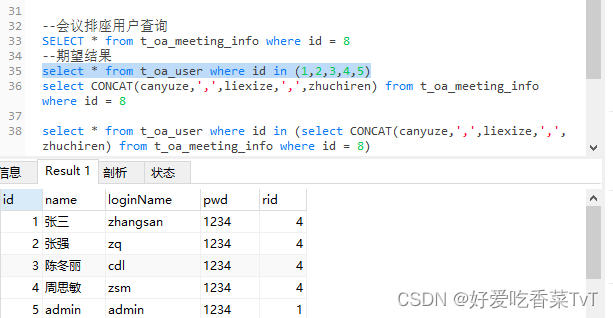

Using functions Find_in_set
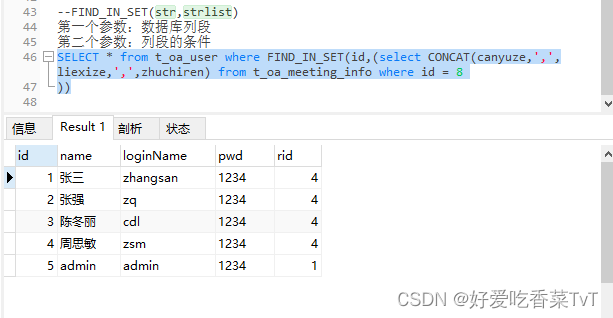
select * from t_oa_user where FIND_IN_SET(id,"
				+ "(select concat(canyuze,',',liexize,',',zhuchiren) uid "
				+ "from t_oa_meeting_info where id="+meetingId+"))
3.2 Background coding
userDao
public List<User> queryUserByMeetingId(Long meetingId) throws Exception{
		String sql="select * from t_oa_user where FIND_IN_SET(id,"
				+ "(select concat(canyuze,',',liexize,',',zhuchiren) uid "
				+ "from t_oa_meeting_info where id="+meetingId+"))";
		return super.executeQuery(sql, User.class, null);
	}
userAction
public String queryUserByMeetingId(HttpServletRequest req,HttpServletResponse resp) throws Exception{
		try {
			String meetingId = req.getParameter("meetingId");
			List<User> users = userDao.queryUserByMeetingId(Long.valueOf(meetingId));
			CommonUtils.toJson(true, users, resp);
		} catch (Exception e) {
			CommonUtils.toJson(false," Failed to get the information of participants ", resp);
			e.printStackTrace();
		}
		return null;
	}
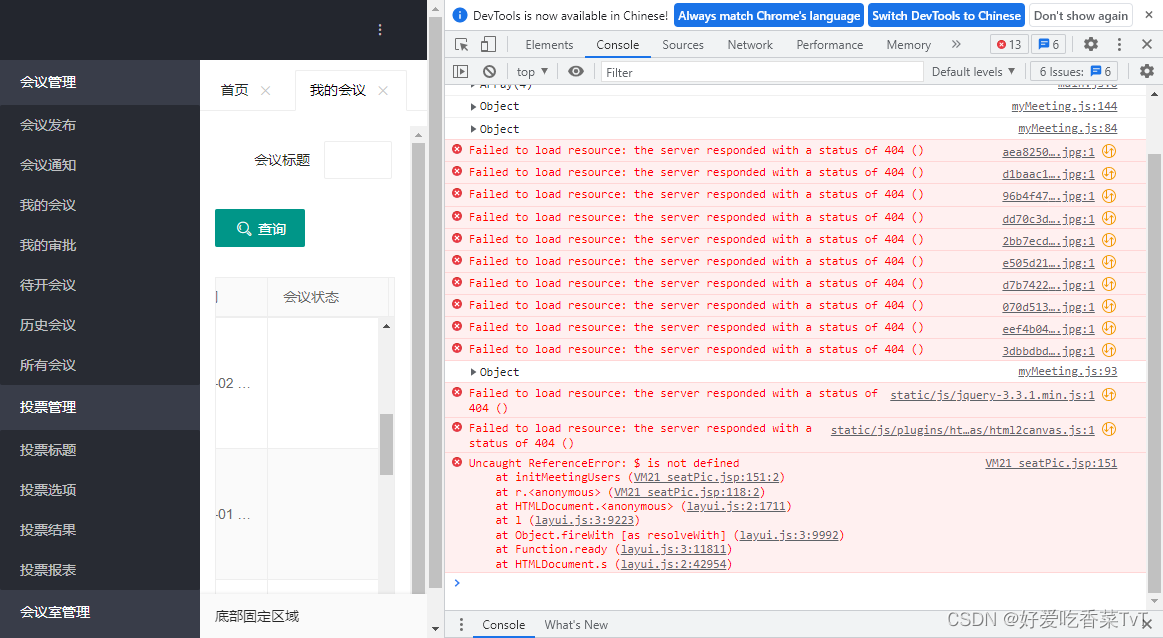
Error message : Remember to import jquery Class library ,, Otherwise, the data cannot be displayed on the meeting seating interface

4、 Generate meeting seating pictures
4.1meetinginfoDao
//	 According to the meeting ID Update the seating pictures of the meeting
	public int updateSeatPicById(MeetingInfo info) throws Exception {
		String sql="update t_oa_meeting_info set seatPic=? where id=?";
		return super.executeUpdate(sql, info, new String[] {"seatPic","id"});
	}
4.2meetinginfoAction
//	 According to the meeting id Update row seats
	public String updateSeatPicById(HttpServletRequest req,
			HttpServletResponse resp) throws Exception{
		try {
			//1. Save the seating image to the specified location and get the image path
			//1)  Define the path to save the meeting pictures
			String serverPath=PropertiesUtil.getValue("serverPath");
			String dirPath=PropertiesUtil.getValue("dirPath");
			//2)  Define the name of the meeting seating picture ( Finally, save it to the database table ), for example :/uploads/xxxxx.jpg
			String fileName=UUID.randomUUID().toString().replace("-", "")+".jpg";
			//3)  Splice into a complete path
			String realPath=dirPath+fileName;
			//4)  Save the picture to the specified location
			Base64ImageUtils.GenerateImage(info.getSeatPic().replace("data:image/png;base64,",""), realPath);

			//2. According to the meeting ID Modify the meeting picture information
			info.setSeatPic(serverPath+fileName);
			infoDao.updateSeatPicById(info);
			ResponseUtil.writeJson(resp, R.ok(200, " Update the seating pictures of the meeting successfully "));
		} catch (Exception e) {
			e.printStackTrace();
			try {
				ResponseUtil.writeJson(resp, R.error(0, " Failed to update the seating image of the meeting "));
			} catch (Exception e1) {
				e1.printStackTrace();
			}
		}
		return null;
	}

Click download and it will be displayed in our local E On the disk and can be displayed on the interface


Two 、 submit for censorship
1、 Background coding
1.1meetinginfoDao
//	 According to the meeting ID Update the approver of the meeting ( submit for censorship )
	public int updateAuditorById(MeetingInfo info) throws Exception {
		String sql="update t_oa_meeting_info set auditor=?,state=2 where id=?";
		return super.executeUpdate(sql, info, new String[] {"auditor","id"});


}
1.2meetinginfoAction
//	 According to the meeting ID Update the approver of the meeting ( submit for censorship )
	public String updateAuditorById(HttpServletRequest req, HttpServletResponse resp) {
		try {
			int rs = infoDao.updateAuditorById(info);
			if (rs > 0) {
				ResponseUtil.writeJson(resp, R.ok(200, " The meeting was approved successfully "));
			}else {
				ResponseUtil.writeJson(resp, R.error(0, " Meeting approval failed "));
			}
		} catch (Exception e) {
			e.printStackTrace();
			try {
				ResponseUtil.writeJson(resp, R.error(0, " Meeting approval failed "));
			} catch (Exception e1) {
				e1.printStackTrace();
			}
		}
		return null;
	}
2、 Front desk code
meetinginfo.js
// Meeting submission for approval
function openLayerAudit(){
	// Each time you open it, you will initialize the submitter and set the default value
	$('#auditor').val("");
	// You have to re render
	form.render('select');
	// Pop-up dialog box
    layer.open({
        type: 1,                    //layer Provides 5 Layer type . The values that can be passed in are :0( Message box , Default )1( Page layer )2(iframe layer )3( Loading layer )4(tips layer )
        title:' Meeting submission for approval ',
        area: ['426px', '140px'],   // Wide and high
        skin: 'layui-layer-rim',    // Style class name
        content: $('#audit'),   // Pop up content . You can pass in ordinary html Content , You can also specify DOM, With more type Different but different
    });
}
Running effect :

边栏推荐
- 金仓数据库 KingbaseES SQL 语言参考手册 (21. KES正则表达式支持)
- 内网渗透学习(二)信息收集
- Kingbasees SQL language reference manual of Jincang database (19. SQL statement: drop table to load)
- LeetCode_回溯_中等_40.组合总和 II
- 金仓数据库 KingbaseES SQL 语言参考手册 (17. SQL语句: DISCARD 到 DROP LANGUAGE)
- There is an Oolong incident in open source. Maybe you don't know these five open source protocols
- 2022 极术通讯-安谋科技开启商业化新篇章
- 答应我,看完别再写狗屎代码了。。
- openstack 虚拟机网卡被重名为cirename0
- LeetCode_回溯_中等_216.组合总和 III
猜你喜欢
[cache series] advantages, disadvantages and choices of several cache read-write schemes

计算机组成原理常见面试题目总结,含答案

花1200亿修一条“地铁”,连接4个万亿城市,广东在想啥?

Overview of canvas
ShardingSphere-JDBC 关键字问题
DevOps 实践多年,最痛的居然是?

plsql包

KVM virtualization
![[Android] the black technology behind kotlin's rapid compilation. Learn about it~](/img/d6/ae107f75c158e97913e6d75eac5b84.png)
[Android] the black technology behind kotlin's rapid compilation. Learn about it~
一年卖7亿,德州扒鸡赶考IPO
![[cache series] advantages, disadvantages and choices of several cache read-write schemes](/img/2f/e51aeed15f7c3d9771c353b8a5fadb)
随机推荐
SQL injection
ES6的方法&类数组转成真正的数组&判断数组的方法
Scope in JS
使用ECS和OSS搭建个人网盘
计算机专业面试题目总结,总导航
What should we do about the fragmentation of internal information? Try this
2000 words to help you master anti shake and throttling
Excel-VBA 快速上手(十、提示框、可输入的弹出框)
Kingbases SQL language reference manual of Jincang database (16. SQL statement: create sequence to delete)
Kingbases SQL language reference manual of Jincang database (13. SQL statement: alter synonym to comment)
Zhongtian steel uses tdengine in GPS and AIS scheduling
this指向-超经典面试题
C#异步编程看这篇就够了
【OBS】解决OBS推两个rtmp流 + 带时间戳问题
负载均衡的使用
Kingbasees SQL language reference manual of Jincang database (20. SQL statements: merge to values)
靠元宇宙和NFT,天下秀疯狂“割韭菜”?
Kingbasees SQL language reference manual of Jincang database (19. SQL statement: drop table to load)
计算机组成原理常见面试题目总结,含答案
答应我,看完别再写狗屎代码了。。