当前位置:网站首页>Under the same WiFi, the notebook is connected to the virtual machine on the desktop
Under the same WiFi, the notebook is connected to the virtual machine on the desktop
2022-06-25 17:28:00 【jaffe—fly】
The virtual machine must be in Bridge Street mode

Vmware You must select the host network card in the virtual network editor of
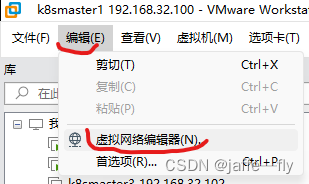


Don't select auto here
Don't select auto here
Don't select auto here
Choose the one on your host that accesses the Internet wifi network card
The network segment and gateway of the virtual machine must be the same as that of the host
The problem is , Why change to bridge mode , The host machine ping No virtual machine , Virtual machine also ping No host , Virtual machine also ping no www.baidu.com,
That's the problem
Network segment
The same network segment means multiple IP If they have the same network address, they are considered to be in the same network segment . Illustration :192.168.1.60 and 192.168.1.70 Two IP If the mask is used, it is 255.255.255.0 Words , The same network address is 192.168.1.0 Well, the two one. IP On the same network segment . But if two IP The mask used is 255.255.255.192 Then their network addresses are 192.168.1.0 and 192.168.1.64 了 , These are two Ip It is not in a network segment .
So... With the same network address IP In the same segment , Computers in the same network segment can communicate directly , The gateway is required for host communication between different network segments .
Because virtual machines used to be NAT Pattern , Later, in order to connect desktop computers with notebooks , The mode of the virtual machine must be set to bridge , Although the settings have been changed , however ip The address is still reserved before NAT Of ip, So you need to check the host computer ip And gateway , The virtual machine is changed to be the same as the host
The host machine ipconfig see 
IPv4 Address , Subnet mask , The default gateway All three are important
gateway (Gateway)
For host computer route print, For virtual machines route -n, View gateway routes
Set up
The virtual machine ip Change the address to 192.168.3.xxx
The virtual machine mask remains the same as the host
The gateway is set to the same
Use command vim /etc/sysconfig/network-scripts/ifcfg-ens33
IPADDR=192.168.3.100
NETMASK=255.255.255.0
GATEWAY=192.168.3.1
Remember... After the change service network restart
Get it done , Toss about 2 Hours , You can happily use your laptop to toss around your desktop , Mainly to build k8s
边栏推荐
- try with resource
- 超全金屬PBR多通道貼圖素材網站整理
- 单例模式应用
- Is Guotai Junan Securities reliable? Is it legal? Is it safe to open a stock account?
- The art of code annotation. Does excellent code really need no annotation?
- 大学生暑假换机热,ROG 明星产品幻 16 翻转版 / 幻 13 / 幻 X 预约
- Sword finger offer II 035 Minimum time difference
- 2022云的世界会更好吗
- Are these old system codes written by pigs?
- Kotlin入门(20)几种常见的对话框
猜你喜欢

How smart PLC constructs ALT instruction
杰理之唤醒口使用注意事项【篇】

Redis系列——概述day1-1

杰理之adc_get_voltage 函数获取电压值不准【篇】

Kotlin

CVPR small target detection: context and attention mechanisms improve small target detection (attached with paper Download)

"Podcast with relish" 386 Yuan Tang Hua Yuan Shi: who is not a "Mr. White character"?
STM32 hardware error hardfault_ Handler processing method

Learn Tai Chi Maker - mqtt (III) connect to mqtt server
![[UVM practice== > episode_2] ~ VIP, VIP development, VIP release](/img/de/4befb321d5cf5b0aa630e9ad0fda2a.png)
[UVM practice== > episode_2] ~ VIP, VIP development, VIP release
随机推荐
Kotlin
剑指 Offer 39. 数组中出现次数超过一半的数字
Tasklet API usage
Protocol and hierarchy
Mathematical modeling - nonlinear programming
CVPR小目标检测:上下文和注意力机制提升小目标检测(附论文下载)
[UVM practice== > episode_2] ~ VIP, VIP development, VIP release
【编译原理】词法分析
软考中级和高级选哪个比较好?
Redis series - overview day1-1
LSF如何看job预留slot是否合理?
软考中的嵌入式系统设计师为什么考的人少?
FreeRTOS内核时钟不对的问题解决
【Matlab】数据插值
Involution? Foam? Change? Ten questions directly hit the core puzzle of "meta universe" – the essence of "ask ta- Wang Lei about the time of the universe"
try with resource
JS disable browser default events
Vscode plug-in self use
上线移动ERP系统有哪些步骤?环环紧扣很重要
宝藏又小众的国画3d材质贴图素材网站分享