当前位置:网站首页>Array or object, date operation
Array or object, date operation
2022-07-28 04:51:00 【Please don't bully hamburgers with noodles】
One . Array
1. Integration of two arrays concat
arrs1=["0002", "0003"];
arrs2=["0004", "1000"];
arrs1 = arrs1.concat(arrs2);
console.log(arrs1);// Output  ["0002", "0003", "0004", "1000"]
Extended to the accumulation of a data
Start arr=[]; Click Get arr=["1002","1002"], Click the operation again arr=["1403","1334"] At this point, you should add up the results obtained by each click
 var  sumData = new Array();// This requires setting global variables


 var selectData=[];// Get the array every time you click
 sumData=sumData.concat(electData);
 console.log(sumData)
2. js Compare two array objects , Take out different values
var array1 = [ {"bgxmid": "1002 "  },{"bgxmid": "1003" }];
var array2 = [ {"bgxmid": "1002 ","bgxmmc": "t1 " }, {"bgxmid": "1003","bgxmmc": "t2"}, {"bgxmid": "1005 " ,"bgxmmc": "t3 "}];
var result = [];
for(var i = 0; i < array2.length; i++){
    var obj = array2[i];
    var bgxmid = obj.bgxmid;
    var isExist = false;
    for(var j = 0; j < array1.length; j++){
        var aj = array1[j];
        var n = aj.bgxmid;
        if(n == bgxmid){
            isExist = true;
            break;
        }
    }
    if(!isExist){
        result.push(obj);
    }
}
console.log(result);// Output {bgxmid: "1005 ", bgxmmc: "t3 "}
3. An array object removes duplicate elements
res =[
	{"bgxmid":"0021","bgxmmc":" Blizzard "},
	{"bgxmid":"0223","bgxmmc":" routine blood test "},
	{"bgxmid":"0333","bgxmmc":" White blood cells "},
	{"bgxmid":"0444","bgxmmc":" Blizzard "},
	{"bgxmid":"0623","bgxmmc":" routine blood test "},
	{"bgxmid":"0733","bgxmmc":" red blood cell "},
]


var newBgxmID = [];
 var t = 0;
for(i=0;i<res.length;i++){
     var isTrue = true;
     for(j=i+1;j<res.length;j++){
         if(res[i].bgxmmc == res[j].bgxmmc){
              isTrue = false;
              break;
           }
     }
    if(isTrue){
         newBgxmID[t] = res[i];
           t++;
      }
 }
console.log(newBgxmID)
4. 2 Arrays are combined into a new data set
Case one :
var ids = ['1002','10003','1004'];
var vals = [' Apple ',' pear ',' Banana '];
var obj = [];
for(let i =0;i<ids.length;i++){
	obj.push({id:ids[i],value:vals[i]})
}
console.log(obj)
The second case
var ids = [{'id':'1002','zhy':' Hours '},{'id':'10003','zhy':' Hours '},{'id':'1004','zhy':' Hours '}];
var vals = [{'name':' Apple '},{'name':' pear '},{'name':' Banana '}];
var arr=[];
for(var i=0;i<ids.length;i++){
	arr.push({'id':ids[i].id,'zhy':ids[i].zhy,'name':vals[i].name})

}
console.log(arr)


 Optimization method :

for(var i=0;i<ids.length;i++){
	arr.push(Object.assign(ids[i],vals[i]))

}

5. Check whether a parameter is in an array , No longer , Then the array is added , stay , Ignore
  let nowCourse = [];
			nowCourse = [].concat(this.nowCourse);
			let result = [];
			var isExist = false;
			for (var i = 0; i < nowCourse.length; i++) {
				if (nowCourse[i] == this.course) {
					isExist = true;
					break;
				}
			}
			if (!isExist) {
				result.push(this.course);
			}
			this.nowCourse = result.concat(this.nowCourse);
6. A set of data restructuring
let yyqxList = [
{
id: 1,
yyqxdm: "yyqx_1",
clmc: " material yyqx_1_1",
yyqx: " situation 1"
},
{
id: 2,
yyqxdm: "yyqx_2",
clmc: " material yyqx_2_1",
yyqx: " situation 2"
},
{
id: 3,
yyqxdm: "yyqx_1",
clmc: " material yyqx_1_2",
yyqx: " situation 1"
},
{
id: 4,
yyqxdm: "yyqx_2",
clmc: " material yyqx_2_2",
yyqx: " situation 2"
},
{
id: 5,
yyqxdm: "yyqx_3",
clmc: " material yyqx_3",
yyqx: " situation 3"
}
];
const mapList = {};
 yyqxList.forEach(item => {
    if (mapList[item.yyqxdm]) {
    	mapList[item.yyqxdm].push({'clmc':item.clmc,'yyqx':item.yyqx});
    } else {
    	mapList[item.yyqxdm]=[{'clmc':item.clmc,'yyqx':item.yyqx}];
   }
});
const mapList = {};
    			yyqxList.forEach(item => {
    				if (mapList[item.yyqxdm]) {
    					mapList[item.yyqxdm].push(item);
    				} else {
    					mapList[item.yyqxdm]=[item];
    				}
    			});

    			const myList = Object.keys(mapList).map(key => {
    				const item = mapList[key];
    				return {
    					id: item[0].id,
    					yyqx: item[0].yyqx,
    					list: item.map(info => info.clmc)
    				};
    			});
    			console.log(myList);
7. It is known that menuCheckedKeys = [1001, 1046,4,1049] Value obtain , Its parent node ( Such as : adopt 1001 obtain 1,100; adopt 1046 obtain 2,109)
<!DOCTYPE html>
<html>
    <head>
        <meta charset="utf-8">
        <meta http-equiv="X-UA-Compatible" content="IE=edge">
        <meta name="viewport" content="width=device-width,initial-scale=1.0">
        <title></title>
    </head>
    <body>
    </body>
    <script src="https://cdn.jsdelivr.net/npm/[email protected]/lodash.min.js"></script>
    <script>
        let menuOptions = [
    {
        "id":1,
        "label":" System management ",
        "children":[
            {
                "id":100,
                "label":" User management ",
                "children":[
                    {
                        "id":1001,
                        "label":" User query "
                    },
                    {
                        "id":1002,
                        "label":" New users "
                    },
                    {
                        "id":1003,
                        "label":" The user to change "
                    }
                ]
            },
            {
                "id":101,
                "label":" Role management ",
                "children":[
                    {
                        "id":1008,
                        "label":" Role search "
                    },
                    {
                        "id":1009,
                        "label":" Role addition "
                    }
                ]
            },
            {
                "id":102,
                "label":" Menu management ",
                "children":[
                    {
                        "id":1013,
                        "label":" Menu query "
                    },
                    {
                        "id":1014,
                        "label":" Menu added "
                    }
                ]
            }
        ]
    },
    {
        "id":2,
        "label":" System monitoring ",
        "children":[
            {
                "id":109,
                "label":" Online users ",
                "children":[
                    {
                        "id":1046,
                        "label":" Online query "
                    },
                    {
                        "id":1047,
                        "label":" Batch forced return "
                    },
                    {
                        "id":1048,
                        "label":" Single strong retreat "
                    }
                ]
            },
            {
                "id":110,
                "label":" Timing task ",
                "children":[
                    {
                        "id":1049,
                        "label":" Task query "
                    },
                    {
                        "id":1050,
                        "label":" Task addition "
                    }
                ]
            },
            {
                "id":111,
                "label":" Data monitoring "
            },
            {
                "id":112,
                "label":" Service monitoring "
            },
            {
                "id":113,
                "label":" Cache monitoring "
            }
        ]
    },
    {
        "id":3,
        "label":" System tools ",
        "children":[
            {
                "id":114,
                "label":" Form building "
            },
            {
                "id":116,
                "label":" system interface "
            }
        ]
    },
    {
        "id":2000,
        "label":" Invoice issuing management ",
        "children":[
            {
                "id":2001,
                "label":" Unit authorization management ",
                "children":[
                    {
                        "id":2004,
                        "label":" Inquire about "
                    }
                ]
            },
            {
                "id":2019,
                "label":" Invoice application ",
                "children":[
                    {
                        "id":2022,
                        "label":" newly added "
                    },
                    {
                        "id":2023,
                        "label":" modify "
                    }
                ]
            }
        ]
    },
    {
        "id":2043,
        "label":" Query statistics ",
        "children":[
            {
                "id":2044,
                "label":" Invoice issuing query ",
                "children":[
                    {
                        "id":2047,
                        "label":" Inquire about "
                    },
                    {
                        "id":2048,
                        "label":"  Check tax "
                    }
                ]
            }
        ]
    }
]

let menuCheckedKeys = [1001, 1046,4,1049];
let halfCheckedKeys = []
halfCheckedKeysFn();
//  Take the data
function halfCheckedKeysFn() {
	let parentIds = getNewData(menuOptions);
	if (!parentIds || parentIds.length === 0) {
		return []
	}
	Object.keys(parentIds).map(key => {
		const currentIndex = menuCheckedKeys.indexOf(parseInt(key))
		if (currentIndex !== -1) {
			halfCheckedKeys.push(parentIds[key])
		}
	})

	console.log(' The final data halfCheckedKeys:',_.uniq(halfCheckedKeys.flat(Infinity)))
}
// menuOptions  The data result is converted into a flattened array
function getNewData(datas) {
	const mapList = {};
	if (!datas || datas.length === 0) {
		return []
	}
	datas.forEach(node => {
		if (mapList[node.id]) {
			mapList[node.id].push(node.id);
		} else {
			mapList[node.id] = []
		}
		if (node.children && node.children.length > 0) {
			let erData = node.children;
			erData.forEach(er => {
				if (mapList[er.id]) {
					mapList[er.id].push(node.id);
				} else {
					mapList[er.id] = [node.id]
				}
				if (er.children && er.children.length > 0) {
					let sanData = er.children;
					sanData.forEach(san => {
						if (mapList[san.id]) {
							mapList[san.id].push(node.id);
							mapList[san.id].push(er.id);
						} else {
							mapList[san.id] = [node.id, er.id]
						}
					})
				}
			})
		}
	})
	console.log(' Erase the data :',mapList)
	return mapList
}
    </script>

</html>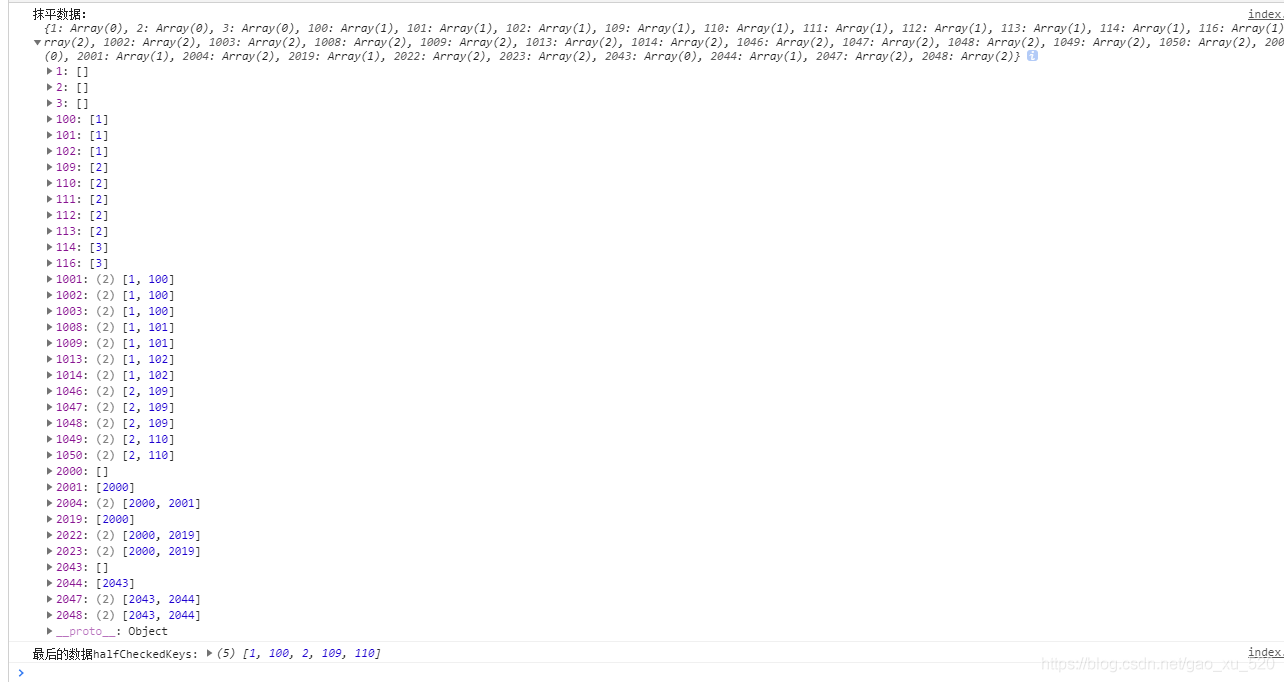
8. js Get all parent nodes and all child nodes of a node in the tree structure
data type
let newData = [
			{
				id: 100,
				label: " Fujian Province ",
				children: [
					{
						id: 103,
						label: " Quanzhou branch ",
						children: [
							{
								id: 101,
								label: " Licheng District ",
								children: [
									{
										id: 102,
										label: " Jiu Yi Branch "
									},
									{
										id: 104,
										label: " Fuqiao Branch "
									},
									{
										id: 105,
										label: " Xinmen branch "
									}
								]
							},
							{
								id: 113,
								label: " Anxi County Branch ",
								children: [
									{
										id: 115,
										label: " Xin'an Branch "
									}
								]
							}
						]
					},
					{
						id: 1041,
						label: " Fuqiao Branch ",
						children: [
							{
								id: 1105,
								label: " Xin'an Branch "
							}
						]
					}
				]
			},
			{
				id: 1034,
				label: " Fuqiao Branch ",
				children: [
					{
						id: 1155,
						label: " Xin'an Branch "
					}
				]
			}
		];
(1) It is known that id, obtain id Subsets under id
created() {
console.log(this.getChild(newData, 102, []));
},
methods: {
    getChild(nodes, item, arr) {
        for (let el of nodes) {
            if (el.id === item) {
                arr.push(el.id);
                if (el.children) {
                    this.childNodesDeep(el.children, arr);
                }
            } else if (el.children) {
                this.getChild(el.children, item, arr);
            }
        }
        return arr;
    },
    childNodesDeep(nodes, arr) {
        if (nodes)
            nodes.forEach(ele => {
                arr.push(ele.id);
                if (ele.children) {
                    this.childNodesDeep(ele.children, arr);
                }
            });
    },
 }
(2) It is known that id, obtain id The parent of id
const targetData = {};
created() {
    this.loops(newData);
    // Get parent node
    const target = this.getNode(113);
    console.log(target);
},
methods: {
    loops(data = [], parent) {
        return data.map(({ children, id: value }) => {
            const node = {
                value,
                parent
            };
            targetData[value] = node;
            node.children = this.loops(children, node);
            return;
        });
    },
    getNode(value) {
        let node = [];
        let currentNode = targetData[value];
        node.push(currentNode.value);
        if (currentNode.parent) {
            node = [...this.getNode(currentNode.parent.value), ...node];
        }
        return node;
    },

 }
(3) according to id lookup tree node
[
  {
    "id": 1,
    "name": " Office management ",
    "pid": 0,
    "children": [
      {
        "id": 2,
        "name": " Application for leave ",
        "pid": 1,
        "children": [
          {
            "id": 4,
            "name": " Leave record ",
            "pid": 2
          }
        ]
      },
      {
        "id": 3,
        "name": " Application for business trip ",
        "pid": 1
      }
    ]
  },
  {
    "id": 5,
    "name": " System settings ",
    "pid": 0,
    "children": [
      {
        "id": 6,
        "name": " Rights management ",
        "pid": 5,
        "children": [
          {
            "id": 7,
            "name": " User roles ",
            "pid": 6
          },
          {
            "id": 8,
            "name": " Menu settings ",
            "pid": 6
          }
        ]
      }
    ]
  }
]
recursively :
function getChildrenById(dataSource, id) {
  // hasFound  Indicates whether it has been found id value
  let [hasFound, result] = []

  function findById(data) {
    if (Array.isArray(data) && !hasFound) { //  Determine whether it is an array and there is no ,
      data.forEach(item => {
        if (item.id === id) { //  Data cycles through each subitem , And judge whether there is id value
          result = item; //  The result returned is equal to each item
          hasFound = true; //  And find id value
        }
        else if (item.children) {
          findById(item.children); //  Recursively call the children below
        }
      })
    }
  }

  findById(dataSource); //  Call
  return result;
}
for of Optimal recursive
export const getChildrenById = (dataSource = [], id) => {
  let result;

  function findById(data) {
    if(result) break; //  emphasis , Otherwise, there will be redundant rendering

    //  Determine whether it is an array and , Arrays have lengths
    if (Array.isArray(data)) {
      for (const item of data) {
        //  Data cycles through each subitem , And judge whether there is id value
        if (item.id === id) {
          result = item; //  The result returned is equal to each item
          break;
        } else if (Array.isArray(item.children)) {
          findById(item.children); //  Recursively call the children below
        }
      }
    }
  }

  findById(dataSource); //  Call
  return result;
};
Two . object
1. Integration between objects Object.assign(oData,fData);
var oData={'hzxm00':' Smile ','brxb00':' Woman '};
var fData={'brnl00':'24','brls00':' fuzhou '};
info = Object.assign(oData,fData);
info={'hzxm00':' Smile ','brxb00':' Woman ','brnl00':'24','brls00':' fuzhou '}
2.js Conversion of objects json object
Use JSON.parse() take JSON String to JS object
JS Object turn JSON :Object.toJSONString()
var allData = {
	bbcj:[],
	info:{swrq00:"20181009",syzz01:" fever ℃",syzz02:" Flushed ",syzz26:" Vomit times / God "}
}

var jsonStr = JSON.stringify(allData); //js Conversion of objects json object
console.log(jsonStr)
{"info":{"swrq00":"20181009","syzz01":" fever ℃","syzz02":" Flushed ","syzz26":" Vomit times / God "},"bbcj":[]}
3. Determine whether there is an empty value in a set
var noData={'hzxm00':' Smile ','brxb00':'','brnl00':'','brls00':' fuzhou '}
var isNull = false;
for(var i in noData){
	if(noData[i] == ''){
		isNull = true;
	}
}
if(isNull==true){
	console.log(' Empty value ')
	return false;
}
4. Object delete
var obj={name: " Little high ",  Project type : " drug ",  Project name : " cloth "}
if(obj.hasOwnProperty(' Project type ') == true){
     delete obj[' Project type ']
}
console.log(obj)//{name: " Little high ",  Project name : " cloth "}
5. cutting
1. Cut strings with spaces as separators
var str=' fever   38℃';
var arr = str.split(/\s+/);//[" fever ", "38℃"]

2. Comma separated
str="2,2,3,5,6,6"; // This is a string
	var bzglStrs = new Array();
    bzglStrs = str.split(",")

3.'-' Get rid of
var  date = '2018-10-22';
date.replace(/-/g, "");//20181022
date.replace(/\-| |:/g,"")+"000000" //20181022000000

yyyy-mm-dd hh:mm:ss   Turn into YYYYMMDDHHMMSS
var  date = '2018-10-22 10:22:12';
date.replace(/\-| |:/g,"");//20181022102212

4.'20181022'=====>'2018-10-22'
var date='20181022';
var newDate = date.substring(0, 4)+'-'+ date.substring(4, 6)+'-'+ date.substring(6, 8);
console.log(newDate)//'2018-10-22'

5.'2019-07 - 2019-08' ====>201907  201908
var date = '2019-07 - 2019-08';
date.replace(/\-/g, '');


6. How to split a string on multiple separators

/  Comma (,) And semicolon (;) Separate .
const list = "apples,bananas;cherries"
const fruits = list.split(/[,;]/)
console.log(fruits); // ["apples", "bananas", "cherries"]
6. Check whether the string has specific characters , Or replace characters
1. Check whether the string contains a specific sequence

const text = "Hello, world! My name is Kai!"
console.log(text.includes("Kai")); // true

2. Check whether the string starts or ends with a specific sequence

const text = "Hello, world! My name is Kai!"

console.log(text.startsWith("Hello")); // true

console.log(text.endsWith("world")); // false

3. Replace all occurrences of the string

const text = "I like apples. You like apples."

console.log(text.replace(/apples/g, "bananas"));
// "I like bananas. You like bananas."

console.log(text.replaceAll("apples", "bananas"));
// "I lik
3、 ... and . date
1. The date becomes a timestamp
var times = (new Date("2018/06/24 01:12:33")).getTime()/1000;
2. The timestamp becomes the date
new Date(parseInt("1561338000") * 1000).toLocaleString().replace(/:\d{1,2}$/,' ') // 2019/6/24 In the morning 9:00
3. Add and subtract time
Time stamp In fact, it turns into milliseconds , So time , The addition and subtraction of dates are all converted into time stamps ( millisecond ), And then calculate
1.09:00  reduce 30 (9 Point advance 30 Minutes of time )

 var ns = (new Date("2019/06/24 09:00:00")).getTime()/1000;
var prevTime = (30 * 60 * 1000)/1000;
var duraction =ns - prevTime;
var nowday = new Date(parseInt(duraction) * 1000).toLocaleString().replace(/:\d{1,2}$/,' '); //2019/6/24  In the morning 8:30
4. Time comparison
//2. Get local timestamp
const timestampNows = new Date().getTime();
 var  times = (new Date("2020/09/24 14:10:00")).getTime();
 console.log(' Time stamp :',timestampNows,times,(timestampNows-times)/1000/60)
times = (timestampNows -times)/1000/60;

times  minute
边栏推荐
- [function document] torch Histc and paddle Histogram and numpy.histogram
- [Sylar] framework chapter -chapter10-address module
- MySQL数据库————初识数据库
- Research on the design of robot education in stem course
- [Sylar] practical part - redis based parameter query service
- Depth traversal and breadth traversal of tree structure in JS
- 【sylar】框架篇-Chapter14-TcpServer 模块
- Angr(十一)——官方文档(Part2)
- printf()打印char* str
- Use animatedbuilder to separate components and animation, and realize dynamic reuse
猜你喜欢

Destructor of member function
Easycvr Video Square snapshot adding device channel offline reason display

吉利AI面试题【杭州多测师】【杭州多测师_王sir】

【Oracle】083错题集

Blooming old trees -- quickly build a map bed application with imageprocessor

提升学生群体中的STEAM教育核心素养
Leetcode 454. Adding four numbers II

Observable time series data downsampling practice in Prometheus

Is low code the future of development? On low code platform

Tiantian AMADA CNC bending machine touch screen maintenance rgm21003 host circuit board maintenance
随机推荐
01 node express system framework construction (express generator)
[Sylar] framework -chapter14 tcpserver module
Rendering process, how the code becomes a page (2)
Interview fraud: there are companies that make money from interviews
阿里巴巴面试题【杭州多测师】【杭州多测师_王sir】
How to upgrade a pair of 12.2 RAC(primary) and a pair of 12.2 RAC(dataguard) to 19c
What should testers know about login security?
The difference between alter and confirm, prompt
Ma Yi, Shen Xiangyang, Cao Ying's latest AI overview is hot! It took 3 months to build, netizens: required papers
Printf() print char* str
Rendering process, how the code becomes a page (I)
With a monthly salary of 15.5K, he failed to start a business and was heavily in debt. How did he reverse the trend through software testing?
App test process and test points
Cmake usage base summary
ADB environment configuration
[Sylar] framework Chapter 6 collaborative scheduling module
(clone virtual machine steps)
低代码是开发的未来吗?浅谈低代码平台
MySQL partition table transformation
go-zero单体服务使用泛型简化注册Handler路由