当前位置:网站首页>First meet flask
First meet flask
2022-07-23 11:16:00 【ZXY_ lucky】
1.Flask Introduce
Flask It's lightweight Web Development framework , Than Django It's a lot lighter
Flask The core is Werkzeug( Routing module ),Jinja2 template engine , To realize other functions, you need to install and expand
Flask Though light , But it has strong expansion ability , Rely on extensions to add functionality
2. Build a virtual environment
First step 
The second step 
The third step 
Step four 
2.1 Advance and retreat virtual environment
Exit virtual environment
First step : Enter the virtual environment folder 
The second step : Carry out orders , And exit venv file 
Enter the virtual environment
First step : Get into venv Under the document scripts Folder
The second step : perform 
The third step : sign out venv file 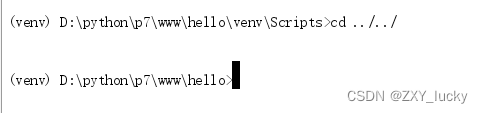
3. install Flask
Import the installation files in the root directory
pip install -r file name .txt
4. Realization Flask
4.1 Realization Flask Get started with Applications
Created in the root directory app.py file
 First step : Instantiation Flask
from flask import Flask
#  Instantiation flask
# __name__  Current package name
app = Flask(__name__)

 The second step : Configure function routing
#  Configure the routing
@app.route('/hello')
def hello():
    return "<h1> ha-ha 12345</h1>"

 The third step : start-up flask
if __name__ == '__main__':
    app.run()
4.2 Factory mode
Factory mode : Responsible for creating other types of objects , The user calls this method with parameters , The factory returns to the client
4.2.1 Example of factory model
#  Write an interface class
class Animal():
    def do_say(self):
        pass

class Cat(Animal):
    def do_say(self):
        print('miao miao')

class Dog(Animal):
    def do_say(self):
        print('wang wang')

class Forest():
    def sav(self,animal_type):
        return eval(animal_type)().do_say()

if __name__ == '__main__':
    a = input(' Please enter the animal type :Cat or Dog:')
    print('111',a)
    Forest().sav(a)
4.2.2 Factory mode
encapsulation APP : establish py file
from flask import Flask

def create_app():
	flask_app = Flask(__name__)
	print(' Call me ')
	return flask_app
Create a file and call
View routes — Run on the command line : flask routes
 First step : Import the encapsulated function
from create_app import create_app
from flask import url_for

 The second step : call
app = create_app()

# endpoint  Used for route reverse generation
#method  Usage method
@app.route('/hello',methods=['get','post'],endpoint='aaa')
def hello():
    return 'hello'

# url_for  Reverse query
@app.route('/path')
def get_path():
    url = url_for('aaa')
    print(url)
    return url

 The third step : start-up
if __name__ == '__main__':
    app.run()
4.3 Flask To configure
- Load... From the configuration object
- Load from the configuration file
- Load from the environment variable
4.3.1 Load... From the configuration object
First step : establish py file
class DefaultConfig:
    #  Property name   It has to be all in capitals
    NAME = "haha"
    #  Automatically refresh
    DEBUG = True
The second step : call
from flask import Flask
from settings.config import DefaultConfig
#  Instantiation flask
# __name__  Current package name
app = Flask(__name__)
app.config.from_object(DefaultConfig)  #  Load configuration from object
print('1111', app.config)

# "D:\python\p7\pwd.py"
#  Configure the routing
@app.route('/hello')
def hello():
    return "<h1> ha-ha 12345</h1>"

if __name__ == '__main__':
    app.run()
4.3.2 Load from the configuration file
First step : establish py file
#  Through the configuration file

AGE = 18
The second step : call
from flask import Flask

#  Instantiation flask
# __name__  Current package name
app = Flask(__name__)
app.config.from_pyfile('setting.py') #  Load configuration from file

print('1111', app.config)

# "D:\python\p7\pwd.py"
#  Configure the routing
@app.route('/hello')
def hello():
    return "<h1> ha-ha 12345</h1>"

if __name__ == '__main__':
    app.run()
4.3.3 Call... From the environment variable
First step : Create files from different directories
PASSWORD = 123456
The second step : Configure environment variables
from flask import Flask

#  Instantiation flask
# __name__  Current package name
app = Flask(__name__)
app.config.from_envvar('pwd',silent=True) #  Configure from environment variables
print('1111', app.config)

# "D:\python\p7\pwd.py"
#  Configure the routing
@app.route('/hello')
def hello():
    return "<h1> ha-ha 12345</h1>"

if __name__ == '__main__':
    app.run()
The third step : Configuration environment
4.4 Starting mode
- app.run()
- flask.run()
- Configure pepper
Method 1 :
if __name__ == '__main__':
    app.run()
Method 2 :
perform :flask fun command
Method 3 :
边栏推荐
猜你喜欢

Install pyGame using CMD
idea中复制一个项目/project

从零开始的pytorch小白使用指北

主从同步步骤读写分离+自遇错误分享
![[部署]presto-server-0.261.tar.gz的集群部署和启动](/img/37/1185b2321b003a7793c8c37891008c.png)
[部署]presto-server-0.261.tar.gz的集群部署和启动

cuda10.0配置pytorch1.7.0+monai0.9.0

JDBC的學習以及簡單封裝

JDBC database connection pool

pygame实现飞机大战游戏

How to merge the website content with video and audio separated? How to write batch download code?
随机推荐
Shardingsphere sub database and table scheme
【无标题】
知识点回顾
MySql语句查询某一级节点的所有子节点
大厂面试机器学习算法(6)时间序列分析
从零开始的pytorch小白使用指北
Pytorch white from zero uses North pointing
2.启动函数返回值的剖析
Activiti工作流使用之项目实例
联合主键和索引
Install enterprise pycharm and Anaconda
Keras保存训练过程中的最好模型
MySQL-8.0.28 用户操作 or 用户权限操作
cuda10.0配置pytorch1.7.0+monai0.9.0
[监控部署实操]基于granfana展示Prometheus的图表和loki+promtail的图表
初识Flask
同步发送短信验证码
Machine learning algorithm for large factory interview (6) time series analysis
pyspark学习笔记
idea中复制一个项目/project