当前位置:网站首页>Properties类和properties配置文件的理解学习
Properties类和properties配置文件的理解学习
2022-07-27 06:32:00 【爱学习的大雄】
引言
可能当我们的java程序正在运行时,我们需要修改其中配置的某一个值,但是我们又不可能将程序停止后修改其中的值,这个时候,就体现出使用properties配置文件的好处了。
如果该值是处properties配置文件中的,其可以很好很方便的跟java程序进行交互,我们不需要停止程序,可以直接修改properties配置文件中的值,那么java程序中的该值即可改变。
而Properties类,是java程序中读取properties配置文件的优选类,所以我们有必要去掌握它!
基本介绍
该类父类是HashTable,底层原理也是HashTable

该类是专门用于读写properties配置文件的集合类,配置文件格式如下:
键=值
键=值
**注意:**键值对不需要有空格,值不需要用引号一起来,默认类型是String
常用方法
load:加载配置文件的键值对到Properties对象list:将数据显示到指定设备getProperty(key):根据键获取值setProperty(key,value):设置键值对到Properties对象store:将Properties中的键值对存储到配置文件,在idea中保存信息到配置文件,如果含有中文,会存储为unicode码
需求编码
需求1:读取配置文件内容
如下一个配置文件mysql.properties
ip=0.0.0.0
user=root
pwd=root
在java程序中去读取其值
传统方式实现
使用字符流的方式去读取
/** * @author:雷子杰 * @date:2022/7/27 */
public class Properties01 {

    public static void main(String[] args) throws IOException {

        //获取当前工作目录,后面file的相对路径根据这个来写
        //System.out.println(System.getProperty("user.dir"));//E:\Allworkspaces\idea-workspace\JavaEE

        File file = new File("basic_review\\src\\properties_\\mysql.properties");
        BufferedReader bufferedReader = new BufferedReader(new FileReader(file));
        String line;
        while((line = bufferedReader.readLine())!=null){

            //分割读取出来的字符串
            String[] split = line.split("=");
            System.out.println(split[0]+"值是:"+split[1]);

            //下面这个是输出全部内容
            //System.out.println(line);
        }
        bufferedReader.close();
    }
}
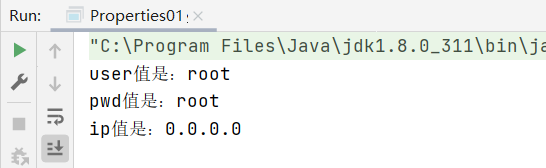
使用Properties类读取
使用Properties类读取配置文件中内容
/** * * 使用Properties来读取文件 * * @author:雷子杰 * @date:2022/7/27 */
public class Properties02 {

    public static void main(String[] args) throws IOException {


        Properties properties = new Properties();
        //获取当前工作目录,后面file的相对路径根据这个来写
        //System.out.println(System.getProperty("user.dir"));//E:\Allworkspaces\idea-workspace\JavaEE
        //加载指定配置文件,相对路径为当前工作目录的相对路径
        properties.load(new FileReader("basic_review\\src\\properties_\\mysql.properties"));
        //将k-v显示控制台
        properties.list(System.out);

        System.out.println("=====================");
        //根据key获取对于的值
        String user = properties.getProperty("user");
        String pwd = properties.getProperty("pwd");
        System.out.println("用户名:"+user);
        System.out.println("密码:"+pwd);

    }
}

需求2:添加配置文件内容
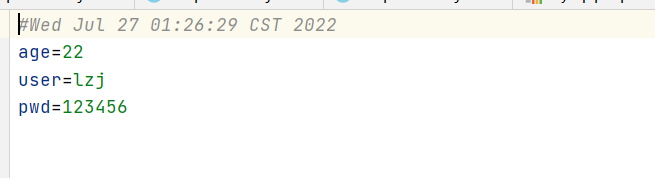
将Properties类创建的键值对写入新文件中
/** * * 使用properties类来创建配置文件 * * @author:雷子杰 * @date:2022/7/27 */
public class Properties03 {

    public static void main(String[] args) throws IOException {


        Properties properties = new Properties();

        //创建
        properties.setProperty("user","lzj");//如果用户名为中文,则会保存unicode码
        properties.setProperty("pwd","123456");
        properties.setProperty("age","22");

        //存储至文件中
        //形参中的comments为null即可,如果添加即为添加注释
        properties.store(new FileOutputStream("basic_review\\src\\properties_\\mysql2.properties"),null);
        System.out.println("保存配置成功");

    }
}
需求3:修改读取的配置文件
先读取,再修改配置写入原文件即可
/** * * 使用Properties来修改读取的文件 * * @author:雷子杰 * @date:2022/7/27 */
public class Properties04 {

    public static void main(String[] args) throws IOException {


        Properties properties = new Properties();
        //获取当前工作目录,后面file的相对路径根据这个来写
        //System.out.println(System.getProperty("user.dir"));//E:\Allworkspaces\idea-workspace\JavaEE
        //加载指定配置文件,相对路径为当前工作目录的相对路径
        properties.load(new FileReader("basic_review\\src\\properties_\\mysql.properties"));
        //将k-v显示控制台
        properties.list(System.out);

        //修改user
        properties.setProperty("user","lzj");

        System.out.println("=====================");
        //根据key获取对于的值
        String user = properties.getProperty("user");
        String pwd = properties.getProperty("pwd");
        System.out.println("用户名:"+user);
        System.out.println("密码:"+pwd);

        //将修改完成后的键值对写入文件中
        properties.store(new FileOutputStream("basic_review\\src\\properties_\\mysql.properties"),null);

    }
}

全部方法
| Modifier and Type | Method and Description |
|---|---|
String | getProperty(String key) 使用此属性列表中指定的键搜索属性。 |
String | getProperty(String key, String defaultValue) 使用此属性列表中指定的键搜索属性。 |
void | list(PrintStream out) 将此属性列表打印到指定的输出流。 |
void | list(PrintWriter out) 将此属性列表打印到指定的输出流。 |
void | load(InputStream inStream) 从输入字节流读取属性列表(键和元素对)。 |
void | load(Reader reader) 以简单的线性格式从输入字符流读取属性列表(关键字和元素对)。 |
void | loadFromXML(InputStream in) 将指定输入流中的XML文档表示的所有属性加载到此属性表中。 |
Enumeration<?> | propertyNames() 返回此属性列表中所有键的枚举,包括默认属性列表中的不同键,如果尚未从主属性列表中找到相同名称的键。 |
void | save(OutputStream out, String comments) 已弃用 如果在保存属性列表时发生I / O错误,此方法不会抛出IOException。 保存属性列表的store(OutputStream out, String comments)方法是通过store(OutputStream out, String comments)方法或storeToXML(OutputStream os, String comment)方法。 |
Object | setProperty(String key, String value) 致电 Hashtable方法 put 。 |
void | store(OutputStream out, String comments) 将此属性列表(键和元素对)写入此 Properties表中,以适合于使用 load(InputStream)方法加载到 Properties表中的格式输出流。 |
void | store(Writer writer, String comments) 将此属性列表(键和元素对)写入此 Properties表中,以适合使用 load(Reader)方法的格式输出到输出字符流。 |
void | storeToXML(OutputStream os, String comment) 发出表示此表中包含的所有属性的XML文档。 |
void | storeToXML(OutputStream os, String comment, String encoding) 使用指定的编码发出表示此表中包含的所有属性的XML文档。 |
Set<String> | stringPropertyNames() 返回此属性列表中的一组键,其中键及其对应的值为字符串,包括默认属性列表中的不同键,如果尚未从主属性列表中找到相同名称的键。 |
边栏推荐
- sql-labs SQL注入平台-第1关Less-1 GET - Error based - Single quotes - String(基于错误的GET单引号字符型注入)
- MySQL: 提高最大连接数
- Oracle 组合查询
- UUID与secrets模块
- adb指令整理
- ShowDoc漏洞学习——CNVD-2020-26585(任意文件上传)
- Pg_relation_size 问题
- STM32_找到导致进入HardFault_Handler的函数
- Calledprocesserror during pre commit install
- Use the PIP command to switch between different mirror sources
猜你喜欢

美联储SR 11-7:模型风险管理指南(Guidance on Model Risk Management)-万字收藏

Jmeter:接口自动化测试-BeanShell对数据库数据和返回数据比较

【WSL2】配置连接 USB 设备并使用主机的 USB 摄像头

Array method and loop in JS

Zabbix: 将收集到值映射为易读的语句

Drools (5): drools basic syntax (3)

35. Search insert position

Cadence(十一)丝印调整和后续事项

使用pip命令切换不同的镜像源

A small cotton padded jacket with air leakage
随机推荐
yhb_sysbench
Please ask the big guys a question. The pgsqlcdc task can't monitor changes after running for a period of time. Just restart it. What should I do
Jmeter: interface automation test - BeanShell compares database data and return data
How to submit C4d animation to cloud rendering farm for fast rendering?
Use shell to calculate the sum of numbers in text
【QT】无法在QT创建者中打开包含文件pcap.h(C1083)
一款开源 OA 办公自动化系统
Zabbix: 将收集到值映射为易读的语句
(2022牛客多校三)A-Ancestor(LCA)
2022-07-25 顾宇佳 学习笔记
Logcat tool
【QT】capture.obj:-1: error: LNK2019: 无法解析的外部符号 __imp_htons(解决方法)
C语言实现猜数字小游戏项目实战(基于srand函数、rand函数,Switch语句、while循环、if条件判据等)
tableau prep连接maxcompute,只是书写很简单的sql,为啥报这个错误呢?
在mysql中同时使用left join on 和where 的查询结果分析
The possibility of metauniverse from the perspective of technical principles: how Omniverse "built" Mars
(2022牛客多校三)J-Journey(dijkstra)
Single arm routing (explanation + experiment)
杂谈:高考
MySQL: 提高最大连接数