当前位置:网站首页>DVWA配置教程
DVWA配置教程
2022-06-21 12:08:00 【玉米同学】
放到WWW下后,打开C:\WWW\DVWA-master\config

将config.inc.php.dist重命名为config.inc.php并修改配置,mysql数据库密码

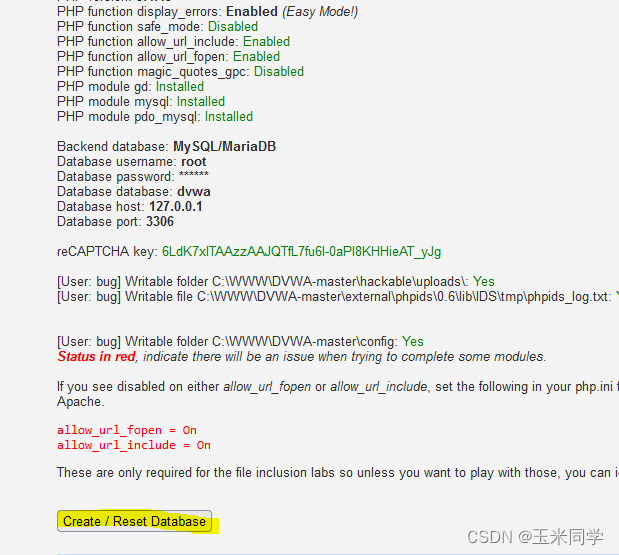
标红:PHP function allow_url_include: Enabled
DVWA给的提示:
If you see disabled on either allow_url_fopen or allow_url_include, set the following in your php.ini file and restart Apache.
allow_url_fopen = On
allow_url_include = On
打开C:\phpStudy\PHPTutorial\php\php-5.4.45修改php.ini

查找allow_url_include,并改为on

标红:reCAPTCHA key: Missing

编辑 dvwa/config/config.inc.php这个配置文件
文件提示:eCAPTCHA settings
# Used for the 'Insecure CAPTCHA' module
# You'll need to generate your own keys at: https://www.google.com/recaptcha/admin
把key填上就行了
$_DVWA[ 'recaptcha_public_key' ] = '6LdK7xITAAzzAAJQTfL7fu6I-0aPl8KHHieAT_yJg';
$_DVWA[ 'recaptcha_private_key' ] = '6LdK7xITAzzAAL_uw9YXVUOPoIHPZLfw2K1n5NVQ';
全绿了以后点Create
admin/password

开始8

边栏推荐
- uniapp中常用到的方法(部分) - 时间戳问题及富文本解析图片问题
- Common instructions for five basic data types in redis
- i.MX - RT1052 BOOT启动
- Use huggingface to quickly load pre training models and datasets in the moment pool cloud
- The difference between knowing and understanding
- Golang implements redis (9): use geohash to search people nearby
- "Forget to learn again" shell process control - 36. Introduction to the for loop
- i. MX - rt1052 pulse width modulation (PWM)
- Hands on data analysis data reconstruction
- 『忘了再学』Shell流程控制 — 36、for循环介绍
猜你喜欢

CPU、MPU、MCU、SoC、MCM介绍

STM32开发之 VS Code + gcc环境编译
STM32笔记之 SWJ(JTAG-DP和 SW-DP)

These three young men are more ruthless than Ma Huateng and Zhang Yiming

MySQL 5.6.49 企业版设置密码复杂度策略

Rename all files in the folder with one click

STM32cubeMX之 uart问题汇总
![[untitled]](/img/97/7a3dac6e07318613090722ec620e32.png)
[untitled]

Typera free version, without cracking, can be installed and used directly

SDCC编译器 + VSCode开发 8位微控制器
随机推荐
Codeworks round 797 (Div. 3) F. shifting string problem solution
dicom格式转成nii.gz文件
STM32 notes swj (jtag-dp and sw-dp)
i. MX - rt1052 pulse width modulation (PWM)
WPF 使用 MAUI 的自绘制逻辑
第八章 Web项目测试
TypeScript 变量声明 —— 类型断言(Type Assertion)
Redis maximum memory elimination strategy
Travel does not heal the soul
Hands on data analysis data reconstruction
Huawei cloud releases desktop ide codearts
Redis-bitmap 位图
Vs code + GDB download and debugging of STM32 development
一文掌握SQLite3基本用法
i.MX - RT1052时钟及锁相环(PLL)分析
Is pension insurance a financial product? What is the expected return?
MySQL-DML
2-zabbix automatically add hosts using autodiscover
tensorflow中使用的一些函数
马斯克的“好朋友”,冲击2022港股最大IPO