当前位置:网站首页>VU 非父子组件通信
VU 非父子组件通信
2022-07-31 13:15:00 【半点闲】
VU 非父子组件通信
作者:高玉涵
时间:2022.7.28 08:55
博客:blog.csdn.net/cg_i
一、组件通信
组件关系可分为父子组件通信(通过 props 传递数据)、兄弟组件通信、跨级组件通信。这里我主要介绍跨级组件通信的方法。

1.1 非父子组件通信
非父子组件一般有两种,兄弟组件和跨多级组件。在 Vue.js 2.x 中,使用一个空的 Vue 实例作为中央事件总线(bus),也就是一个中价。为了更形象地了解它,我们举一个生活中的例子。
比如你需要租房子,你可能会找户产中介来登记你的需求,然后中介把你的信息发给满足要求的出租者,出租者再把报价和看房时间告诉中介,由中介再转达给你,整个过程中,买家和卖家并没有任何交流,都是通过中间人来传话的。
或者你最近可能要换房子,你会找房产中介登记你的信息,订阅与你找户需求相关的资讯,一旦有符合你的房子出现时,中介会通知你,并传达你房子的具体信息。
这两个例子中,你和出租者担任的就是两个跨级的组件,而房产中介就是这个中央事件总线(bus)。比如下面的示例代码:
<!DOCTYPE html>
    <head>
        <meta charset="utf-8">
        <title>跨组件通信</title>
    </head>
    <body>
        <div id="app">
            {
   { message }}
            <component-a></component-a>
        </div>

        <script src="../vue.js"></script>
        <script>
           var bus = new Vue();

           Vue.component('component-a',{
                template: '<button @click="handleEvent">传递事件</button>',
                methods:{
                    handleEvent: function (){
                        bus.$emit('on-message', '来自组件 component-a 的内容');
                    }
                }
            });

            var app = new Vue ({
                el: '#app',
                data: {
                    message: ''
                },
                mounted: function (){
                    var _this = this;
                    // 在实例初始化时,监听来自 bus 实例的事件
                    bus.$on('on-message', function (msg){
                        _this.message = msg;
                    });
                }
            });
        </script>
    </body>
</html>
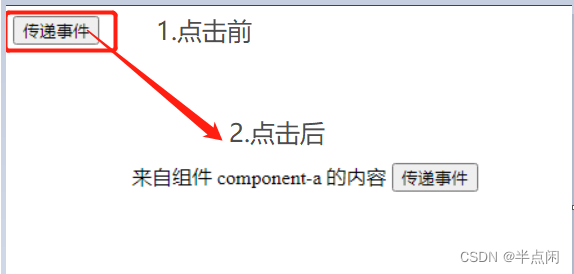
首先创建一个名为 bus 的空 Vue 实例,里面没有任何内容:然后全局定义了组件 component-a;最后创建 Vue 实例 app,在 app 初始化时,也就是在生命周期 mounted 钩子函数里监听了来自 bus 的事件 on-message,而在组件 component-a 中,点击按钮会通过 bus 把事件 on-message 发出去,此时 app 就会接收到来自 bus 的事件,进而回调里完成自己的业务逻辑。
这种方法巧妙而轻量地实现了任何组件间的通信,包括父子、兄弟、跨级,而且 Vue 1.x 和 Vue 2.x 都适用。如果深入使用,可以扩展 bus 实例,给它添加 data、methods、computed 等选项,这些都是可以公用的,在业务中,尤其是协同开发时非常有用,因为经常需要共享一些通用的信息,比如用户登录的昵称、性别、邮箱等,还有用户的授权 token 等。只需在初始化时 bus 获取一次,任何时间、任何组件就可以从中直接使用了。
二、补充知识:自定义事件
当子组件需要向父组件传递数据时,就要用到自定义事件。指令 v-on 除了监听 DOM 事件外,还可以用于组件之间的自定义事件。 Vue 中子组件用 $emit() 来触发事件,父组件用 $on() 来监听子组件的事件。父组件也可以直接在子组件的自定义标签上使用 v-on 来监听子组件触发的自定义事件。示例代码如下:
<!DOCTYPE html>
    <head>
        <meta charset="utf-8">
        <title>自定义事件</title>
    </head>
    <body>
        <div id="app">
           <p>总数:{
   { total }}</p>
           <my-component
            @increase="handleGetTotal"
            @reduce="handleGetTotal"></my-component>
        </div>

        <script src="../vue.js"></script>
        <script>
           Vue.component('my-component',{
                template: '\
                <div>\
                    <button @click="handleIncrease">+1</button>\
                    <button @click="handleReduce">-1</button>\
                </div>',
                data: function () {
                    return {
                        counter:0
                    }
                },
                methods:{
                    handleIncrease: function (){
                        this.counter++;
                        this.$emit('increase', this.counter);
                    },
                    handleReduce: function (){
                        this.counter--;
                        this.$emit('reduce', this.counter);
                    }
                }
            });

            var app = new Vue ({
                el: '#app',
                data: {
                    total: ''
                },
                methods:{
                    handleGetTotal:function (total){
                        this.total = total;
                    }
                }
            });
        </script>
    </body>
</html>

上面示例中,子组件有两个按钮,分别实现加 1 和减 1 的效果,在改变组件的 data “counter” 后,通过 $emit() 再把它传递给父组件,父组件用 v-on:increase 和 v-on:reduce(示例使用的是语法糖)。$emit() 方法的第一个参数是自定义事件的名称,例如示例的 increase 和 reduce 后面的参数都是要传递的数据,可以不填或填写多个。
除了用 v-on 在组件上监听自定义事件外,也可以监听 DOM 事件,这时可以用 .native 修饰符表示监听的是一个原生事件,监听的是该组件的根元素,示例代码如下:
<my-component v-on:click.native="handleClick"></my-component>
边栏推荐
- How to quickly split and merge cell data in Excel
- golang-gin-pprof-使用以及安全问题
- Productivity Tools and Plugins
- 集群中增加数据节点与退役数据节点
- NameNode故障处理的两种方法
- PyQt5 rapid development and actual combat 10.2 compound interest calculation && 10.3 refresh blog clicks
- 如何使用StarUML画类图[通俗易懂]
- Reasons and solutions for Invalid bound statement (not found)
- Golang - gin - pprof - use and safety
- C# control ListView usage
猜你喜欢
PyQt5 rapid development and actual combat 9.7 Automated testing of UI layer
EXCEL如何快速拆分合并单元格数据

IDEA找不到Database解决方法

中望3D 2023正式发布,设计仿真制造一体化缩短产品开发周期

PyQt5 rapid development and actual combat 10.1 Get city weather forecast
爱可可AI前沿推介(7.31)
架构实战营|模块8
PyQt5快速开发与实战10.2 复利计算 && 10.3 刷新博客点击量

MATLAB | 我也做了一套绘图配色可视化模板

C# control ListView usage
随机推荐
网络协议及相关技术详解
PyQt5 rapid development and actual combat 9.7 Automated testing of UI layer
ERROR 1064 (42000) You have an error in your SQL syntax; check the manual that corresponds to your
pytorch gpu版本安装最新
Golang - gin - pprof - use and safety
滑窗法切分数据
Istio微服务治理网格的全方面可视化监控(微服务架构展示、资源监控、流量监控、链路监控)
尚硅谷–MySQL–基础篇(P1~P95)
Introduction to the PartImageNet Semantic Part Segmentation dataset
Centos7 install mysql5.7 steps (graphical version)
ADS与C#通信
The latest complete code: Incremental training using the word2vec pre-training model (two loading methods corresponding to two saving methods) applicable to various versions of gensim
C#中+=的用法
Error IDEA Terminated with exit code 1
Productivity Tools and Plugins
浏览器被hao360劫持解决办法
NameNode故障处理的两种方法
ECCV2022:在Transformer上进行递归,不增参数,计算量还少!
系统集成项目管理工程师(软考中级)知识点总结【挣值分析】【关键路径】
报错:npm ERR code EPERM