当前位置:网站首页>【深入理解TcaplusDB技术】Tmonitor后台一键安装
【深入理解TcaplusDB技术】Tmonitor后台一键安装
2022-06-25 18:12:00 【数据人儿】
一键安装脚本修改
Tmonitor一键安装脚本默认是为TcaplusDB业务编写的,对于其他业务,安装步骤同"Tmonitor单机安装指引",安装前要对以下脚本进行修改:
1.修改init_some_tables.sql。

\2. 修改脚本的gen_dcsvr_conf()函数。
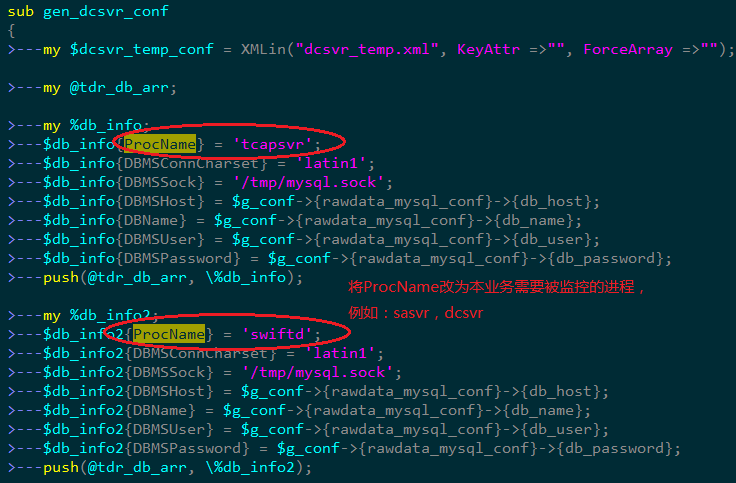
两个Tmonitor互相监控的配置实例:

第二个监控Tmonitor2安装配置
A.修改sql语句、配置文件和执行安装脚本
- scp tmonitor_install_2.2.5sp3_130243.tar.gz /data
- tar xf tmonitor_install_2.2.5sp3_130243.tar.gz
- Vim init_some_tables.sql

- mysql -h10.59.41.57 -uroot -ptcaplus#2003
- create database tmonitor2_db;use tmonitor2_db;
- source create_tables.sql
- source init_some_tables.sql
- Vim tmonitor_install.pl

- 修改tmonitor_conf.xml配置文件,为执行脚本安装做准备


- 最后执行以下命令安装tmonitor2,有可能出现错误,解决方法如下
$ ./tmonitor_install.pl install
Can’t locate XML/Simple.pm in @INC (@INC contains: /usr/local/lib64/perl5 /usr/local/share/perl5 /usr/lib64/perl5/vendor_perl /usr/share/perl5/vendor_perl /usr/lib64/perl5 /usr/share/perl5 .) at ./tmonitor_install.pl line 10.
BEGIN failed–compilation aborted at ./tmonitor_install.pl line 10.
| Transaction Check Error:file /usr/share/man/man3/XML::SAX::Base.3pm.gz conflicts between attempted installs of perl-XML-SAX-0.96-7.el6.noarch and perl-XML-SAX-Base-1.04-1.el6.rf.noarchfile /usr/share/man/man3/XML::SAX::Exception.3pm.gz conflicts between attempted installs of perl-XML-SAX-0.96-7.el6.noarch and perl-XML-SAX-Base-1.04-1.el6.rf.noarchError Summary------------- | |
|---|---|
把rpmforge的关闭(enabled=0,位于/etc/yum.repos.d/rpmforge.repo),
再次安装,成功!搞定!
yum install -y perl-XML*
B.将Tmonitor2注册为一个监控服务器


C.将Tmonitor2也注册为一个业务,可以被Tmonitor1监控,实现互相监控

**D.**脚本安装后的手工起进程步骤
- ./tmonitor_install.pl install 脚本安装后需要手动启动tagent、tcenterd、tcmcenter、dc_tconnd、dcsvr、sasvr等进程(由于一些配置需要改动)
- Tagent:
 修改后重启
修改后重启 - Tcenterd:
 修改后重启
修改后重启 - Tcmcenter: 需要先修改host.xml里的准确IP地址,然后重启
- Dc_tconnd:在以上几个进程启动成功后,进入tcmconsole里start
- Dcsvr:使用以下命令修改dcsvr.xml的配置,然后启动进程
sed -i ‘/DBMSHost/c 10.59.41.57’ dcsvr.xml
sed -i ‘/DBMSPassword/c XXXXX’ dcsvr.xml
sed -i ‘/DBName/c tmonitor2_db’ dcsvr.xml <----------填写A-5建立的库名
sed -i ‘/DBMSUser/c tmonitor’ dcsvr.xml
7. Sasvr:需要修改sasvr.xml里面连的db(修改为前端页面使用的db,即tmonitor_center_db)和weburl
E. Tmonitor2安装完毕
第一个监控Tmonitor1安装配置
负责监控Tcaplus集群的Tmonitor1需要为自己添加dc_tconnd和dcsvr进程上报自身的状态,方能给tmonitor2监控。以下是配置步骤:
A. 准备工作
cd ~/tmonitor_install
cp -rp dc_tconnd_1 dc_tconnd_9
cp -rp dcsvr_1 dcsvr_9
B.为Tmonitor1建库建表
Vim init_some_tables.sql
mysql -h10.59.41.57 -uroot -ptcaplus#2003
create database tmonitor1_db;
Use tmonitor1_db;
source create_tables.sql
source init_some_tables.sql
C.配置dc_tconnd
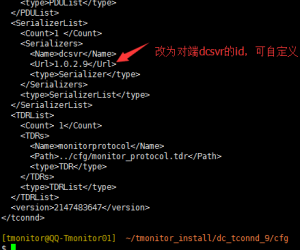
1.修改dc_tconnd_9的配置文件xml

2.修改dc_tconnd_9的日志配置文件tconnd_log.xml

3.修改dc_tconnd_9的进程启动、停止脚本里的id

**D.**配置dcsvr_9
1.修改dcsvr_9的配置文件xml,确保存在sasvr和dcsvr两个进程项(可修改其他的进程项,因为这里只需要用到sasvr和dcsvr)

2.修改dcsvr_9的日志配置文件dcsvr_log.xml(此处进程ID得和C-1的修改值一致)
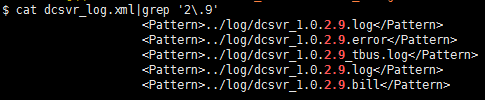
3.修改dcsvr_9的进程启动、停止脚本里的id(此处进程ID得和C-1的修改值一致)

**E.**将dc_tconnd_9和dcsvr_9添加到tcm管理,并为他们下发tbus通道,最后启动dc_tconnd_9和dcsvr_9
1.添加进程信息到proc_deploy.xml
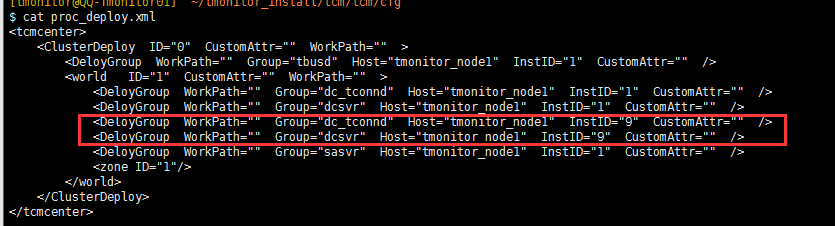
2.重启tcmcenter
3.从tcmconsole里下发tbus通道:refreshbuscfg ...
4.到各自的bin目录下启动进程:./start_tconnd.sh; ./start_dcsvr.sh
**F.**为受控Tmonitor1进程做配置、采集策略下发、告警策略配置
1.Tmonitor1的web基础配置

2.采集策略下发

3.采集策略下发后观察几分钟,如下图为正常

4.添加默认告警接收者和配置告警策略
TcaplusDB是腾讯出品的分布式NoSQL数据库,存储和调度的代码完全自研。具备缓存+落地融合架构、PB级存储、毫秒级时延、无损水平扩展和复杂数据结构等特性。同时具备丰富的生态、便捷的迁移、极低的运维成本和五个九高可用等特点。客户覆盖游戏、互联网、政务、金融、制造和物联网等领域。

边栏推荐
- 视频制作素材网站整理
- IVX sailing
- 1、对范数的理解
- Meaning of% in C language
- How to develop the hash quiz game system? Hash quiz game system development application details case and source code
- QT generate random numbers (random strings) within the specified range
- 什么是算子?
- 【深入理解TcaplusDB技术】TcaplusDB业务数据备份
- 篇6:CLion:Toolchains are not configured Configure Disable profile
- 篇7:CLion中没有代码提示,,,
猜你喜欢

Article 7: there is no code prompt in clion,,,

喜报|海泰方圆通过CMMI-3资质认证,研发能力获国际认可

A simple and easy-to-use graph visualization tool developed recently
Handling method of qstring containing "\u0000" in QT

The Stackies 2022:32个营销技术栈入选

【日常记录】——对BigDecimal除法运算时遇到的Bug

篇4:win10安装MingW64
Article 6:clion:toolchains are not configured configure disable profile
Good news | Haitai Fangyuan has passed the cmmi-3 qualification certification, and its R & D capability has been internationally recognized

視覺SLAM十四講 第9講 卡爾曼濾波
随机推荐
Li Kou daily question - day 27 -561 Array splitting I
利用Qt制作美化登录界面框
视觉SLAM十四讲 第9讲 卡尔曼滤波
微信小程序报错:request:fail url not in domain list
How to develop the hash quiz game system? Hash quiz game system development application details case and source code
【工作小技巧】刚入职的软件测试工程师怎么快速上手新岗位
Accumulation of some common knowledge points
十大券商的排名是?手机开户安全么?
Wechat applet reports an error: request:fail URL not in domain list
【flutter 页面跳转后退如何刷新?】
Slam visuel Leçon 14 leçon 9 filtre Kalman
揭秘GES超大规模图计算引擎HyG:图切分
Vscode / * * generate function comments
Using QT to make a beautiful login interface box
How to open a stock account? Is it safe to open a securities account
How to judge whether you are suitable for software testing
图标丢失,URL附带JESSSIONID的什么来的?
Android Internet of things application development (smart Park) - picture preview interface
Meaning of% in C language
Unity technical manual - interference / noise sub module