当前位置:网站首页>利用Qt制作美化登录界面框
利用Qt制作美化登录界面框
2022-06-25 17:38:00 【欧特克_Glodon】
/*** * ┌─┐ ┌─┐ + + * ┌──┘ ┴───────┘ ┴──┐++ * │ │ * │ ─── │++ + + + * ███████───███████ │+ * │ │+ * │ ─┴─ │ * │ │ * └───┐ ┌───┘ * │ │ * │ │ + + * │ │ * │ └──────────────┐ * │ │ * │ ├─┐ * │ ┌─┘ * │ │ * └─┐ ┐ ┌───────┬──┐ ┌──┘ + + + + * │ ─┤ ─┤ │ ─┤ ─┤ * └──┴──┘ └──┴──┘ + + + + * 神兽保佑 * 代码无BUG! */
1、演示效果
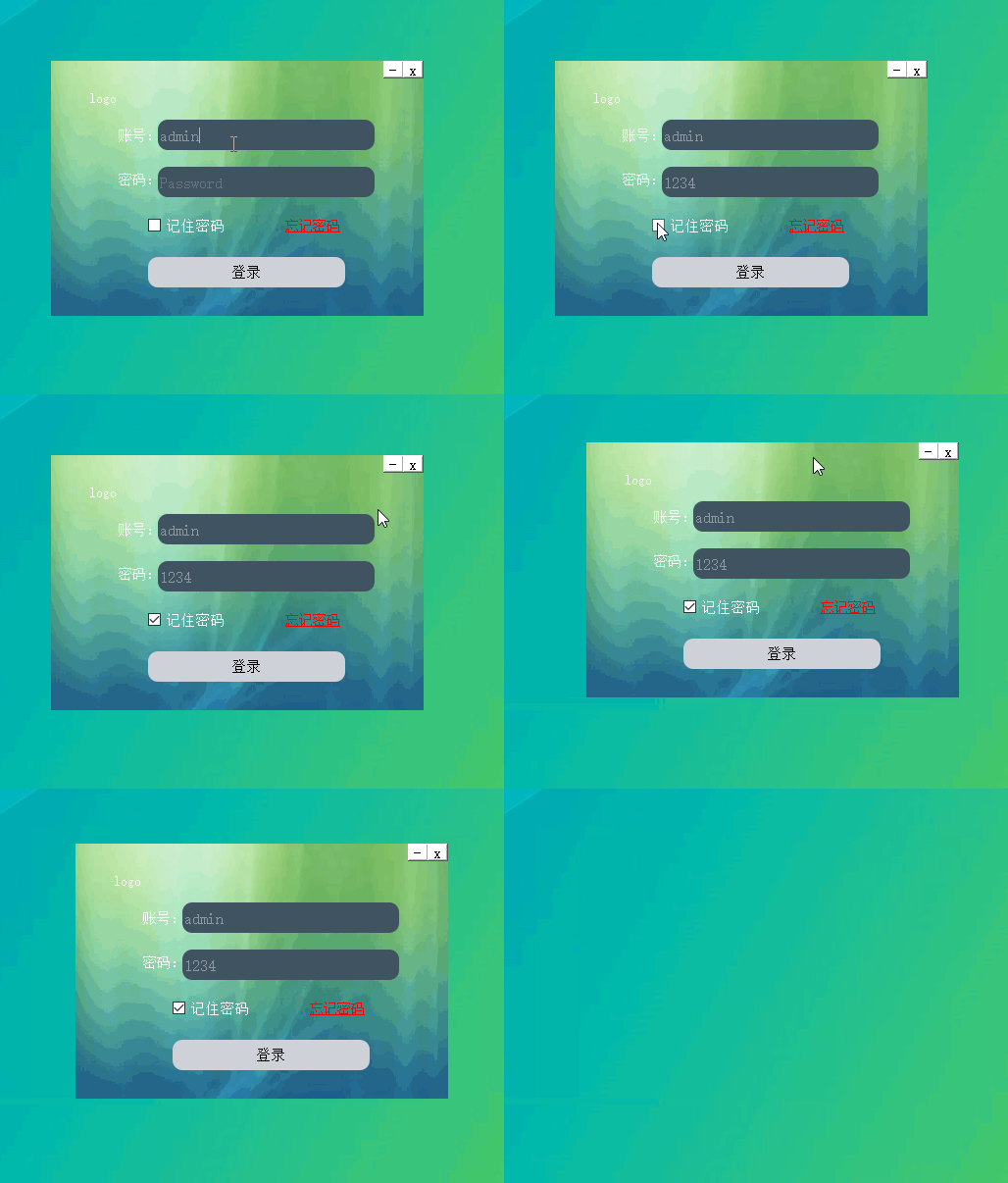
2、制作
2.1、新建一个Qwidget项目

2.2、添加界面组件
调整容器为合适大小,同时调整整个画布为合适大小。
2.3、添加按钮,标签,文字组件
账号密码部分使用Input Widgets:Line Edit
Logo和忘记密码使用两个Display Widgets:TextLabel
是否记住选择一个Buttons:CheckBox
登录按钮使用Buttons:PushButton
修改Line Edit默认文本属性,分别点击两个LineEdit修改文本属性placeholdertext为Username和Password。
2.4、添加qss样式表
*{

background:rgb(255, 255, 255);
font-size:15px;
font-style:MingLiU-ExtB;
}
QFrame{

border:sold 10px rgba(0,0,0);
background-image:url(:/image/background.png);
}
QLineEdit{

color:#8d98a1;
background-color:#405361;
font-size:16px;
border-style:outset;
border-radius:10px;
font-style:MingLiU-ExtB;
}
QPushButton{

background:#ced1d8;
border-style:outset;
border-radius:10px;
font-style:MingLiU-ExtB;
}
QPushButton:pressed{

background-color:rgb(224,0,0);
border-style:inset;
font-style:MingLiU-ExtB;
}
QCheckBox{

background:rgba(85,170,255,0);
color:white;
font-style:MingLiU-ExtB;
}
QLabel{

background:rgba(85,170,255,0);
color:white;
font-style:MingLiU-ExtB;
font-size:14px;
}
#label_forget{

color:red;
text-decoration: underline
}

2.5、实现最小化窗口和关闭窗口功能
为最小化好关闭按钮添加槽函数:
void Widget::on_minButton_clicked()
{

    showMinimized();
}

void Widget::on_closeButton_clicked()
{

    close();
}
2.6、隐藏widget窗口边框和背景
Widget::Widget(QWidget *parent)
    : QWidget(parent)
    , ui(new Ui::Widget)
{

    ui->setupUi(this);
    //去窗口边框
        setWindowFlags(Qt::FramelessWindowHint | windowFlags());

    //把窗口背景设置为透明;
        setAttribute(Qt::WA_TranslucentBackground);
}
2.7、实现界面可移动
void mouseMoveEvent(QMouseEvent *e);//鼠标移动
void mousePressEvent(QMouseEvent *e);//鼠标按下移动
void Widget::mouseMoveEvent(QMouseEvent* event)
{

    if(event->buttons() & Qt::LeftButton)
    {

        //移到左上角
        move(event->globalPos() - point);
    }
}

void Widget::mousePressEvent(QMouseEvent* event)
{

    if(event->button() == Qt::LeftButton)
    {

        //求坐标差值
        //当前点击坐标-窗口左上角坐标
        point = event->globalPos() - this->frameGeometry().topLeft();
    }
}
边栏推荐
猜你喜欢

超全金屬PBR多通道貼圖素材網站整理

【 NLP 】 in this year's English college entrance examination, CMU delivered 134 high scores with reconstruction pre training, significantly surpassing gpt3

New characteristics of cultural consumption in the era of digital economy
![[matlab] curve fitting](/img/58/3fdcc4d34e7c7c71b73324517ff69d.png)
[matlab] curve fitting
![Precautions for the use of Jerry's wake-up mouth [chapter]](/img/01/3bfba9a486eb7fa3c0a888bb3ea2d2.png)
Precautions for the use of Jerry's wake-up mouth [chapter]
沁恒CH583 USB 自定义HID调试记录

How does LSF see whether the job reserved slot is reasonable?
![How Jerry used to output a clock source to the outside world [chapter]](/img/ea/161be6416726bcd80bb2823a5f6389.png)
How Jerry used to output a clock source to the outside world [chapter]

Introduction to the container of() function
Website arrangement of super all metal PBR multi-channel mapping materials

随机推荐
Under the same WiFi, the notebook is connected to the virtual machine on the desktop
Agent white paper - jointly build agents and create the wisdom of the whole scene | cloud library No.21 recommendation
[compilation principle] overview
Sentinel sentinel mechanism
SDN系统方法 | 10. SDN的未来
Introduction to the container of() function
杰理之SPI 从机使用注意事项【篇】
Can I open an account? Is it safe to open an account
杰理之系统时钟设置出现复位或无效问题【篇】
杰理之定时器捕获(timer_cap.c)使用注意事项【篇】
Mobx learning path - powerful "state management tool"
Operating steps for installing CUDA in win10 (continuous improvement)
mvdr波束 matlab,mvdr波束形成matlab[通俗易懂]
杰理之如何给外界输出一个时钟源使用【篇】
CVPR small target detection: context and attention mechanisms improve small target detection (attached with paper Download)
杰理之增加加密文件播放功能【篇】
配电室环境的分布式远程管理
启牛涨乐财付通下载是可以开户吗?开户安全吗
杰理之唤醒口使用注意事项【篇】
杰理之获取复位源和唤醒的 IO 口的方法【篇】