当前位置:网站首页>Pytest test framework II
Pytest test framework II
2022-06-24 21:05:00 【gchh_ spring】
pytest fixture usage
fixture The role of
1、 Define the data set in the incoming test case , Similar to the role of data parameterization
2、 Configure the state of the system before the test , Works in a similar way setup and teardown The role of , But it's better than setup and teardown More flexible to use
3、 Provide data source for batch testing
fixture Usage of
1、 Application of initial state differentiation in automated use cases ( Than setup More flexible )
Application scenarios : When the test case is executed , Some use cases require login , Some use cases do not require login , here , Use the original setup This requirement cannot be fulfilled
1、 Use fixture, It is only necessary to define a fixture Method of decoration , Pass in... In the test case fixture Method name , Then the use case must be executed before execution fixture Method of decoration , The code and running results are as follows :
@pytest.fixture()
def login():
    print(" Login operation ")

#  Need to log in in in advance
def test_case1(login):
    print(" The test case 1")

#  No need to login in advance
def test_case2():
    print(" The test case 2")
In the code ,login The method uses fixture Decorate :@pytest.fixture()
In use cases , This... Needs to be called login Methodical , You can pass in the method name in the parameter , Then you can execute before the use case is executed login Method , No need to execute login Of , No need to pass in , Each use case has been realized

2、 There is also a call fixture The way , Use @pytest.mark.usefixtures(string) call fixture
For example, add a new test_case3(), Don't use test_case3(login) Method , You can use the following decorator methods to call
@pytest.mark.usefixtures("login")
def test_case3():
    print(" The test case 3")
2、 Application of data cleansing in automated use cases (yield)
The use of fixture Realized setup Similar functions of , So how to use fixture Realization teardown The function of ? For example, after executing the use case , You need to exit the login operation , So how ?
1、 Can be in login Use in yield To realize the recovery operation after the use case is executed , similar teardown function , stay yield The following code statement is the operation to be performed after the use case is executed
@pytest.fixture()
def login():
    print(" Login operation ")
    yield
    print(" Log out ")
3、fixture Method returns data information
fixture Method of decoration , Can pass yield Statement to return data information
@pytest.fixture()
def login():
    print(" Login operation ")
    username = "jerry"
    password = "123456"
    yield [username, password]
    print(" Log out ")
How to get... In test cases fixture Method : Use directly in test cases fixture Method to get the data it returns
#  Need to log in in in advance
def test_case1(login):
    print(f" Login user information :{login}")
    print(" The test case 1")
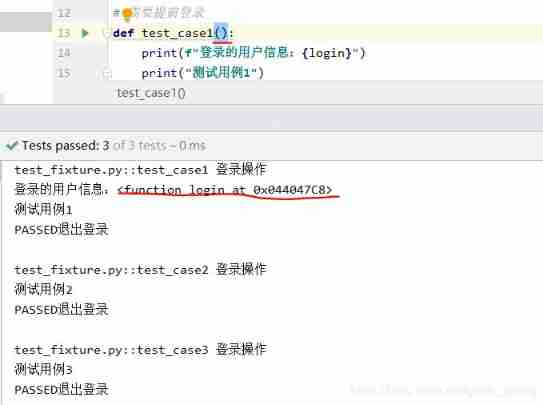
stay test_case1 Call in login The return information of , The operation results are as follows :

Summary :fixtrue Can simulate setup and teardown,yield It used to be setup, And then teardown,yield Equivalent to one return function , When you need to return data, put the data in yield Behind
4、fixture Method :autouse Parameters
If all current use cases need the same initial operation , You can use settings autouse Parameter values for True, Then all use cases will call this method , There is no need to set the use cases one by one
usage , stay fixture Method autouse=True
@pytest.fixture(autouse=True)
def login():
    print(" Login operation ")
    username = "jerry"
    password = "123456"
    yield [username, password]
    print(" Log out ")
Be careful : If there is a call in the test case fixture Return value of method , Then the parameters of the use case need to be passed in fixture Method name , If it doesn't come in , The return value of the call does not directly display the information of the value , Instead, a memory address is displayed
fixture Scope of action
function: Function or method level will call
class: Class level call once
module: Module level call once , It's just one. py file
session: Multiple files called once , It's just one execution pytest The command belongs to one session
fixture The scope of is through scope Parameter setting ,scope The default value is function, The value range is :function,class,module,package( New version added ),session
scope The value is function Scope of : Called fixture All methods of will execute connectDB function , If it is not called, it will not be executed connectDB
@pytest.fixture(scope='function')
def connectDB():
    print("\n Connect to database operation ")
    yield
    print("\n Disconnect database operation ")

class TestDemo:
    def test_a(self, connectDB):
        print(" The test case a")

    def test_b(self):
        print(" The test case b")
scope The value is class Scope of : If... Is called in the test class fixture Method connectDB, Then, before and after the test class is executed connectDB Method
@pytest.fixture(scope='class')
scope The value is module Scope of : If py The file is called. fixture Method connectDB, Then the execution of the py Before and after the file connectDB Method
scope The value is session Scope of : If it's here session Called in fixture Method connectDB, Then in execution pytest Before and after connectDB Method
conftest.py Usage of
Use scenarios : When writing use cases , You may need to write more than one fixture Method , It also needs to be shared with other small partners for direct use , If it is directly like the above definition to test Of py In file , Not conducive to sharing , Then you can put fixture Method
Write to a public place , Share with others ,pytest Provides a solution , Namely conftest.py, It is equivalent to a common module , And the name cannot be changed , Only for conftest.py
Create a... In the working directory conftest.py file , Put... Directly fixture Method connectDB Cut and paste into conftest.py In file , And then directly execute the call connectDB Test cases for , It can be executed normally ( No more demonstrations )
conftest.py Be careful :
1、 The name cannot be changed
2、conftest.py In the same place as the use case to be run package Next
3、 No need to import ,pytest When the use case is executed, it will automatically find
4、 All files in the same directory will be executed before execution conftest.py file
5、 The global configuration and preliminary work can be written here
6、 stay conftest.py There is a public login method in the file , But there are some differences in the login methods used in some actual use cases , That is, public methods are configured differently in different scenarios , Then you can create a new package Create a new conftest.py( One package There can only be one conftest), So in the new package The test case under invokes fixture Method , Then it is called nearby fixture Method
fixture Parameterization of methods
1、 adopt params Parameters are passed in ,params The parameters are list
2、 adopt ids Parameters can customize the names of parameters and use cases
3、 Get incoming params, Only use fixed usage to get :request.param
@pytest.fixture(params=[1, 2, 3], ids=['r1', 'r2', 'r3'])
def login(request):
    #  Get incoming params, There is a fixed usage :request.param
    data = request.param
    print(" Get test data ")
    return data

def test_case1(login):
    print("test_case1 Get the value passed in as login:", login)
Running results :

pytest Common plug-ins
pip The official website of Bao :https://pypi.org/
You can enter the information you need to query on the official website pip Software name , Such as pytest-rerunfailures, Check the operating instructions of the software after searching : How to install 、 Dependent version 、 Detailed instructions for use, etc
Be careful :pytest The common plug-ins of must be installed before use package package , have access to pip install install , You can also directly pycharm Install in
pytest-rerunfailures Fail to run again
https://pypi.org/project/pytest-rerunfailures/
Use scenarios : Install the pytest After the plug-in , It can realize the function of immediate rerunning of failed cases , Through this plug-in, you can set the number of reruns and the interval between reruns
Usage method :
1、 stay terminal The input terminal pytest Add parameter settings during command
pytest -vs --reruns 2 --reruns-delay 3 test_*.py
--reruns 2: The failed use case is rerun twice
--reruns-delay 3: The failed use cases are in the interval 3 Run again in seconds
def test_rerun1():
    assert 1 == 2

def test_rerun2():
    assert 2 == 2

def test_rerun3():
    assert 3 == 2
2、 Use decorators on use cases that need to be rerun , Some failed cases can be rerun , Use cases that do not use decorators but fail do not rerun
@pytest.mark.flaky(reruns=2, reruns_delay=3) Decorator code
pytest-assume Multiple check
Use scenarios :pytest Provides assert Assert to judge , But if you write more than one assert sentence , As long as there is one assert Assertion failed , The following code will not be executed , But we hope that if the assertion fails, we can continue to execute the code
pytest-assume Multiple assertion judgments can be implemented , And if the assertion fails, all the code can be executed
Usage method : When using assertions assert Switch to pytest.assume() Make assertive judgments
def test_assume():
    pytest.assume(1 == 2)
    pytest.assume(False == True)
Running results : Two assertion failures are printed in the run log , State the judgment made by all assertions

pytest-ordering Control the execution sequence of use cases
Use scenarios : Control the execution sequence of use cases
Usage method : By adding decorators to use cases
1、 Use @pytest.mark.run(order=1),order The greater the value of , The more you sort back
@pytest.mark.run(order=2)
def test_foo():
    assert True

@pytest.mark.run(order=1)
def test_bar():
    assert True
The running sequence is first test_bar after test_foo

2、 Use @pytest.mark.first;@pytest.mark.second, The bigger the value is. , The more you sort back
pytest-xdist Distributed concurrent execution use cases
Use scenarios : The number of test cases is large , Need to execute use cases concurrently
Usage method :pytest -n numcpus,numcups Only cpu The number of nuclear , The value can only be lower than or equal to cpu The number of nuclear , Beyond that, there will be problems
边栏推荐
- Format method and parse method of dateformat class
- Comprehensive comparison of the most popular packet capturing tools in the whole network
- Openvino2022 dev tools installation and use
- Hongxiang Yunteng is compatible with dragon lizard operating system, and the product runs stably
- Berkeley, MIT, Cambridge, deepmind et d'autres grandes conférences en ligne: vers une IA sûre, fiable et contrôlable
- 微信小程序自定义tabBar
- It is said that Tencent officially announced the establishment of "XR" department to bet on yuanuniverse; Former CEO of Google: the United States is about to lose the chip competition. We should let T
- 2021-09-30
- Prototype mode -- clone monster Army
- Map跟object 的区别
猜你喜欢

Adding subscribers to a list using mailchimp's API V3

Agency mode -- Jiangnan leather shoes factory

二叉树的基本性质与遍历

JMeter response assertion
浅谈MySql update会锁定哪些范围的数据

Power apps Guide

顺序表的基本操作

Two fellow countrymen from Hunan have jointly launched a 10 billion yuan IPO

Procedural life: a few things you should know when entering the workplace

The four stages of cloud computing development have finally been clarified

随机推荐
A/b test helps the growth of game business
Prototype mode -- clone monster Army
How Fiddler works
Smooth live broadcast | analysis of key technologies for live broadcast pain points
JMeter parameterization
Record a deletion bash_ Profile file
Selenium crawl notes
An example illustrates restful API
Background operation retry gave up; KeeperErrorCode = ConnectionLoss
浅谈MySql update会锁定哪些范围的数据
顺序表的基本操作
Leetcode (146) - LRU cache
Learn to use a new technology quickly
Bridging mode -- law firm
It is said that Tencent officially announced the establishment of "XR" department to bet on yuanuniverse; Former CEO of Google: the United States is about to lose the chip competition. We should let T
Docker deploy mysql5.7
Difference between map and object
Visitor model -- generation gap between young and middle-aged people
Dx12 engine development course progress - where does this course go
红象云腾完成与龙蜥操作系统兼容适配,产品运行稳定