当前位置:网站首页>一、SQLServer2008安装(带密码)、创建数据库、C#窗体项目测试
一、SQLServer2008安装(带密码)、创建数据库、C#窗体项目测试
2022-06-11 07:03:00 【beyond谚语】
一、下载和安装SQLServer2008
东西太大了,没法上传到资源里面,官网其他公众号都下载可以。
右击管理员身份 运行setup.exe


这个密钥不能用的话,也可以去百度其他密钥JD8Y6-HQG69-P9H84-XDTPG-34MBB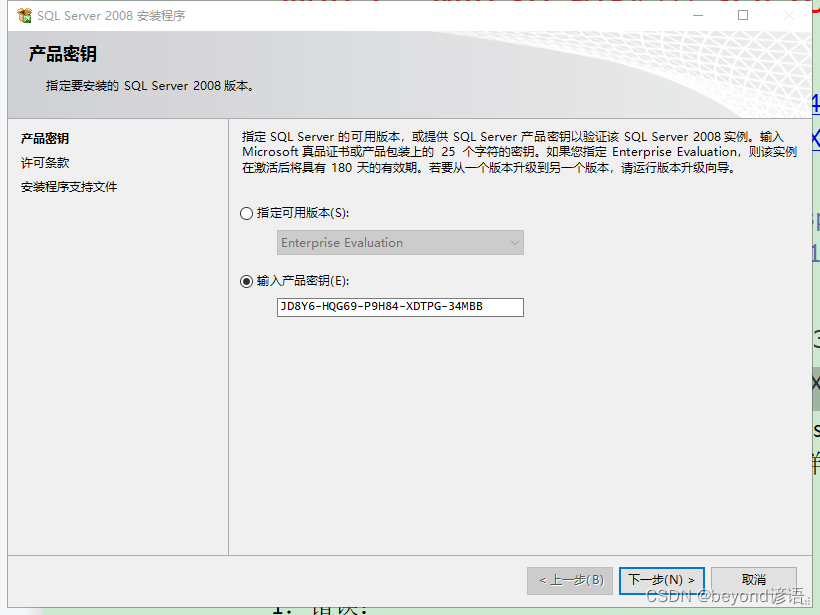


建议改一下路径,我这边修改报错了,然后就直接安装到C盘了~~~


输入数据库密码,后面连接数据库的时候需要使用到


不勾选直接下一步


二、创建数据库


右击 数据库—>新建数据库
路径啥的自己可以修改
右击 表 —> 新建表,创建自己需要用到的表
我这里为了测试用户登录,所以就创建了一个user_yy表
主键id需要设置为自增方便后续操作,将标识规范设置为是

右击user_yy表,编辑前200行,手动添加三条用户数据
这里通过用户登录来进行测试
三、C#测试


下一步
创建
测试个简单的页面
四、效果图


五、代码如下
using System;
using System.Collections.Generic;
using System.ComponentModel;
using System.Data;
using System.Drawing;
using System.Linq;
using System.Text;
using System.Threading.Tasks;
using System.Windows.Forms;
using System.Data.SqlClient;

namespace test_login
{

    public partial class Form1 : Form
    {

        public static string str_conn = "server=CY-20190824RMES;Initial Catalog=fiber_yy;User ID=sa;pwd=beyond";//server为电脑名、Initial Catalog为数据库名称、pwd为安装数据库时候的密码
        SqlConnection conn = new SqlConnection(str_conn);

        public Form1()//加载页面开始测试数据库是否连接成功
        {

            InitializeComponent();
            conn.Open();
            MessageBox.Show("database connection succeeded!!!");

        }

        private void button1_Click(object sender, EventArgs e)
        {

            string username = textBox1.Text;
            string password = textBox2.Text;

            if (username.Equals("") || password.Equals(""))
            {

                MessageBox.Show("提示:请输入用户名、密码!", "警告");
            }

            else
            {

                string sqlSel = "select count(*) from user_yy where username = '" + username + "' and password = '" + password + "'";

                SqlCommand cmd = new SqlCommand(sqlSel, conn);
                if (Convert.ToInt32(cmd.ExecuteScalar()) > 0)
                {

                    MessageBox.Show("用户登录成功");
                }
                else
                {

                    MessageBox.Show("用户登录失败");
                }
            }
        }
    }
}
边栏推荐
- Comparison of DOM tags of wechat applet development (native and uniapp)
- Simple integration of client go gin six list watch two (about the improvement of RS, pod and deployment)
- Notice on organizing the application for the first edition of Ningbo key software in 2022
- Do you know what the quotation for it talent assignment service is? It is recommended that programmers also understand
- The difference between TCP and UDP
- 教育专家王中泽老师:家庭教育重在自己成长
- 服务器调参实录
- byte和bit的区别
- Unity 全景漫游过程中使用AWSD控制镜头移动,EQ控制镜头升降,鼠标右键控制镜头旋转。
- 并发工具类
猜你喜欢
![[deploy private warehouse based on harbor] 3 deploy harbor](/img/cd/be68a430e86b4b23ad93b42a338f00.jpg)
[deploy private warehouse based on harbor] 3 deploy harbor
![Illustrate the principle of one-way linked list and the method of JS to realize linked list [with source code]](/img/0d/2de3413fcb77ac2bd093677035f2e7.jpg)
Illustrate the principle of one-way linked list and the method of JS to realize linked list [with source code]

教育专家王中泽老师:家庭教育重在自己成长

Biweekly investment and financial report: capital rush yuan universe game

Leetcode hot topic 100 topic 21-25 solution

About the designer of qtcreator the solution to the problem that qtdesigner can't pull and hold controls normally
常用问题排查工具和分析神器,值得收藏

Shutter restraint container assembly

【迅为干货】龙芯2k1000开发板opencv 测试
[Xunwei dry goods] opencv test of Godson 2k1000 development board
随机推荐
资深OpenStacker - 彭博、Vexxhost升级为OpenInfra基金会黄金成员
Implementation of customization function page of online Fox game server room configuration wizard service
[deploy private warehouse based on harbor] 4 push image to harbor
【Matlab WSN通信】A_Star改进LEACH多跳传输协议【含源码 487期】
Difference between byte and bit
saltstack部署lnmp
Aircraft battle from scratch (III) flight between player aircraft and enemy aircraft
JS implementation of Hill sort of graphic insertion sort [with source code]
顶流编辑器 Atom,将于 12 月 15 日退出历史舞台
Summary of string processing skills III
Esp32 learning notes (49) - esp-wifi-mesh interface use
saltstack的常用模块
通过 Ingress 进行灰度发布
Bat (batch processing) processing special symbols (exclamation point, percent sign), etc
Heartless sword Chinese English bilingual poem 001 Love
Leetcode-9.Palindrome Numbber
[Xunwei dry goods] opencv test of Godson 2k1000 development board
Start the Nacos server of shell script
[matlab printed character recognition] OCR printed letter + number recognition [including source code 1861]
服务器调参实录