当前位置:网站首页>信用卡数字识别(opencv,代码分析)
信用卡数字识别(opencv,代码分析)
2022-07-26 15:05:00 【csp_】
目录
项目源码
可在github下载:
https://github.com/chenshunpeng/Credit-card-digital-identification
环境配置与预处理
导入工具包
# imutils是在OPenCV基础上的一个封装,达到更为简结的调用OPenCV接口的目的
from imutils import contours
# 主要用于对多维数组执行计算,极大地简化了向量和矩阵的操作处理
import numpy as np
# argparse 是 python 用于解析命令行参数和选项的标准模块
import argparse
# OpenCV2(OpenCV是一个基于BSD许可(开源)发行的跨平台计算机视觉库)
import cv2
# 导入myutils.py文件里面的方法
import myutils
设置参数
关于argparse的使用可看:
Python, argparse, and command line arguments(推荐)
python之parser.add_argument()用法——命令行选项、参数和子命令解析器
首先以参数形式设置输入图像和模板的位置,这里参数指定了默认值,因此需要将 required=True 改成 required=False,否则会报错(借鉴:解决报错:设置了默认参数,仍报错:error: the following arguments are required:)
# argparse 模块是 Python 内置的一个用于命令项选项与参数解析的模块,
# argparse 模块可以让人轻松编写用户友好的命令行接口。
# 通过在程序中定义好我们需要的参数,然后 argparse 将会从 sys.argv 解析出这些参数。
# argparse 模块还会自动生成帮助和使用手册,并在用户给程序传入无效参数时报出错误信息。

ap = argparse.ArgumentParser()
ap.add_argument("-i", "--image",default='./images/credit_card_03.png', required=False,
	help="path to input image")
ap.add_argument("-t", "--template",default='./images/ocr_a_reference.png', required=False,
	help="path to template OCR-A image")
args = vars(ap.parse_args())
模板处理方法
转二值图像
cv2.threshold()方法可看:CV2简单阈值函数:cv2.threshold()
# 绘图展示
def cv_show(name,img):
	cv2.imshow(name, img)
	cv2.waitKey(0)
	cv2.destroyAllWindows()

# 读取一个模板图像(因为BGR,所以每个像素都是[255 255 255])
img = cv2.imread(args["template"])
cv_show('img',img)
# 转换为灰度图(BGR 到 GRAY)
ref = cv2.cvtColor(img, cv2.COLOR_BGR2GRAY)
cv_show('ref',ref)
# 二值图像(选项为cv2.THRESH_BINARY_INV)
ref = cv2.threshold(ref, 10, 255, cv2.THRESH_BINARY_INV)[1]

cv_show('ref',ref)
- 灰度图:在RGB模型中,如果R=G=B时,则彩色表示一种灰度颜色,其中R=G=B的值叫灰度值,因此,灰度图像每个像素只需一个字节存放灰度值(又称强度值、亮度值),灰度范围为0-255。一般常用的是加权平均法来获取每个像素点的灰度值。
- 二值图:图像的二值图,就是将图像上的像素点的灰度值设置为0或255,也就是将整个图像呈现出明显的只有黑和白的视觉效果。
- 彩色图象:多光谱图象的一种特殊情况,对应于人类视觉的三基色即红、绿、蓝三个波段,是对人眼的光谱量化性质的近似。
可以看到灰度图和二值图占空间较小,是彩色图象(BGR)的三分之一
单步调试(方法可看 :传送门):


原图:

二值图像如下:

计算轮廓
之后计算这10个数的轮廓,因为这10个轮廓的排列顺序并不一定是按照这个0-9的轮廓对应着来的,我们需要根据每个轮廓左上角的坐标值,先从小到大排序,这样就可以保证在匹配时顺序是对应的(比如 “354” 对应的的确是template中第4,6,5个数字)
# 计算轮廓
#cv2.findContours()函数接受的参数为二值图,即黑白的(不是灰度图),cv2.RETR_EXTERNAL只检测外轮廓,cv2.CHAIN_APPROX_SIMPLE只保留终点坐标
#返回的list中每个元素都是图像中的一个轮廓

# ref_, refCnts, hierarchy = cv2.findContours(ref.copy(), cv2.RETR_EXTERNAL,cv2.CHAIN_APPROX_SIMPLE)
refCnts, hierarchy = cv2.findContours(ref.copy(), cv2.RETR_EXTERNAL,cv2.CHAIN_APPROX_SIMPLE)

# -1表示绘制所有轮廓,后面是画笔颜色,画笔大小
# refCnts返回绘制了轮廓的图像
cv2.drawContours(img,refCnts,-1,(0,0,255),3)
cv_show('img',img)
print (np.array(refCnts).shape)
refCnts = myutils.sort_contours(refCnts, method="left-to-right")[0] #排序,从左到右,从上到下
digits = {
    }
排序前refCnts:
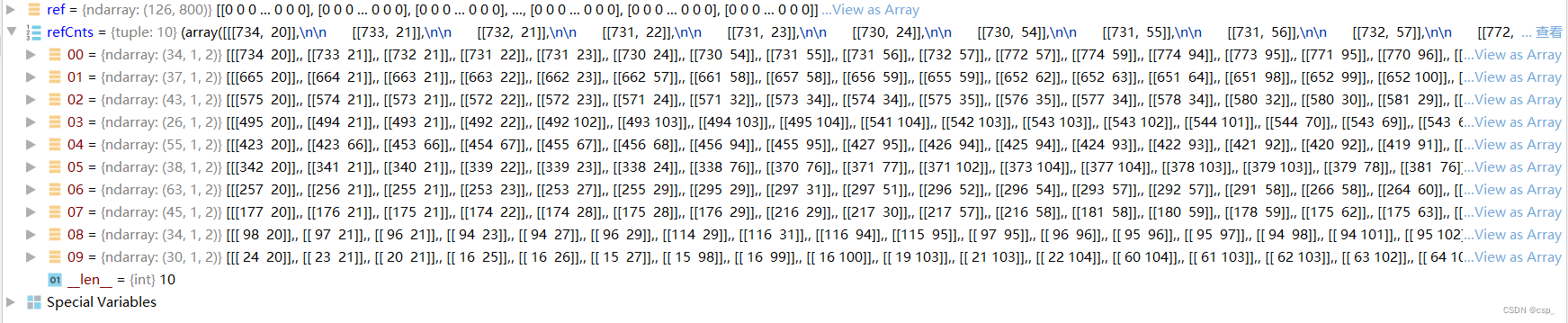
排序后refCnts:

排序函数sort_contours:
boundingBoxes有4个返回值(x,y,h,w),其中凭借 x 即可判断出数字的前后位置关系
def sort_contours(cnts, method="left-to-right"):
    reverse = False
    i = 0

    if method == "right-to-left" or method == "bottom-to-top":
        reverse = True

    if method == "top-to-bottom" or method == "bottom-to-top":
        i = 1
    boundingBoxes = [cv2.boundingRect(c) for c in cnts] #用一个最小的矩形,把找到的形状包起来x,y,h,w
    (cnts, boundingBoxes) = zip(*sorted(zip(cnts, boundingBoxes), key=lambda b: b[1][i], reverse=reverse))

    return cnts, boundingBoxes
结果:

之后对应每个数字,resize成合适大小,放入digits数组中制作成模板
# 遍历每一个轮廓
for (i, c) in enumerate(refCnts):
	# 计算外接矩形并且resize成合适大小
	(x, y, w, h) = cv2.boundingRect(c)
	roi = ref[y:y + h, x:x + w]
	roi = cv2.resize(roi, (57, 88))

	# 每一个数字对应每一个模板
	digits[i] = roi
digits数组最后结果:

输入数据处理方法
初始化卷积核,图像预处理
首先初始化卷积核,读取输入图像,预处理
# 初始化卷积核
rectKernel = cv2.getStructuringElement(cv2.MORPH_RECT, (9, 3))
sqKernel = cv2.getStructuringElement(cv2.MORPH_RECT, (5, 5))

#读取输入图像,预处理
image = cv2.imread(args["image"])
cv_show('image',image)
image = myutils.resize(image, width=300)
gray = cv2.cvtColor(image, cv2.COLOR_BGR2GRAY)
cv_show('gray',gray)
rectKernel:

sqKernel:

图像:

调整大小,转灰度图后:

顶帽操作
一些形态学操作可看
图像形态学操作之顶帽操作(TopHat)与黑帽操作(BlackHat)
【OPENCV3.3+PYTHON3.6】图像形态学操作之顶帽,黑帽以及形态学梯度
#顶帽操作,突出更明亮的区域
#根据自己指定的核大小进行顶帽操作
tophat = cv2.morphologyEx(gray, cv2.MORPH_TOPHAT, rectKernel)
cv_show('tophat',tophat)
结果:

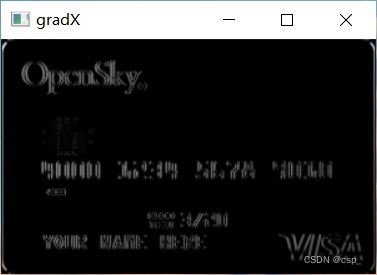
Sobel算子进行高通滤波
一些形态学操作可看:Sobel算子
# ksize:是Sobel算子的大小,即卷积核的大小,必须为奇数,默认值为3(ksize=-1相当于用3*3的)
gradX = cv2.Sobel(tophat, ddepth=cv2.CV_32F, dx=1, dy=0, ksize=-1)

# 绝对值
gradX = np.absolute(gradX)
# 归一化
(minVal, maxVal) = (np.min(gradX), np.max(gradX))
gradX = (255 * ((gradX - minVal) / (maxVal - minVal)))
gradX = gradX.astype("uint8")

print (np.array(gradX).shape)
cv_show('gradX',gradX)
结果:
闭操作,二值化
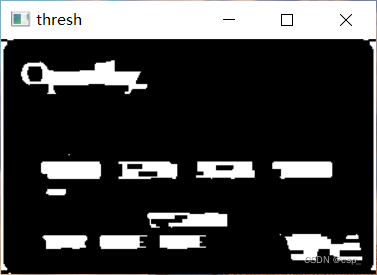
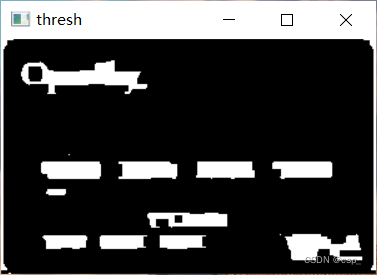
之后2次闭操作(先膨胀,再腐蚀)将数字连在一起,中间可以用THRESH_OTSU进行二值化处理,其优点在于可以自动寻找合适的阈值
#通过闭操作(先膨胀,再腐蚀)将数字连在一起
gradX = cv2.morphologyEx(gradX, cv2.MORPH_CLOSE, rectKernel)
cv_show('gradX',gradX)
#THRESH_OTSU会自动寻找合适的阈值,适合双峰,需把阈值参数设置为0
thresh = cv2.threshold(gradX, 0, 255,
	cv2.THRESH_BINARY | cv2.THRESH_OTSU)[1]
cv_show('thresh',thresh)

#重复一次闭操作
thresh = cv2.morphologyEx(thresh, cv2.MORPH_CLOSE, sqKernel)
cv_show('thresh',thresh)
第1次闭操作:

二值化处理:
第2次闭操作:
计算轮廓
# 计算轮廓
# thresh_, threshCnts, hierarchy = cv2.findContours(thresh.copy(), cv2.RETR_EXTERNAL,cv2.CHAIN_APPROX_SIMPLE)
threshCnts, hierarchy = cv2.findContours(thresh.copy(), cv2.RETR_EXTERNAL,cv2.CHAIN_APPROX_SIMPLE)
把轮廓绘制到彩图上
cnts = threshCnts
cur_img = image.copy()
cv2.drawContours(cur_img,cnts,-1,(0,0,255),3)
cv_show('img',cur_img)
结果:

过滤轮廓
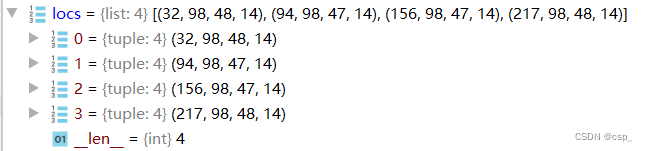
之后过滤轮廓,即通过计算所有轮廓外接矩形的大小,找到有价值的数字区域,把这4个区域放入locs列表进行排序
locs = []

# 遍历轮廓
for (i, c) in enumerate(cnts):
	# 计算矩形
	(x, y, w, h) = cv2.boundingRect(c)
	ar = w / float(h)

	# 选择合适的区域,根据实际任务来,这里的基本都是四个数字一组
	if ar > 2.5 and ar < 4.0:

		if (w > 40 and w < 55) and (h > 10 and h < 20):
			#符合的留下来
			locs.append((x, y, w, h))

# 将符合的轮廓从左到右排序
locs = sorted(locs, key=lambda x:x[0])
locs列表内容:
模板匹配得出识别结果
模板匹配
先把轮廓稍微放大,之后遍历每一个轮廓中的数字,和上面的方法类似,找到每个数字后,在模板中计算每一个得分,得到最合适的数字并画出来:
output = []

# 遍历每一个轮廓中的数字
for (i, (gX, gY, gW, gH)) in enumerate(locs):
	# initialize the list of group digits
	groupOutput = []

	# 根据坐标提取每一个组
	group = gray[gY - 5:gY + gH + 5, gX - 5:gX + gW + 5]
	cv_show('group',group)
	# 预处理
	group = cv2.threshold(group, 0, 255,
		cv2.THRESH_BINARY | cv2.THRESH_OTSU)[1]
	cv_show('group',group)
	# 计算每一组的轮廓
	# group_,digitCnts,hierarchy = cv2.findContours(group.copy(), cv2.RETR_EXTERNAL,cv2.CHAIN_APPROX_SIMPLE)
	digitCnts,hierarchy = cv2.findContours(group.copy(), cv2.RETR_EXTERNAL,cv2.CHAIN_APPROX_SIMPLE)
	digitCnts = contours.sort_contours(digitCnts,
		method="left-to-right")[0]

	# 计算每一组中的每一个数值
	for c in digitCnts:
		# 找到当前数值的轮廓,resize成合适的的大小
		(x, y, w, h) = cv2.boundingRect(c)
		roi = group[y:y + h, x:x + w]
		roi = cv2.resize(roi, (57, 88))
		cv_show('roi',roi)

		# 计算匹配得分
		scores = []

		# 在模板中计算每一个得分
		for (digit, digitROI) in digits.items():
			# 模板匹配
			result = cv2.matchTemplate(roi, digitROI,
				cv2.TM_CCOEFF)
			(_, score, _, _) = cv2.minMaxLoc(result)
			scores.append(score)

		# 得到最合适的数字
		groupOutput.append(str(np.argmax(scores)))

	# 画出来
	cv2.rectangle(image, (gX - 5, gY - 5),
		(gX + gW + 5, gY + gH + 5), (0, 0, 255), 1)
	cv2.putText(image, "".join(groupOutput), (gX, gY - 15),
		cv2.FONT_HERSHEY_SIMPLEX, 0.65, (0, 0, 255), 2)

	# 得到结果
	output.extend(groupOutput)
部分结果:


output列表:

打印结果
# 打印结果
print("Credit Card Type: {}".format(FIRST_NUMBER[output[0]]))
print("Credit Card #: {}".format("".join(output)))
cv2.imshow("Image", image)
cv2.waitKey(0)
结果:

边栏推荐
- R语言ggplot2可视化:使用ggpubr包的ggdotplot函数可视化点阵图(dot plot)、设置add参数添加均值和标准差竖线、设置error.plot参数实际显示箱体
- Vs add settings for author information and time information
- Chuhuan technology is listed on Shenzhen Stock Exchange: Minsheng securities, with a market value of 2.7 billion, is a shareholder
- Unity URP入门实战
- Familiarize you with the "phone book" of cloud network: DNS
- 关于工控网关物联网串口转WiFi模块与串口转网口模块的选型
- Within a week, I developed my own knowledge sharing platform
- Crystal special decoration submitted for registration: the first quarter revenue fell by 80%, and Chen Bo controlled 68.5% of the equity
- Xiaobai, which securities firm is the best and safest to open an account
- Chapter 08_ Principles of index creation and design
猜你喜欢

The most detailed patent application tutorial, teaching you how to apply for a patent
Cve-2022-33891 vulnerability recurrence

Crystal special decoration submitted for registration: the first quarter revenue fell by 80%, and Chen Bo controlled 68.5% of the equity
driver开发环境

OpenGL学习日记2——着色器

Google tries to introduce password strength indicator for chromeos to improve online security

FOC学习笔记-坐标变换以及仿真验证

楚环科技深交所上市:市值27亿 民生证券是股东

Prometheus adds redis and MySQL node monitoring

生泰尔科技IPO被终止:曾拟募资5.6亿 启明与济峰资本是股东
随机推荐
Remote desktop on Jetson nano
How to translate academic documents?
【五分钟Paper】基于参数化动作空间的强化学习
示波器的使用
Data permissions should be designed like this, yyyds!
Write a summary, want to use a reliable software to sort out documents, is there any recommendation?
【LeetCode每日一题】——121.买卖股票的最佳时机
R语言wilcox.test函数比较两个非参数样本的总体的中心位置是否具有显著差异(如果两个样本数据是配对数据设置paired参数为TRUE)
二叉树的创建以及遍历
In the changing era of equipment manufacturing industry, how can SCM supply chain management system enable equipment manufacturing enterprises to transform and upgrade
Deep Packet Inspection Using Quotient Filter论文总结
晶品特装递交注册:第一季营收降80% 陈波控制68.5%股权
哪里有写毕业论文需要的外文文献?
OSS deletes all files two days before the current time
Use of oscilloscope
Ner of NLP: Exploration and practice of product title attribute recognition
楚环科技深交所上市:市值27亿 民生证券是股东
R language tests the significance of correlation coefficient: use Cor The test function calculates the value and confidence interval of the correlation coefficient and its statistical significance (if
【LeetCode每日一题】——268.丢失的数字
[leetcode daily question] - 268. Missing numbers