当前位置:网站首页>Use of stm32cubemonitor Part II - historical data storage and network access
Use of stm32cubemonitor Part II - historical data storage and network access
2022-07-25 02:59:00 【ASWaterbenben】
The previous article has briefly explained STM32CubeMonitor How to configure and test data through historical data diagram and instrument panel , So what we need to do this time is to turn the detected data into CSV File store , As a data record . And realize network access in LAN .
One 、 Historical data storage
CSV I believe you are not unfamiliar with the format , Its format is relatively simple , adopt “,” Split data units , And fill the data units into the table , It can be understood that my data is
A,B,C
Save as CSV After the format file, the file becomes a table , The content is
| A | B | C |
|---|
Today's main purpose is to save the data prototype of the detection interface to a CSV In file , And use matlab Compare the drawing with the previous monitoring map .
First of all, take out the original configuration and code module made last time , Don't read my first part of blog clearly
STM32CubeMonitor Use of the first part - Data drawing and instrument display
In fact, the content of this time is relatively simple , The main thing is to learn how to use the left storage bar file function 
Same as the picture in the previous issue , But in the output position file function , Let's talk about it here file Set the question of
- file name : You need to set the absolute location of the file , To point to the exact path of the file
- Behavior : Divided into additional 、 make carbon copies 、 Delete three , This is handled as needed
- Line feed and create directory need to be checked , If you have handled the file problem, you can ignore
- Encoding: The encoding type , Output is CSV Keep the default file
- name : Set function name , It is convenient for later revision and understanding
After setting, click the upper right corner to complete .
Remember to click on the... Above after setting DEPLOY Deployment , The save location I set is my desktop , So first test a few data 
The empty location in the upper right corner is the storage location of the data file , Not yet , Click START ACQUISITION Then you can start writing data , In the corresponding position of the desktop data.csv file 
Now I'll give you a data.csv Screenshot of the file 
The data is the data in the graph and the displayed data in the historical graph . Now the data is saved .
Two 、 Configure network access
But every time the dry goods are lost, there is suspicion of water articles , So I need to update a little STM32CubeMonitor Display interface problem .
STM32CubeMonitor Deployed interfaces are not simply deployed on their own software , It's about putting your own computer IP Address a port as the interface , It can be accessed through the browser in the LAN , If the LAN has transparent transmission function, it can also be accessed remotely .
Premise is : The detector must be equipped with STM32CubeMonitor Keep it open
Address format is :
http://xxx.xxx.xxx.xxx ( Their own IP Address ):1880/ui
Because I'm lazy , Don't bother to check your own IP 了 , So enter directly in the browser http://127.0.0.1:1880/ui, The open interface is as follows 
Compared with STM32CubeMonitor Configuration diagram of , The result is exactly the same .
To confirm whether it can be accessed by LAN , I connected my LAN with a tablet , Fill in my... According to the address format IP And access , The results are as follows :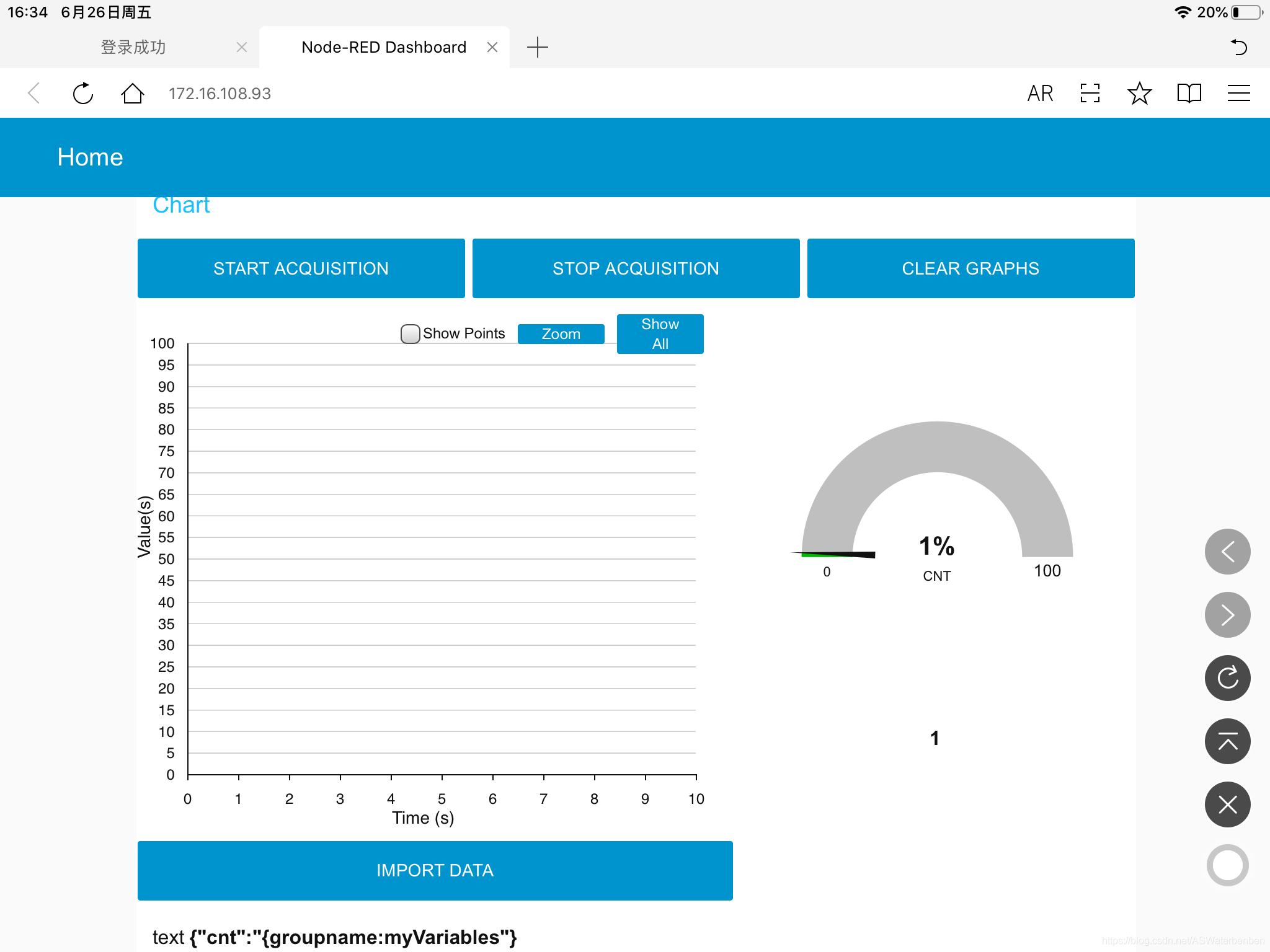
Screenshots of tablets are successful , There is no reason to doubt the authenticity of this function .
Sum up , Just keep STM32CubeMonitor For open state , The monitoring interface can be shared in the LAN , Realize multi person collaborative monitoring .
STM32CubeMonitor The operation is relatively simple , The difficulty is that there is no tutorial , So it will be difficult to use at first , Next, I will continue to watch mood updates , Brothers and sisters in need praise, pay attention to the comments and go for a wave !
边栏推荐
- What should I do when the interface encounters jsonstring
- Threat report in June: new bank malware malibot poses a threat to mobile banking users
- JS construction linked list
- Js a simple way to store several objects in an array
- Wechat sports field reservation of the finished works of the applet graduation project (7) mid-term inspection report
- DOM node type
- Wechat sports field reservation of applet completion works applet graduation design (8) graduation design thesis template
- Daily three questions 7.15
- SQL recursive follow-up
- Common Oracle commands
猜你喜欢

Beginners must see the markdown User Guide

6.0 cancellation of member registration verification code

Domestic edge computing organization and product research

Jenkins plug-in development -- plug-in expansion

Preliminary foundation JVM

R language one page and many pictures

Learning record 12

Riotboard development board series notes (VII) -- the use of framebuffer
Generator set work arrangement problem code

Arduino IDE for raspberry PI Pico development firmware localization installation tutorial
随机推荐
Solve the error: could not find 'xxxtest‘
Routing policy interferes with routing
hello csdn
Define macros in makefile and pass them to source code
Backtracking to solve combinatorial problems
DLL load failed: the page file is too small to complete the operation
Is redis'module'not an internal or external command?
Ffmpeg 4.3 add custom demuxer
Keras load history H5 format model error: attributeerror 'STR' object has no attribute 'decode‘
# CF #808 Div.2(A - C)
How to use blender to make 360 degree panorama and panoramic video?
JS construct binary tree
Keil compile download error: no algorithm found for: 08000000h - 08001233h solution
Technical experts from large factories: Thoughts on cloud nativity and software supply chain security
The file in scanpy1.9.1 cannot be read in scanpy1.7.2. The problem is solved
Analysis of FLV packaging
JS construction linked list
Tp5.1 login configuration method of whether to login public functions (complete login case)
JS written test question -- realize the flat function of array
Classic network learning RESNET code implementation