当前位置:网站首页>Jdbc-api details
Jdbc-api details
2022-07-23 05:32:00 【CHY resounding】
Catalog
(3) principle ( How to precompile , How to prevent sql Inject )
1.DiverManager
PS: This article takes JDK11 As the standard

(1) register
 But in our last note, we got the driver like this :
Class.forName("com.mysql.jdbc.Driver");Why is that ?, In fact, you can click Driver Source code :
( Pay attention to the new version idea What is recommended is com.mysql.cj.jdbc.Driver, Instead of the stereotype com.mysql.jdbc.Driver)

In essence, there is a static code block , And according to the knowledge learned , This static code block will automatically proceed as the class is loaded , There is no need to adjust any method , You can register .
however 5.0 after class It's OK not to write this line , because :
 There is a corresponding file and then read , I can do this by myself

(2) Connect

2.Connection



(1) Business management :
/**
 * JDBC API  Detailed explanation :Connection
 */
public class JDBCDemo3_Connection {

    public static void main(String[] args) throws Exception {
        //1.  Registration drive
        //Class.forName("com.mysql.jdbc.Driver");
        //2.  Get the connection : If the connection is local mysql And the port is the default  3306  Can simplify writing
        String url = "jdbc:mysql:///db1?useSSL=false";
        String username = "root";
        String p = "1234";
        Connection conn = DriverManager.getConnection(url, username, p);
        //3.  Definition sql
        String sql1 = "update account set money = 3000 where id = 1";
        String sql2 = "update account set money = 3000 where id = 2";
        //4.  Access to perform sql The object of  Statement
        Statement stmt = conn.createStatement();


        try {
            //  Open transaction
            conn.setAutoCommit(false);
            //5.  perform sql
            int count1 = stmt.executeUpdate(sql1);// Rows affected
            //6.  Processing results
            System.out.println(count1);
            int i = 3/0;
            //5.  perform sql
            int count2 = stmt.executeUpdate(sql2);// Rows affected
            //6.  Processing results
            System.out.println(count2);

            //  Commit transaction
            conn.commit();
        } catch (Exception throwables) {
            //  Roll back the transaction
            conn.rollback();
            throwables.printStackTrace();
        }


        //7.  Release resources
        stmt.close();
        conn.close();
    }
}
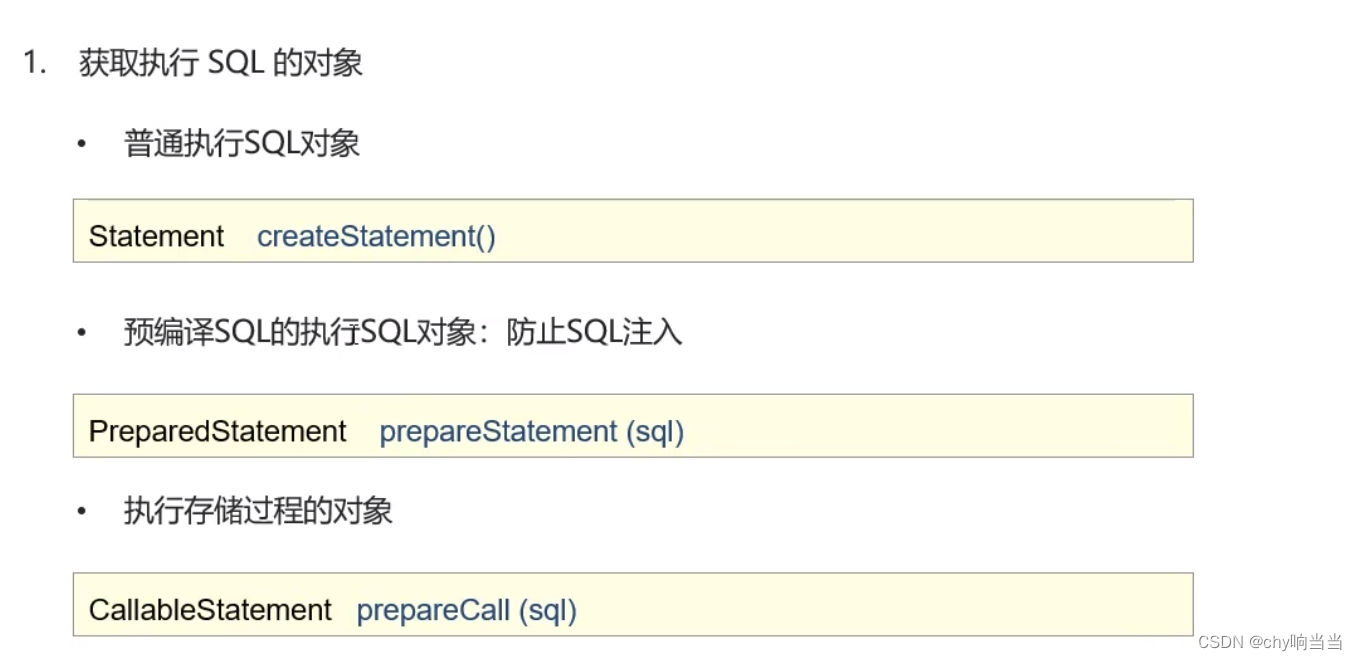
(2) Get objects —— Integrate and reflect in other knowledge points
3.Statement


(1) perform DML、DDL
/**
 * JDBC API  Detailed explanation :Statement
 */
public class JDBCDemo4_Statement {

    /**
     *  perform DML sentence
     * @throws Exception
     */
    @Test
    public void testDML() throws  Exception {
       //1.  Registration drive
       //Class.forName("com.mysql.jdbc.Driver");
       //2.  Get the connection : If the connection is local mysql And the port is the default  3306  Can simplify writing
       String url = "jdbc:mysql:///db1?useSSL=false";
       String username = "root";
       String p = "1234";
       Connection conn = DriverManager.getConnection(url, username, p);
       //3.  Definition sql
       String sql = "update account set money = 3000 where id = 1";
       //4.  Access to perform sql The object of  Statement
       Statement stmt = conn.createStatement();
       //5.  perform sql
       int count = stmt.executeUpdate(sql);// After execution DML sentence , Rows affected
       //6.  Processing results
       //System.out.println(count);
        if(count > 0){
            System.out.println(" Modification successful ~");
        }else{

            System.out.println(" Modification failed ~");
        }
       //7.  Release resources
       stmt.close();
       conn.close();

   }


    /**
     *  perform DDL sentence
     * @throws Exception
     */
    @Test
    public void testDDL() throws  Exception {
        //1.  Registration drive
        //Class.forName("com.mysql.jdbc.Driver");
        //2.  Get the connection : If the connection is local mysql And the port is the default  3306  Can simplify writing
        String url = "jdbc:mysql:///db1?useSSL=false";
        String username = "root";
        String p= "1234";
        Connection conn = DriverManager.getConnection(url, username, p);
        //3.  Definition sql
        String sql = "drop database db2";
        //4.  Access to perform sql The object of  Statement
        Statement stmt = conn.createStatement();
        //5.  perform sql
        int count = stmt.executeUpdate(sql);// After execution DDL sentence , May be 0
        //6.  Processing results
        //System.out.println(count);
       /* if(count > 0){
            System.out.println(" Modification successful ~");
        }else{

            System.out.println(" Modification failed ~");
        }*/
        System.out.println(count);

        //7.  Release resources
        stmt.close();
        conn.close();

    }

}
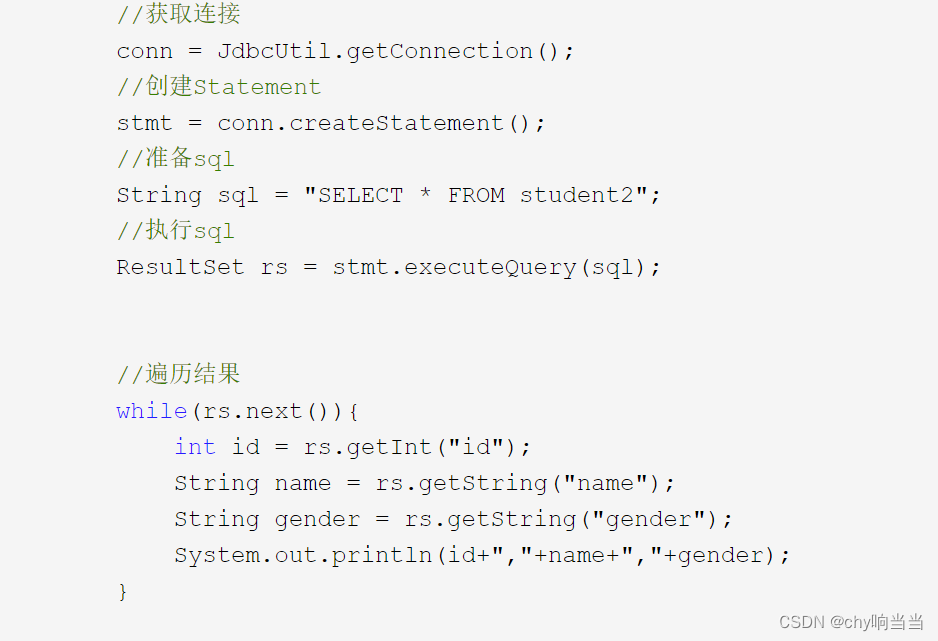
(2) perform DML
stay resultset The case reflects .
4.ResultSet

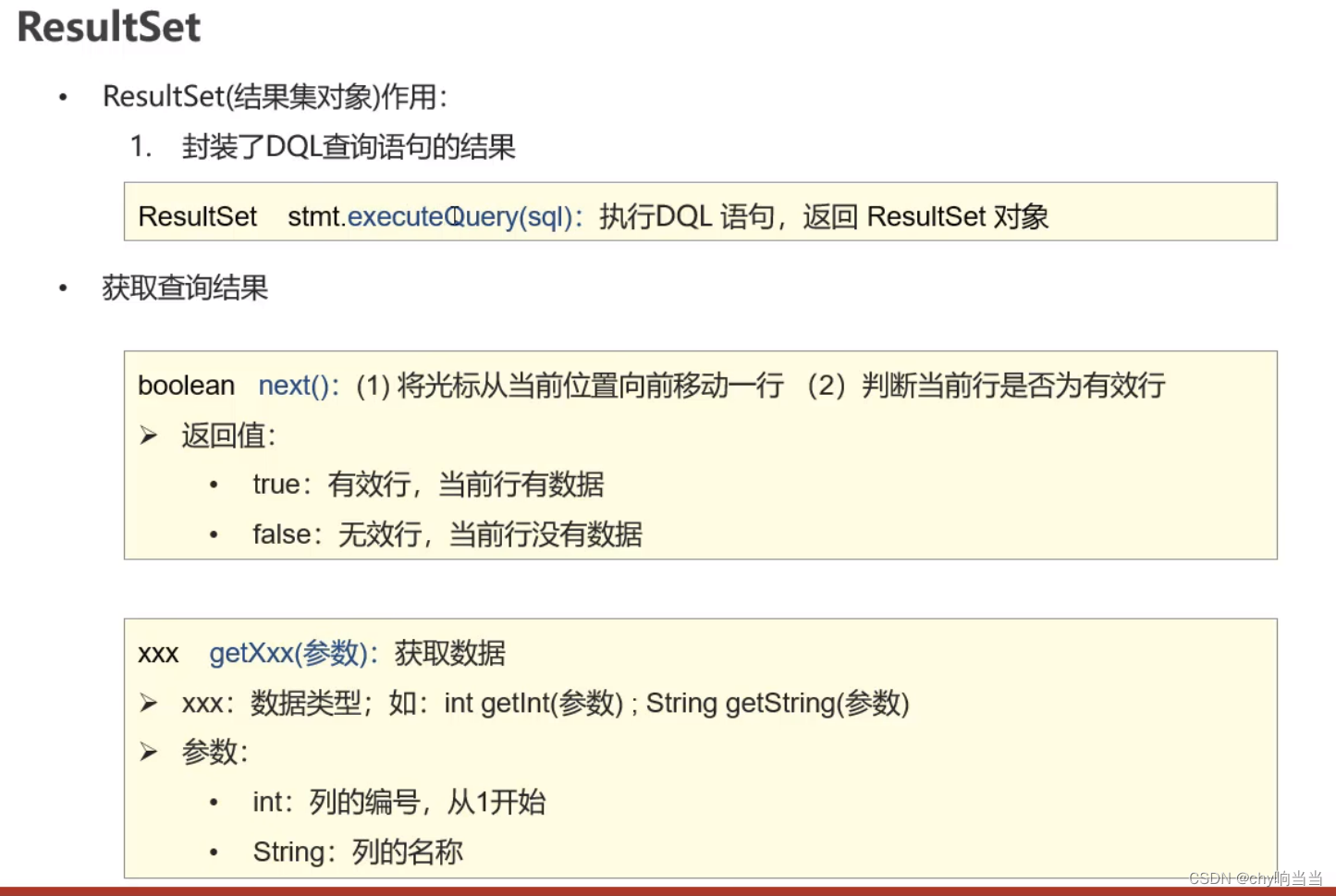

(1) Code testing
/**
 * JDBC API  Detailed explanation :ResultSet
 */
public class JDBCDemo5_ResultSet {

    /**
     *  perform DQL
     * @throws Exception
     */
    @Test
    public void testResultSet() throws  Exception {
       //1.  Registration drive
       //Class.forName("com.mysql.jdbc.Driver");
       //2.  Get the connection : If the connection is local mysql And the port is the default  3306  Can simplify writing
       String url = "jdbc:mysql:///db1?useSSL=false";
       String username = "root";
       String p= "1234";
       Connection conn = DriverManager.getConnection(url, username, p);

       //3.  Definition sql
        String sql = "select * from account";

        //4.  obtain statement object
        Statement stmt = conn.createStatement();

        //5.  perform sql
        ResultSet rs = stmt.executeQuery(sql);

        //6.  Processing results ,  Traverse rs All data in
        // 6.1  Move the cursor down one line , And judge whether there is data in the current line
        while (rs.next()){
            //6.2  get data   getXxx()
            int id = rs.getInt("id");
            String name = rs.getString("name");
            double money = rs.getDouble("money");

            System.out.println(id);
            System.out.println(name);
            System.out.println(money);

            System.out.println("--------------");

        }


        //7.  Release resources
        rs.close();
        stmt.close();
        conn.close();
    }


}
(2) Case study :

/**
* Inquire about account Account table data , Encapsulated in the Account In the object , And store it in ArrayList Collection
* 1. Defining entity classes Account
* 2. Query data , Package to Account In the object
* 3. take Account Objects in ArrayList Collection
*
*
* @throws Exception
*/
public static void main(String[] args) throws Exception {
        //1.  Registration drive
        Class.forName("com.mysql.jdbc.Driver");// This can't help me Jar The bag is old , You need to change one jar Bao this case to , Forget it today
        //2.  Get the connection : If the connection is local mysql And the port is the default  3306  Can simplify writing
        String url = "jdbc:mysql:///dbTest?useSSL=false";
        String username = "root";
        String p = "***";
        Connection conn = DriverManager.getConnection(url, username, p);

        //3.  Definition sql
        String sql = "select * from emp";

        //4.  obtain statement object
        Statement stmt = conn.createStatement();

        //5.  perform sql
        ResultSet rs = stmt.executeQuery(sql);

        // Create array
        ArrayList<Emp> emps = new ArrayList<>();

        //6.  Processing results ,  Traverse rs All data in
        // 6.1  Move the cursor down one line , And judge whether there is data in the current line
        while (rs.next()){
            //6.2  get data   getXxx()
            int id = rs.getInt("id");
            String name = rs.getString("ename");
            double money = rs.getDouble("salary");
            String date =rs.getString("joindate");
            Emp emp = new Emp();
            emp.setEname(name);
            emp.setId(id);
            emp.setJoindate(date);
            emp.setSalary(money);
            emps.add(emp);
            //System.out.println("--------------");
        }
        for (Emp emp : emps) {
            System.out.println(emp.toString());
        }

        //7.  Release resources
        rs.close();
        stmt.close();
        conn.close();
    }
5.PreparedStatement


(1) SQL Inject Demo :
/**
     *  demonstration SQL Inject
     * @throws Exception
     */
    @Test
    public void testLogin_Inject() throws  Exception {
        //2.  Get the connection : If the connection is local mysql And the port is the default  3306  Can simplify writing
        String url = "jdbc:mysql:///db1?useSSL=false";
        String username = "root";
        String p = "1234";
        Connection conn = DriverManager.getConnection(url, username, p);

        //  Receive user input   User name and password
        String name = "hfkjsfhskj";
        String pwd = "' or '1' = '1";

        String sql = "select * from tb_user where username = '"+name+"' and password = '"+pwd+"'";
        System.out.println(sql);
        //  obtain stmt object
        Statement stmt = conn.createStatement();
        //  perform sql
        ResultSet rs = stmt.executeQuery(sql);

        //  Judge whether the login is successful
        if(rs.next()){
            System.out.println(" Login successful ~");
        }else{
            System.out.println(" Login failed ~");
        }

        //7.  Release resources
        rs.close();
        stmt.close();
        conn.close();
    }
Be careful , Why can I log in here , We put name pwd Plug in sql Later, analyze :
select * from tb_user where username = '123' and password = '' or '1' = '1'
First of all, whether your user name is right or not ,and Connected at the back password=''( empty ) It must be wrong , And the back Or Of 1=1 It must be right , So it's actually the logical expression I learned before : (x&false)| true =true
namely :select * from tb_user where true
——》 It's all ok
(2) solve SQL Inject

// Receive user input User name and password
String name = "zhangsan";
String pwd = "' or '1' = '1";
// Definition sql
String sql = "select * from tb_user where username = ? and password = ?";
// obtain pstmt object
PreparedStatement pstmt = conn.prepareStatement(sql);
// Set up ? Value
pstmt.setString(1,name);
pstmt.setString(2,pwd);
// perform sql
ResultSet rs = pstmt.executeQuery();
Then how did he solve it ?
Because in set He will carry out escape , such as ' The machine knows that you want to pass a single quotation mark , It would be /', Keep his original meaning , Not with password The grammatical single quotation marks inside are confused , It will pwd As a whole .
(3) principle ( How to precompile , How to prevent sql Inject )

It's obvious on the log :
If you don't open it, that's it :

Open yes prepare Precompilation :

边栏推荐
猜你喜欢



随机推荐
Hefei University of technology information theory and coding course design, including code, visual interface, course design report
Leetcode-172. zero after factorial
JDBC快速入门
Pointers and functions
VCs command (continuous update)
leetcode-326. 3的幂
3步就能制作漫画头像的机器人,想拥有一个吗?
Leetcode-188. the best time to buy and sell stocks IV
Code random notes_ Linked list_ 24 exchange nodes in the linked list in pairs
树和二叉树(C语言)
Construction training camp module I operation
Leetcode-384. clutter array
Bubble sorting in C language
Leetcode-583. Deleting two strings
leetcode-384.打乱数组
leetcode-415.字符串相加
链表的基本操作
大一暑假实习day5_2
JDBC-API详解
合肥工业大学信息论与编码课程设计,含代码,可视化界面,课设报告