当前位置:网站首页>类加载内存分析
类加载内存分析
2022-06-22 06:10:00 【酷小亚】
Java内存分析
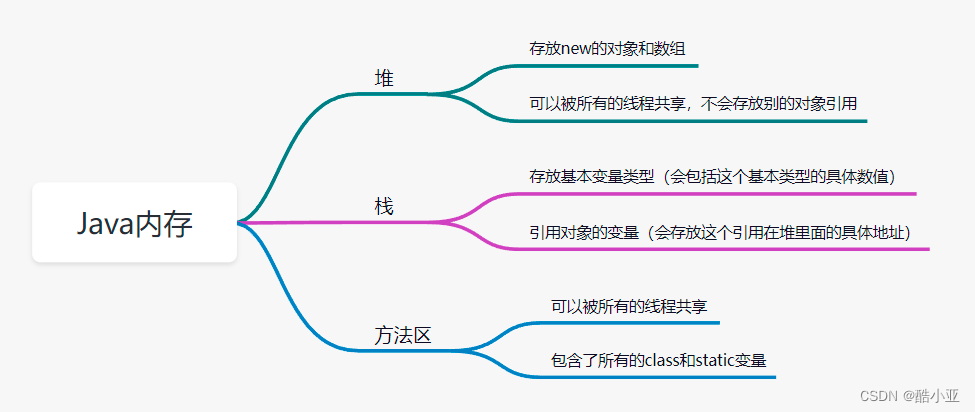
了解:类的加载过程

类的加载与ClassLoader的理解

下面放两个不同的代码,分别看下代码效果图,以作分析:
public class Demo7 {

    public static void main(String[] args) {

        A a = new A();
        System.out.println(A.m);
          /** * 1、加载到内存,会产生一个类class对象 * 2、链接,链接结束后 m = 0 * 3、初始化 * <clinit>(){ * System.out.print("A类静态代码块初始化"); * m = 100; * m = 300; * } * m = 300 */
    }
}
class A {


    static int m = 100;
    static {

        System.out.println("A类静态代码块初始化");
        m = 300;
    }

    public A(){

        System.out.println("A类的无参构造初始化");
    }

}

public class Demo7 {

    public static void main(String[] args) {

        A a = new A();
        System.out.println(A.m);
         /** * 1、加载到内存,会产生一个类class对象 * 2、链接,链接结束后 m = 0 * 3、初始化 * <clinit>(){ * System.out.print("A类静态代码块初始化"); * m = 300; * m = 100; * } * m = 100 */
    }
}
class A {

	//打印结果为:100
    static {

        System.out.println("A类静态代码块初始化");
        m = 300;
    }
	 static int m = 100;

    public A(){

        System.out.println("A类的无参构造初始化");
    }

}

边栏推荐
- D3D learning notes (1) - Introduction to the use conditions of autodraw at so stage
- Single cell paper record (Part11) -- clustermap for multi-scale clustering analysis of spatial gene expression
- h = key. Hashcode()) ^ (H > > 16) detailed explanation and why the hashcode value should be shifted to the right by 16 bits and XOR with the original hashcode value
- matlab 的离散pid控制
- idea本地运行scope
- 生信可视化(part4)--相关性图
- BinaryFormatter saving and loading game data for unity
- 【NAND文件系统】UBIFS介绍
- Vulkan pre rotation processing equipment direction
- Empirical mode decomposition (EMD) and Hilbert Huang transform (HHT)
猜你喜欢

On the definition of jinja2 macro

单细胞论文记录(part12)--Unsupervised Spatial Embedded Deep Representation of Spatial Transcriptomics
Unity development - scene asynchronous loading

Frame profiling

Flink核心功能和原理
EMC的解决

W800 chip platform enters openharmony backbone
Shengxin visualization (Part3) -- violin diagram

Linear regression: least squares, Tellson estimation, RANSAC

On the matrix order of MNIST linear model
随机推荐
Single cell paper record (Part11) -- clustermap for multi-scale clustering analysis of spatial gene expression
【云计算重点复习】
reduce_sum()中的reduction_indices
No business series 7: removing spots from old photos
Discrete PID control based on MATLAB
【自己动手写CPU】异常相关指令的实现
R language observation log (part24) -- writexl package
Improve your game‘s performance
Generics in C #
常用CMOS模拟开关功能和原理
pgsql批量插入
Flink核心功能和原理
单细胞论文记录(part14)--CoSTA: unsupervised convolutional neural network learning for ST analysis
单细胞论文记录(part8)--Cell2location maps fine-grained cell types in spatial transcriptomics
八锁问题详解
Modeling and Simulation of Radar Seeker Servo System
为什么我选择 Rust
Frame profiling
五大常考SQL面试题
PyG教程(7):剖析邻域聚合