当前位置:网站首页>Tm1638 LED digital display module Arduino drive code
Tm1638 LED digital display module Arduino drive code
2022-07-25 13:50:00 【Wuyu】
Recently bought a piece LED Digital tube display module , Welding on the plate 8 A digital tube ,8 Independent LED The lamp ,8 A separate button .TM1638 Driver chip , Five core signal interface ,5V Power supply . Here's the picture :
 The circuit diagram is as follows :
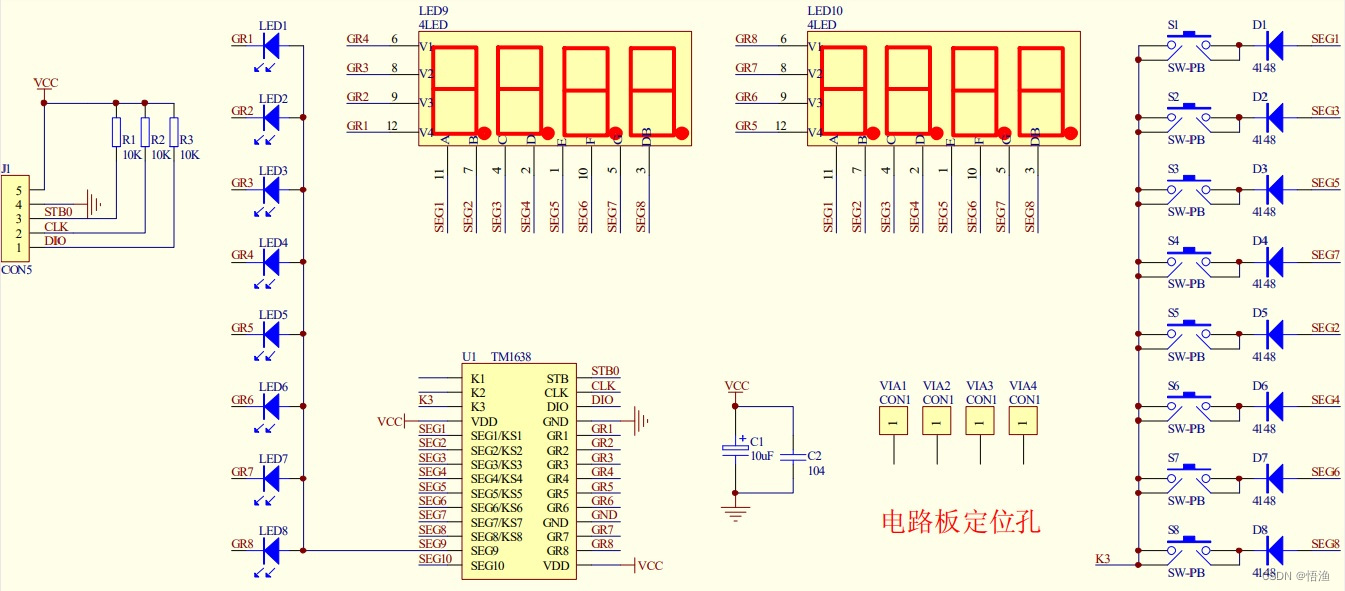
The demo code provided by the merchant shows confusion , There is an error in the code , Found online TM1638 Data manual , use ARDUINO Write a driver code , Encapsulated into CLASS object . Provide nixie tube display 、 Second dot display 、 Independent LED Light display control function , Provide display switch function, module test function and above function demonstration code . Now share the code below .
Module file :TM1638.C
#ifndef TM1638_H  // Avoid repeating definitions .
  #define TM1638_H
  class TM1638{
  private:
    // In my ESP32 On module , all ”delayMicroseconds(TM1637_DELAY_US)”( Time delay ) Statements can be deleted , But in order to make higher dominant frequency MCU It can adapt to the bus speed , It is suggested to add delay .
    #define TM1637_DELAY_US 1
    uint8_t STB = 17;uint8_t CLK = 16;uint8_t DIO = 4;//TM1638 Module pin definition .
    //LED_CODE_COUNT Express LED The nixie tube can display the total number of character codes . To extend encoded characters , Just modify the following two lines .
    #define LED_CODE_COUNT 19
    uint8_t LED_CODE[LED_CODE_COUNT]={0x3F,0x06,0x5B,0x4F,0x66,0x6D,0x7D,0x07,0x7F,0x6F,0x77,0x7C,0x39,0x5E,0x79,0x71,0x40,0x74,0x5C};// Digital coding 0~f Add "-""h""o".
    uint8_t brightnessData=0;// Brightness value .
    uint8_t ledData=0;//LED memory ( every last Bit Bits correspond to one LED Lamp beads ), All are off by default .
    uint8_t pointData=0;// Decimal point display memory ( first Bit The digit corresponds to the decimal point of a nixie tube ), All are off by default .
    uint8_t displayData[8];// Nixie tube video memory .
  protected:
    void init(void){uint8_t i;pinMode(STB,OUTPUT);pinMode(CLK,OUTPUT);digitalWrite(STB,HIGH);digitalWrite(CLK,HIGH);com_Write(0x88);com_Write(0x40);digitalWrite(STB,LOW);bus_Write(0xc0);for(i=0;i<16;i++){bus_Write(0x00);}digitalWrite(STB,HIGH);}// initialization .
    uint8_t bus_Read(void){uint8_t i;uint8_t temp=0;pinMode(DIO,INPUT);delayMicroseconds(TM1637_DELAY_US);for(i=0;i<8;i++){temp>>=1;digitalWrite(CLK,LOW);delayMicroseconds(TM1637_DELAY_US);digitalWrite(CLK,HIGH);delayMicroseconds(TM1637_DELAY_US);if(digitalRead(DIO)==HIGH){temp|=0x80;}}return temp;}// Read a byte from the bus .
    void bus_Write(uint8_t Data){uint8_t i;pinMode(DIO,OUTPUT);for(i=0;i<8;i++){delayMicroseconds(TM1637_DELAY_US);digitalWrite(CLK,LOW);digitalWrite(DIO,Data&0x01);delayMicroseconds(TM1637_DELAY_US);digitalWrite(CLK,HIGH);Data>>=1;}}// Write a byte to the bus .
    void com_Write(uint8_t in_Com){digitalWrite(STB,LOW);delayMicroseconds(TM1637_DELAY_US);bus_Write(in_Com);delayMicroseconds(TM1637_DELAY_US);digitalWrite(STB,HIGH);}// Write command words .
    void add_Write(uint8_t Add,uint8_t Data){com_Write(0x44);digitalWrite(STB,LOW);bus_Write(0xc0|Add);bus_Write(Data);digitalWrite(STB,HIGH);}// Write data to the specified address .
  public:
    TM1638(void){;}
    TM1638(uint8_t in_STB,uint8_t in_CLK,uint8_t in_DIO){STB=in_STB;CLK=in_CLK;DIO=in_DIO;}
    void    begin(void){init();}
    void    begin(uint8_t in_STB,uint8_t in_CLK,uint8_t in_DIO){STB=in_STB;CLK=in_CLK;DIO=in_DIO;init();}
    void    test(void){uint8_t index=0;uint8_t count=0;uint8_t tem=0;com_Write(0x8f);for(index=0;index<16;index+=2){com_Write(0xc0);add_Write(0xc0|index,0xff);add_Write(0xc0|index+1,0xff);delay(50);}for(count=0;count<6;count++){com_Write(0x87|(count%2)<<3);delay(100);}delay(500);}// test ( For display LED Whether it can be lit , This process will destroy the previous display ).
    void    brightness(uint8_t in_Data){brightnessData=in_Data&0x07;com_Write(0x88|brightnessData);}// Brightness setting (0~7).
    uint8_t brightness(void){return brightnessData;}// Return to the brightness setting (0~7).
    uint8_t key(void){uint8_t c[4],i,key_value=0;digitalWrite(STB,LOW);bus_Write(0x42);for(i=0;i<4;i++){c[i]=bus_Read();}digitalWrite(STB,HIGH);for(i=0;i<4;i++){key_value|=c[i]<<i;}for(i=0;i<8;i++){if((0x01<<i)==key_value){break;}}return i;}// Get key value (0~8,8 Indicates that no key is pressed ), This system 8 All the key wires are connected K3 port , Key combinations are not supported .
    void    led(uint8_t index,boolean state){if(index>7){return;}if(state){ledData=ledData|(0x01<<index);}else{ledData=ledData&(~(0x01<<index));}add_Write(2*index+1,state);}// Control the specified LED bright / Extinction state .
    void    led(uint8_t in_ledData){uint8_t i;ledData=in_ledData;for(i=0;i<8;i++){if(ledData&(0x01<<i)){add_Write(2*i+1,1);}else{add_Write(2*i+1,0);}}}// Control with one byte of data 8 individual LED Lamp beads , Each bit of the parameter controls one LED Light of lamp beads / Extinction state .
    uint8_t led(void){return ledData;}// Return one byte of data , Each of them Bit Bit indicates corresponding LED Liang Liang / Extinction state .
    void    point(uint8_t index,boolean state){if(index>=8){return;}if(state){pointData=pointData|(0x01<<index);add_Write(2*index,LED_CODE[displayData[index]]|0x80);}else{pointData=pointData&(~(0x01<<index));add_Write(2*index,LED_CODE[displayData[index]]&0x7f);}}// Change the designation LED Nixie tube decimal point status .
    void    point(uint8_t in_pointData){uint8_t i;pointData=in_pointData;for(i=0;i<8;i++){if(pointData&(0x01<<i)){add_Write(2*i,LED_CODE[displayData[i]]|0x80);}else{add_Write(2*i,LED_CODE[displayData[i]]&0x7f);}}}// Set the brightness of all decimal points / destroy , Every parameter Bit The digit corresponds to the decimal point of a nixie tube .
    uint8_t point(void){return pointData;}// Display status by returning decimal point with single byte data . Each digit corresponds to a decimal point .
    void    display(uint8_t index,int in_Data){uint8_t Data;Data=uint8_t(in_Data);if(index>=8||in_Data>=LED_CODE_COUNT){return;}if(in_Data<0){add_Write(2*index,0x00);return;}displayData[index]=Data;if(pointData&(0x01<<index)){add_Write(2*index,LED_CODE[displayData[index]]|0x80);}else{add_Write(2*index,LED_CODE[displayData[index]]&0x7f);}}// Specify the nixie tube to display data , A negative parameter indicates that it is off .
    uint8_t display(uint8_t index){if(index>=8){return 0;}return displayData[index];}// Returns the specified LED Hexadecimal value of nixie tube ( Including decimal point ).
    void    close(){com_Write(0x80);}// Turn off display .
    void    open(){com_Write(0x88|brightnessData);}// Turn on the display .
  };
#endif
Demo code :TM1638.INO
#include "TM1638.C"
TM1638 tm1638;
void setup ()
{
  Serial.begin(115200);
  tm1638.begin(14,26,32);// Pin settings .
 }
void loop(){
  uint8_t Tem;uint32_t timeval;
  Tem=tm1638.key();
  if(Tem<8){
    tm1638.led(Tem,true);// Light the... Corresponding to the key LED.
    tm1638.display(0,Tem);// Display key number .
  }else{
    tm1638.led(0);// Extinguish all LED.
    tm1638.display(0,-1);// Off key number display nixie tube ( Indicates that the key is released ).
  }
  timeval=millis();
  Tem=timeval%1000;// Number of seconds to start timing .
  for(uint8_t i=7;i>4;i--){
    tm1638.display(i,Tem%10);
    Tem=Tem/10;
  }
  timeval=timeval/1000;
  Tem=timeval%60;// Number of seconds to start timing .
  tm1638.display(4,Tem%10);
  tm1638.point(4,true);
  tm1638.display(3,Tem/10);
  tm1638.display(2,16);// Show horizontal lines .
  timeval=timeval/60;
  Tem=timeval%60;// Start the score of timing .
  tm1638.display(1,Tem%10);
}
I use ESP32 Connect this module , Burn the program ( Pay attention to the pin setting of the communication line ) after ,ESP32 restart , You will see the test effect , Press different keys , Corresponding LED It will light up , The nixie tube will display the key value of the corresponding key .
边栏推荐
- @Classmethod decorator
- 【Platform IO编译Hifive1-revB】*** [.pio\build\hifive1-revb\src\setupGPIO.o] Error 1的解决办法
- Canal realizes MySQL data synchronization
- 电脑里一辈子都不想删的神仙软件
- Namespaces and libraries
- hcip第九天笔记
- 2022年下半年软考初级程序员备考
- [force buckle] 645. Wrong set
- 百度搜索打击盗版网文站点,SEOer应该关注哪些问题?
- The whole process of 6w+ word recording experiment | explore the economical data storage strategy of alluxio
猜你喜欢
【力扣】1030.距离顺序排列矩阵单元格

QGIS加载在线地图:高德、天地图等

Workplace "digital people" don't eat or sleep 007 work system, can you "roll" them?
![Error of Tencent cloud [100007] this env is not enable anonymous login](/img/a2/a209a0d94e3fbf607242c28d87e2dd.png)
Error of Tencent cloud [100007] this env is not enable anonymous login
HTTP cache tongtianpian, there may be something you want
刷题-洛谷-P1089 津津的储蓄计划

0710RHCSA

0715RHCSA

Brush questions - Luogu -p1046 Tao Tao picking apples

Leetcode202 --- Happy number

随机推荐
Brush questions - Luogu -p1059 clear random number
Brush questions - luogu-p1089 Jinjin savings plan
leetcode1 --两数之和
stable_ Baselines quick start
dp-851
DNS resolution error during windows unbutu20 lts apt, WGet installation
0720RHCSA
互斥锁、自旋锁、读写锁……理清它们的区别和应用
@classmethod 装饰器
6.27 uniapp项目历程
Canvas判断内容为空
Turn off automatic update when brew executes commands
Workplace "digital people" don't eat or sleep 007 work system, can you "roll" them?
G027-op-ins-rhel-04 RedHat openstack creates a customized qcow2 format image
hcip第七天笔记
Uncaught SyntaxError: Octal literals are not allowed in strict mode.
Install mujoco and report an error: distutils.errors DistutilsExecError: command ‘gcc‘ failed with exit status 1
HTTP cache tongtianpian, there may be something you want
Leetcode1 -- sum of two numbers
0717RHCSA