当前位置:网站首页>G027-op-ins-rhel-04 RedHat openstack creates a customized qcow2 format image
G027-op-ins-rhel-04 RedHat openstack creates a customized qcow2 format image
2022-07-25 13:35:00 【51CTO】
1 You need to understand
- Appointment : We call it running on
VMware WorkstationThe virtual machine inside isClient virtual machines( hereinafter referred to asThe virtual machine, useCentOS 7.8Graphical ); We call it inThe virtual machineIt's based onKVMThe running virtual machine isKVM virtual machine( hereinafter referred to asKVM The virtual machine, useCentOS 7.4), Yes , Two layer dolls The virtual machineBefore starting , Must be inVMware WorkstationStart the virtualization engine onvirtualization Intel VT-x/EPT or AMD-V- Suggest
The virtual machineThe network configuration isNATorThe bridge, Because the futureKVM The virtual machineNeed helpThe virtual machineInternet capability to install software packages - You can refer to the following related articles
G016complete CentOS Installation andG019andG020complete RedHat OpenStack Environment construction and basic operation - For a better browsing experience , You can click on the top left of the article
CatalogButton to display the overall directory structure of the article
- Related articles
- G016-OS-LIN-CENT-01 CentOS 7.8.2003 install
- G019-OP-INS-RHEL-01 PackStack install RedHat OpenStack
- G020-OP-INS-RHEL-02 RedHat OpenStack Issue virtual machine ( Command line )
- G023-OP-INS-RHEL-03 RedHat OpenStack Cinder docking NFS Back end storage
2 install KVM The virtual machine
2.1 Virtual machine installation virtualization software package
Be careful :
The virtual machinerefer to CentOS 7.8
2.2 establish KVM The virtual machine
Be careful :
The virtual machineThrough the commandifconfigYou can see a virtual network cardvritbr0, The virtual network card iskvm The virtual machinedefault defaultNATNetwork type network card (192.168.122.1)
2.3 install KVM The virtual machine
2.3.1 Language choice

2.3.2 Automatic partition

2.3.3 Network and host name
Be careful : When the network is turned on , Must be able to pass
DHCPAutomatically getIPAddress , Here's the picture

2.3.4 To configure ROOT password
Minimize by default
minimalinstall

2.3.5 Restart and test the network
restart
kvm The virtual machine, AndrootIdentity login , testkvm The virtual machineCan you connect to the external network


3 To configure KVM virtual machine
3.1 modify KVM Virtual machine network configuration file
Be careful : The change is
kvm The virtual machine, NoThe virtual machine, Unclear concept ? Refer to part IAppointment
3.2 install cloud-init software package
according to
2.3.5Section test ,kvm The virtual machineIt can be connected to the external network normally , At this point, you can directly install the software package online . The purpose is to obtainCustomer defined metadata information, Such as hostname and root Password etc. .
3.3 edit cloud.cfg file
edit
/etc/cloud/cloud.cfgThe configuration file , staycloud_init_modulesAdd the following below
3.4 edit network file
edit
/etc/sysconfig/networkThe configuration file , Make it include the following , Avoid visiting EC2 There is a problem with metadata service .
3.5 edit grub file
edit
/etc/default/grubThe configuration file , Make it include the following boot options , To ensure that the console information appears in dashboard In the log tab of , as well as nova console-log In the output of the log .
3.6 close KVM virtual machine
4 establish QCOW2 Mirror image
Be careful : The following steps are
The virtual machineIn the operation , Nokvm The virtual machine, Unclear concept ? Refer to part IAppointment
4.1 Reset and clean up the mirror
4.2 Create and compress images
5 Test image startup
5.1 Register image
Will mirror
centos-cloud.qcow2Sign up toOpenStackplatform , The following is a graphical registration demonstration , For command line registration, please refer to the blog G020-OP-INS-RHEL-02 RedHat OpenStack Issue virtual machine ( Command line )


5.2 Create a virtual machine type ( specifications )
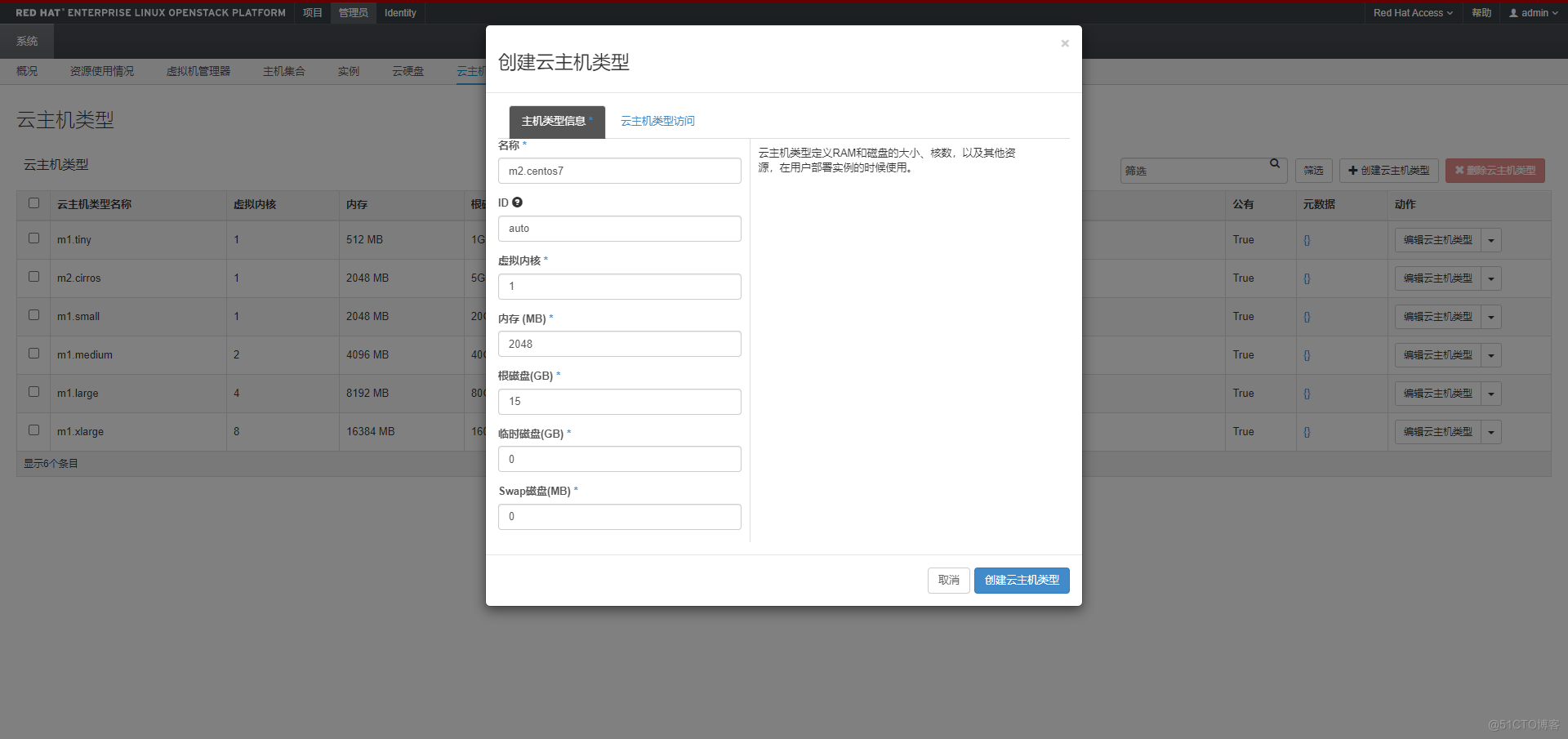

5.3 Issue virtual machine test
Be careful : For network and routing, please refer to
G020establish , Be sure to ensure the existence of routes and gateways , Otherwise, you cannot get the custom host name


Observe the startup process and try to login , Test that the image is correct


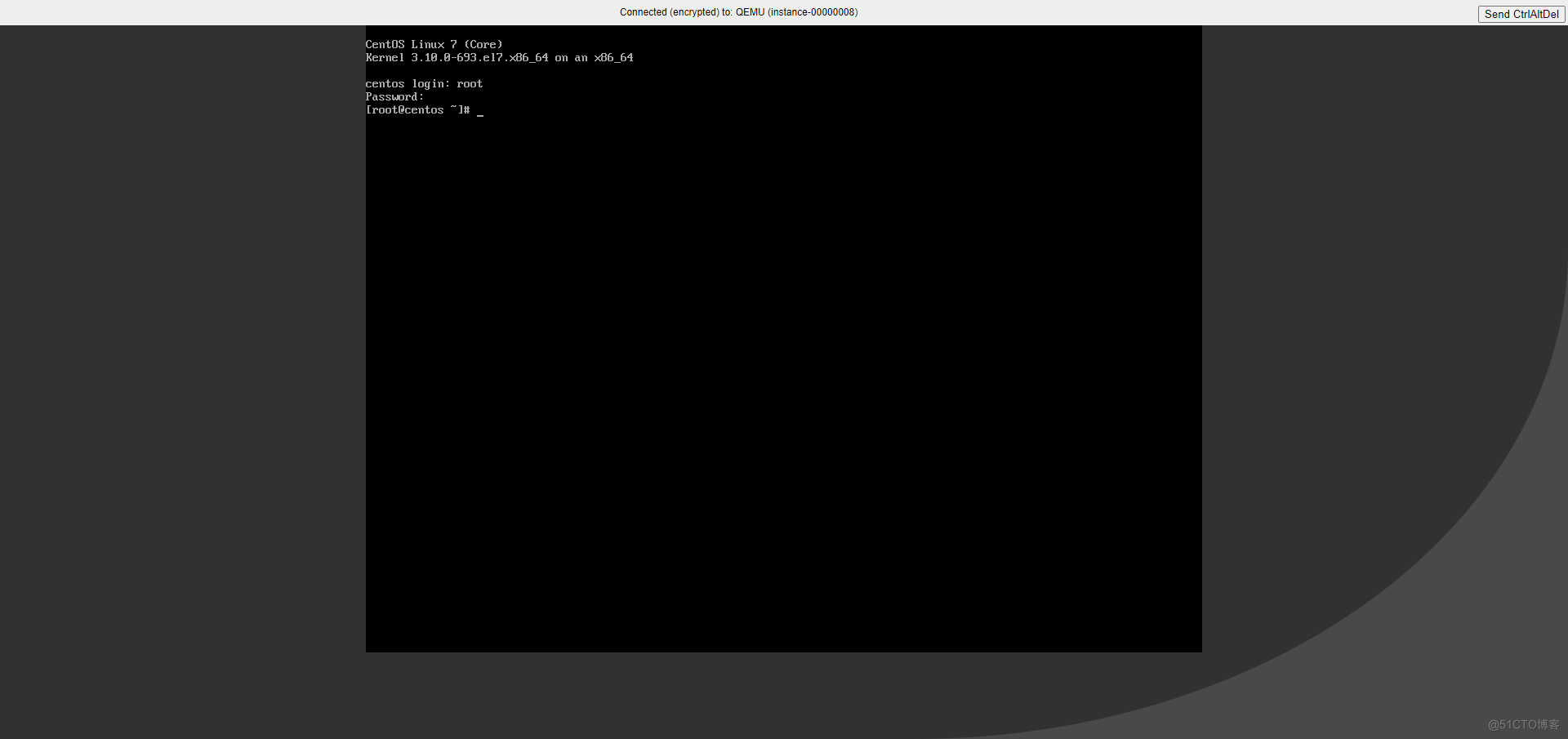
- END
边栏推荐
- hcip第八天实验
- 我的创作纪念日
- Leetcode 113. 路径总和 II
- Gym安装、调用以及注册
- 刷题-洛谷-P1146 硬币翻转
- 备战2022 CSP-J1 2022 CSP-S1 初赛 视频集
- 【AI4Code】《Unified Pre-training for Program Understanding and Generation》 NAACL 2021
- Jupyter Notebook介绍
- The migration of arm architecture to alsa lib and alsa utils is smooth
- Online Learning and Pricing with Reusable Resources: Linear Bandits with Sub-Exponential Rewards: Li
猜你喜欢

刷题-洛谷-P1151 子数整数

Basic knowledge of binary tree

Uncaught SyntaxError: Octal literals are not allowed in strict mode.

window unbutu20 LTS apt,wget 安装时 DNS 解析错误
刷题-洛谷-P1075 质因数分解

好友让我看这段代码

Preparing for the soft test for junior programmers in the second half of 2022

6.27 uniapp project history

Any time, any place, super detective, seriously handle the case!

IM系统-消息流化一些常见问题
随机推荐
Excel import and export source code analysis
0720RHCSA
stable_ Baselines quick start
pycharm不能输入中文解决方法
包管理 apt,dpkg
0717RHCSA
QGIS加载在线地图:高德、天地图等
Hcip eighth day experiment
Programmer growth chapter 27: how to evaluate requirements priorities?
stable_baselines快速入门
6W+字记录实验全过程 | 探索Alluxio经济化数据存储策略
0717RHCSA
【GCN-CTR】DC-GNN: Decoupled GNN for Improving and Accelerating Large-Scale E-commerce Retrieval WWW22
【GCN】《Adaptive Propagation Graph Convolutional Network》(TNNLS 2020)
【AI4Code】《Pythia: AI-assisted Code Completion System》(KDD 2019)
Introduction and features of numpy (I)
面试官问我:Mysql的存储引擎你了解多少?
详解浮点数的精度问题
Discussion on principle and application technology of MLIR
The whole process of 6w+ word recording experiment | explore the economical data storage strategy of alluxio