当前位置:网站首页>Malicious code analysis practice - use IDA pro to analyze lab05-01 dll
Malicious code analysis practice - use IDA pro to analyze lab05-01 dll
2022-06-12 10:34:00 【Bng!】
Malicious code analysis practice —— utilize IDA PRO analysis Lab05-01.dll
1. The experiment purpose
utilize IDA Pro analysis Lab05-01.dll Malicious code found in , Answer the following questions :
- DLLMain What's the address of ?
- Use Imports Window and browse to gethostbyname, What address does the import function locate ?
- How many functions have called gethostbyname?
- Concentrate on 0x10001757 Right at gethostbyname Call to , You can find out which DNS Will the request be triggered ?
- IDA Pro Identified in 0x10001656 How many local variables in the subprocess at ?
- IDA Pro Identified in 0x10001656 How many parameters in the subprocess at ?
- Use Strings window , To locate the string in disassembly \cmd.exe /c, Where is it located ?
- In reference to \cmd.exe /c What happens in the region where your code is located ?
- In the same area , stay 0x100101C8 It's about , look dword_1008E5C4 It seems to be a global variable , It helps decide which path to take . How is the malicious code set dword_1008E5C4 What about ?( Tips : Use cross references )
- Located in 0x1000FF58 Among the hundreds of lines of instructions in the subprocess at , A series of uses memcmp To compare strings . If the robotwork The string comparison is successful ( When memcmp return 0), What's going to happen ?
- PSLIST What does the export function do ?
- Use graph mode to draw pairs of sub_10004E79 Cross reference diagram of . When you enter this function , Which one? API The function may be called ? Just based on these API function , How would you rename this function ?
- DllMain How many... Are called directly Windows API? How many at a depth of 2 When called ?
- stay 0x10001358 It's about , There is one right Sleep( A parameter that uses a parameter that contains the number of milliseconds to sleep API function ) Call to . Look back along the code , If this code executes , How long does this program sleep ?
- stay 0x10001701 The place is a pair of socket Call to , its 3 What are the two parameters ?
- Use MSDN Page socket and IDA Pro Named symbolic constants in , Can you make the parameters more meaningful ? After modification , What are the parameters ?
- Search for in Instructions (opcode 0xED) Use . This instruction and a magic string VMXh Used for Vmware testing . Is it used in this malicious code ? Use to execute in Cross reference of instruction function , Can detect further Vmware Evidence of ?
- Jump your cursor to 0x1001D988 It's about , What did you find ?
- If you install it IDA Python plug-in unit ( Include IDA Pro Commercial version plug-ins ), function Lab05-01.py, One IDA Pro Python Script ( Make sure the cursor is on 0x1001D988 It's about ), What happens after running the script ?
- Place the cursor in the same position , How do you turn this data into a single ASCII character string ?
- Open the script using a text editor . How it works ?
2. Experimental environment ( Hardware 、 Software )
Winxp virtual machine :
Hardware : processor Intel Core i5-10210U CPU @ 1.60GHz 2.11 GHz
Software :32 Bit operating system
3. The experimental steps
(1)DLLMain What's the address of ?
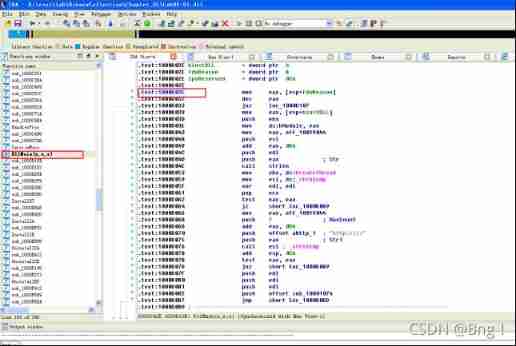
You can see from it DLLMain The address for 1000D02E
(2) Use Imports Window and browse to gethostbyname, What address does the import function locate ?

You can see from it gethostbyname The location is 100163CC
(3) How many functions have called gethostbyname?

You can see that there is 5 Function calls gethostbyname function 9 Time
(4) Concentrate on 0x10001757 Right at gethostbyname Call to , You can find out which DNS Will the request be triggered ?
Jump to the first 10001757 It's about , In this assembly code, we first put 10019040 The contents of are stored in the register eax in , Let's double-click off_10019040 Get into 10019040 see 
found pics.praticalmalwareanalys The words... , Then double click. aThisIsRdoPics_, Found out praticalmalwareanalysis.com Domain name information .

use hex The window opens aThisIsRdoPics_
Before discovery 13 Bytes is [This is RDO], in other words , Later I ordered eax add 0Dh, Will be eax Yes praticalmalwareanalysis.com, And then eax Push into the stack as gethostbyname Parameters of . So it's in 0x10001757 Right at gethostbyname Call to access praticalmalwareanalysis.com
(5)IDA Pro Identified in 0x10001656 How many local variables in the subprocess at ?

So there is 23 Local variables
(6)IDA Pro Identified in 0x10001656 How many parameters in the subprocess at ?

There is one parameter
(7) Use Strings window , To locate the string in disassembly \cmd.exe /c, Where is it located ?

So it's located in 0x10095B34
(8) In reference to \cmd.exe /c What happens in the region where your code is located ?
Came to 0x10095B34 It's about , double-click sub_1000FF58 View the cross reference of this string 
See again 100101D0 The string is pushed onto the stack 
You can find that there is another string before the string is referenced 
double-click aHiMasterDDDDDD
The string in the figure represents remote shell Session decrypts a number , That is to start a remote section session conversation .
(9) In the same area , stay 0x100101C8 It's about , look dword_1008E5C4 It seems to be a global variable , It helps decide which path to take . How is the malicious code set dword_1008E5C4 What about ?( Tips : Use cross references )

double-click dword_1008E5C4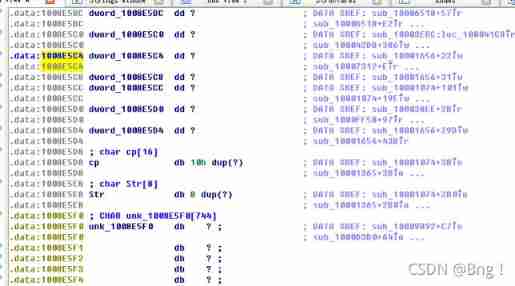
Choose 1008E5C4,ctrl+x See cross references , It is found that only the first one performs the write operation 
double-click 10001656+22, Finding it will eax The value of is assigned to dword_1008E5C4, and EAX Is the return value of the previous instruction function call . So double click the previous function call sub_10003695 see eax The return value of 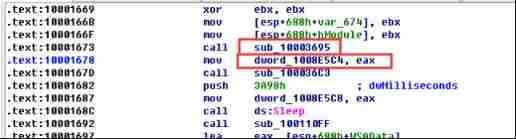
You can see that this function includes a GetversionExA Call to , Used to obtain information about the current operating system version , After then VersionInformation.dwPlatformId And 2 Compare to determine the register al The value of is eax Value .
among 2 representative WIN32_NT System , in other words , The function here will check whether it is win32 The system decides eax Value , Then save and put dword_1008E5C4 in , and dword_1008E5C4 The value of 0 or 1
(10) Located in 0x1000FF58 Among the hundreds of lines of instructions in the subprocess at , A series of uses memcmp To compare strings . If the robotwork The string comparison is successful ( When memcmp return 0), What's going to happen ?
Jump to 0x1000FF58 Turn down , find rootwork
jnz The command is to jump when it is less successful , So skip jnz The instruction is executed downward , Double click to view sub_100052A2 function , We see information about the registry 
Scroll down and you will find that sub_100038EE function 
Double click in sub_100038EE The function view , It is found that it calls malloc Function creates memory space , And then it calls again send function , Finally called. free Function to free memory space , So guess it might be the registry SOFTWARE\Microsoft\Windows\CurrentVersion Modified or queried , Then send the structure out .

For a more intuitive and detailed view sub_100052A2 What exactly does a function do , We go back to sub_100052A2 Within the function , Press down F5 View pseudo c Code 
Find out first with RegOpenKeyExA Function opens the registry HKLM\SOFTWARE\Microsoft\Windows\CurrentVersion, Then I inquired aWorktime and aWorktimes The key is worktime and worktimes Value of key , And then it calls sub_100038EE function , Sent out these messages .
(11)PSLIST What does the export function do ?
Enter the export list window 
double-click PSLIST function , See its assembly code , First call sub_100036C3 function , If the return value is 1 Then execute the function down sub_10006518 and sub_1000654C.
First go to sub_100036C3 Function , And press F5 View pseudo c Code , You can see sub_100036C3 Function makes a judgment , Determine whether the system is win32 And the version is larger than win2000, If so, return 1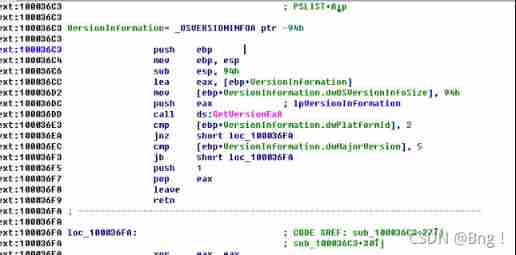

We enter sub_10006518 and sub_1000654 View... In two functions 

They all call CreateToolhelp32Snapshot Functions and sub_1000620C function ,CreateToolhelp32Snapshot Function is to get the process information of the host , and sub_1000620C, We click in to observe the fake C The code finds that it writes the queried process information to a file .
therefore PSLIST The export function is used to search the process in the host and write it to a file to form a process list .
(12) Use graph mode to draw pairs of sub_10004E79 Cross reference diagram of . When you enter this function , Which one? API The function may be called ? Just based on these API function , How would you rename this function ?
Jump to this function , Choose sub_10004E79, And then click User xrefs chart Generate cross reference diagrams 
When you enter this function GetSystemDefaultLangID、sprintf、strlen These three API Called .
This function calls sub_100038EE function , and sub_100038EE Function called again send,malloc,free,__imp_strlen function .
Because this function calls GetSystemDefaultLangID function , And indirectly called send function , So I guess this function will get the system default language ID after , adopt send Function to send the other side of the remote connection , So this function can be named GetSystemLanguageID.
(13)DllMain How many... Are called directly Windows API? How many at a depth of 2 When called ?
Jump to DLLMain At function , Choose DLLMain function , Click on view→Subviews→Function Calls View the function call window 
You can see that it calls directly strlen、strnicmp、CreateThread、strncpy this 4 individual Windows API.
open User xrefs chart, Tick off Cross,references to, And set the depth to 2

Zoom in to see , There are about 31 individual API In depth 2 When called
(14) stay 0x10001358 It's about , There is one right Sleep( A parameter that uses a parameter that contains the number of milliseconds to sleep API function ) Call to . Look back along the code , If this code executes , How long does this program sleep ?
Jump to 0x10001358 It's about , Drop in the call Sleep Before you eax Pushed into the stack as Sleep The parameters of the function , That is, sleep time , So look ahead and find eax Value , That is, sleep time .
It can be seen from it that , In this assembly code , First the off_10019020 It's in storage eax in , We double-click to enter off_10019020, View its contents 
Found out [This is CTI]30 The words... , Double click in aThisIsCti30, It is found that the defined value is [This is CTI]30
stay Sleep In that assembly code eax added 0DH, That is to say 13 byte , That is, the corresponding information is [This is CTI], That is to say eax Yes 30 And then eax Push to stack , Called atoi Function will eax The value of is reduced to an integer , in other words eax The value of is 30, then imul The instruction will eax multiply 3E8h, That is to say 30*1000=30000ms=30s, therefore sleep Function will make the program sleep 30s
(15) stay 0x10001701 The place is a pair of socket Call to , its 3 What are the two parameters ?
Jump to 0x10001701 It's about , Found calling socket Before the function 6,1,2 These three numbers are pushed onto the stack , So its three parameters are 6,1,2
(16) Use MSDN Page socket and IDA Pro Named symbolic constants in , Can you make the parameters more meaningful ? After modification , What are the parameters ?
Right click the three parameters of a single machine , choice use standard symbolic constant, Will list IDA Pro All the corresponding quantities found for this particular value 
And for socket function , The three parameters are domain( Protocol domain , Or protocol family family)、type(socket type )、protocol( agreement ). In this socket Function ,domain=2 Corresponding AF_INET, That is to say, it is decided to use IPv4 Address (32 position ) And port number (16 position ) The combination of ;type=1 The corresponding is SOCK_STREAM, Streaming socket ;protocol=6 The corresponding is IPPROTO_TCP, namely TCP agreement . The modified parameters applied are as follows :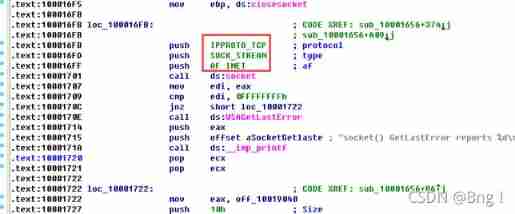
(17) Search for in Instructions (opcode 0xED) Use . This instruction and a magic string VMXh Used for Vmware testing . Is it used in this malicious code ? Use to execute in Cross reference of instruction function , Can detect further Vmware Evidence of ?
Search for in Instructions 

double-click sub_10006196 Jump to in At the instruction address , Found some hexadecimal numbers similar to strings 
Check these hexadecimal numbers , Press R Key to convert it to a string , Find that they are VMXh, So this malicious code uses Vmware Detection technology .
A single machine should in The function name of the instruction , Press ctrl+x See cross references , It is found that there are three functions calling this function 
Look at the three functions respectively , It is found that there are Found Virtual Machine,Install Cancel The words... , These are right VMware Evidence of further testing .


(18) Jump your cursor to 0x1001D988 It's about , What did you find ?
Found a string of random data without meaning 
(19) If you install it IDA Python plug-in unit ( Include IDA Pro Commercial version plug-ins ), function Lab05-01.py, One IDA Pro Python Script ( Make sure the cursor is on 0x1001D988 It's about ), What happens after running the script ?


After running the script, it becomes a clear text string
(20) Place the cursor in the same position , How do you turn this data into a single ASCII character string ?
Press down a Post key 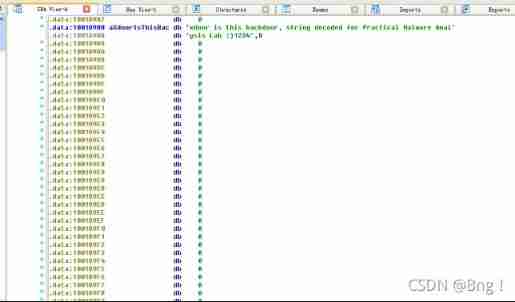
The string is xdoor is this backdoor, string decoded for Practical Malware Analysis Lab :)1234
(21) Open the script using a text editor . How it works ?

ScreenEA() Function to obtain IDA The address of the code pointed to by the cursor in the debug window ,for The cycle range is continuous 50 Bytes ,Byte Function reads the value of each byte , Then apply the value to 0x55 Xor operation , Finally, the result output is returned to IDA In the corresponding address .
4. The experimental conclusion
- DLLMain What's the address of ?
0x1000D02E - Use Imports Window and browse to gethostbyname, What address does the import function locate ?
0x100163CC - How many functions have called gethostbyname?
By 5 Three different function calls call 9 Time - Concentrate on 0x10001757 Right at gethostbyname Call to , You can find out which DNS Will the request be triggered ?
If in 0x10001757 In the call gethostbyname, Malicious code can initiate attacks on praticalmalwareanalysis.com Of DNS request - IDA Pro Identified in 0x10001656 How many local variables in the subprocess at ?
Identified 23 Local variables - IDA Pro Identified in 0x10001656 How many parameters in the subprocess at ?
A parameter was identified - Use Strings window , To locate the string in disassembly \cmd.exe /c, Where is it located ?
be located 0x10095B34 It's about - In reference to \cmd.exe /c What happens in the region where your code is located ?
Open a remote segment for the attacker shell conversation - In the same area , stay 0x100101C8 It's about , look dword_1008E5C4 It seems to be a global variable , It helps decide which path to take . How is the malicious code set dword_1008E5C4 What about ?( Tips : Use cross references )
sub_10003695 Function first checks whether the host is win32_NT System , Then judge the result (0 or 1) Put in eax In the register , And then put in dword_1008E5C4 in - Located in 0x1000FF58 Among the hundreds of lines of instructions in the subprocess at , A series of uses memcmp To compare strings . If the robotwork The string comparison is successful ( When memcmp return 0), What's going to happen ?
The registry HKLM\SOFTWARE\Microsoft\Windows\CurrentVersion\WorkTime and Worktimes The value of will be queried , And then via remote shell The connection is sent to the attacker . - PSLIST What does the export function do ?
PSLIST The export function will query all processes , And send the process list through the network , Or look for a particular process and get its information - Use graph mode to draw pairs of sub_10004E79 Cross reference diagram of . When you enter this function , Which one? API The function may be called ? Just based on these API function , How would you rename this function ?
Called GetSystemDefaultLangID、sprintf、strlen Three API, It can be renamed GetSystemLanguageId - DllMain How many... Are called directly Windows API? How many at a depth of 2 When called ?
Call directly strncpy、strnicmp、CreateThread and strlen The four API, There are about 31 individual API The depth is 2 When called - stay 0x10001358 It's about , There is one right Sleep( A parameter that uses a parameter that contains the number of milliseconds to sleep API function ) Call to . Look back along the code , If this code executes , How long does this program sleep ?
Malicious code can put programs to sleep 30 second - stay 0x10001701 The place is a pair of socket Call to , its 3 What are the two parameters ?
These three parameters are 6,1,2 - Use MSDN Page socket and IDA Pro Named symbolic constants in , Can you make the parameters more meaningful ? After modification , What are the parameters ?
domain=2 Corresponding AF_INET;type=1 The corresponding is SOCK_STREAM;protocol=6 The corresponding is IPPROTO_TCP - Search for in Instructions (opcode 0xED) Use . This instruction and a magic string VMXh Used for Vmware testing . Is it used in this malicious code ? Use to execute in Cross reference of instruction function , Can detect further Vmware Evidence of ?
In this code there is in Instructions and VMXh Use , There is still Found Virtual Machine,Install Cancel String , It is proved that the malicious code has made further Vmware testing - Jump your cursor to 0x1001D988 It's about , What did you find ?
Found a bunch of random data - If you install it IDA Python plug-in unit ( Include IDA Pro Commercial version plug-ins ), function Lab05-01.py, One IDA Pro Python Script ( Make sure the cursor is on 0x1001D988 It's about ), What happens after running the script ?
The random data becomes a string of plaintext - Place the cursor in the same position , How do you turn this data into a single ASCII character string ?
Press down a key , These single characters are converted to a single ASCII character string - Open the script using a text editor . How it works ?
ScreenEA() Function to obtain IDA The address of the code pointed to by the cursor in the debug window ,for The cycle range is continuous 50 Bytes ,Byte Function reads the value of each byte , Then apply the value to 0x55 Xor operation , Finally, the result output is returned to IDA In the corresponding address .
边栏推荐
- 93. 獲得內網的所有IP地址
- 蓝桥杯2015年CA省赛(填坑中)
- A hundred secrets and a few secrets - Caesar encryption
- QT custom window fillets
- PHP Apple internal purchase callback processing
- How to refund the pre-sale deposit of JD 618 in 2022? Can JD 618 deposit be refunded?
- Circuitbreaker fuse of resilience4j - circuitbreakerevent event
- ServletContext object
- A snare - Cookie spoofing
- [CEGUI] font loading optimization
猜你喜欢

Add jar package under idea2018 web project
Implementation principle of redisson distributed lock

机器学习不是你想用,想用就能用
![[CEGUI] log system](/img/5d/c8f76194b1ae2a62d3f5a1e84a5603.jpg)
[CEGUI] log system
![[CEGUI] window environment compilation](/img/be/0413fc876ffbbd40371469eee06f01.jpg)
[CEGUI] window environment compilation

浅谈调和形状上下文特征HSC对3DSC的改进

A snare - Cookie spoofing

ASP. Net core permission system practice (zero)
![[CEGUI] concept introduction](/img/a6/695d7f1a4e57c8438e2d1a4cad11dc.jpg)
[CEGUI] concept introduction

【实验】MySQL主从复制及读写分离
随机推荐
Binassii module - converting between binary and ASCII
PHP Apple internal purchase callback processing
使用cpolar远程办公(2)
Pycharm view the current version of opencv
2022淘宝618超级喵运会怎么玩?2022淘宝618喵运会玩法技巧
The solution of Lenovo notebook ThinkPad t440 WiFi dropping all the time
PHP: Excel to get the letter header
Valentina Studio Pro for MAC (MAC database management software)
Assign a specified amount to a specified number of people at random
PHP occupies memory
Halcon combined with C # to detect surface defects -- affine transformation (III)
Remote desktop cannot copy and paste solution
The solution of Lenovo notebook ThinkPad t440 WiFi unable to connect to the Internet
Common tools download address
How Qualcomm platform modifies special voltage
ASP. Net core permission system practice (zero)
Circuitbreaker fuse of resilience4j - Summary
在App内跳转微信,打开微信
2022淘宝618超级喵运会玩法来了 超级喵运会有哪些攻略方法
CONDA install tensorflow test tensorflow